





Zentachi
Members
-
Joined
-
Last visited
Everything posted by Zentachi
-
Many thanks for your advice. Definitely will have a look!
-
Any news on a function like this? I would like to delete a few older snapshots from my zfs disk in the array which causing very long mounting times when I reboot the server.
-
I believe the ZFS master plugin. I set everything up some time back. Maybe I should go ask in the ZFS master plugin thread rather than wasting your time
-
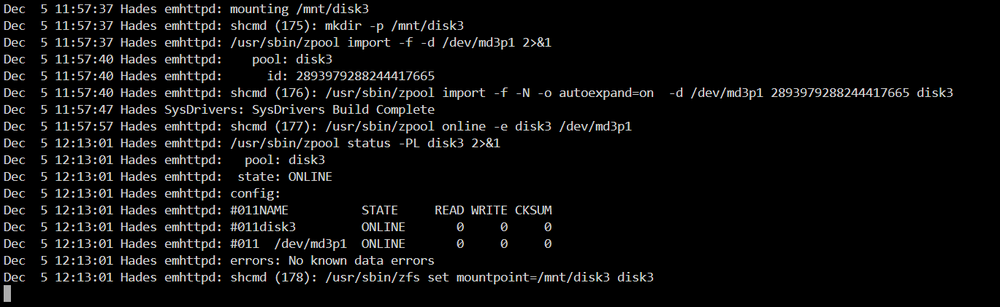
In the end I decided to just recreate the pools. Thankfully I had some partial backups of the VMs in this pool and I managed to have everything up and running almost as good as before. One of the things I found out though is that the array start up in my case takes too long. Disk 3 which is a zfs disk overall takes 50+ mins to be mounted. I don't know if its because it has too many snapshots (3000+) since it doesn't seem there is any other issue with it. Any idea how to remove some snapshots or how to decrease the frequency they are created?
-
Yes it was created with Unraid. I tried a couple of things but nothing worked for the cachessd pool. So I destroyed it and will rebuild it from scratch.
-
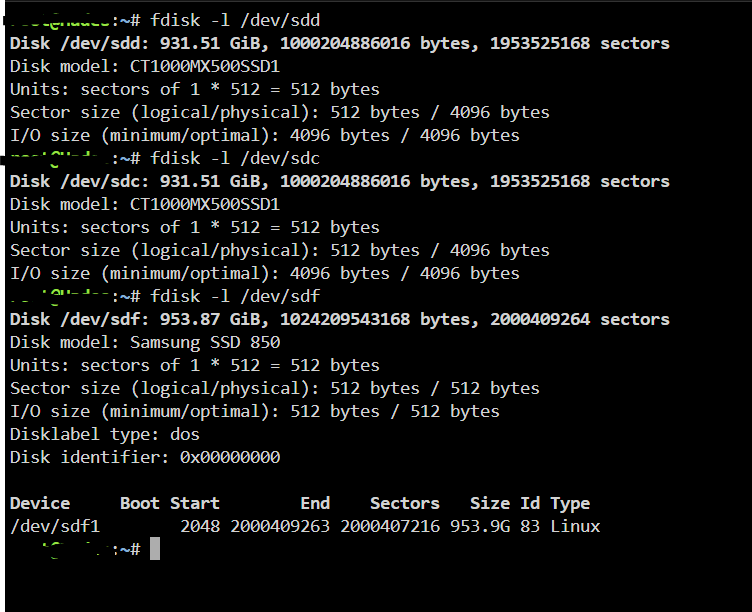
I entered this , took like 10 mins and came online. If not disk3 problem maybe its the cachessd pool zfs raidz1? I came across this topic Do you think it is a partition problem in my case as well? Even though the two bad disks aren't identical to the still working one? fdisk -l fdis If there is no other ideas I think I will try this solution
-
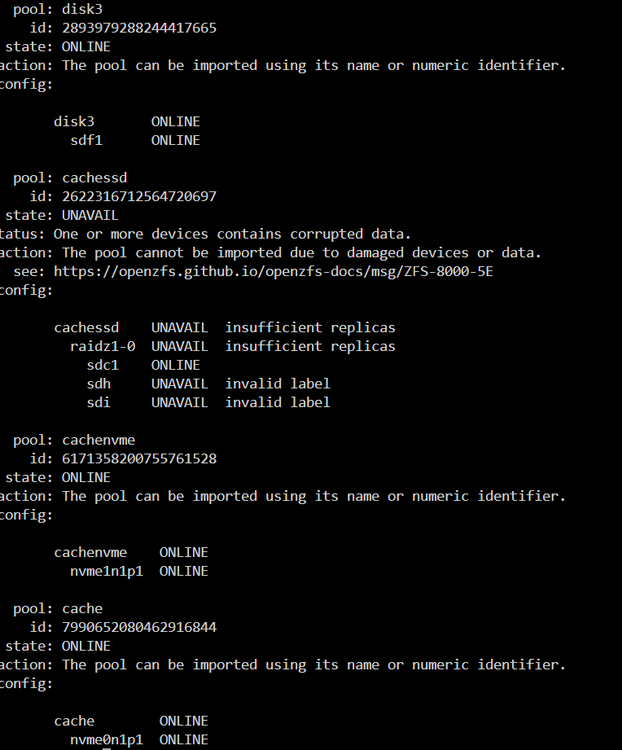
Hi everyone, hope you can help me fix the following issue. I had to shutdown my array today due to electrical work taking place, and the array isn't starting up anymore. It is stuck on mounting disks. I am attaching the diagnostics before I start the array. I don't see any issue on the log file. The process is stuck at trying to mount Disk 3 of the array. Disk 1 and 2 are xfs and Disk 3 is zfs. 8TB each. zpool import returns Which is strange since I didn't do anything to the cachessd pool which shows as unavailable. Any thoughts are more than welcome. Cheers, Zen hades-diagnostics-20241205-1144.zip
-
Thanks again, I used fdisk to remove the zfs_member signature.
-
Thanks for trying to help @JorgeB. In the end I just erased and recreated the pool from scratch. By the way, now I have 1 disk under unassigned devices with label pool greyed out. How can I format this one and just use it as an unassigned device?
-
I still get the same pool: cachessd id: 16821189125514654564 state: UNAVAIL status: One or more devices contains corrupted data. action: The pool cannot be imported due to damaged devices or data. see: https://openzfs.github.io/openzfs-docs/msg/ZFS-8000-5E config: cachessd UNAVAIL insufficient replicas raidz1-0 UNAVAIL insufficient replicas sde1 ONLINE replacing-1 UNAVAIL insufficient replicas 14112098753288857692 UNAVAIL 9022637102148647340 UNAVAIL sdd1 UNAVAIL I don't seem to be able to get the missing drive to show up.
-
Yes it is still connected. However, when I connected it back it gave me an error: "Unraid Cachessd 3 errorAlert [HADES] - Cachessd 3 in error state (disk bad)ST1000LM024_HN-M101MBB" Is there a way to cancel the replacing-1? I change this disk back to the original so there is no need to do any replacement. Somehow I would like to change: replacing-1 UNAVAIL insufficient replicas 14112098753288857692 UNAVAIL 9022637102148647340 UNAVAIL to sdc1
-
Hi everyone using the latest unraid version I had a zfs pool with 3 drives in raidz. I tried to replace one of the drives but unfortunately somehow I managed to get the pool all messed up. Even though I added the old drive back when I start the array I get a message saying "Unmountable: unsupported or no file system" When I use the zpool import this is what I get: pool: cachessd id: 16821189125514654564 state: UNAVAIL status: One or more devices contains corrupted data. action: The pool cannot be imported due to damaged devices or data. see: https://openzfs.github.io/openzfs-docs/msg/ZFS-8000-5E config: cachessd UNAVAIL insufficient replicas raidz1-0 UNAVAIL insufficient replicas sde1 ONLINE replacing-1 UNAVAIL insufficient replicas 14112098753288857692 UNAVAIL 9022637102148647340 UNAVAIL sdd1 UNAVAIL As I said I have back in all the original drives. Is there a way to get them back online and not loose any data? Many thanks, zen PS: If I destroy and recreate the pool with the original drives, will I lose all the data? hades-diagnostics-20231003-0713.zip
-
Did the migration to Nordlynx as well yesterday. Everything seems to work smoothly. I am using docker-compose.yaml for setting up my containers rather than the unraid gui.
-
Can you please give a few more details like a step by step guide? Or was it plug and play?
-
Updated to 6.9.1 as well and everything runs smoothly. As I can see the issue is resolved for everyone, so will be tagging this topic as solved.
-
Indeed, it worked in my case but definitely there might be other reasons for not spinning down. Nevertheless, "Autofan" and processes using smartctl should be checked if someone has a similar problem. I would never have thought that my issue was caused by "Autofan".
-
Your post helped me find the culprit! It was "Autofan". Even though I could manually spin down the disks and they would remain down, it seems "Autofan" wasn't allowing this to happen automatically. I disabled "Autofan" and now the delay spin down works!
-
Thanks everyone for your input. It seems like a bug indeed. In my case as I mentioned it doesn't matter if I have docker containers running or not. Disks will not spin down automatically, however once I manually click the spin down button they will remain like that until they are accessed.
-
Hi all, I have built my first unraid for a month now more or less and I have a problem that cannot seem to resolve. My setup is 1x8 TB WD purple, 2x8 TB WB purple, 3 cache pools ( 1x512 GB NVME, 1x512 GB NVME and 1x1 TB SSD). I am using Version: 6.9.0-rc2. My issue is that my array disks do not spin down automatically! When I click the spin down they do without any issues and remain like that until I spin them up or start using the shares. There are no active streams, no file activity and the open files plugin shows only connections to the cache drives and nothing to the data disks. I have played with the delay both in global settings and per disk, but nothing. Any insight of what should I check? As I mentioned when I manually click to spin them down it works and they remain like that. The auto spin down delay isn't working. Many thanks
-
Many thanks for your detailed answer and advice. I have watched a few videos (mainly from the great spaceinvaderone) about the DockerMan GUI and it does seem like a nice tool. Definitely I won't be able to transfer everything since I do have linked network interfaces for some. I don't know if its worth splitting my docker-compose file migrating some and leaving the rest. However, I might try it for a couple containers initially to check whether it will be convenient for me. Which method you use to make your docker-compose permanent? The below from a previous post or is there another one available nowdays?
-
Hey everyone, First of all wishing you a happy 2021! In the next couple of weeks I am going to build my first unraid server (migrating from ubuntu). I have a question in regards to docker-compose in unraid. Currently I have 29 docker containers running which are managed with docker-compose as it makes it very convenient. Going forward, do you guys believe is worth migrating those to the docker template system of unraid or is it better to install docker-compose. If I use the latter will I still be able to use the unraid docker management to do some managing or everything will be based on my docker-compose config file? Thanks
-
I am currently running the Plex server in its own VM, but indeed with the new setup I should actually migrate it to a docker container as well. I found out about the LSI by re-reading your initial post, but in any case the reddit link is very helpful! Thanks for the power consumption figure.
-
I am in the process of building my first unraid server for NAS (7 mixed sizes SATA disks and 1x512 nvme). I will be also have a Plex server VM and several docker containers such as HomeAssistant. My final choices came down to: Asus ROG Crosshair VIII Hero or (Asus ROG Strix X570-E Gaming) and Ryzen 7 3700X MSI Z490 Tomahawk (or Asrock z490 Steel) and Core i7-10700 SuperMicro X11SCL-F with Intel Xeon E-2278G Coffee Lake After reading your post and how smoothly you upgraded your system without any issues, I think I will go with option 1. How is power consumption? Which GPU ( looking for 1050Ti) card are you using?


