wuyongjun
Members
-
Joined
-
Last visited
Everything posted by wuyongjun
-
同一局域网中的两台unraid服务器在软路由中生成的duid是相同的无法生成两个不同的duid,造成ipv6两个地址更新就相互交换。如何生成两个不同的duid。从而固定ipv6在更新时不再相互交换的问题。
-
yes,the Directory/File Hierarchy/Level. For example User/Test or User/Test/Test2 ... In the latest version 7.1.4, I found that this problem no longer exists with Samba/Network Neighbors (CIFS). I can use the desired directory as external storage now. Currently, I am using it in conjunction with Home Assistant.
-
yes,the Directory/File Hierarchy/Level. For example User/Test or User/Test/Test2 ...
-
您不应该在 /mnt/user 下挂载任何其他内容,即为 Unraid 保留的,使用不同的挂载点,例如 UD 创建的 /mnt/addons
-
没遇到过。请检查网络
-
您不应该在 /mnt/user 下挂载任何其他内容,即为 Unraid 保留的,使用不同的挂载点,例如 UD 创建的 /mnt/addons
-
At present, most NAS support level 2 and 3 directory setting sharing, and UNRAID now supports it through third-party plug-ins. Want to optimize sharing settings. It can be easily set up to support secondary and tertiary directory sharing.
-
在运行moviepilot一两天后,内存就会出错。经常性的提示“{"status":"OK","version":{"major":2,"minor":12,"revision":3}}”,一开始以为重启moviepilot就好了,可是重启很多次也没用。有时说是因为升级没成功问题造成的。便是多数时候不是因为升级问题造成的。在检查日志时发现,和内存有关。也和/etc/nginx下的/etc/nginx/nginx.conf的配置有关。如CPU的使用核数。内存等问题有关。但又不知道那里修改。请了解的。提供帮助。谢谢。
-
遇到这样的错误如何解决:Apr 13 15:53:48 Tower kernel: traps: node[40210] trap int3 ip:2197c92 sp:7ffe1bf1c110 error:0 in node[b82000+1abe000]。
-
1.安装遇到MD5希哈值不正确问题 原因:因大陆区屏蔽了外网,下载时可能未完整下载。造成希哈值不对。无法安装。 2.安装时无法解压recycle.bin-xxxx.tgz 原因:因大陆区屏蔽了外网,下载时可能未完整。造成解压失败。 3.安装时无法通过/bin/bash问题 原因。因下载后的tgz文件下载不完整。解压后文件不全,所以无法通过/bin/bash。 解决办法: 1.在giteek中更新相应的插件。 2.编辑plg文件 3.把<!ENTITY author "xxxxx">中的xxxxx改成自己gitee的仓库名 4.把原网址改成gitee国内的网址。 如:<!ENTITY gitURL "https://gitee.com/&author;/&name;/raw/master"> 5.屏蔽<!ENTITY MD5 "6e9c720736a3a3f34be359ddd0077d65"> 如:<!--<!ENTITY MD5 "6e9c720736a3a3f34be359ddd0077d65">--> 6.屏蔽<MD5>&MD5;</MD5> 如:<!--<MD5>&MD5;</MD5>--> 7.修改完成后“提交保存”。 8.点击“克隆/下载” 9.下载zip。把完整的包下载好待用。 10.解压下载好的zip包 11.把plg文件上传到/boot/config/plugins目录。 12.把最新tgz文件上传到/boot/config/plugins/recycle.bin目录。(如果是其它有MD5验证的把tgz放到相应的目录下)。 13.打开unraid插件页面——安装插件 14.把下面的连接复制到URL https://gitee.com/xxxxxx/recycle.bin/raw/master/recycle.bin.plg 15.安装。 16.享用
-
弱弱的问下,这个补丁Unraid 7.0.0要打吗?
-
使用unraid也有一段时间了。Unraid Connect提供的信息从我的使用角度来说,它只是一个非常简单的可视查面板,缺少操控性。有与没有不是很重要。但界面提供的信息又是简洁的表达了相关基本信息。正如天朝有个经典典古叫“鸡肋”,它的的意思就是:“用之无用,弃之可惜”的意思。通俗的讲就是:“有一块鸡骨头,骨头上贴着非常非常少的鸡肋肉,你吃它,不够吃,不吃它,把它丢了又感觉可惜了”。而现在你的Unraid Connect又面临着这样的局面。用Unraid Connect,它没有功能,除了看看基本信息没有其它的可用。保存闪存备份。可能显得很多余,因为这些在安全以的的网络使用。如果没有来得急时关闭Unraid Connect,别人就有可能把你的闪存备份复制走。用户名上面又能看我的密钥。这都违背的系统安全的要求。我希望给出个点意见希望开发者得到重视。 一、把Unraid Connect中的闪存备份直接备份在阵列中。而不是下载在本地,或取消这个在首页中的闪存备份,因为你们又在我的密钥中也会显示闪存备份。这有些重复。又显得多余。 二、把我的密钥增加二次密码。在进我的密钥时需要输入安全进入密码(邮箱,手机安全码,或密码)。以防止信息泄露。 三、为Unraid Connect增加远程开机,关机,重启,休眠等功能。 四、增加文件管理,功能有跟第二点一样的安全效果,以防止更多信息泄露。 目前,更多的功能不好一一列举。但只有保障到以上四点Unraid Connect才有存在的意思。也能保障用户购买正版的需求性。如果系统本身就能看,文件管理还要自己去安装,那Unraid Connect的存在只是为了看看基本信息吗?哪要跟不要这个Unraid Connect没有区别。 那么在系统的仪表盘看信息不是更全面吗?有以上四点的保障。用户在外网访问服务器更为安全,也能更好的保障正版用户的使用权力。
-
看来不止我今天遇到这问题,还有同道中人。一开始因为unraid体积小,买了个正版就以为能得个好用。没想到花了钱,还不如不花钱,用其它nas服务器可能比这unraid更好用。经常拉取不到镜像头痛的很。还正版,我呸。正打算底价把这unraid给卖了。回点本算了,已考虑入其它freenas
-
-
-
Thank you and look forward to the good news from you
-
Why did I send a diagnostic report and you still haven't sent a solution to the problem with Tower-2?
-
谢谢,我试试。
-
Don't know what you need to copy?
-
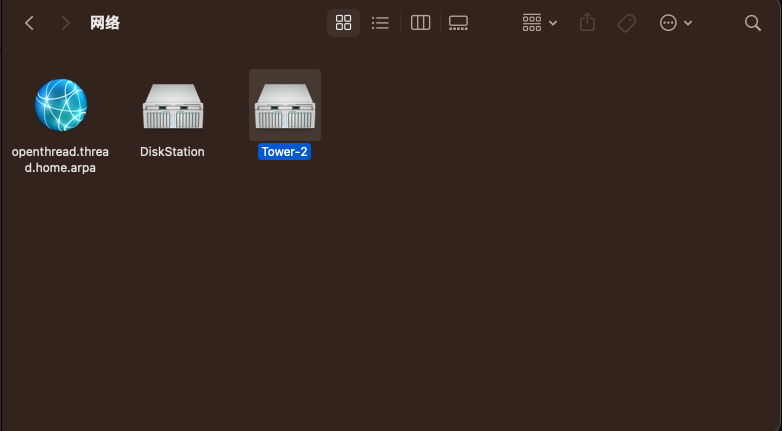
The Tower-2 problem occurred again, there is no system user Tower, and the network connection is not normal. tower-diagnostics-20240312-1458.zip
-
alist本身是不提供本地挂载功能的。它只提供云盘集成本地功能。就是在那个网页上看的功能。要挂载到本地上像硬盘一样用。就得用rclone来挂载了,当然你要是用mac或是用windows来挂载像硬盘一样用就下载rclone的mac版和windows版本来配置。当然也可以映像服务器的上的本地目录挂载到mac或Windows上使用
-
Mar 11 00:56:14 Tower root: error: /webGui/include/Boot.php: wrong csrf_token Mar 11 00:56:14 Tower rc.docker: transmission: started succesfully! Mar 11 00:56:21 Tower rc.docker: v2raya: started succesfully! Mar 11 00:56:32 Tower root: error: /webGui/include/Boot.php: wrong csrf_token Mar 11 01:18:44 Tower avahi-daemon[9320]: Host name conflict, retrying with Tower-2 Mar 11 01:18:44 Tower avahi-daemon[9320]: Registering new address record for 192.168.31.10 on br0.IPv4. Mar 11 01:18:45 Tower avahi-daemon[9320]: Server startup complete. Host name is Tower-2.local. Local service cookie is 2622481786. Mar 11 01:18:46 Tower avahi-daemon[9320]: Service "Tower-2" (/services/ssh.service) successfully established. Mar 11 01:18:46 Tower avahi-daemon[9320]: Service "Tower-2" (/services/smb.service) successfully established. Mar 11 01:18:46 Tower avahi-daemon[9320]: Service "Tower-2" (/services/sftp-ssh.service) successfully established. Edited just now by wuyongjun
-
6.12.7 ------- 6.12.8 I'm having the same issue and I haven't done the first backup as of now. The unraid Time Machine setup disconnection issue needs more to be improved
-
I have been using unraid for more than a month. There are two problems that have been confusing me at the moment, the first is that unraid always disconnects when connecting to the time machine, and it disconnects after a backup. I want to further improve the backup connection stability of Time Machine. The second problem: the name of the native unraid is that Tower will disconnect while transferring large files, and then the Tower name cannot be found on the computer when the file transfer is completed. Instead, a Tower-2 computer hostname was generated. The Tower name can only be reverted back to after restarting unraid. What is the problem?
-
把数据同步完后,我的Tower不见了。可是很快就能在网络中看到一个Tower-2.不知道是unraid系统问题,还是bug。可是只要重启unraid,就能恢复到Tower,不知道谁能解决下 Mar 11 00:56:14 Tower root: error: /webGui/include/Boot.php: wrong csrf_token Mar 11 00:56:14 Tower rc.docker: transmission: started succesfully! Mar 11 00:56:21 Tower rc.docker: v2raya: started succesfully! Mar 11 00:56:32 Tower root: error: /webGui/include/Boot.php: wrong csrf_token Mar 11 01:18:44 Tower avahi-daemon[9320]: Host name conflict, retrying with Tower-2 Mar 11 01:18:44 Tower avahi-daemon[9320]: Registering new address record for 192.168.31.10 on br0.IPv4. Mar 11 01:18:45 Tower avahi-daemon[9320]: Server startup complete. Host name is Tower-2.local. Local service cookie is 2622481786. Mar 11 01:18:46 Tower avahi-daemon[9320]: Service "Tower-2" (/services/ssh.service) successfully established. Mar 11 01:18:46 Tower avahi-daemon[9320]: Service "Tower-2" (/services/smb.service) successfully established. Mar 11 01:18:46 Tower avahi-daemon[9320]: Service "Tower-2" (/services/sftp-ssh.service) successfully established.