





flowermoron
Members
-
Joined
-
Last visited
Everything posted by flowermoron
-
try this
-
i found this instead log level = 1 auth_json_audit:3 less chatty and only shows access logs, works with fail2ban so far
-
under #unassigned_devices_start both log level and logging are set to zero maybe thats the problem?
-
should i reboot unraid? i hate doing that, takes a thousand years to for the gui to work!
-
that's terrible only nextcloud got hit? do you have fail2ban? was your ssh exposed?
-
hmmm not working this is my smb extras store dos attributes = yes ea support = yes map archive = yes map hidden = yes map system = yes map readonly = yes log level = 3 logging = syslog server min protocol = SMB3_11 client ipc min protocol = SMB3_11 client signing = mandatory server signing = mandatory client ipc signing = mandatory client NTLMv2 auth = yes smb encrypt = required restrict anonymous = 2 null passwords = No raw NTLMv2 auth = no #unassigned_devices_start #Unassigned devices share includes include = /tmp/unassigned.devices/smb-settings.conf #unassigned_devices_end #vfs_recycle_start #Recycle bin configuration [global] syslog only = No syslog = 0 logging = 0 log level = 0 vfs:0 #vfs_recycle_end
-
Hello Anyone knows the locations for access logs or how to make unraid produce them?
-
is there a tutorial for making ssh with nginx manager work? and is it safe?
-
i want to protect my services and nas, i dont want my ip traced.
-
Hello i need advice choosing a good vpn provider that works with nginx, i have couple of sevices running like nextcloud and such, i want to put them behind a vpn using pfsense, i tried 2 so far (protonvpn & mullvad), i was able to get them working but no luck with nginx. i think the problem is that i need a vpn provider that allow port forwarding, anyone out there who has a similar set up using a good vpn provider? thanks
-
i figured it out, too much ram assaigned to the vm
-
hello trying to create a win10 vm like this.. <?xml version='1.0' encoding='UTF-8'?> <domain type='kvm'> <name>Windows 10</name> <uuid>6e649c94-0a6d-7349-9074-077fc18ff86d</uuid> <metadata> <vmtemplate xmlns="unraid" name="Windows 10" icon="windows.png" os="windows10"/> </metadata> <memory unit='KiB'>8388608</memory> <currentMemory unit='KiB'>8388608</currentMemory> <memoryBacking> <nosharepages/> </memoryBacking> <vcpu placement='static'>2</vcpu> <cputune> <vcpupin vcpu='0' cpuset='2'/> <vcpupin vcpu='1' cpuset='6'/> </cputune> <os> <type arch='x86_64' machine='pc-i440fx-5.1'>hvm</type> <loader readonly='yes' type='pflash'>/usr/share/qemu/ovmf-x64/OVMF_CODE-pure-efi.fd</loader> <nvram>/etc/libvirt/qemu/nvram/6e649c94-0a6d-7349-9074-077fc18ff86d_VARS-pure-efi.fd</nvram> </os> <features> <acpi/> <apic/> <hyperv> <relaxed state='on'/> <vapic state='on'/> <spinlocks state='on' retries='8191'/> <vendor_id state='on' value='none'/> </hyperv> </features> <cpu mode='host-passthrough' check='none' migratable='on'> <topology sockets='1' dies='1' cores='1' threads='2'/> <cache mode='passthrough'/> </cpu> <clock offset='localtime'> <timer name='hypervclock' present='yes'/> <timer name='hpet' present='no'/> </clock> <on_poweroff>destroy</on_poweroff> <on_reboot>restart</on_reboot> <on_crash>restart</on_crash> <devices> <emulator>/usr/local/sbin/qemu</emulator> <disk type='file' device='disk'> <driver name='qemu' type='raw' cache='writeback'/> <source file='/mnt/user/domains/Windows 10/vdisk1.img'/> <target dev='hdc' bus='virtio'/> <boot order='1'/> <address type='pci' domain='0x0000' bus='0x00' slot='0x04' function='0x0'/> </disk> <disk type='file' device='cdrom'> <driver name='qemu' type='raw'/> <source file='/mnt/user/software/os/Windows 10/Windows.iso'/> <target dev='hda' bus='ide'/> <readonly/> <boot order='2'/> <address type='drive' controller='0' bus='0' target='0' unit='0'/> </disk> <disk type='file' device='cdrom'> <driver name='qemu' type='raw'/> <source file='/mnt/user/isos/virtio-win-0.1.190-1.iso'/> <target dev='hdb' bus='ide'/> <readonly/> <address type='drive' controller='0' bus='0' target='0' unit='1'/> </disk> <controller type='usb' index='0' model='ich9-ehci1'> <address type='pci' domain='0x0000' bus='0x00' slot='0x07' function='0x7'/> </controller> <controller type='usb' index='0' model='ich9-uhci1'> <master startport='0'/> <address type='pci' domain='0x0000' bus='0x00' slot='0x07' function='0x0' multifunction='on'/> </controller> <controller type='usb' index='0' model='ich9-uhci2'> <master startport='2'/> <address type='pci' domain='0x0000' bus='0x00' slot='0x07' function='0x1'/> </controller> <controller type='usb' index='0' model='ich9-uhci3'> <master startport='4'/> <address type='pci' domain='0x0000' bus='0x00' slot='0x07' function='0x2'/> </controller> <controller type='pci' index='0' model='pci-root'/> <controller type='ide' index='0'> <address type='pci' domain='0x0000' bus='0x00' slot='0x01' function='0x1'/> </controller> <controller type='virtio-serial' index='0'> <address type='pci' domain='0x0000' bus='0x00' slot='0x03' function='0x0'/> </controller> <serial type='pty'> <target type='isa-serial' port='0'> <model name='isa-serial'/> </target> </serial> <console type='pty'> <target type='serial' port='0'/> </console> <channel type='unix'> <target type='virtio' name='org.qemu.guest_agent.0'/> <address type='virtio-serial' controller='0' bus='0' port='1'/> </channel> <input type='tablet' bus='usb'> <address type='usb' bus='0' port='1'/> </input> <input type='mouse' bus='ps2'/> <input type='keyboard' bus='ps2'/> <graphics type='vnc' port='-1' autoport='yes' websocket='-1' listen='0.0.0.0' keymap='en-us'> <listen type='address' address='0.0.0.0'/> </graphics> <video> <model type='qxl' ram='65536' vram='65536' vgamem='16384' heads='1' primary='yes'/> <address type='pci' domain='0x0000' bus='0x00' slot='0x02' function='0x0'/> </video> <hostdev mode='subsystem' type='pci' managed='yes'> <driver name='vfio'/> <source> <address domain='0x0000' bus='0x08' slot='0x00' function='0x0'/> </source> <address type='pci' domain='0x0000' bus='0x00' slot='0x05' function='0x0'/> </hostdev> <memballoon model='none'/> </devices> </domain> ...but it always crashes for some reason.. ErrorWarningSystemArrayLogin -overcommit mem-lock=off \ -smp 2,sockets=1,dies=1,cores=1,threads=2 \ -uuid 6e649c94-0a6d-7349-9074-077fc18ff86d \ -no-user-config \ -nodefaults \ -chardev socket,id=charmonitor,fd=34,server,nowait \ -mon chardev=charmonitor,id=monitor,mode=control \ -rtc base=localtime \ -no-hpet \ -no-shutdown \ -boot strict=on \ -device ich9-usb-ehci1,id=usb,bus=pci.0,addr=0x7.0x7 \ -device ich9-usb-uhci1,masterbus=usb.0,firstport=0,bus=pci.0,multifunction=on,addr=0x7 \ -device ich9-usb-uhci2,masterbus=usb.0,firstport=2,bus=pci.0,addr=0x7.0x1 \ -device ich9-usb-uhci3,masterbus=usb.0,firstport=4,bus=pci.0,addr=0x7.0x2 \ -device virtio-serial-pci,id=virtio-serial0,bus=pci.0,addr=0x3 \ -blockdev '{"driver":"file","filename":"/mnt/user/domains/Windows 10/vdisk1.img","node-name":"libvirt-3-storage","cache":{"direct":false,"no-flush":false},"auto-read-only":true,"discard":"unmap"}' \ -blockdev '{"node-name":"libvirt-3-format","read-only":false,"cache":{"direct":false,"no-flush":false},"driver":"raw","file":"libvirt-3-storage"}' \ -device virtio-blk-pci,bus=pci.0,addr=0x4,drive=libvirt-3-format,id=virtio-disk2,bootindex=1,write-cache=on \ -blockdev '{"driver":"file","filename":"/mnt/user/software/os/Windows 10/Windows.iso","node-name":"libvirt-2-storage","auto-read-only":true,"discard":"unmap"}' \ -blockdev '{"node-name":"libvirt-2-format","read-only":true,"driver":"raw","file":"libvirt-2-storage"}' \ -device ide-cd,bus=ide.0,unit=0,drive=libvirt-2-format,id=ide0-0-0,bootindex=2 \ -blockdev '{"driver":"file","filename":"/mnt/user/isos/virtio-win-0.1.190-1.iso","node-name":"libvirt-1-storage","auto-read-only":true,"discard":"unmap"}' \ -blockdev '{"node-name":"libvirt-1-format","read-only":true,"driver":"raw","file":"libvirt-1-storage"}' \ -device ide-cd,bus=ide.0,unit=1,drive=libvirt-1-format,id=ide0-0-1 \ -chardev pty,id=charserial0 \ -device isa-serial,chardev=charserial0,id=serial0 \ -chardev socket,id=charchannel0,fd=36,server,nowait \ -device virtserialport,bus=virtio-serial0.0,nr=1,chardev=charchannel0,id=channel0,name=org.qemu.guest_agent.0 \ -device usb-tablet,id=input0,bus=usb.0,port=1 \ -vnc 0.0.0.0:1,websocket=5701 \ -k en-us \ -device qxl-vga,id=video0,ram_size=67108864,vram_size=67108864,vram64_size_mb=0,vgamem_mb=16,max_outputs=1,bus=pci.0,addr=0x2 \ -device vfio-pci,host=0000:08:00.0,id=hostdev0,bus=pci.0,addr=0x5 \ -sandbox on,obsolete=deny,elevateprivileges=deny,spawn=deny,resourcecontrol=deny \ -msg timestamp=on 2022-03-28 05:28:54.681+0000: Domain id=10 is tainted: high-privileges 2022-03-28 05:28:54.681+0000: Domain id=10 is tainted: host-cpu char device redirected to /dev/pts/1 (label charserial0) 2022-03-28 05:28:58.140+0000: shutting down, reason=crashed i created win10 vms before just fine but i dont see errors or anything, any ideas? thanks!
-
nevermind, it just worked on its own. 😑
-
nevermind, i just typed a simple password like 123 and now it works!
-
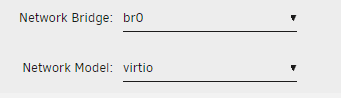
hello I'm having problems setting a static IP, I only succeeded once but now for some reason it doesn't work any more, my VM network is set up like this.. I have the VM IP set as 192.168.1.101 It worked only once, but a restart somehow broke it No problems with my router since my DHCP starts at 192.168.1.200 and above, also the VM works with an automatic assigned IP just fine like this..

-
how to login as administrator in phpbb? PHPBB_USERNAME and PHPBB_PASSWORD dont work
-
ops! didn't know that existed .. ! delete this if you want, my apologies.
-
hello i got an ssl certificate from no-ip but i have no clue how to use it! i assumed both the certificate & private key goes in "/mnt/user/appdata/nextcloud/keys" i can see a cert.crt & cert.key, i replaced those with mine but nothing, it still say my nextcloud is not secure in my browser when using internal ip or no-ip dns address.
-
thank you! it worked!
-
so if i did something like this... ...i wont be locked out of my unraid?
-
hello i have 2 ethernet ports on my motherboard, i want to use one for pfsense, im suppose to turn off one of the ports to use it as WAN i think.. but i ran into a problem, both ports use same device id



