





Spirevipp
Members
-
Joined
-
Last visited
Everything posted by Spirevipp
-
Seems like the latest BepInEx update has changed something with its loader, so it breaks with the start script. Edit: Created a github issue
-
one last question, is there a "best" way to transfer the files from the ssd to the array? i thought of just doing a normal copy from a tmux session, but array would need to be started then? the ssd i used for the clone is the one im gonna use for the new cache, so i cant set it up until after i have transfered the files
-
okay, thank you so much for the help!
-
okay so the ddrescue operation completed after a single pass, and the resulting cloned disk is mountable, and everything seems to be there? here is output from the process: root@SpireTower:~# ddrescue -f /dev/sdh /dev/sdc /boot/ddrescue.log GNU ddrescue 1.27 Press Ctrl-C to interrupt ipos: 512110 MB, non-trimmed: 0 B, current rate: 50028 kB/s opos: 512110 MB, non-scraped: 0 B, average rate: 127 MB/s non-tried: 0 B, bad-sector: 0 B, error rate: 0 B/s rescued: 512110 MB, bad areas: 0, run time: 1h 7m 9s pct rescued: 100.00%, read errors: 0, remaining time: n/a time since last successful read: n/a Copying non-tried blocks... Pass 1 (forwards) Finished root@SpireTower:~# cat /boot/ddrescue.log # Mapfile. Created by GNU ddrescue version 1.27 # Command line: ddrescue -f /dev/sdh /dev/sdc /boot/ddrescue.log # Start time: 2024-12-26 20:29:10 # Current time: 2024-12-26 21:36:37 # Finished # current_pos current_status current_pass 0x773C250000 + 1 # pos size status 0x00000000 0x773C256000 + i also did the next step for btrfs, for finding missing / corrupt files, and it did not do any replaces root@SpireTower:~# printf "Unraid " >~/fill.txt root@SpireTower:~# ddrescue -f --fill=- ~/fill.txt /dev/sdc /boot/ddrescue.log GNU ddrescue 1.27 Press Ctrl-C to interrupt Initial status (read from mapfile) filled size: 0 B, filled areas: 0 remaining size: 0 B, remaining areas: 0 Current status filled size: 0 B, filled areas: 0, current rate: 0 B/s remain size: 0 B, remain areas: 0, average rate: 0 B/s current pos: 0 B, run time: 0s Finished root@SpireTower:~# cat /boot/ddrescue.log # Mapfile. Created by GNU ddrescue version 1.27 # Command line: ddrescue -f --fill=- /root/fill.txt /dev/sdc /boot/ddrescue.log # Start time: 2024-12-26 21:45:00 # Current time: 2024-12-26 21:45:00 # Finished # current_pos current_status current_pass 0x00000000 + 1 # pos size status 0x00000000 0x773C256000 + am i interpreting this correctly that it was successfully able to clone the disk? no missing data? any other tasks i should do before restoring my array and setting up a new cache? spiretower-diagnostics-20241226-2213.zip
-
okay, i will try that, thank you!
-
Here is diagnostics of after i connected a different drive to the sata port of the defective drive, formatted it and mounted it using unassigned devices. I also connected the defective drive to another sata port (on a different sata controller), still throwing errors. spiretower-diagnostics-20241226-1926.zip
-
diagnostics after replacing sata cable. spiretower-diagnostics-20241226-1647.zip
-
diagnostics from after starting the array (without maintenance mode enabled) spiretower-diagnostics-20241226-1431.zip
-
Okay, now it works, server is up and running using the new flashdrive. now to fixing the dead cache ssd. using checking-a-file-system from the docs, i have ran a btfrs check of the ssd with unmountable file system, i do not know what this means so here is the result. [1/7] checking root items [2/7] checking extents [3/7] checking free space tree [4/7] checking fs roots [5/7] checking only csums items (without verifying data) [6/7] checking root refs [7/7] checking quota groups skipped (not enabled on this FS) Opening filesystem to check... Checking filesystem on /dev/sdd1 UUID: c6c53b8d-4791-4359-b767-671dd4d4a71c found 362191216640 bytes used, no error found total csum bytes: 344665484 total tree bytes: 1369554944 total fs tree bytes: 641613824 total extent tree bytes: 268550144 btree space waste bytes: 303860724 file data blocks allocated: 2428063203328 referenced 345975992320 attached is the SMART report from the drive. Do you think this might be recoverable, atleast temporarily? not all appdata folders are backed up, so it could be nice to be able to get the data off the drive before its trashed spiretower-smart-20241226-1358.zip
-
Looking in the usb drive, it does not seem like the usb creator tool has properly setup the drive? its missing all the plugins from backup and none of the .cfg files has been copied over?
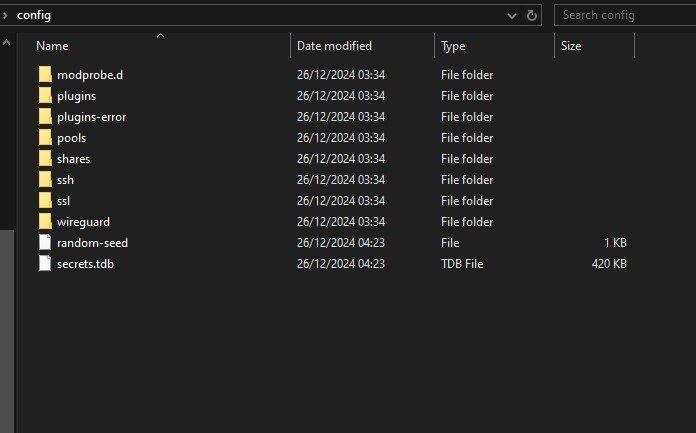
-
attached diagnostics. it also havent set the name i selected in the usb creator tool when restoring from backup there have been some file not found errors aswell, /var/local/emhttp/var.ini not found when using shutdown cmd in terminal tower-diagnostics-20241226-0410.zip EDIT: just realized this is from safe mode, will create one from normal boot aswell
-
finally got around to working on this again, new usb drive and attempting to restore from a unraid connect backup. at first boot, the server refuses any connection to the webgui. I started it using gui mode, so i can see the OS on screen, but the webbrowser does not connect to localhost, and i cant connect using my other computer(s) using either hostname or ip address. the servers ip address is correctly set, and i can ping other devices on my network from the server. ssh refuses to let me use my old password from the backup, but it works when signing in using gui mode
-
oh no
-
Hello, A short while ago, my cache ssd died. I did not try fixing it immediately, as i expected it to be very time consuming. Now that i have some extra time and a new ssd to replace it with, i cant seem to get the GUI to let me do any changes to the cache pool. No matter what i do, it will not let me unselect the defective ssd, and select the new one. there are some errors in the syslog about "read only file system" related to disks: Nov 10 21:57:39 SpireTower emhttpd: error: put_disk_settings, 4905: Read-only file system (30): fopen: /boot/config/disk.cfg I am also not able to update any plugins, getting generic error, tried with array started and not started using unraid version 6.12.6 attached diagnostics and the smart report for the broken ssd spiretower-diagnostics-20241110-2208.zip spiretower-smart-20241110-1844.zip
-
well, i solved it myself....... in the go file i had a custom line to download a custom version of runc for a binhex container... Binhex documentation - github - Scroll down to the bottom of the file curl -o '/usr/bin/runc' -L 'https://github.com/binhex/arch-packages/raw/master/static/x86-64/runc/runc' && chmod +x '/usr/bin/runc' I think i had to add this for some of his containers to work this spring. modified date of the file is back in april this year. removing the line solved everything, the fault had nothing to do with anything in original post.
-
TLDR: I filled the cache drive 100% when transferring files, ran mover and finished the transfer. after this i did a server reboot as a new docker container would not start. Now none of the containers will start, error OCI runtime create failed (the docker service starts with no errors). Hi, I was transferring some large backup files to a backup share on my server from windows using robocopy. The backup share is set to use cache. I underestimated the size of the files, and this ended with the cache folder getting 100% filled. While this was transferring in the background, i added a new docker container (adguard-home). This new docker container would not start. Note, this container was added while there was at least 100GB free space on the cache drive. I noticed after a while that the cache drive was completely filled, and a few containers had stopped. I then stopped the transfer, ran mover to free up space on cache, and then resumed the transfer. when it was done transferring i ran mover again (yes, i know), then i did a server restart since some containers had stopped and wouldnt start. (adguard-home, overseerr and organizr) After the reboot then none of my containers will start, they all print the same error to log (this is for duckdns): time="2021-10-27T12:45:08.635963389+02:00" level=error msg="stream copy error: reading from a closed fifo" time="2021-10-27T12:45:08.635966512+02:00" level=error msg="stream copy error: reading from a closed fifo" time="2021-10-27T12:45:08.800240194+02:00" level=error msg="04bc6832995f19f166b0652050b9d53ccf603d5bb486a9e111b1ee0e36dee5fa cleanup: failed to delete container from containerd: no such container" time="2021-10-27T12:45:08.800261780+02:00" level=error msg="Handler for POST /v1.41/containers/duckdns/start returned error: OCI runtime create failed: unable to retrieve OCI runtime error (open /var/run/docker/containerd/daemon/io.containerd.runtime.v2.task/moby/04bc6832995f19f166b0652050b9d53ccf603d5bb486a9e111b1ee0e36dee5fa/log.json: no such file or directory): fork/exec /usr/bin/runc: exec format error: unknown" I searched google, and found a forum thread for an nvidia hardware container (container using nvidia hardware, idunno how to say it) where they got this error after a driver update. the nvidia driver plugin was set to download latest driver, and a new driver was released recently so i tried downgrading, but no luck. This is as far as i have come. I have attached the diagnostics archive, i unfortunately dont have any logs from before i did the first restart (that i know of, maybe they get saved somewhere?) Forgive any weird english, its not my native language. Thank you for any input and help Spirevipp spiretower-diagnostics-20211027-1254.zip
-
Just FYI, from what i have read and heard, minecraft 1.17 will require Java 16, starting with snapshot 21W19A.

