





bclinton
Members
-
Joined
-
Last visited
-
This needs a space invader one video really bad 😄
-
Hi friends.....Benn happily using this script for several years now on my local unraid to usb weekly backup. I recently acquired a second unraid server and am trying to copy the existing server over to it (both on the local network and have setup ssh keys on both. It has a 24TB ZFS pool with a folder for backups which is where I am trying to place a copy of the original server data into. I am able to run a dry run rsync copy fine. It reports no errors ("rsync -avz --dry-run /mnt/user/data [email protected]:/mnt/user/backups") however when I configure this script I get a hardlinks unsupported error and the script fails. Any suggestions? error I am getting.... created directory /mnt/user/backups/link_dest >f+++++++++ empty.file --link-dest arg does not exist: /mnt/user/backups/link_dest removed '/tmp/_tmp_user.scripts_tmpScripts_192168124 - 192168125_script/empty.file' Error: Your destination /mnt/user/backups does not support hardlinks! Script Finished Feb 03, 2026 11:09.54
-
Wow! Hopefully you can get this resolved! That would suck.
-
I can't help you, but I figured I would let you know that I never resolved this. I wound up removing the container and installing a different one.
-
I have never used docker compose with unraid. I couldn't tell you how to do it. When I first installed the container over 3 years ago it was a native unraid app and I used the usual template. I can only assume that the app not being updated in 3 years has something to do with it being changed.
-
Just to follow up to this.....I realized the container has not been updated since 2021. I installed the current binhex version and got it running so I will be deleting the outdated version of qbittorent.
-
Hi friends. I have been using this container for a while. I installed it from the apps store. Inoticed I am now not able to edit its settings via the webui anymore. It shows 3rd party. Not sure what changed and figured I would check to see if there is a workaround to editing the containers settings. I have never used docker compose and am not sure how or why this container shows 3rd party now.
-
Hi friends....I installed a Qbittorrent container about 3 years ago from the app store. I recently went in to change some paths and find the container listed as a 3rd party container and I do not have the option to click the name and edit its settings. Not sure why it is 3rd party now. I have only installed containers from the app store and never used docker compose. I am wondering why it is now a 3rd party app and how can I change the setting variables for the container.

-
That was it! I noticed that was right there in the config instructions too. How dumb of me! Thanks for taking the time to help!
-
Hi friends....I decided to go ahead and install a the 7daystodie server app in unraid. It installs fine and the logs look fine.....I am able to connect to it with the dashboard however when i try to connect to it via the game with the IP I get 7daystodie "server unexpected data received server is either running an incompatible version or server requires a mod" I have wiped the container and started over with no luck. I know 7DTD is releasing 1.0 in a few days and I wanted to get it up before then so I can start over with a new build. Is there a way to force the container to update to the latest server build? If I run the container with the gamid that it defaults to does it pulI the latest experimental build for the server? threw together a win10 machine on an older dell and am able to get it all working fine. I was just trying to use unraid to stop from running another machine.
-
Hi friends. What setting would I change to have the script only keep the latest backup? In other words, after it backs up it would delete the previous backup folder and my backup drive would simply have 1 (the latest) backup folder. I changed the days retention to 1, will that do it? I backup once a week on Mondays. Would this do the trick? # keep backups of the last X days keep_days=1 # keep multiple backups of one day for X days keep_days_multiple=0 # keep backups of the last X months keep_months=0 # keep backups of the last X years keep_years=0
-
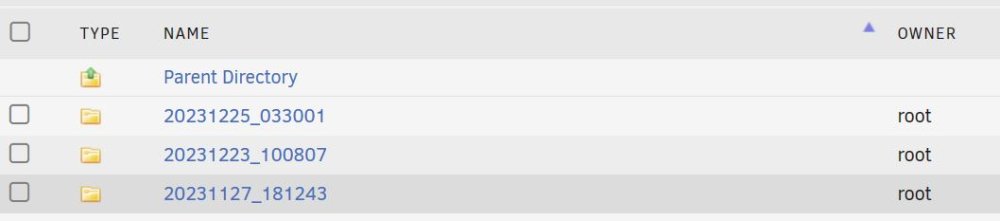
Sorry for the ?'s but I have one more. In this example can I simply keep the original backup and the last backup and be fine? In other words simply delete the 1223 backup to save space and only keep the 1225 and the 1127. The next week backup will be 010124 so I can delete the 1225 backup once the 0101 is finished?
-
Interesting....still trying to wrap my little brain around hardlinks.....on my backup drive (below) I can delete the 254G and the 154G folder and run the back up again and it will backup all the files back to the original 6TB backup on 11-27? My driive is 8TB and what I have been doing is formatting it when it gets close to 8TB and running a fresh backup and stating over. Being able to delete the incremental only would save a little time. 6.4T /mnt/disks/backup 6.0T /mnt/disks/backup/20231127_181243 254G /mnt/disks/backup/20231204_033001 154G /mnt/disks/backup/20231211_033001
-
I guess that is my problem. How do you copy the snapshots? Command line? Where could I find examples of doing that?
-
Hi friends. Still trying to wrap my head around zfs. I followed SI tutorial and converted my 2 drive BTRFS cache pool to ZFS. . All seems fine and I created a snapshot for all of the datasets. I also created a dataset for each docker folder inside of appdata. Before this process I ran appdata backup plugin that created a zip file once a week of the appdata folder and placed it in a backup share. I then copied the backup share to offsite storage. Fast forward to now.....the appdata backup plugin no longer works for my ZFS dataset so I turned it off. My struggle is understanding how I can move the dataset over to a separate backup location in the event something bad happens to my 2 drive zfs cache pool. In other words how can I backup my datasets and if something does happen, I will be able to restore the latest snapshot to a repaired ZFS cache pool. Thanks for any insight


