





CobraPL
Members
-
Joined
-
Last visited
Everything posted by CobraPL
-
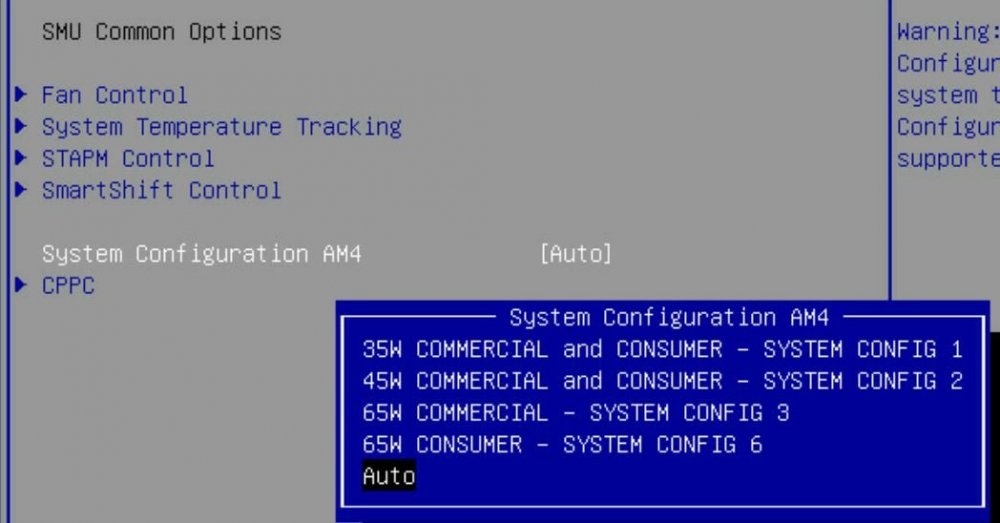
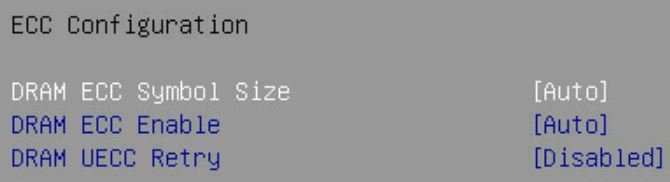
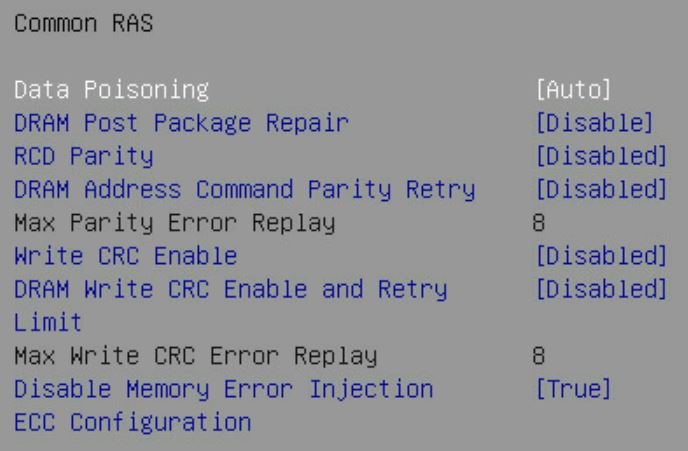
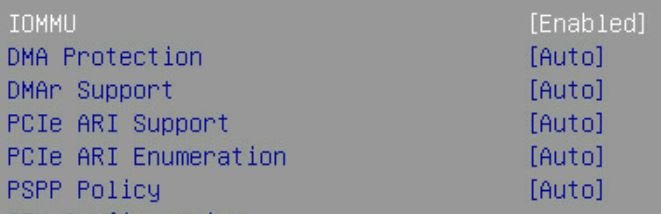
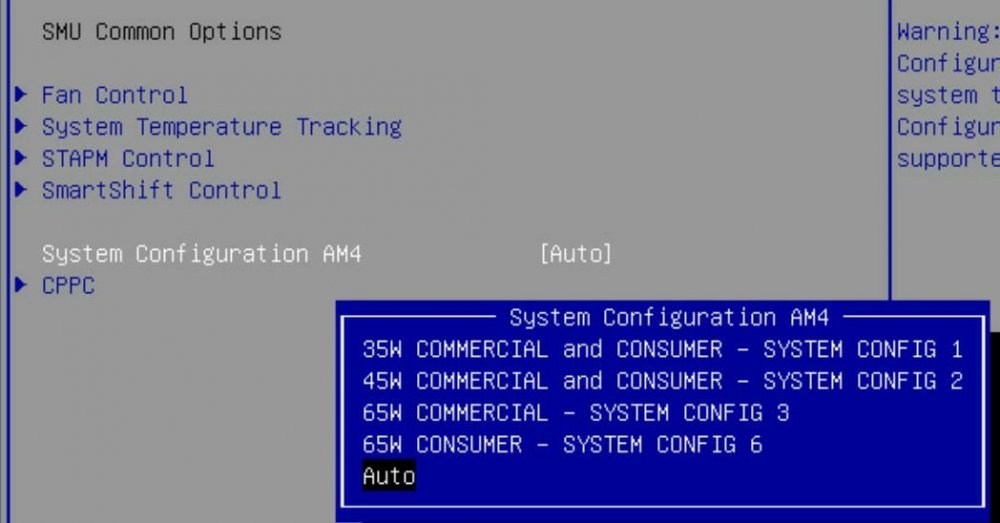
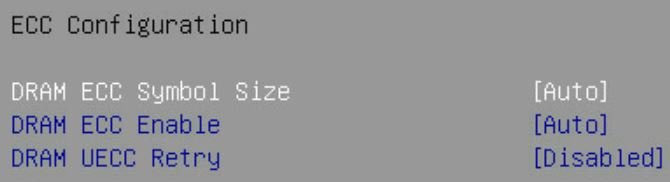
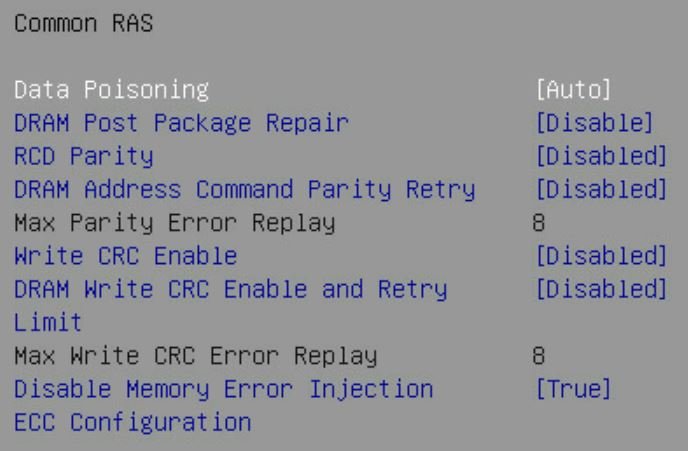
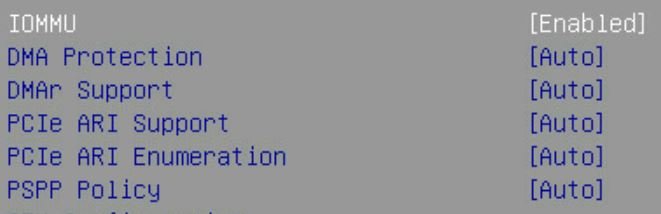
Guys, I am back to try unRAID as backup server for various people over WAN. I also plan to have my VN for busness stuff (e-mail etc. as RDP over Wireguard) Some questions/issues: 1. UEFI or MBR? In case I ever want to pass-through GPU I think I saw that UEFI is a must. In case I ever want to move to new hardware, I may be forced to use UEFI in X years. Is there any easy switch from MBR made unRAID stick to UEFI one? Now I have MBR unRAID unable to boot to UEFI, but it is not too late for change. 2. I think everyone failed trying to pass-though 4xxxG/5xxxG iGPU. I saw some threads, everyone seem to lost the battle. Should I give up? I have 4650G. 3. I had resets w/o trace in log during unRAID trial work (once per ~1day, in the night, during HDD read or write tests). After that I did following: a) disabled global C-state something b) disabled CPPC c) disabled aggressive something for SATA Now I'll check for resets again. Any other Ryzen recommendations? RAM is ECC, tested/OK. 4. Any general unRAID recommendations before I fresh start? Recommended SAFE apps? 5. What are recommended VM settings for: a) W10P b) Server 2022 Standard (one looks like 10, not one looking like W11/next) And which is better for RDP daily work? Money aside. 6. Any help for setting following options in my AsrockRack? 7. I plan to RDP to VM, but OFC over VPN, Wireguard probably. I could handle Wireguard via Mikrotik router or via unRAID (preferrably). BUT! If I set br0 how can I put RDP behind unRAID's Wireguard? 8. i440fx or Q35? Should I always select latest version? EDIT: 9. Both for Virtualbox and Vmware I could do following steps: a) delete temp files inside VM (under Windows) (optionally defrag inside Windows to compact all files to beginning of the disk) b) "sdelete -z" to fill empty space with zeores c) compact image file How to do c) point in unRAID? Is image file sparse? How to copy image file to remote destination every X days?
-
I have system reset/"unsafe shutdown"(it is reset) once per 24h of running server. I just updated BIOS/BMC and disabled global C-STATE. Any other recommendations? Ram is ECC, I checked it anyway, no problems. BTW where is exactly ECO mode in BIOS 1.20? I saw only general option: Power plan - Performance mode or Energy efficient mode. Is it the same?
-
I have latest RC install, almost clean state. No other plugins (except IPMI). ECC Ram, platinum-grade 550W. I had unraid restart ~@2AM w/o reason, all logs lost. Clearing HGST/WD 18TB HDD was already past 24H. I also have such thing in LOG: root: error: /plugins/preclear.disk/logger.php: wrong csrf_token
-
Anyone tried BIOS 1.20? Complicated (DOS) BMC update needed.
-
1.13 BETA 4/27/2021 Update AMD AGESA ComboAM4v2 1.2.0.2
-
ALERT!!! Beta Bios 1.12 https://www.asrockrack.com/general/productdetail.asp?Model=X570D4U#Download 1. Update AGESA ComboV2 to 1.2.0.1 2. Fix issue of low network speed in Ubuntu *Lab BMC
-
ALERT!!! Beta Bios 1.12 https://www.asrockrack.com/general/productdetail.asp?Model=X570D4U#Download 1. Update AGESA ComboV2 to 1.2.0.1 2. Fix issue of low network speed in Ubuntu *Lab BMC
-
On that matter, PLEASE, everyone that has this problem, open a support ticket on Asrock so they know there are more people interested in a fix. http://event.asrockrack.com/tsd.asp for the serial number, just copy it from IPMI.
-
@doesntaffect What are your write and read speeds to and from array (cached or not) using integrated Intel NICs? I searched for an answer, ppl state that integrated NICs could result slow speeds on unRAID.
-
I have same MOBO now. BIOS 1.10, ECC 2x32 3200. I test it for few hours yet. No lockups, just poor data transfers. Installing W10P for testing. TexasDaddy - did you upgrade the BIOS to 1.10? What ram slots did you populate? I did almost no BIOS changes, especially advanced ones. EDIT: I can confirm NICs BUG! Laughable transfers under Linux.
-
Not sure. My technician just put RAM in correct place and updated the BIOS. Today I started the server for the 1st time. Ran into issues. HDD 18TB HGST/WD, capable of 270MBps, with cache disabled, 1GBps network I have: 50MBps write over SMB 6.5MBps read over SMB (from/to W10P)
-
Server is WIP. De-facto done, waiting for more trays and PCIe x1 3.0 ASM1166 controller. I saw it already - completely silent, ram at 3200, no USB 2.0. I'll report when ready. BTW., Where is ECO mode in BIOS? I searched for few minutes (BIOS 1.10) and failed to see any. My NOCTUA is much bigger. I may have some problems in case of switching to rack-mounted case.
-
Everything except Mikrotik is already ordered. I have some parts at home. I'll have latest BIOS and I'll share info about ram speed.
-
Are you sure you did not confuse MT with MHz? Is max "3000" a 1500MHz/3000MT or 3000MHZz/6000MT (DDR4-6000) ?
-
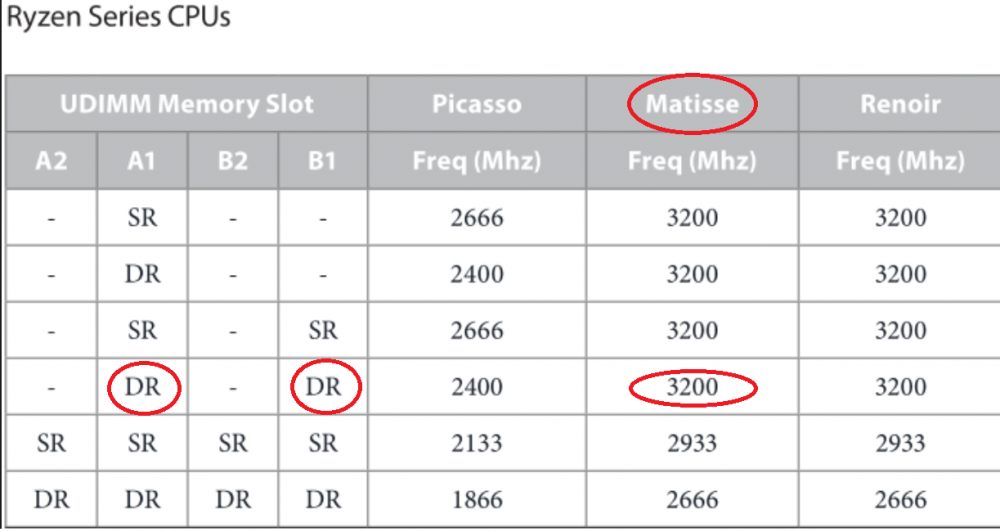
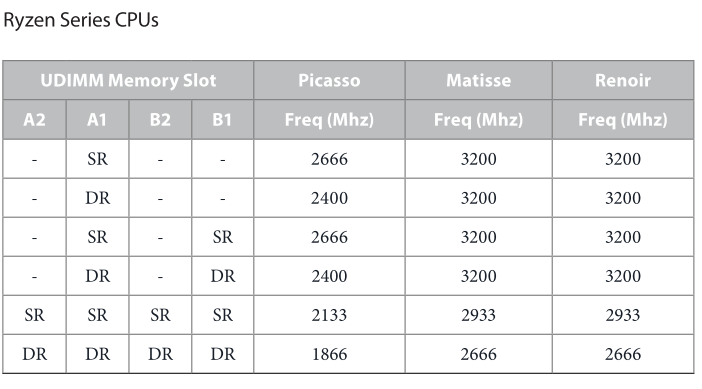
Since I plan to use unRAID and I have zero experience, I confuse cache for disk write and cache for VM. Can I e.g. one SSD (Samsung PM983 960GB) for both my VM (e.g. 50GB) as de-facto SSD for this VM AND The same SSD disk for write cache with option to not start HDD until e.g. 750GB is written to SSD, then start corresponding HDD(s), write whole 750GB, power down HDD(s) and free space on cache SSD. Does it work that way? About RAM, I think you may be wrong: "they confirmed 2666 is the max. speed - which makes sense since the two dimms are dual rank (DR), where the limit is 2666" For 2000 series Ryzen yes. Both you and me use 3000 (Matisse), in case of two banks usage in slots 1234 2 and 4, 3200 speed is stated in manual. Anyway, I will report my findings after I build my set myself. My comment: nice thing with BeQuiet! - I will use slightly more expensive version with 5x4 SATA slots and maybe Define 7XL with space for 18HDDs (be quiet! Dark Power Pro 11 550W 80 Plus Platinum). I will overpay not that much money, while having room for LOTS of HDDs. I also see on Polish ebay equivalent: Mellanox ConnectX-3 CX322A LSI SAS 9201-16e H200e JBOD Both rise some questions. I will ask the seller. What router you have? I plan this one: https://mikrotik.com/product/ccr2004_1g_12s_2xs My usage will be different, since I will provide "1" in 3:2:1 backup scheme over VPN. I will also invest in cheap 18TB Ultrastars. I will use unRAID superb possibility of easily adding new drive to an "array".
-
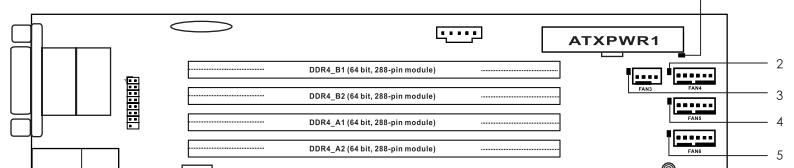
Dude, on some pics you had RAM in wrong places. On some of them it is fixed. Did this trick allowed 3200 speed? How exactly looked ram speed problem? Lack of setting in the BIOS? What is your FCLK compared to ram speed?
-
THX! Since I am unRAID newbie (I never installed it yet TBH) I have a questions: 1. Why and how did you make such powerful cache? What exactly which array does? 2. How did you get such fancy M.2 radiators? On the open market? Were such thinks a bundle part of SSD? 3. I bought 4650G for now for price of 3600(x). I thought that iGPU may be pass-through for virtual WS2022 for better experience while ASM2500 will be for remote management only. But what do you think about leaving ASM2500 as ONLY one card in the system. Any considerations? PS. I did "Thanks to bomb" on you. Thanks.
-
@doesntaffect dude, I plan almost identical system! I plan X570D4U-2L2T or X570D4U. I have 2x3200 GB ECC Kingston (hey, same as yours!) (you sure 2666 is still max??? Did you try 1.10 bios?). I already ordered Noctua NH-C14S (same as yours!). Can't decide between Define 5, 7 and 7XL I'll use 4650G for now (iGPU passthrough for virtual PC), I will wait for AMD Warhol. If it will work with this mobo, I will buy it. If not (AM5 maybe?) then 5900X probably. For now I complete my 1st NAS device, so no need to buy extravagant PC. Not mentioning too much ram - 64GB total. Any problems? Any issues to avoid? Any not obvious things to keep in mind? How SATA works? Any problems? Some ppl complain about AMD SATA MOBO ports. I see you populated both MB NVME slots. Any issues?


