CobraPL
Members
-
Joined
-
Last visited
Everything posted by CobraPL
-
Ultrastars only. For cheaper builds any purple/av ones - quality of NAS ones with lower price.
-
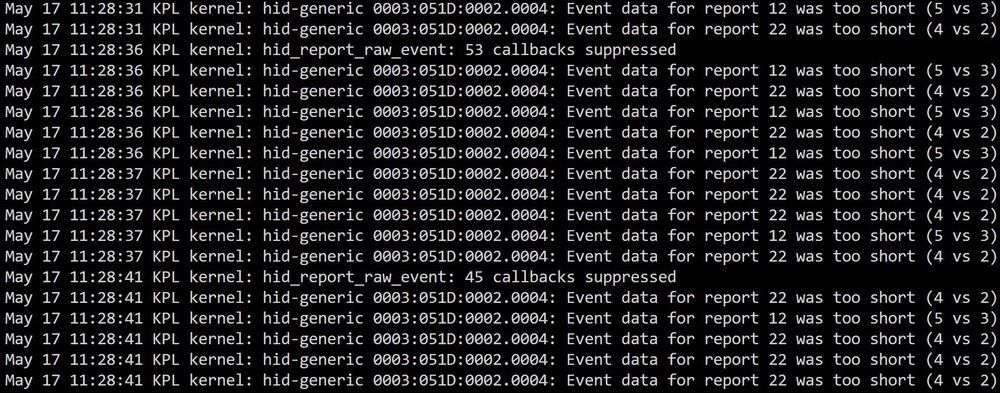
I think UPS support may be flawed in 7.3.0 I have APC one via USB - an older Unraid worked OK. Now I have a situation as depicted on the attached picture. I personally went to server room and unplugged the UPS and it is working, Unraid had an event about UPS. My log is spammed with HID problems like on the attached image.

-
Not sure what's wrong, but is simply does not work at all. First of all, I installed it in APPS. It has: Status:Stopped I've sent WOL both to the VM and eth0 which is configured as listening. Not working.
-
Greetings, I have W10P VM in sleep state. I tried app to wake on lan, it won't work. Basically, I want to use RDP following way - the VM is paused. I try to connect, it resumes, I connect. I work, I log out, it pauses. However I see no method to resume/start VM w/o logging to unRAID via www. How to do so?
-
How can I access/locate the "output" directory? I tried for last 30min.
-
So this "xfs_repair -v" destroys data in case of wrong disk/parition selected. Unlike chkdsk for Windows, which refuses to work in case it can't detect supported filesystem. And I guess there is no backup of hdd's headers and other sensitive data stored on e.g. cache or pen? VeraCrypt for example had special CD/Iso with headers backed up.
-
GUI had xfs_repair option only for cache, not for array disk. For array one it was simply absent. So I used command line xfs_repair -v but probably on wrong partition.
-
[edit: summary: xfs_repair used on wrong partition or whole disk. Instead of refusing to repair because RAW/unknown file system (like chkdsk does) it just destroyed the data. ] Greetings, I started array in maintenance mode, list disks and did xfs_repair -v on my HDD (array, not cache). To my surprise, multiple errors appeared. And after restart the disk is "not encrypted". What now? How can I at least copy data and reformat? The HDD physically is OK, just "xfs_repair -v" destroyed my data. How to recover it? Are there any header/partition backups in unRAID? "Unmountable: Volume not encrypted" Perhaps I selected whole disk instead of specific partition to repair, hmm. Under Windows in case of trying to use chkdsk on unsupported disk or partition it simply refuses to check. /dev/sdb1: UUID="78521ded-6ac7-40ca-84e6-7095eb84e6d7" TYPE="crypto_LUKS" PARTUUID="44a21b7f-09aa-4683-acd6-8e1762050e43" /dev/md1p1: UUID="78521ded-6ac7-40ca-84e6-7095eb84e6d7" TYPE="crypto_LUKS"
-
https://www.reddit.com/r/unRAID/comments/139h5i5 Most important/critical: Global C-State Control (crashes in unRAID) - multiple sources, both Reddit and forum are swarmed with such reports! Some reports are that Global C-State Control crash affects ZEN 1-2 only. unRAID could just warn, that in case of random crashes, try disabling Global C-State Control. Optional: CPPC (may be in two places in BIOS) - performance loss under Windows, not sure if under Linux/unRAID source: https://www.reddit.com/r/Amd/comments/pbbqd0/cppc_enabled_vs_disabled/ Aggressive SATA Sleep (some SSDs degradation/failures). I had problem with this setting too.source: https://www.reddit.com/r/DataHoarder/comments/8q0cg8/comment/e0fflz Rather disable fTPM in case you don't use it. It caused some problems in the past, not sure if it is actually fixed.
-
1. 2.
-
Disable Global C States and CPPC. First one caused hangs/resets, second one degrades performance a lot (there was a thread on Reddit with benchmarks).
-
Probably even Pentium/modern Atom will be enough. 12700 is an overkill already. I use 5900X, but I host game servers etc. For pure NAS, nothing fancy is needed.
-
I ask since some people complained about "btrfs crash". Topic from 2015 is full of complains about btrfs: What is the best practice for latest unRAID?
-
THX. Except I can't passthrough AMD APU. What are your recommendations for non-passthrough (software) scenario?
-
So are we ready to announce 4650G passthrough does not work and it is waste of time for many people? For example I've lost surely over 10h total time of my life. OFC I can't extract bios with SI's script, because "access denied". I tried various bioses. Same here, no progress.
-
Greetings, I plan to move work-related stuff to remote VM. I have Ryzen 4650G (5700G 5750G considered) as unRAID server. I could pass-through iGPU (someone succeeded finally for 5700G!). But I want to benefit from iGPU on RDP. AFAIK normally RDP uses software rendering, but I googled how to enable iGPU. Questions: 1. What OS is needed? W10P is enough or I need at least W2016S or W10Enterprise? 2. Do I need RemoteFX? 3. Is AMD's iGPU supported? 4. Any other considerations? Thanks EDIT: WARNING! 5700G does NOT support ECC. It looks confirmed. One needs 5750G.
-
Hi, I have Renoir GPU. Where did you get working BIOS for AMD APU? I am VERY interested. MANY people have problems (actually you are first one who succeeded).
-
I see no-one answers you. I can't say for sure (I am beginner too), but you may not be able to pass-through Radeon cards. Anyway, every report I saw here was about failure to successfully pass-through Radeon integrated to Windows and install drivers. Not sure for Linux or Mac. I have 4650G and I failed too.
-
updated BIOS/BMC, disabled global C-STATE, disabled aggressive SATA, disabled CPPC. I think it stopped resetting, need more testing. RAM is multi-byte ECC, it passed all tests
-
Forget G models, pass-through does not work. AFAIK no-one succeeded (people can't install drivers under VM). So it is waste of cache. Unless 8C G version is FAR cheaper. I recommend for this MOBO: - CPU cooler compatibility!!! DOUBLE CHECK. I have Noctua NH-L12S because it fitted. In case of doubt, just buy this version! - disable global C state, disable aggressive SATA (in two places, one for CPU, one for chipset), disable CPPC - double check ram slots you populate - rather upgrade BIOS if you have <1.20. - there are NO USB 2.0 slots at all on these mobos, buy 2.0 pendrive then. Never use 3.0 pen in 3.0 slot (it will fail, matter of days, weeks MAYBE months, but it will fail) - check if second M.2 disables any SATA ports I have X570D4U and failed to pay extra cash for X570D4U-2L2T. Now it is 2x more expensive I have Mellanox3, but it took precious PCIe slot. I have 4650G (bought for a good price). Aiming for 5800X3D in case it ever appears. Answering your question: take 5800X or 5700G only if it is cheaper. Look there, I have almost identical build, and this guy is PRO CLASS:
-
Hmm, I've created 72GB VM and installed Srv2022Std. Image should be few GBs on cache drive and but it is 72GB. Sparse images should grow with data written and should have option to shrink/compact them, especially after using "sdelete -z" on VM. Exactly like in Virtualbox and VMWare. How to enable such option?
-
"This is all client side and you'd have to investigate there." Really? The VM is hibernated or paused. RDP port is probably not open at all. How to wake such VM up via client side? Disconnecting will do nothing, Closing will cause hibernating after changing unRAID option. OK Only problem is what to do to easily start hibernated/paused VM w/o logging every time by hand.
-
Thanks for your answer, so I want my VM to: a) pause when I simply disconnect b) hibernate when last user logs out c) resume upon RDP connection attempt, sth. ike wake on lan. How can I do that exactly? EDIT: "You set the default action in unraid to be hibernate instead of shutdown" Where is this option? I have both drivers and tools installed on VM.
-
1. What is difference between "pause" and "hibernate"? 2. Is there any "suspend to disk"?, so after I restart unRAID I can continue work on VM w/o losing anything? Is such suspending default behavior in unRAID's graceful restart/shutdown? I had sth like that in Virtualbox and VMWare. 3. VM, even when I am not logged, takes some CPU power. How to handle pausing/resuming in clever way? So VM is paused after e.g. I hit log out (in VM's Windows) and is resumed when I try to RDP to VM? Or maybe there is another solution like some mobile app to pause/resume by hand, but easily?
-
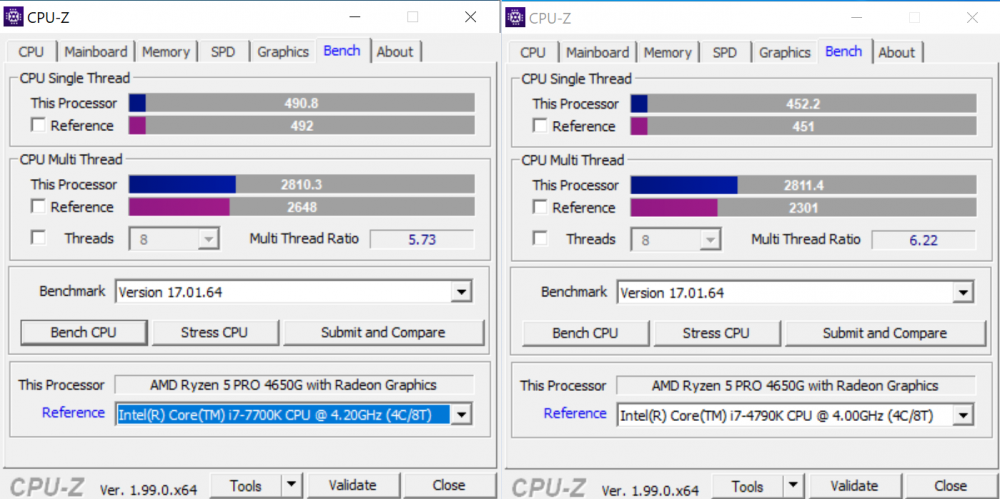
Here is same processor two times (two cores for unRAID, 4 cores for VM). "power plan" "performance" to the right, energy efficient to the left. 8.5% single core performance. I'll check wattage after I obtain the proper device to check it.