





Peddarson
Members
-
Joined
-
Last visited
-
Direkt bei Western Digital gibt es momentan Rabatt für diverse Red Plus: https://www.westerndigital.com/de-de/products/outlet/internal-drives/wd-red-plus-sata-3-5-hdd#WD20EFRX Mit Corporate benefits sind teilweise sogar ganz gute Preise möglich.
-
Thanks for this. I like it much better because of its simplicity than FireflyIII.
-
Thanks, that solved it.
-
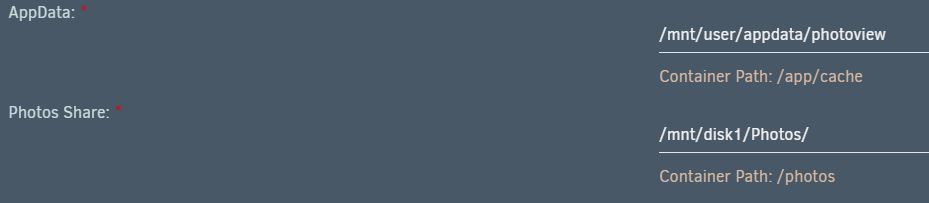
Somehow i cannot get this to work. The initial setup worked fine and to my point of view it should be correct. At least i am able to login without any errors in the logs. At the user settings i cannot define any path (only "/" is possible). There's always a error message popping up. According to the official Docker instruction i only have to put "/Photos" as a Photo path as it is defined for "Photo Shares" but this does not work -> error message. Here are two screenshots of my settings and then the error message: My docker data is stored on a separate drive if this is a necessary information.

-
Thank you for the guide. The flashing process went buttery smooth on an a21 model.
-
Update to 6.9.1 went smooth. Somehow the workload of the cpu went a bit higher since upgrading on version 6.9.

