jaybigman77
Members
-
Joined
-
Last visited
-
Love the new server is it possibile we can get the unraid case with the eypc instead of the the i7
-
Current i have the settings at .7 1.3 in the plugin settings ran intel_gpu_top in terminal this is what i get (attached) also want to add the display now appears for a second then disappears
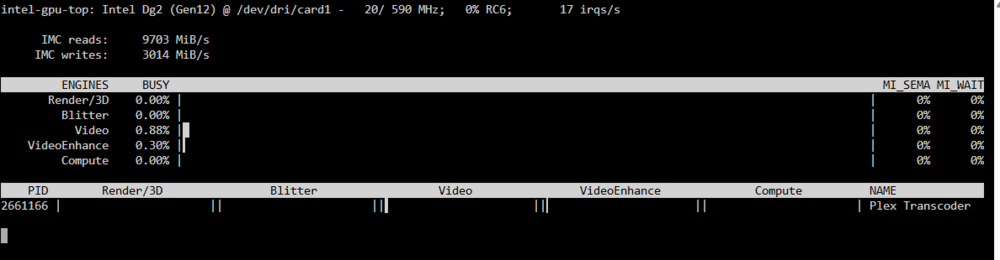
-
Didn't work made sure i was on 2023.03.12 installed didnt work updated intel_gpu_top with no luck either still gives same no data error
-
-
Didn't work everything disappeared had to reinstall plugin
-
ok im in ... i'm i to add that script you provided to the existing one? if so where top bottom etc?
-
used that path and it says it doesnt exist using unraid terminal
-
Not really sure how to do that? built this thing watching videos lol
-
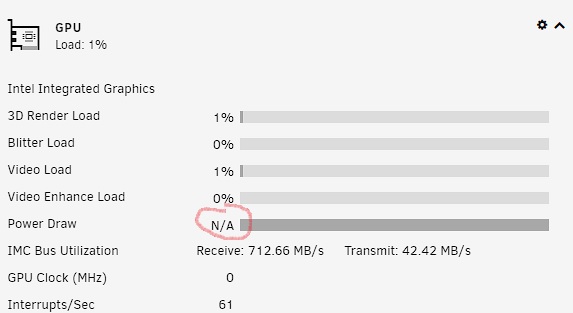
Everyone i have a small issue here i have an i5-11400 64GB of Ram w/ iGPU (Rocket-Lake and Intel arc A310 both enable in bios and both show up in Unraid. The issue is that both graphics cards come back with Vendor command returned unparseable data or Vendor command returned no data. screenshot attached. I have read thru some of the forums and changed the Intel_top_command_timeout but to no fix at all. Is there anything else that can be done. Thanks
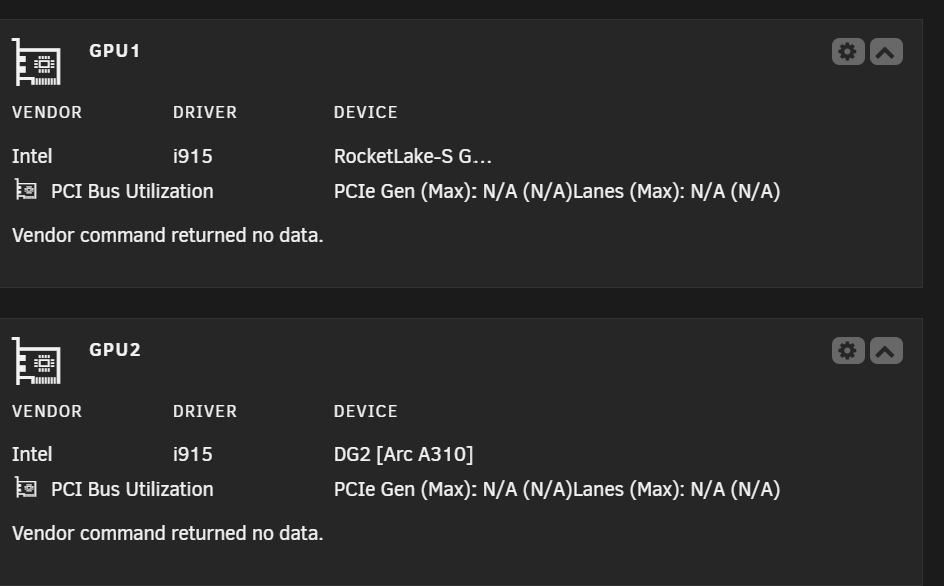
-
So all i have to do is drop this file in this location (config >modprobe.d) and i can upgrade to 6.12.3 from 6.11.5 with no more issues running i5-11400 and iGPU with 32GB/Ram
-
Mine seems to be working fine
-
What info do i need to include
-
how can i fix this error lastest version 00:02.0 VGA compatible controller: Intel Corporation RocketLake-S GT1 [UHD Graphics 730] (rev 04) powerdraw.txt