





srirams
Members
-
Joined
-
Last visited
Everything posted by srirams
-
Thanks, but that will still kill the network for some time which would be undesirable... I'm wondering if I can just disable the disks_mounted and unmounting_disks events with no side effects (provided that all data lives on drives not on the array)?
-
I would like to use a container to run openwrt (or just plain alpine) as my router. I've tried it out and it works great (except for stopping when the array is stopped )
-
Would it be possible to keep lxc containers running even if the array is stopped (all lxc data is on a unassigned devices drive)?
-
Is there any utility in spinning down SSDs? I would think it would be better to skip spin down operations on SSDs... Also there is no "settings cog" next to the disks, so I'm not able mark them as passed through? The disks are btrfs formatted (each individual 200gb pooled into one 800gb). root@trantor:~# df -Th Filesystem Type Size Used Avail Use% Mounted on /dev/sdx btrfs 746G 451G 293G 61% /mnt/disks/scratch
-
Upgraded and restarted and the problem went away... I think the problem was due to something else because I had the same out of space error on a docker container. Thanks!
-
I have a sun oracle f80 pcie ssd that UD (I think) is constantly trying to spin down. Jul 13 21:06:08 trantor emhttpd: spinning down /dev/sdz Jul 13 21:06:08 trantor emhttpd: spinning down /dev/sdaa Jul 13 21:06:08 trantor emhttpd: spinning down /dev/sdx Jul 13 21:06:10 trantor emhttpd: spinning down /dev/sdy (The above is repeated every 45 minutes) The drives are formatted using btrfs (not through UD).

-
Attached! trantor-diagnostics-20230709-2127.zip
-
I'm trying to create and start a container but it is failing: root@trantor:/mnt/disks/data# lxc-start -F oracle lxc-start: oracle: ../src/lxc/conf.c: lxc_setup_console: 2156 No space left on device - Failed to allocate console from container's devpts instance lxc-start: oracle: ../src/lxc/conf.c: lxc_setup: 4471 Failed to setup console lxc-start: oracle: ../src/lxc/start.c: do_start: 1272 Failed to setup container "oracle" lxc-start: oracle: ../src/lxc/sync.c: sync_wait: 34 An error occurred in another process (expected sequence number 4) lxc-start: oracle: ../src/lxc/start.c: __lxc_start: 2107 Failed to spawn container "oracle" lxc-start: oracle: ../src/lxc/tools/lxc_start.c: main: 306 The container failed to start lxc-start: oracle: ../src/lxc/tools/lxc_start.c: main: 311 Additional information can be obtained by setting the --logfile and --logpriority options and df -H Filesystem Size Used Avail Use% Mounted on rootfs 17G 1.3G 16G 8% / tmpfs 34M 5.1M 29M 15% /run /dev/sda1 16G 800M 15G 6% /boot overlay 17G 1.3G 16G 8% /lib/firmware overlay 17G 1.3G 16G 8% /lib/modules devtmpfs 8.4M 0 8.4M 0% /dev tmpfs 17G 0 17G 0% /dev/shm cgroup_root 8.4M 0 8.4M 0% /sys/fs/cgroup tmpfs 135M 15M 120M 11% /var/log tmpfs 1.1M 0 1.1M 0% /mnt/disks tmpfs 1.1M 0 1.1M 0% /mnt/remotes tmpfs 1.1M 0 1.1M 0% /mnt/addons tmpfs 1.1M 0 1.1M 0% /mnt/rootshare /dev/sdx 800G 451G 348G 57% /mnt/disks/scratch /dev/md1 12T 12T 69G 100% /mnt/disk1 /dev/md2 8.0T 8.0T 35G 100% /mnt/disk2 /dev/md3 12T 12T 161G 99% /mnt/disk3 /dev/md4 12T 12T 41G 100% /mnt/disk4 /dev/md5 8.0T 7.9T 116G 99% /mnt/disk5 /dev/md6 12T 11T 1.8T 86% /mnt/disk6 /dev/md7 12T 12T 11G 100% /mnt/disk7 /dev/md8 10T 9.9T 122G 99% /mnt/disk8 /dev/md9 8.0T 7.9T 106G 99% /mnt/disk9 /dev/md10 8.0T 8.0T 36G 100% /mnt/disk10 /dev/md11 10T 9.7T 351G 97% /mnt/disk11 /dev/md12 8.0T 7.9T 166G 98% /mnt/disk12 /dev/md13 10T 9.9T 121G 99% /mnt/disk13 /dev/md14 12T 12T 28G 100% /mnt/disk14 /dev/md15 12T 2.1T 10T 17% /mnt/disk15 /dev/sdb1 250G 119G 132G 48% /mnt/disks/data /dev/sdp1 4.0T 963G 3.1T 25% /mnt/disks/backup /dev/sds1 5.0T 2.0T 3.1T 40% /mnt/disks/transfer /dev/sdu1 4.0T 161G 3.9T 5% /mnt/disks/nvr /mnt/disks/data 250G 119G 132G 48% /share-ro/data /mnt/disks/scratch 800G 451G 348G 57% /share-ro/scratch /mnt/disks/transfer 5.0T 2.0T 3.1T 40% /share-ro/transfer /mnt/disks/backup 4.0T 963G 3.1T 25% /share-ro/backup /mnt/disk2 8.0T 8.0T 35G 100% /share-ro/17 /mnt/disk4 12T 12T 41G 100% /share-ro/29 /mnt/disk8 10T 9.9T 122G 99% /share-ro/a01 /mnt/disk11 10T 9.7T 351G 97% /share-ro/a02 /mnt/disk1 12T 12T 69G 100% /share-ro/a03 /mnt/disk5 8.0T 7.9T 116G 99% /share-ro/23 /mnt/disk6 12T 11T 1.8T 86% /share-ro/27 /mnt/disk7 12T 12T 11G 100% /share-ro/a05 /mnt/disk9 8.0T 7.9T 106G 99% /share-ro/30 /mnt/disk13 10T 9.9T 121G 99% /share-ro/a01 /mnt/disk12 8.0T 7.9T 166G 98% /share-ro/31 /mnt/disk15 12T 2.1T 10T 17% /share-ro/a07 /mnt/disk10 8.0T 8.0T 36G 100% /share-ro/20 /mnt/disk3 12T 12T 161G 99% /share-ro/28 /mnt/disk14 12T 12T 28G 100% /share-ro/a06 /dev/loop3 1.1G 5.0M 948M 1% /etc/libvirt /dev/loop2 43G 19G 24G 44% /var/lib/docker
-
I have the same problem....
-
Sorry, can't think of what else could be the problem... Plugin in needs sas address in order to work.
-
The problem is that you don't have a sas address for your disks.... Is the hba on raid or jbod mode?
-
Hi, can't access the output... please try putting it in a pastebin, or include it here.
-
That worked, thanks! Didn't realize that I had to format it in unraid after preclear.
-
I've attached it below! TRANTOR-unassigned.devices.preclear-20220603-1056.zip
-
I think unraid creating the folders when you add a new container is ok, but I don't see the use case for docker ever creating folders when you start a container (its gonna create an empty folder because the appdata folder is not mounted)
-
Currently, I believe that unraid is using -v to mount paths in docker. This has the undesirable side effect of creating the path in the host system if it doesn't exist. So, for example, if you've use a bind mount in docker pointing to /mnt/disks/data and /mnt/disks/data does not exist, it will be created in the host system as an empty directory, leading to problems when you want to actually mount something into /mnt/disks/data. Using the --mount syntax instead will not auto create paths. See https://docs.docker.com/storage/bind-mounts/ for reference.
-
I successfully did a preclear on a new disk, but when I try to add it the array I'm getting this error "Unmountable: Unsupported partition layout"?
-
I would like to be able to have disk labels (eg, instead of disk1, I would like to label the disk movies-1) and the corresponding disk share should use the same label. Currently doing this using xfs labels and a custom script, but would like it to be integrated.
-
Unfortunately it doesn't look like your enclosure is reporting itself properly.... there should be an entry like: [1:0:19:0] disk sas:0x5003048000fdfa23 /dev/sdv /dev/sg21 [1:0:20:0] enclosu sas:0x5003048000fdfa3d - /dev/sg22 [1:0:21:0] enclosu sas:0x500304801234567d - /dev/sg23 [2:0:0:0] disk sata:500a0751f003bc4e /dev/sdb /dev/sg1 [9:0:0:0] disk sas:0x4433221104000000 /dev/sdw /dev/sg24 for enclosures. I did find this reddit post with the following perl code which you can try, but I don't think it will work as it is looking for the same thing.
-
Just updated and it seems to be generating valid entries! Thank you
-
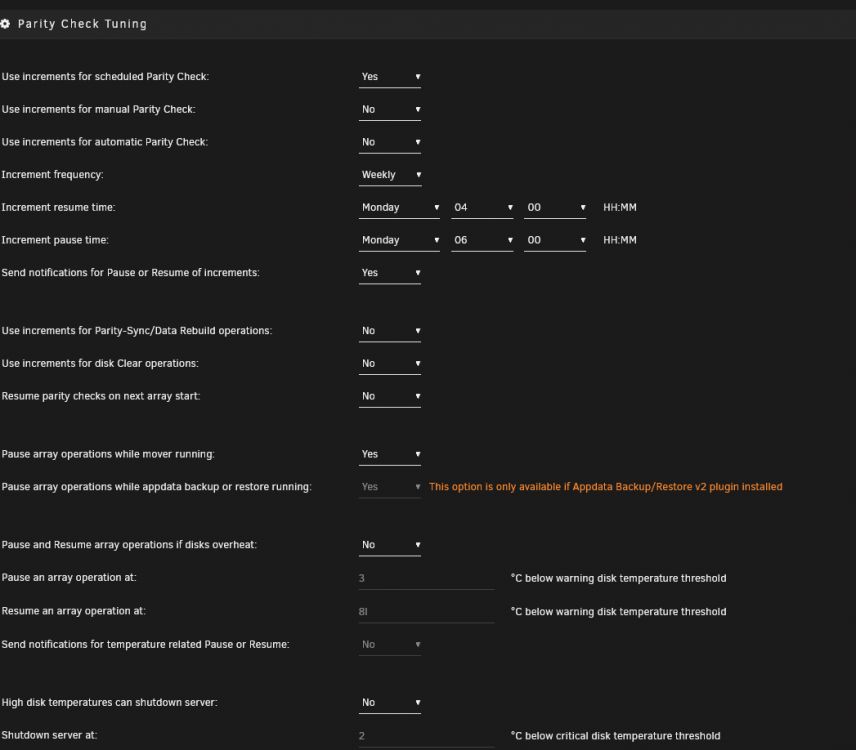
Using Version: 2022.03.23, the plugin seems to be generating invalid crontab entries. This is from /etc/cron.d/root # Generated schedules for parity.check.tuning 0 4 * *1 /usr/local/emhttp/plugins/parity.check.tuning/parity.check.tuning.php "resume" &> /dev/null 0 6 * * 1 /usr/local/emhttp/plugins/parity.check.tuning/parity.check.tuning.php "pause" &> /dev/null */17 * * * * /usr/local/emhttp/plugins/parity.check.tuning/parity.check.tuning.php "monitor" &>/dev/null This is from my log: Mar 28 06:54:01 trantor crond[2424]: failed parsing crontab for user root: *1 /usr/local/emhttp/plugins/parity.check.tuning/parity.check.tuning.php "resume" &> /dev/null I've tried changing the times, and still get the invalid crontab entry without the space (*1)
-
I'd like to run an hour of parity check every week on Tuesday mornings. I've set the increment resume time as: 0 5 * * 2 and the pause time as: 0 6 * * 2. I am unsure what to use for the scheduled parity check. With 12tb drives, I'd need to start about two parity checks a year. If I use the same as the increment resume time (eg: 0 5 * * 2), will the parity check reset to 0% each time? Also, if I start a parity check using a script (parity.check nocorrect), is it considered a scheduled, manual or automatic check?
-
Can you give me the output of: lsscsi -t -g
-
This plugin allows the toggling of the led locator lights found in certain enclosures. Only tested on my Supermicro BPN-SAS2-846EL connected to a LSI 2008 HBA. Install: https://raw.githubusercontent.com/srirams/unraid-enclosure-led/master/plugin/enclosure-led.plg



