





jensrobot
Members
-
Joined
-
Last visited
Everything posted by jensrobot
-
Oh i see. Thanks for that info. In that case ill upgrade to 7.3 again and make a new post
-
Sorry but what does the reset button do? corruption errors doesn't seem like something you just reset. I had a bunch of corruption errors on 2 pool drives (see earlier post). Reset button was clickable im pretty sure, but i got scared and downgraded to 7.2.6 instead
-
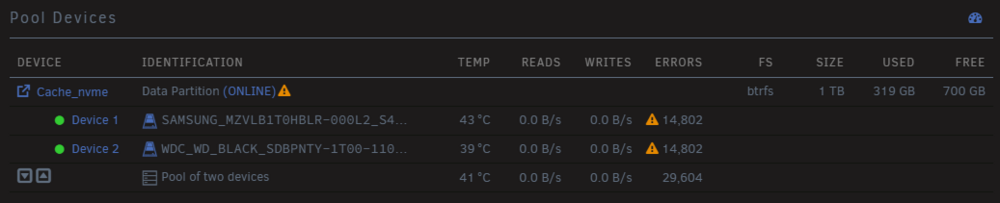
Just updated from 7.2.6 and get this nasty one: Corruption errors was instant i did not see it accumulate, and the number hasnt gone up... skabet-diagnostics-20260513-2153.zip

-
Thanks I'm marking this answered and I'll post a new thread if it happens again
-
My unraid server goes completely dark and unresponsive. It happened under a week ago, and again today 4-5 hours ago. Only way to get any control again is to physicly hold down the power button to turn off, then power on again and do parity check - which always clears. Actually this happens like once a year, and has done so for many years over different hardware. Since its so rare i put it into the same category as my router and just went on without looking into it. Does diagnostic data even show anything from before crash? Can you look through it please and see if anything pops up or tell me how to get proper diagnostic data for you thanks skabet-diagnostics-20250721-2154.zip
-
Thats great news, thanks!
-
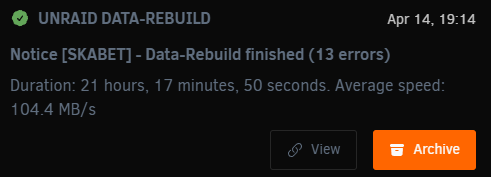
I've had trouble with a HBA recently. See this post After upgrading to a new mainboard, cpu, ram and a cooler for the HBA, I ran a parity check which detected errors and should have fixed them. I had "write corrections" checkmark on. After this parity check, disk 6 popped up with errors. I've had this drive report error once right before the my hba acted up, so i simply switched it with a precleared disk and started to rebuild. Now its done but it says 13 errors, but only in the notification not on the "main" page. I cant seem to find info anywhere on what those errors are. Need help please! skabet-diagnostics-20250414-2038.zip
-
Thanks JorgeB This explains a lot actually. I'm moving everything to a new mainboard and cpu, and ill clean it all up and make sure airflow is good. Worst case i buy a new HBA
-
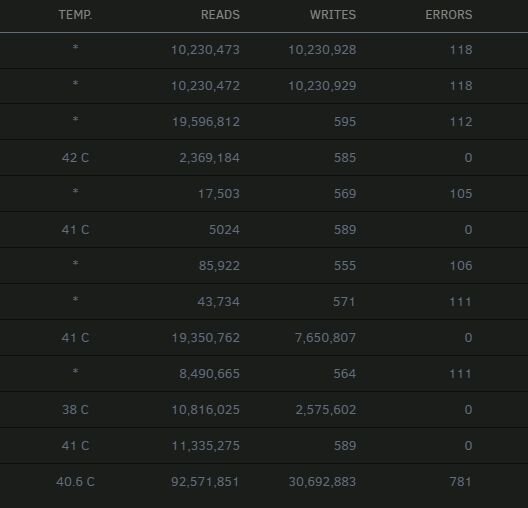
I just panic shutdown my server after seeing 7 (out of 12) disks report errors. I've had a system crash about a week ago, after that i ran a parity check and it found errors on disk 6. I've postponed swapping out the disk, as i didn't have a spare one on hand. The system was also doing weird stuff like not recognizing the usb stick for booting and corrupting it so i had to recopy unraid onto it. Can I assume there is data corruption now since errors span across many disks and the parity drives? Can I turn the system back on and do a parity check, or whats the best practice for this i'm scared I attach diagnostics. skabet-diagnostics-20250322-0850.zip
-
Thanks. Yeah i'll try some other cables once i get it shutdown. The PSU is not that old, i got it recommended from this board. Super flower Leadex III Gold. Looks like ill have to force it
-
Hello I was preclearing a NEW 8 TB hdd (sector scanned it before installing into server + smart ok) which i started yesterday. Today when i checked on it, it doesnt say it's preclearing anymore in dashboard, so i checked under tools->preclear, and i can se the job. Its done pre-reading but something has happened when it began the 2nd step / preclearing. It's running at "3 mb/sec" now and the sys log is going crazy. It seems like the disk is being constantly disconnected and reconnected, and the LED on the HDD bay tells the same story - it's blinking like crazy. I've had one issue earlier with a disk that "dissapeared" while pre-clearing in the same HDD slot, so im pretty sure its a bad connection, but at the time i just used another HDD slot and there was no problem. Im gonna try another cable once i have the server shut down, but if anyone here can shed some more light on the problem via the attached logs it would be apreciated. But the main thing right now is i can't shut down the server, i cant even stop the array, so im confused how to proceed. Shutdown button does nothing, and stopping array just gets me the orange loading symbol never going away. I don't wanna force shutdown if array is still running. I closed all vm's and dockers. skabet-diagnostics-20230915-1803.zip
-
@ich777 This fixed it all it seems! yay thank you so much for taking your time to help Can I buy you a "coffee" i.e. do you have a donation link?
-
Yeah I'm running it of my cache drive, is that a problem? I've done this with other steamcmd servers no problem. I left these unaltered: Steamcmd: /mnt/user/appdata/steamcmd Serverfiles: /mnt/cache/appdata/arma3/gamefiles profiles: /mnt/cache/appdata/arma3/profiles Appreciate your help alot!
-
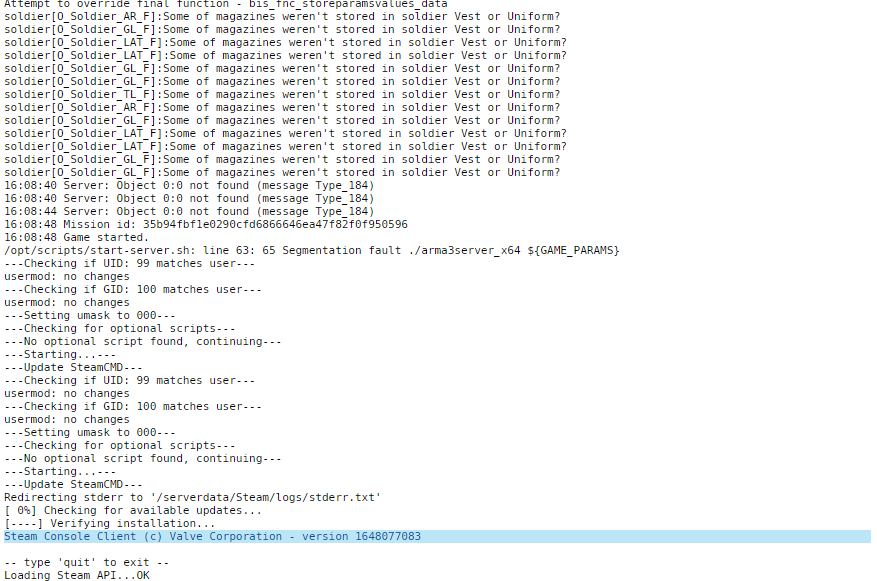
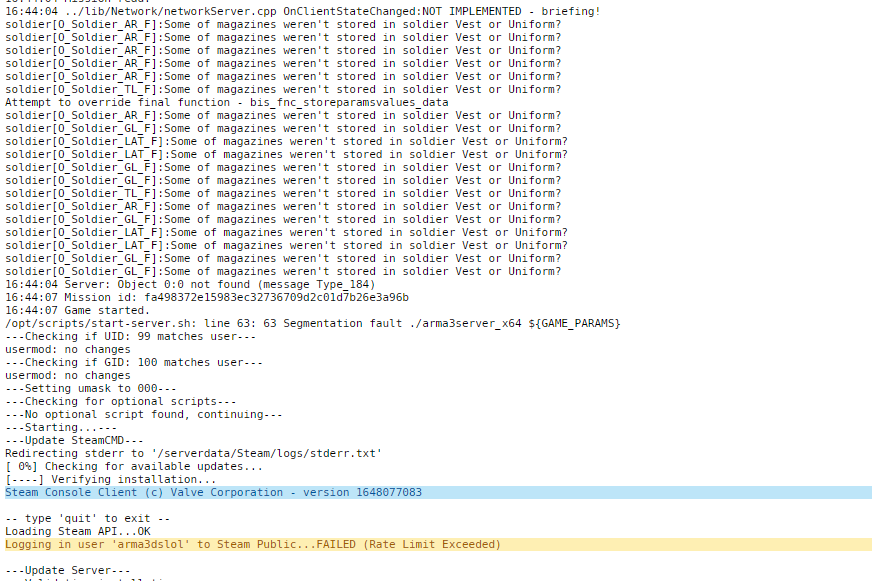
thx! yeah i was watching the log on my second screen as it restarted itself. This log window autoscrolls super fast, and also start hanging when restart happens. Therefor it was hard to spot and copy text, but i managed to grab 2 screenshots is it perhaps the "Server 0:0 not found" entry? diagnostics should be in previous post?
-
Trying to run an Arma3 server using this docker and it's acting really weird. Everything seems to work fine, server starts, and we can connect remotely to it fine and pick mission and roles, but when you try and start mission from the map briefing the server just restarts with no apparent error, and clients hang with "no message recieved for XX seconds". During this the server restart, and my dashboard gui goes unresponsive for 1 min or so. I tried removing and readding docker and i was actually able to get in game only for it to crash after 1 min. After this its back to crashing right at the map briefing. It's vanilla - no mods and i removed all mods on clientside too. Can you help? i cant seem to find the arma logs, or the ones i can see are empty skabet-diagnostics-20220407-1657.zip
-
I'll switch ports next. The motherboard actually have 2 different sata controllers built in (there is 2 extra slots next to the group of i think 6 ports), and i just notice disk6 is the only one on the secondary controller. I'll report back
-
You're a legend, thx!
-
Heya @ich777 Project Zomboid just launched a new build 41 multiplayer test branch. I changed GAME_ID to 380870 -beta b41multiplayer. Now i'm getting errors and server don't start up fully. I've read from one of the devs that they use most recent GLIBC and thats why error appears. Is this something you need to know? Short reddit thread here on the matter: https://www.reddit.com/r/projectzomboid/comments/rctzhv/build_41_multiplayer_dedicated_server_error/
-
Just a quick update. I ran 3 parity checks, and no shutdowns! Sadly 168 read errors on disk6 again during 2nd pass Smart still reports nothing wrong
-
sadly my server has now turned itself off during parity check, and its starting with the array stopped. This happened 2½ months ago also during a parity check, but I thought it was fixed when I got a new PSU (Super Flower Leadex III 550W) about 2 months ago. I wanna try and change the sata cable for disk6, I think the problems started after I added this disk. Is there any risk of data loss from the parity check crash in itself? I'm thinking its ok because it only reads data... I'm looking for a way to replicate this crash for troubleshooting purposes without risk of data loss EDIT: Btw i started array and its seems ok - green lights
-
JorgeB to the rescue Thx for swift reply, ill keep monitoring
-
Hello I recently got some read errors (32 in total) on one of my drives. "kernel: md: disk6 read error, sector=1578945552" and so on. I've run an extended test that passed, and SMART doesn't seem to report any errors. I'm currently doing a parity check too. Any advice on how serious this is, and how to proceed would be appreciated skabet-diagnostics-20211202-1819.zip
-
Oops I posted wrong url, but I was looking and comparing Leadex III "normal" vs RGB. Anyway, after seeing all the praise this PSU is getting around the web and also based on your recommendation, I'm just gonna bite the bullet and pay the premium price of it locally. Import duties and shipping would push it into a similar price range anyway. Thanks for the help!
-
Oh damn! well good to know thx alot Seems silly to pay so much more just for some extra cables... well the search goes on maybe i can buy these separate
-
I wanna buy it locally, and I found the RGB version for "only" 126$ and a lot more vendors to choose from. It should be the same yes? I compared the specs from vendor site, and only difference i could see was that it has less cables for sata in the box, and the RGB version had more stuff under "protection" This is the normal version: https://www.super-flower.com.tw/product-data.php?productID=77&lang=en RGB version: https://www.super-flower.com.tw/product-data.php?productID=138&lang=en I can get some more modular cables of work i think. These should be standardized right?



