





shEiD
Members
-
Joined
-
Last visited
Everything posted by shEiD
-
@itimpi Thank you for the answers. It is rather strange, that such an important part as mover script, which actually, imho, is the most important aspect that makes the use of cache drive useful - that it does not have an ability to ignore folders/shares. I mean, you are forced to use user shares either in cache=No or cache=Only, with a "dumb" mover script like that. I am new to unraid, so maybe I haven't discovered a better way to achieve this. But as of now - it seems anyone using unraid and using torrents/usenet on it, would be in same situation as me. What is more baffling, is that mover cannot be easily disabled via a simple setting in a webUI. I seriously do not understand the logic of this decision.
-
I want to have rutorrent and nzbget download folders be on the cache drive, because it's an SSD. Now nzbget - this is not a problem, I can set it to cache-Only. Or I could even probably use an additional SSD with unnasigned disks plugin. I was just now in the process of setting up nzbget, sonarr and everything else and I realized, that: actually, all of them - nzbget, rutorrent, sonarr, radar and anything else of this kind, needs to be pointed to the exact same user share (eg: /mnt/user/downloads), for them to work perfectly. That means that even nzbget downloads will be on the user share with a setting Use cache disk: Yes. And that is very inconvenient. The rutorrent folder - I need it to be an actual user share with the setting: Use cache disk: Yes. This way rutorrent will download everything into the SSD cache drive, and then I can move those files manually to the pool and keep seeding. I use user shares and split levels to keep my files in a particular order on the data drives. For example - I have movies and tv shows on separate "drive groups", by using separate user shares and Included disk(s) option. Also, I use split levels to keep all of the files belonging to a particular tv show together on the same disk. The user share used by rutorrent is obviously using all the dives in the pool - because I want to seed all sorts of files, from any of the data drives. In this scenario - if the mover moves the files from rutorrent folder - it has no idea if it's a movie, or an episode, etc, so it will pick any drive from the pool. And that is no help at all, because I will need to actually find those files and move them to a proper disk myself, just now I need to go hunting for them among 28 drives, instead of them all being on a single cache drive. Basically, it's simple torrenting stuff. So can mover somehow be set to ignore some particular user share's files on teh cache drive, and leave them alone? If not, can mover script be replaced by a "smarter" mover by using a plugin? Finally, can mover be disabled completely, if want to manage files on the cache drive and the user shares using cache manually? I tried to search for info on this on the forums, but could not find anything recent. Judging form the old discussions, the answers to all 3 would be NO. Which is hard to believe. I hope I misunderstood something or something has changed over last years.
-
Thanks for replies, guys. @ken-ji Thanks for info. Not a linux guy - me, so sorry for maybe misunderstanding some things. @bjp999 Very good points. And I actually agree with most of them. Thanks for actually explaining the math and percentages. It is really quite hard to do it as a new unraid user. Actually, the seconds parity and how the hell it works, and helps to recover - was exactly the point I was and still am not sure 100%. I actually assumed, that the second parity would provide the info, which hard drive was "bad". I guess I was wrong. But then I seriously have no clue, what the hell that second parity does. Of course, this problem could be sorted out by implementing a proper checksums systems. And talking a bout checksums - I have read someplace, that one of the check-summing scripts/plugins has the ability to actually help to achieve this, by providing the information which file has been corrupted, during the repair... is that true? I tried to look through my notes, but can;t find the link, where I read this. The extra 0.26% protection for the price of additional drive sounds really silly, when you put it this way. But I have 2 drives on me in a 1-2 days period at least 3 times over the years. So even from my own experience - this is not that uncommon, especially with a shitload of drives. and I have "some" What worries me more, is if I can't successfully recover from failure 100% - that means that some file(s) got broken. If unraid has no idea what file(s) or on what drive(s), and it sounds like that's the case even with double parity - that means my paranoia and OCD will kill me Or am I misunderstanding how double parity and recovery works again? In this case, I assume, I could at least probably use the hashes made by the Dynamix File Integrity plugin to find the broken files? As for multiple pools - I stand by my opinion - it is essential, imho. Multiple pools would enable to use smaller "protection-groups". For that I would gladly sacrifice more drives. Let's say 1 parity for every 16 or even 10 drives. Multiple pools would greatly speed up parity checks, as I understand. That's just of the top of my head at the moment. As for pooling the pools - why not use the same system? You have multiple separate user shares now. You can setup every share individually - set the included/excluded drives. Nothing has to change when it comes to user shares. The only thing changes is setting up separate parity-pools. I mean, you could set one parity to protect drives 1-16, another would protect 17-32, and so on... That's it. I assume the parity drives and the whole protection scheme has nothing to do with user shares implementation in the current system also... The only changes would be, if they would implement multiple cache pools, which would be awesome. One could be protected (RAID1), another could be simple JOBD... Would be awesome. And the mover script would need to be made a little bit smarter and with options. Also, I'm not whining about moving to Freenas. I know you won't like it me saying it, but it is a fact - unraid and freenas are in different leagues. It's not unraids fault or an accomplishment of Freenas, as it were. It's ZFS - it simply has no equals. Overall, unraid has better usability when it comes anything other than FS - docker, VMs - everything is easier, imho. So don't go biting my head of, now. If/when I want to move to freenas, I'll simply do it, no whining required
-
Thanks you for responses, guys. @bjp999 Me thinking, that the profit is the reason of not having multiple pools, is simply speculation. But what makes me think this way, is that I have not seen any good explanation for the limit on the drives, especially on the most expensive Pro version. Actually, unraid has pricing tied to exactly that - the drive limit. If profits are not the reason - remove the limit on the Pro licence. What's with this 30 drives limit? Why 30, exactly? If unraid can successfully protect 5 or 10 or 28 drives with the same double parity, why not more? What's the difference, anyway, 28 or 48? You are probably hitting I/O bandwidth limits anyway on parity checks. The $129 is not exactly cheap. Especially if you need to buy more than one licence. And even though I have been using unraid only for a couple of weeks, I have been checking the forums for more than 10 years, probably. And I know there are tons of people having bought multiple licences and running multiple unraid boxes. There was even a 2 licence bundle before, iirc, no? I'm pretty sure there was, maybe a long time ago. Why isn't forums a good place to talk about features and feedback? Methinks it a good place to toss some ideas around, especially before contacting the company with half baked requests. @BRiT I know it would take some work. IIRC, I have seen that emHttpd blamed for many things, as being the reason too hard to change to implement this or that... I may be wrong, but methinks, the biggest reason of unraid being hard to change and evolve is - that it's a paid software, closed source and it's using a custom distro, as I understand. @Lev @dgtlman Actually, I am not willing to pay for multiple licences. I especially would not be happy to pay for multiple licences to be used on a single machine, in whichever way it would work - licence per pool, or whatever. Like I said, imho, $129 is expensive enough. Actually, for that money I would actually like to be able to use that same licence on multiple machines. For personal use, that is, for businesses the licence could be different. But that's the point - if Lime-tech would bring out unraid "update" unraid to bring it out from home-hobbyist level, it would be more attractive for business use and the licensing and money would be different. I know I may get booed for saying this, but for business use, imho - it would be silly to use unraid, when there is freenas out there, which is way more secure, faster and most of all - free. But for home use, yes unraid is acceptable, if you have small server with not a lot of drives. Anyway, my previous post was just a frustration. I am in the middle of migrating my windows server to unraid (100TB+ of data). I chose unraid because I already had a license, and it was cheaper (for now) to buy 3 new 10TB drives to replace 3 smaller 3TB drives (which are in perfect condition, btw), just to be able to "fit" my data into that 28 data drives limit on unraid. So, when I saw the exact topic on 30 drives limit, and then read the nonsensical answers, like - more drives more problems, and maybe you don't need that many drives... My reaction simply was - what the hell? That's it. The problem is basically, I chose unraid, even though I already have a server, that I could connect 80 drives to easily, today. I chose unraid, because it has a pretty simple webUI, which is a must for me - because I have no experience with linux, whatsoever. If I had, I would probably do this: The Perfect Media Server 2017 And that's the point I was trying to make before. I may be wrong, being a linux newb, but it seems to me, that all the software needed to make a perfect (or way better) unraid is out there already, and all of it is free and open source. Like I said, all you need is: some good linux distro btrfs for cache pool(s) snapraid for parity mergerfs for easy and flexible pooling a smarter mover script using cron, with some options for multiple cache and data pools and to able to ignore folders, etc docker - no problem, and control with something like Portainer is very nice KVM - no problem write some webUI to manage all this, if you want, but is that necessary? You could easily run this on some linux distro with a Desktop. that's it, isn't it? I am not a programmer, just a hobbyist. And I've got no linux experience. So that's a no-go for me, for now. But that solution sounds pretty doable to me. And awesome. And free. I bet it's gonna be made by someone, and pretty soon...
-
This is a sore subject for me too, actually. The fact that unraid has a limit of drives - is the most annoying thing about it. The main purpose of unraid is to be a storage solution. I know that with VMs and docker support it has evolved to being used not only as storage solution, but that does not change the main purpose of it. And most importantly - unraid is not free, but rather expensive. And for a storage solution software to have a limit on drives in itself (as in - the limit is set in the software itself, and not in hardware limitations) is, IMHO the most ridiculous thing about unraid. And to put it bluntly - it's like a TV manufacturer making and selling TVs that only show 30 channels and no more. And if you happen to have a cable subscription with a hundred channels, you need to buy 4 separate TVs to see all the channels. IMHO, unraid should have supported multiple pools years ago. Multiple pools and no drive limit. And I would actually love to see a proper answer to this question - why doesn't it? Because honestly, the only reason I can see is the money, as in people buying more than one license, hence more money for lime-tech. Multiple pools would solve the problem of drive limits, bandwidth limit problem with a lot of drives when doing parity build/checks, and the problem of actually having 28 drives protected with only 2 parity drives. And I'm sorry guys, but your answers are not very helpful. What would be the difference between 28 and 38 or 48 drives actually? I mean 28 is already too much with only 2 parity. I mean more than 28 with dual parity is way better than 20 with a single parity, as it was a case for years before. And yes, he probably needs that many, seeing that he bought a case that supports 36 drives... More drives means more problems is the same as running unraid is more problems than not running unraid at all. I agree, as it stands now, unraid is only a hobbyist solution at best, and why lime-tech is OK with it I have no idea. I think having a lot of drives even in a home server has already become an enough common-place deal to not be enterprise-only situation. I think it's been years already, with many people having huge home media servers (storage-wise). I am a 100% hobbyist and I have 200TB+ and it's not that hard or expensive as it was before. It's actually pretty easy and cheap nowdays. The cost of having more than 12 drives in one system is actually very cheap. Actually, nowdays you can easily connect more than a hundred drives to a single machine, by using HBA(s) and used external SAS expander boxes from ebay. And it is many times cheaper than building multiple machines + buying multiple unraid Pro licences to run 30 drives at time. That is the situation today, actually. I have bought an unraid licence, as an impulse buy, almost 2 years ago and haven't used it until now for mostly a single reason - the drive limit was too low. I can connect 80 drives to my single home server with my current setup. And 30 is way less than 80. The only reason I actually picked unraid over freenas for now, is because I already had a Pro license. Actually it would be interesting to calculate what would be cheaper to run if you have 50+ or more drives - freenas or unraid. This is just a wishful thinking, but IMHO, what lime-tech should do is: Keep the real time protection using a cache pool, I'm not sure if btrfs is stable enough, though, but it has checksums, and that's a must. Maybe even add an ability to have multiple cache pools with separate raid options. Implement multiple pools. No drive limit. Period. Ditch this proprietary real time 2 parity drives nonsense. Use Snapraid on those multiple data drive pools. Keep the convenience of user shares, of course (the pooling). Result: Way better (if not the best) protection at whatever level user wants. You still get the real time protection using cache pool(s). Mover moves the files from cache during the night hours, and updates Snapraid parity. Copy to the pool(s), update parity, delete from cache... easy. You still have the convenience of adding/removing any type of drives whenever you want. You get the everyday usage speed with cache pools. You avoid I/O bottlenecks during parity checks with smaller Snapraid "protection-pools". Unlimited drives, as it actually should be, in a storage software solution. If/when someone makes a user-friendly solution as described above - unraid will loose customers, imho. Because that one is the best solution for home servers. For anyone that would want more - there's Freenas.
-
@bjp999 @johnnie.black Thanks for info, guys. And I will look into those Seagates, if their reliability has become better. Because in my own experience - Seagates were the worst, actually more than half of mine are dead already. I really can't remember exactly, but I think I have 10+ 1.5TB and 10+ 3TB dead Seagate drives. At the same time - I have like ~30 old as hell 500GB and 750GB Samsung drives - most of them still work perfectly. My go to testing drives Maybe 3-5 dead from ~30, some I have stopped using just because SMART gave warning about reallocated sectors.
-
I have an old i7 rig (about year 2010, IIRC) I could use. How would that cope with dual parity? So unraid's attraction was, it was always running smoothly on old an not power-full hardware. Did that change with dual parity? I mean, forget docker and VMs - just using dual parity...?
-
That is the most reasonable way of doing it, imho. I could buy another license and put up a 2nd unraid, but it's more convenient to have all the stuff in one place. Although, the 2nd one could be a backup, that's always online also. Hmm, gonna think about it some more...
-
@bjp999 All the drives that in that list I already have, and then some. I thought about getting WD Red 8TB drives before my last purchase, but got those 10TB WD Reds. The problem lies with unRAID having a 28 drive limit in the array. Without buying some 10TB drives, I would not have been able to even fit all my data in one unRAID to begin with, as my server now has 36 drives connected. Not to mention that I have a bunch of offline drives full of stuff, that just sit in a drawer. Would love to get that data online too, but will see how it goes. I have 40+ WD Reds, the oldest of them being 3TB drives maybe 4 years old? Only one WD Red "died" on me. But then a couple of months later I connected it to windows machine - and it's OK. Go figure. On the other hand, I have only 2 HGST 4TB drives, about the same age (~4 years). One just gave me reallocation warnings, like 3 days ago Moved all data out and will remove from server on next reboot. As for the Seagate Archive drives, are you talking about shingled ones? Nah... Maybe as backup, but I have plenty for backup as it is. I mean for backing up just the important bits. No point in backing up all the media. At the end of the day, after having so many drives die on me over the years, I just feel kinda good about WD Reds, at least for now. /me knocks on wood. I'm sure you know what I mean. By now I am willing to pay a little extra for a drive, if I am reasonably sure it will be more reliable. Of course nowdays - any drive is lottery. Also, less (bigger) drives - less points of failure. Right? @tdallen Yes and yes. Many "batches" of drives bought at the same time. I had 2 drives fail in an ~24-36 hour period twice over the last 5 years. That's why dual parity was the thing that brought me back to trying unraid. I don;t even remember, when I bought a Pro license. I know I tried unraid for short periods of time like 2-3 times before. But never switched to it. But dual parity, plus Docker, plus VM with hardware passthrough - now we are talking completely different unraid Although, the migration is gonna be f***in nightmare. 100TBs+ of data in a StableBit DrivePool. That means - all the files scattered all over the drives. The main reason, why I am not on unraid already. I'm getting depressed even thinking about it
-
@Frank1940 Yep, exactly - a couple of TBs of data needs to be backed up, but that's it. All the other stuff would take a very long time to get back, but it's doable. And then there's grey area, for example - about 5 years ago I lost a 2TB drive filled with TV Shows. That was a "special" in a manner that all the shows were "short-lived", as in cancelled after 1 season or even after a couple of episodes. To this day, more than half of the stuff from that drive - nowhere to be found. Some of it I found, but in a way worse quality, that I had before. So that one hurt
-
I understand that Dynamix File Integrity plugin does not fix the data. I meant, that I will need it to know which files have been "badly" recovered, in that case, if some drives above the threshold give read errors. So I could know which files I need to replace, which is easy, as most of them are media. As for everyone everywhere constantly repeating about having backups... With all due respect... I bought unraid for the simplest reason, that it wastes the least amount of drives for a reasonable protection, and if shit hits the fan - I'm still left with most of my data NOT gone, as in raid or freenas. And most importantly - if I had the money to waste on the drives just for having a backup of 100TB+ media files, I would not be here I would be sitting on my yacht and my personal IT guy would take care of all this. @bjp999 what are the chances of there being two of you? Edit: Oh, I forgot to mention - all of my data drives are/will be WD Reds: 5x WD Red 10TB 15x WD Red 6TB 8x WD Red 3TB For parity I was thinking, maybe WD Gold 10TB? or Reds would be ok? On the very first SMART warning, I will be replacing the drive with a WD Red 10TB, or maybe there will be something larger by then. If a 3TB drive fails, I still have 7 of those "left over", so maybe will use those, but any 6TB or 10TB gets replaced with 10TBs.
-
@Squid Awesome! And that's why I never did hardware raid, or why I'm reluctant to use Freenas... All I need for that is Dynamix File Integrity plugin or is tehre something better?
-
@itimpi Methingks, maybe I just phrased it wrong. I do understand, that parity does not store any regular data, but recovery stuff. And I understand about the math of how many drives can be restored. I was only interested in HOW dual parity works. With single parity and XOR is very simple. With dual - that's what I was interested in. I will need to read up on Reed-Solomon, but the math will probably be above my head. @bjp2006 I will be running an array with 28 data drives. I wish I could do more Or better still, I hope unraid will implement multiple pools and hence no drive limit as a result. I could easily connect 70 drives to my server with my current setup. And I can't afford to build another server atm, so I'll be stuck with 28 drives, I guess, unless I could run multiple unraids on ESXi... As for your comments on dual parity. With28 drives in a pool, I would feel uneasy with single parity. Or am I wrong? As for recovery - how does unraid react, if additional drive (above the tolerance) goes bad while recovery is in progress? I mean, if another drive just up and dies right there - I understand that recovery at this point is mute. But how about, if during recovery some additional drive gives a single bad/unreadable sector? Does unraid just up and gives up, or recovers everything, except that sector? I mean, if it would complete the recovery, there would be a single "bad / partially-recovered" on the recovered drive(s)? I'm just thinking logically, with basically no experience in unraid, so excuse my ignorance, if I'm talking rubbish.
-
@johnnie.black Thanks
-
@johnnie.black thanks for the answer. So what black magic is stored on those 2 parity drives? Any links where I could read up on that? I mean how does only 2 drives store the info on whats in 28 drives? Oh, and btw, the latest version drive limits are still the same as in the 6.2 Release Notes, that is 2 parity and 28 data drives?
-
I am still kinda confused, how does dual parity work. Does it really mean, that having unRAID use dual parity I could recover from ANY 2 drives failing? Like they say, a picture is worth a thousand words...
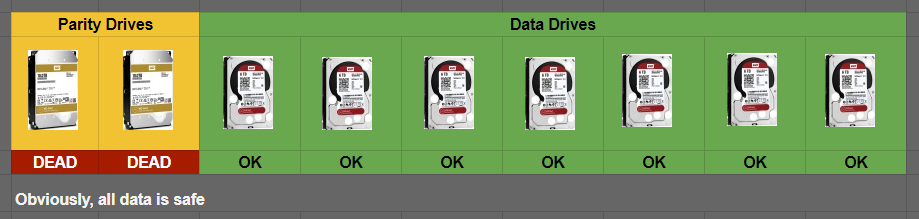
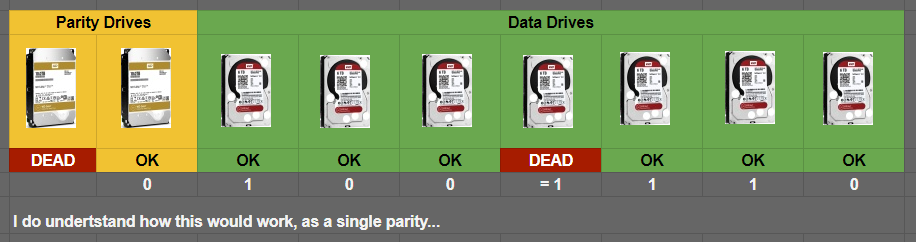
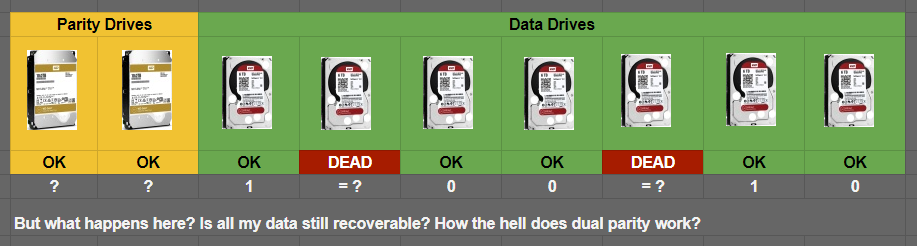
-
@ RobJ, thank you.
-
Hi, my first time trying unRAID and linux of any kind. Using "unRAID Server 5.0-rc5 AiO" free version. Followed the guides on wiki, unraid booted ok, used the preclear_disk.sh on 3 of my old SAMSUNG HD501LJ 500GB dirves. The results are in the attached files. Total newb here, but everything seems ok? All 3 drives are barely used, they spent their lives in drawer Going to try to create unraid array now... A couple of questions: [*]Would very much appreciate, if someone verifies the results, that drives are ok. [*]Whats the preferred method to post the results: via attached files, or in a "code" insert? [*]I ran 3 simultaneous preclears (putty + screen), and used grep preclear /var/log/syslog | todos >> /boot/preclear_results.txt (as per wiki) to get the log. This way all 3 drives logs were flushed in a single file. I separated them manually. Is there any way to get the results written to separate files for every drive or even cycle? [*] Am I correct assuming, that the number in preclear_disk-diff[XXXXX] on every line is used to differentiate the preclear script runs in the log? I ran a single cycle on 3 drives, so I thought the number was for the drives, but looking at some other peoples results, I noticed, that it seems that every cycle of the same drive has its own number? [*]It's been more than 10 hours since I ran preclear, but myMain always shows the drives as spinning. Why haven't they been spun down after an hour of inactivity? Is it because they're unassigned? (see picture below) preclear_results_SAMSUNG-HD501LJ_S0MUJ1EPC45373_2012-Jun-29.txt preclear_results_SAMSUNG-HD501LJ_S0MUJ1EPC45374_2012-Jun-29.txt preclear_results_SAMSUNG-HD501LJ_S0MUJ13P313683_2012-Jun-29.txt



