





snowy00
Members
-
Joined
-
Last visited
Everything posted by snowy00
-
Wäre schon das beste - aber ich habe das schöne kompakte Gehäuse Fractal Design Node 304, da pass nichts anderes rein. Müsste dann Gehäuse und MB tauschen. Muss ich mal schauen - ich berichte dann 🙂.
-
Ja genau und Lieferzeit-- Hab da ein oder andere Mal 2 Monate gewartet. Das Kabel lieg auch bei 50€ 😔 - Weiß auch nicht warum ich mich damals für ein mITX Board entscheiden habe 😅
-
Danke für die schnelle Info. Hab das ASRock Fatal1ty B450 Hab den auch gefunden aber wie du schon erwähnt hast nur über Aliexpress beziehbar. Evtl. wäre das eine Möglichkeit: https://www.reichelt.de/konverter-m-2-key-a-e-1-x-minipcie-delock-62848-p199211.html?&nbc=1 https://www.reichelt.de/netzwerkkarte-mini-pci-gigabit-ethernet-2x-rj45-delock-95258-p290366.html?&nbc=1
-
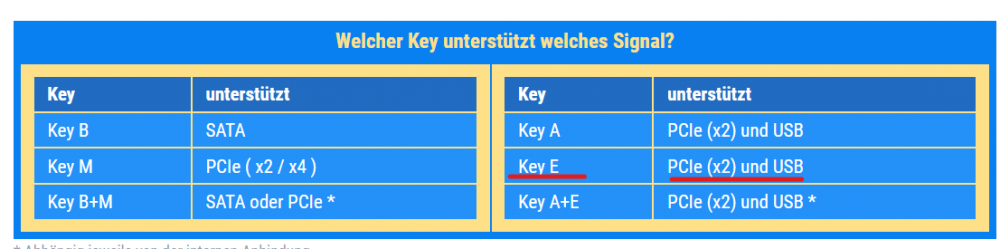
Hallo zusammen, ich habe auf meinem Mainboard noch einen M.2 Key E Slot mit einem WLan Modul, welches ich nicht brauche. Jetzt habe ich mir überlegt, ob ich diesen nicht für eine Ethernet Karte nutzen kann. (evtl. für pfSense) Hat jemand damit schon Erfahrungen gemacht und gibt es einen Adapterkabel von M.2 Key E auf PCIe? Theoretisch müsste es doch auf PCIe x2 gehen... Hat jemand vielleicht einen Link für einen entsprechenden Adapter. Vielen Dank!
-
Wie coll ist das denn :-)... Ich kannte das plugin nicht vielen Dank für den Tipp. Mir geht es auch nur um daten, die im cache bleiben sollen bis ich entscheide, dass diese wichtig sind und auch in das array sollen.
-
Vielen Dank für die super Erklärung :-)... "Yes" kommt für mich nicht in Frage, weil ich nicht möchte dass alle Daten durch den mover ins array geschoben werden. Dann werde ich es weiterhin so machen dass ich die Daten auf die entsprechende disk verschiebe. Ich wollte nur verhindern - nicht immer drauf achten zu müssen, ob genug Speicherplatz auf der Ziel disk ist. THX
-
Hallo zusammen, ich nutze schon seit einiger Zeit UNRAID und stolpere immer wieder über den folgenden Punkt: Ich habe ein Share mit der Einstellung cache prefer - jetzt möchte ich daten aus diesem Share auf ein Share verschieben cache "no". Ich habe das eigentlich so verstanden dass die Daten jetzt doch physikalisch von dem SSD cache pool in das array verschoben werden sollten, was aber nicht der Fall ist. Hab ich das falsch verstanden? Im Moment kopiere ich dann immer die Daten direkt von SSD zur entsprechenden DISK. Hat jemand hierzu einen TIPP? THX
-
Same for 2200G.
-
I have also given up. I tried to dump the bios from my Ryzen 2200G with the script from Spaceinvader One and the system crashes after aborting the script. The script stops when trying to stop the tmp VM. Hopefully there is a instruction available soon, how to pass through the internal GPU.
-
Hello together, I tried that with my AMD Ryzen 3 2200G and the bios which was shared in the former posts. After starting the VM the system getting unrespond and the only way was to hard reboot the system to getting the system in normal operation. I used the same configuratin for the VM as shown in the picture on second page. Do I need to bind it to VFIO? Or do I need an other vbios for the Graphics ROM BIOS?

-
I had the same issue, my failure was that I only created a dns record that not used. You have to use a proper dns record that also setup in your reverse proxy. As I mentioned in the former post, that work now for me because sonar is setup in my reverse proxy with a custom certificate from cloudflare. It doesn´t work with a dummy dns record as I configured first something like - tunnel.yourdomain.com CNAME yourdomain.com UUID.cfargotunnel.com CNAME sonarr yourdomain.com ingress: - service: https://192.168.1.47:18443 originRequest: originServerName: sonarr.yourdomain.com
-
Could you please share your configuration on cloudflare: As I understand it should be like: CNAME yourdomain.com UUID.cfargotunnel.com CNAME sonarr yourdomain.com The configuration above works now for me!
-
Hello, I get the error below 2021-06-07T17:15:06Z ERR error="Unable to reach the origin service. The service may be down or it may not be responding to traffic from cloudflared: x509: certificate is not valid for any names, but wanted to match ******.**" cfRay=hfsfhkfhkfh-FRA originService=https://192.168.178.42:4443 When I use this config and disable TSLVerify it works. tunnel: <my_UUID> credentials-file: /home/nonroot/.cloudflared/<my_UUID>.json ingress: - service: https://192.168.1.100:1443 originRequest: noTLSVerify: true On the GitHub post is mentioned to use: host.my.domain, where host is a subdomain you have valid DNS records for. But what does that mean? Have some one an example for me, because I am not so familiär with DNS records.
-
Thanks a lot - works perfect!
-
Hello, just a question - can I install the Radeon-TOP plugin, because I already activated my IGPU (Ryzen with Radeon Vega)? For activating I used this method: mkdir /boot/config/modprobe.d touch /boot/config/modprobe.d/amdgpu.conf In the plugin description is something mentioned about the GO file. So I am currently not sure if this plug in will change something in my system.



