





KnifeFed
Members
-
Joined
Everything posted by KnifeFed
-
Ah, nice!
-
I don't know about iperf (where did you see that?) but Perl is included in 6.11, so yeah, you don't have to do anything to keep your Perl dependant functioning.
-
I have Python installed to run Flask-Shell2HTTP since you can't execute Docker commands from within containers. I don't really see a way around that.
-
This is another good source: https://slackonly.com/pub/packages/15.0-x86_64/
-
I understand your position. It would, however, in my opinion, be a very nice thing to have. NerdPack/DevPack wouldn't exist if there wasn't a desire for something like that. I don't need my server to be a workstation, but I do want it to have a nice SSH experience, e.g. with fish shell, tmux, lf, exa, bat, mcfly etc.
-
Yeah, I get that, but having a package manager and a repo containing the essentials (and the potential for community repos) would be worth so much.
-
Man, I wish Unraid had a package manager.
-
Check if you have "/boot/config/plugins/user.scripts". If so, your scripts should be in the "scripts" folder there, which you can back up and then re-install the plugin.
-
There are pre-built binaries of bat that you can just put somewhere in your path, in the meantime.
-
I have qBittorrent run a script upon download completion, so it runs from within the container. In this script I can `curl http://<server ip>:<container port>` of one container without issues, but for another one, it fails to connect and times out. If I replace `<server ip>` (e.g. 10.0.1.2) with `<internal container ip>` (e.g. 172.19.0.3) it works fine for both containers. Does anyone know why that is? All containers are on the same custom Docker network. Also, `curl http://<container name>:<container port>` works from within all containers except binhex-qbittorrentvpn, where I get `Could not resolve host: <container name>`. Any way to get container name resolution working?
-
Node v14.13.0 is built-in to Unraid 6.9.2. If you need a newer version, run it in a Docker container.
-
No need for that. You can run them directly like: bash /boot/config/plugins/user.scripts/scripts/<name>/script
-
I think it's been down for a while now. https://crontab.guru is a good alternative.
-
That's exactly what you should do Never create directories straight in `/mnt/user` because Unraid will treat them as user shares, which is all fucky.
-
You should definitely fix that. Where are your appdata folders "spread around"? Usually one would want all appdata under `/mnt/user/appdata` (or `/mnt/cache/appdata`, only if you have a cache pool). When you create a new container, you need to make sure `/config` (or whatever the mount point is called in the particular image) points to `/path/to/appdata/<name of container>`. This usually happens by default when installing from a CA (i.e. not directly from e.g. Docker Hub). Go to `/Settings/DockerSettings` in the web UI and check that `Default appdata storage location` is what you expect it to be. If not, choose `Enable Docker` -> `No` to shut down the Docker service and then you'll be able to change that path. After that, enable Docker again.
-
It sounds like you're not using the actual CA template. It's named "plex-utills" but if you search for that, you won't get any results. You have to search for "plex utills", i.e. without the hyphen.
-
Happy new year, buddy. The config is in /root/.config/bashtop
-
Just extract the CA_backup.tar file and you'll have every data folder separately so that you can restore whichever files you want.
-
Could it be that it's a dependency of some other package? Mine might come from Fish shell.
-
Doesn't it come default with Unraid? Otherwise I don't know why I have it: $ which jq /usr/bin/jq $ jq --version jq-1.6
-
All my containers are on the bridge network, except binhex-plexpass which is on host.
-
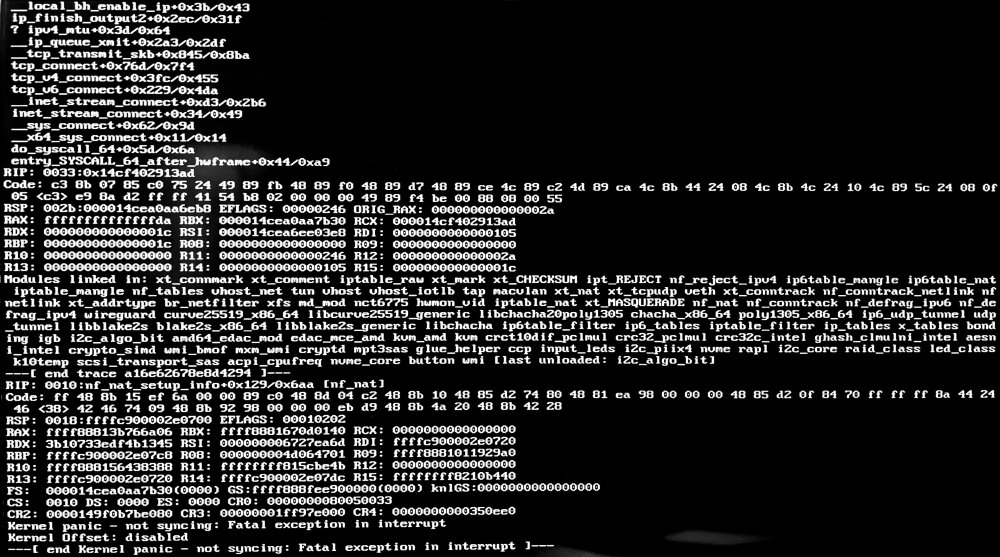
Hi, I've had a few (infrequent) kernel panics and I'm wondering what might be the cause. Here's a photo of what it said on screen when it happened just now: I've successfully completed Memtest twice, first during initial build in early '21 and again after adding more RAM a few months ago. It's ECC RAM. I've attached my diagnostics. I would appreciate any insight, thanks. unraiden-diagnostics-20211202-2353.zip
-
On https://github.com/jkirkcaldy/plex-utills/wiki/Installation it says "Go to the community apps plugin page on your unraid server and search for Plex-Utills and click install.". If you search for "Plex-Utills" in CA, nothing comes up. You have to search for "plex utills" without the hyphen. Not sure why.
-
Right, but why add it to the CA template, is what I'm saying.
-
Because Unraid adds the TZ variable to all containers by default (based on what you have your timezone set to on http://<SERVER>/Settings/DateTime). @jkirkcaldy How come this template sets a duplicate TZ variable?




