





Vynlovanth
Members
-
Joined
-
Last visited
-
Aha, glad I asked. Started my array in maintenance mode, went through my xfs formatted disks with wipefs /dev/md#p1, did a wipefs -a -t zfs_member /dev/md#p1 on any that had zfs_member mentioned in the first command, and confirmed only the xfs line remained with another wipefs /dev/md#p1. Thank you for the assistance!
-
I was working on upgrading my parity disk and swapping smaller/old disks (with no data on them/all data migrated to other disks using unbalanced) with bigger new ones and used New Config to reset the array. Had a screenshot of my array layout so I knew what disks went where. Pretty sure I had done this a while ago with no issues, just start the array and do a parity check. This go around when I tried to start the array, all of my data disks had an error like unrecognized or unmountable partition. Weird, they were all just working fine with an xfs file system (except the former parity disk I moved into the array which hasn't been formatted yet). Came across this post with a similar issue - https://forums.unraid.net/topic/192800-after-new-config-several-drives-are-not-recognizing-the-file-system/. Manually selected xfs for all 8 of my data disks, started the array, and it started right up prompting me to format the 1 former parity disk. All my data/shares are good, no data loss. Of course I'll need to do a parity check. Playing with fire, I pulled one disk out of the array leaving the disk unassigned and that slot in the array empty. I could not mount the disk using unassigned devices, disk log gave me a unraid unassigned.devices: Partition '/dev/sdi1' does not have a file system and cannot be mounted. Did another New Config and put the disk back, selected xfs manually on all the data disks again. Array started fine, no data loss again. JorgeB recommended doing a wipefs /dev/sdX1 in that other thread while the array is stopped, I did that to the disk I tried to mount with unassigned devices and got this: root@unraid:~# wipefs /dev/sdi1 DEVICE OFFSET TYPE UUID LABEL sdi1 0x0 xfs 0b16447b-452a-448c-826d-c2858fd1b7fa sdi1 0xe8d7ff44000 zfs_member 7860065120403136624 disk8 sdi1 0xe8d7ff84000 zfs_member 7860065120403136624 disk8 This drive was formatted as zfs in the array a while ago, but is currently xfs. I take it this means I need to do a wipefs -a /dev/sdi1 (and to all my other drives with similar wipefs /dev/sdX1 output as above )? I've never used wipefs before so not sure of the exact procedure, consequences, if the drive needs to have all data evacuated, etc.
-
I've been using a bonded NIC for the past year as well as this container for nearly the past year. When Unraid 6.12.8 came out I applied the fix for macvlan traces which involves disabling bridging and enabling Host access to custom networks for Docker. Everything has been fine and working as expected throughout the past year until the container update that I applied June 30th. I login to these containers at least every week. The webUI shortcut is already set, just checked what you mentioned and exactly what you have as the value is already there. I tried erasing it and putting it back, no difference. It's not a huge deal since the container itself is working, but I can't be the only one with this issue. I assume it has to do with something in this container's config and using a custom network in Unraid, like it can't detect the IP even though I'm using a fixed IP on the container.
-
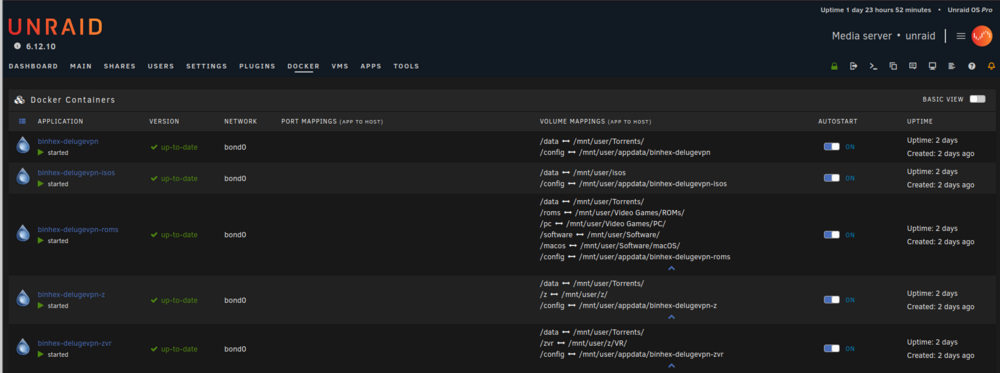
Sure, attached.
-
For some reason since the latest container update, it no longer shows any port mappings in the Unraid Docker UI. This also seems to result in the WebUI shortcut button to not do anything. This is the only container that has this behavior, and I have 5 separate instances of it, other containers that have updated recently are fine. I don't see any errors in the logs though, the Deluge web UI starts successfully, I can use the web UI by manually going to its address, and everything else works as expected. It's online, connected to my paid Proton VPN, can ping out, actively downloading/uploading. Unraid 6.12.10. Tried flushing browser cache, restarting the container, restarting Unraid itself, same behavior.
-
Something in the GUI must not have saved in the back end then because I did have bond0 ticked in Settings -> Docker. That's why I was confused because I followed the process in the release notes exactly and everything looked correct in the GUI other than the networks available to the individual Dockers. I had macvlan next to "Docker custom network type:" as well. Either way, I upgraded to Unraid 6.12.8 and just repeated the process. It works now as expected on macvlan. All of my containers connected to bond0 get an IP address, are online, and show up in my Unifi dashboard now. Just have to keep an eye on it for a bit to make sure I don't see any call traces or crashes.
-
Already have my pro license so I’m largely unaffected until I need another license, but just wanted to say I’m glad the top license is still an unlimited device lifetime update license. Too many services depend on subscriptions (or other regular monthly/yearly fees of sorts to maintain features), and I understand it’s because ongoing updates require continuous streams of revenue but that’s a hard thing to swallow for home use. Personally I’m more than happy to pay more for the lifetime license, pro was already a good deal. I do worry about long term consequences as people buy their 1 year license, never update, then 3 years down the road want to update because of a new feature they heard about and they’re skipping multiple versions to do so. The accessibility of Unraid already lends itself to more casual users who don’t understand the importance of staying relatively up to date with Unraid OS (and don’t bother reading release notes) and I don’t think this will help. Other posters mentioned concerns about maintaining security of an Unraid install that is outside the 1 year support as well.
-
Vynlovanth changed their profile photo
-
@BurntOC Nope I didn't, I'll try again on 6.12.7 and 6.13 when they release but the behavior I experienced is consistent.
-
Running Unraid 6.12.6 on my server, previously on an older version I had run into the macvlan call trace crashing my server, so I had changed my docker network configuration to ipvlan. I'd prefer to switch it back to macvlan to get better data in my Unifi setup if the call traces aren't an issue anymore. I followed the steps in the 6.12.4 release notes to disable bridging on eth0 and host access to custom networks is enabled, docker network type was auto changed to macvlan. When I start my array, my containers that were previously attached to "custom: br0" network interface are now attached to "None". I edited one of the containers in the Unraid GUI and the only network types available are Host, Bridge, or None. I assume I should see a custom: bond0 (I am using bonding) as an option here? My subnet is configured next to "IPv4 custom network on interface bond0:" in Settings -> Docker. I am not really sure what I am missing or where to go with this? I know in the meantime I can revert back easily to ipvlan and my containers automatically start back up with the prior custom: br0 network, just can't figure out where I'm going wrong with the macvlan solution. unraid-diagnostics-20240102-1501.zip
-
Curious about this as well and I wouldn't classify that as "all explained". Increased memory usage doesn't seem like a reason to revert unless it's a memory leak and don't know what these "other issues" are...
-
This poll ends up being a bit of a "Where are you from?" question, because most of the payment methods are country specific. Of course Apple Pay is going to be the most popular one, and I would definitely use it. But the Apple Pay option should probably include Google Pay as well.



