





mattm1121
Members
-
Joined
-
Last visited
Everything posted by mattm1121
-
Thanks for the input. I forgot to add that I CHMOD 777 the Bluray devices /dev/sr* and provide the device ID in the advanced settings by adding "--device=/dev/sr*". This is the only way the containers see the internal device to begin with. I do that for the USB device just to ensure it sees the correct one. I thought about the support for the container, but since three different containers have the same behavior, I can't see how they could help. Although I'll give it a gander none the less. Thanks again for the input.
-
Greetings, I have three devices that I have hooked up to my Unraid 7.0.0 server. Internal LG CD/DVD/BluRay read/writer Dell External USB 2.0 CD/DVD reader ASUS External USB 3.0 CD/DVD/BluRay read/writer I'm using Ripper, MakeMKV, Handbrake and VMS passthrough to test the devices. For some reason the Bluray devices get stuck on "Scanning" when I put in a disk. Regardless of what type of disk I use. This happens when using a docker container. When I passthrough the Bluray USB device to a VM it works fine. So I'm assuming the internal device is ok since both internal and external show the same behavior. The Dell CD/DVD USB device works fine using Docker and VM. The internal and USB Bluray device won't work with Docker containers since it gets stuck on "Scanning". There's no busy light to show any I/O with either device. Has anybody had the same behavior with their Bluray devices? And if so is there a workaround to get the devices working with Docker containers? Such as MakeMKV, Ripper and Handbrake? Thanks for any input.
-
Well this thing is just broke. Why is it even available?
-
For some reason I cannot get this docker app to stop listening on port 80. I've set the port in the WebUI section as well as the advanced view. I also set the networking to Bridged. Nothing I do will change the port. Is this app still a thing? Am I wasting my time on this? It seems to be abandonware.
-
I just had to do a new index since it's been a few years. I'm assuming you're running this from UnRaid Docker? Anyway, did you run the command from the docker itself? When selecting diskover I select ">_Console" from the dropdown. Then I run the following command "python3 /app/diskover/diskover.py -i [Your Index Name] /data -f". Since it's running inside the container you can drop the previous commands. The "-f" is if you already have an index and need to force an overwrite. This worked for me this morning. I'm also a little Sad Panda that it seems so quite around here. Is DiskOver dying or dead? I hope not. Anyway, I'd like to know how it works out for you .
-
Greetings, I'm not sure what the value is for UD having an option to format NTFS. I wanted to use the function to backup my data, then be able to pull out the drive, attach to a PC, then transfer any files. The problem I've run into is that no drive formatted by UD can be used on any Windows PC. And any Windows PC NTFS formatted drive can't be used with UD. All I get is a "Format" option. Am I missing something about the NTFS function? It seems to be rather ineffective and not much use to Windows users. I appreciate any feedback about this. /thx
-
Is there any way to get rid of the "noindex" tag with FileBrowser? I'm trying to use this app as a means to get around the file:// protocol issue with SharePoint search. The file:// protocol won't allow you to download, open or edit a file. Unfortunately the noindex tag stops SharePoint search form indexing the files. There's no way to get SP to bypass that tag. /thx
-
Thx for this. I too am looking for a way to index my documents. Although Diskover indexes filesystems, it doesn't do any breaking or stemming of docs. I'm thinking I may have to put up my SharePoint search engine on a VMS. Kinda overkill but at least it'll work.
-
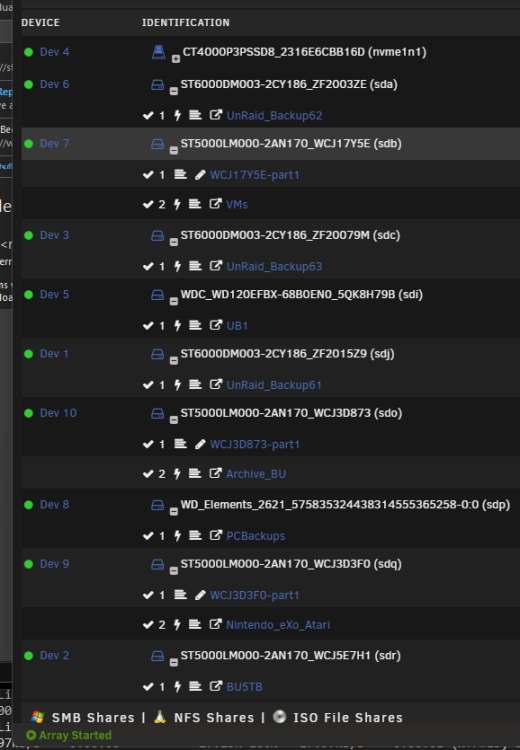
Thanks for the quick response. By device do you mean like /dev/sda?. I see screenshots where peoples drive are set by "Dev 1, Dev 2 Dev3, etc..." but not mine. Which was way I was thinking that there's a way to sort by that. I'll look at the Device Settings of course. Thanks again for the quick response.
-
Is there any way to sort the external drives that are connected to the server? Say by Device # or partition name?
-
Added. Sorry about that.
-
Greetings, I currently have the following set up with UnRaid 6.10.3; Parity WDC_WD121KFBX-68EF5N0_5QK0K9KB - 12 TB (sdi) Disk 1 TOSHIBA_HDWG11A_Z1L0A021FBDG - 10 TB (sdl) Disk 2 WDC_WD102KFBX-68M95N0_VCKR49BP - 10 TB (sdj) Disk 3 WDC_WD102KFBX-68M95N0_VCKW15MP - 10 TB (sdk) During parity checks or certain other operations, the read/write values average around 230mb/s. Parity checks take around 18 hours to complete with an average of 180mb/s according to the history. I purchased two 12tb drives. (Western Digital 12TB WD Red Plus NAS Internal Hard Drive HDD - 7200 RPM, SATA 6 GB/s, CMR, 512 MB Cache, 3.5" - WD120EFBX) I pre-cleared one and added it to the raid. The other I use as to backup data. Once added the parity check took 30+ hours with an average of 114mb/s. So my question would be does it take longer the more drives you add? Is this type of performance change expected? I appreciate any feedback anybody has. Thanks. toph-diagnostics-20221004-0625.zip
-
Greetings, I hope this is the right place to ask for help. I'm using UD as a means to backup data on an UnRaid 6.10 server. I'm using four 8TB devices that are hooked up using 3 Motherboard SATA 6gb slots and 1 USB/HS slot. To test some of the backup I opened a terminal and ran an rsync command; "rsync -avztp /mnt/user/Archive* /mnt/disks/UnRaid_Backup2 --progress --log-file="/mnt/disks/UnRaid_Backup2/copylog.txt" If I read rsync correctly this is pretty standard. The problem that I'm running into is that during the copy progress the throughput will go from 150mb/s to 20k/s quite rapidly. (no pun intended) At first, I thought I had a bad disk. However, trying this same command on four different disks yielded the same results. Each test the drop in performance was at different locations. I tried both NTFS and XFS partitions with the same result. I hate to think that I have four bad drives. I don't have much experience using rsync and was wondering if that app could be the issue. I was wondering if anybody else has had issues with UD as a backup strategy? Or what strategy is used to backup using UD? I appreciate any feedback about this. Thanks, "Desperate in Denver" ASUSTeK COMPUTER INC. ROG MAXIMUS XII HERO (WI-FI) , Version Rev 1.xx 128gb RAM Intel® Core™ i7-10700K CPU @ 3.80GHz
-
Greetings, I was using my UnRaid server yesterday all day and into the evening. When I got up this morning it was unresponsive. I eventually had to hard power off by holding the power button. I've attached the diagnostics that I generated after the start up, but I'm really not sure where to start for troubleshooting. Could someone provide a path that I might take to try and determine why it became unresponsive? I appreciate any feedback and help with this. Thanks, -Matt toph-diagnostics-20220919-0636.zip
-
After looking through this thread it seems this app is abandoned. Is that the case?
-
I'm not sure I understand this. According to the Unraid documentation 3Ware is listed as a controller brand that is considered compatible; "3Ware AMCC RAID Controller 9550SX-12SI" I have the 3Ware AMCC RAID Controller 9650-24. Am I misinterpreting this somehow? Although the 3Ware itself is not a recommended card all the other LSI RAID cards are. Can you clarify your recommendation? Thanks
-
Greetings, I currently have my SATA drives on the local MB and a 3Ware raid card. I have an extra 3Ware raid card and was wondering if putting the Parity drive(s) on their own controller would help with performance. Can anybody provide any information if this would be beneficial? Thanks
-
Greetings, I have a Sabrent Plano external enclosure that I wanted to use as a backup device with some 5TB disks that I have. But for some reason when I format using Windows Unraid can't see the partition. When I use unraid to format (NTFS for both Windows and Unraid) then Windows can't see the partition. Anybody know why something like this happens? Thanks.
-
Greetings, I'm about to embark down this 'passthrough' road. But I don't understand how you actually use the passthrough GPU. Do you have to be at the UnRaid server with a monitor hooked into the GPU? Or do you view it through some other method like a VNC session? Thanks for you feedback.

