





dehein2
Members
-
Joined
-
Last visited
Everything posted by dehein2
-
the New Permission Tool worked fot the extisting files. I'll check later hwat happens if i add new ones
-
drwxrwxrwx 1 nobody users 34 May 25 15:15 Public/ just as all other shares... ;(
-
yes, dehein is my Windows username. I tried to rename a file in a differnet share which worked

-
looks ok, doesn't it? root@deheinServer:/mnt/user/Public# ls -l total 0 drwxr-xr-x 1 nobody users 22 May 25 14:03 Photosync/ -rw-rw-rw- 1 dehein users 0 May 25 15:15 test.txt root@deheinServer:/mnt/user/Public# cd Photosync/ root@deheinServer:/mnt/user/Public/Photosync# ls -l total 0 drwxr-xr-x 1 nobody users 14 May 25 15:32 deheinphone/ root@deheinServer:/mnt/user/Public/Photosync# cd deheinphone/ root@deheinServer:/mnt/user/Public/Photosync/deheinphone# ls -l total 0 drwxr-xr-x 1 nobody users 96 May 25 15:32 Recents/ root@deheinServer:/mnt/user/Public/Photosync/deheinphone# cd Recents/ root@deheinServer:/mnt/user/Public/Photosync/deheinphone/Recents# ls -l total 11956 -rw-r--r-- 1 nobody users 3173794 May 25 15:32 IMG_9472.JPG -rw-r--r-- 1 nobody users 2908182 May 25 15:32 IMG_9474.JPG -rw-r--r-- 1 nobody users 3199306 May 25 15:32 IMG_9475.JPG -rw-r--r-- 1 nobody users 2951366 May 25 15:32 IMG_9476.JPGi thought so too. But when i try to delete a file in a folder: root@deheinServer:/mnt/user/Public/Photosync/deheinphone/Recents# ls -l total 11956 -rw-r--r-- 1 nobody users 3173794 May 25 15:32 IMG_9472.JPG -rw-r--r-- 1 nobody users 2908182 May 25 15:32 IMG_9474.JPG -rw-r--r-- 1 nobody users 3199306 May 25 15:32 IMG_9475.JPG -rw-r--r-- 1 nobody users 2951366 May 25 15:32 IMG_9476.JPG it does not work
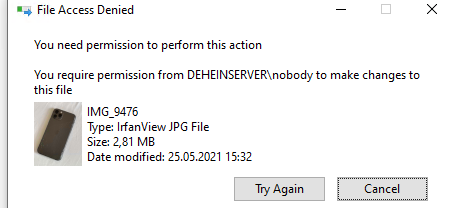 Hi, I'm using nextcloud ( in addition to the regular tasks) to access webdav folders i mounted in the container. E.g. /mnt/user/Public. Generally this works fine but i noticed one issue. nextcloud seems to save the files with different rights than i usually would: root@deheinServer:/mnt/user/Public# ls -l total 0 drwxr-xr-x 1 nobody users 22 May 25 14:03 Photosync/ -rw-rw-rw- 1 dehein users 0 May 25 15:15 test.txt test.txt was created via smb Photosync was uploaded via webdav via nextcloud The issue is that i would like to be able to delete/move files which were uploadd via webdav outside of nextcloud. Is there a way to make nextcloud safe files with the same rights a smb would? e.g. 666Hi, i've goit a question rg. shinobi pro cctv. All files created by the container are not writable by user users (e.g. when accessing via smb). Most containers use PUID/GPID 99/100 and a UMASK that allows file handling via e.g. smb. Is it possible to install the shinobi container in a way that it behaves the same way? ThanksSolved: it was a firefox issue (keepass plugin was blocking the popup)
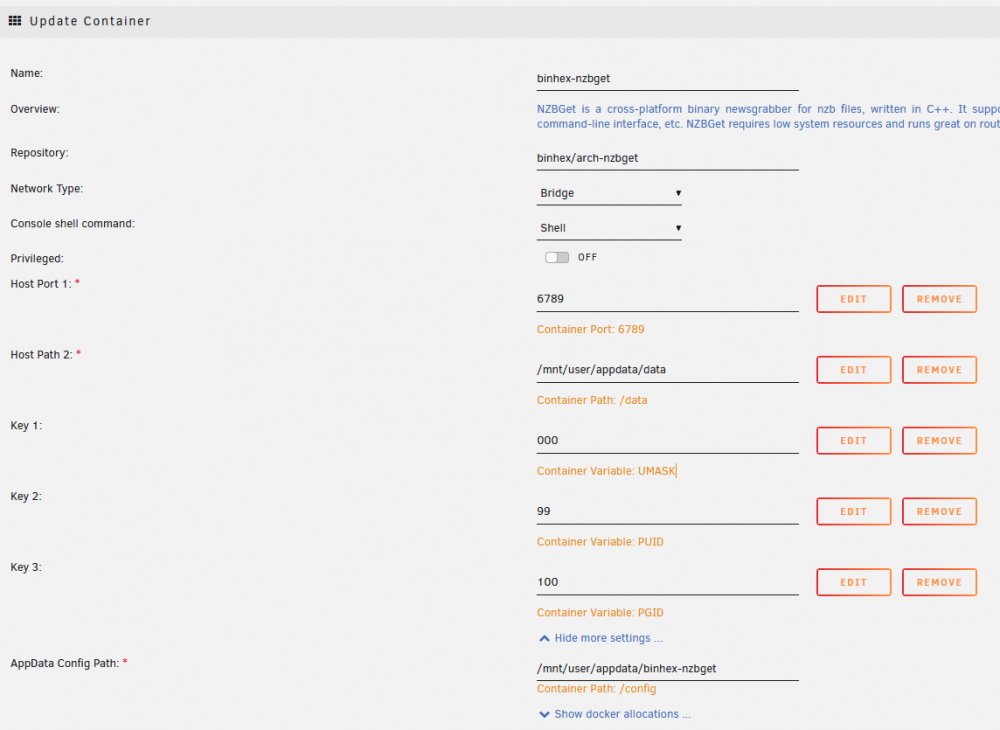 Hi all, i tried to install the binhex nzbget container but can not access it right after installing. The ui just does not load (192.168.2.138:6789) The log looks good!? 2021-05-17 15:14:50.076649 [info] System information Linux daa9e6d710cf 5.10.28-Unraid #1 SMP Wed Apr 7 08:23:18 PDT 2021 x86_64 GNU/Linux 2021-05-17 15:14:50.105432 [info] PUID defined as '99' 2021-05-17 15:14:50.162983 [info] PGID defined as '100' 2021-05-17 15:14:50.211930 [info] UMASK defined as '000' 2021-05-17 15:14:50.237250 [info] Permissions already set for volume mappings 2021-05-17 15:14:50.266595 [info] Starting Supervisor... 2021-05-17 15:14:50,652 INFO Included extra file "/etc/supervisor/conf.d/nzbget.conf" during parsing 2021-05-17 15:14:50,652 INFO Set uid to user 0 succeeded 2021-05-17 15:14:50,655 INFO supervisord started with pid 7 2021-05-17 15:14:51,656 INFO spawned: 'nzbget' with pid 47 2021-05-17 15:14:51,657 INFO reaped unknown pid 8 2021-05-17 15:14:51,670 DEBG 'nzbget' stdout output: [info] NZBGet configuration file exists [info] Patching NZBGet config file for WebDir and ConfigTemplate locations... 2021-05-17 15:14:52,670 INFO success: nzbget entered RUNNING state, process has stayed up for > than 1 seconds (startsecs) any ideas?
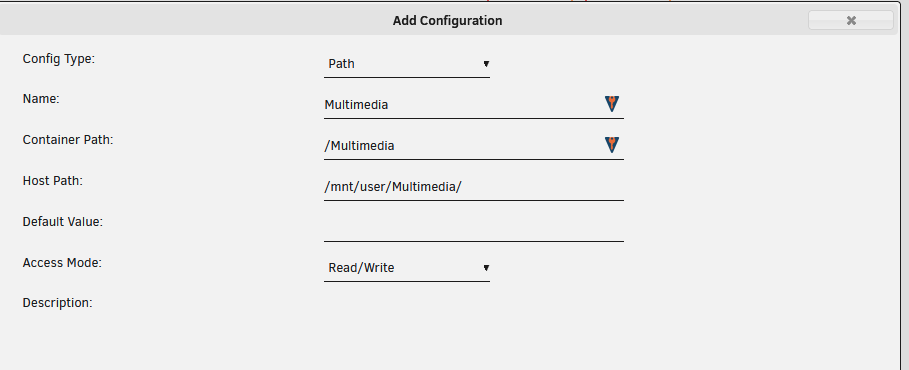
Thank youHi, i enabled the External Storage plugin to access a unraid share via webdav. It works fine and I can access the folder via the nextcloud gui. But how do I find out the webdav url? remote.php/dav/files/Hi all, i would like to move my Plex installation from my QNAP (native /no docker) to my new unRAID server. According to the guide from plex (https://support.plex.tv/articles/201370363-move-an-install-to-another-system/) it seems quite easy. Before i had 2 folders \plex -> with the plex setings \Multimedia with subfoldes for moviews/tv/.. which i added as library in plex Now i wanted to install the container and have a few questions: - By default the config path is mapped to /mnt/user/appdata/plex which is fine. Can I just copy the 3 folders above into this folder? - The template wants to mount various folders for movies/tv/music/. As i only have one Multimedia sahre with subfolders, can I just leave these paths blank and instead create a new patch like this? After that i can readd the path to the library as i would have to do anyway
Hi all, i tried to install the binhex nzbget container but can not access it right after installing. The ui just does not load (192.168.2.138:6789) The log looks good!? 2021-05-17 15:14:50.076649 [info] System information Linux daa9e6d710cf 5.10.28-Unraid #1 SMP Wed Apr 7 08:23:18 PDT 2021 x86_64 GNU/Linux 2021-05-17 15:14:50.105432 [info] PUID defined as '99' 2021-05-17 15:14:50.162983 [info] PGID defined as '100' 2021-05-17 15:14:50.211930 [info] UMASK defined as '000' 2021-05-17 15:14:50.237250 [info] Permissions already set for volume mappings 2021-05-17 15:14:50.266595 [info] Starting Supervisor... 2021-05-17 15:14:50,652 INFO Included extra file "/etc/supervisor/conf.d/nzbget.conf" during parsing 2021-05-17 15:14:50,652 INFO Set uid to user 0 succeeded 2021-05-17 15:14:50,655 INFO supervisord started with pid 7 2021-05-17 15:14:51,656 INFO spawned: 'nzbget' with pid 47 2021-05-17 15:14:51,657 INFO reaped unknown pid 8 2021-05-17 15:14:51,670 DEBG 'nzbget' stdout output: [info] NZBGet configuration file exists [info] Patching NZBGet config file for WebDir and ConfigTemplate locations... 2021-05-17 15:14:52,670 INFO success: nzbget entered RUNNING state, process has stayed up for > than 1 seconds (startsecs) any ideas?
Thank youHi, i enabled the External Storage plugin to access a unraid share via webdav. It works fine and I can access the folder via the nextcloud gui. But how do I find out the webdav url? remote.php/dav/files/Hi all, i would like to move my Plex installation from my QNAP (native /no docker) to my new unRAID server. According to the guide from plex (https://support.plex.tv/articles/201370363-move-an-install-to-another-system/) it seems quite easy. Before i had 2 folders \plex -> with the plex setings \Multimedia with subfoldes for moviews/tv/.. which i added as library in plex Now i wanted to install the container and have a few questions: - By default the config path is mapped to /mnt/user/appdata/plex which is fine. Can I just copy the 3 folders above into this folder? - The template wants to mount various folders for movies/tv/music/. As i only have one Multimedia sahre with subfolders, can I just leave these paths blank and instead create a new patch like this? After that i can readd the path to the library as i would have to do anyway
 @skois Thank you - sounds good. How does it work rg. rights management. Does the user running the docker container have full R/W rights to all shares? And how does rights management in nextcloud work. I guess nextcloud users are not connected to unraid users, correct? So can i assign the External storage in nextcloud to certain users?Hi all, im searching for a way to use webdav with "normal" shares. I often read about nextcloud as it supports webdav. I would like to use nextcloud as a dropbox alterantive anyway, so maybe this is a win-win. What i don't want is to access nextcloud (or its files/userfolders) via webdav, but shares already existing on the system. (e.g. like a Documents share). So my question is if it is possible to enable nextcloud to access normal shares to allow webdav access to them!?



