






Chanchalanch
Members
-
Joined
-
Last visited
Everything posted by Chanchalanch
-
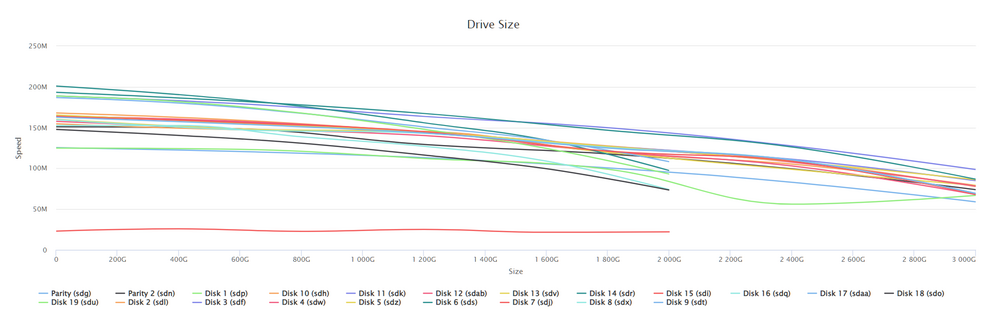
Well I got it running with some help from @jbartlett. I ran the benchmark and ended up with the following. It looks like Disk 15 (sdi) was the issue. I replaced it with another drive I had and the data rebuild is currentlyrunning at ~90MB/sec! Thanks for your help!
-
I think clustering would be awesome. I have a few servers that are laying around. Not worth enough to go through the effort of selling them, but it would be cool to have a cluster of UnRAID servers, one to handle Media like Plex, Emby, etc. Another to handle strictly NAS and backup functions, and the other for everything else. Just a thought. I know ProxMox has functionality like this and I am by no means an expert but the idea seems viable and useful.
-
it looks like for whatever reason (not sure yet) DiskSpeed is having issues on my system. When I go to the WebUI I see what I posted before which contains a stacktrace. I looked in the logs and found 20-May-2024 09:52:04.841 INFO [main] org.apache.catalina.startup.Catalina.start Server startup in [4433] milliseconds WARNING: An illegal reflective access operation has occurred WARNING: Illegal reflective access by lucee.commons.lang.ClassUtil (jar:/opt/lucee/server/lucee-server/patches/6.0.1.83.lco) to constructor com.sun.org.apache.xerces.internal.jaxp.DocumentBuilderFactoryImpl() WARNING: Please consider reporting this to the maintainers of lucee.commons.lang.ClassUtil WARNING: Use --illegal-access=warn to enable warnings of further illegal reflective access operations WARNING: All illegal access operations will be denied in a future release I've completely removed the docker and used the "cleanup Appdata" plugin to remove the config files, then reinstalled and I am still getting the same results. I can look further into this and see what's going on, but if you DO have any ideas... 😄 Thanks again!
-
@JorgeB Not sure if this is what you were looking for but I opened the WebUI for DiskSpeed and here's what was output Scanning Hardware 08:58:19 Spinning up hard drives 08:58:19 Scanning system storage 08:58:21 Scanning USB Bus 08:58:21 Scanning hard drives 08:58:28 Scanning storage controllers 08:58:29 Scanning USB hubs & devices 08:58:31 Scanning motherboard resources 08:58:32 Fetching known drive vendors from the Hard Drive Database Lucee 6.0.1.83 Error (expression) Message Can't cast Complex Object Type Struct to String Detail Use Built-In-Function "serialize(Struct):String" to create a String from Struct Stacktrace The Error Occurred in /var/www/ScanControllers.cfm: line 1851 1849: } else { 1850: if (ListFindNoCase("ADATA,Apacer,Corsair,KINGSTON,Netac,Patriot,PNY,Reletech,Sabrent,Seagate,XPG,ZHITAI",ListFirst(DriveData[i].Model," "))) DriveData.Vendor=ListFirst(DriveData[i].Model," "); 1851: if (ListFindNoCase("Western Digital",ListFirst(DriveData[i].Model," ") & " " & ListGetAt(DriveData,2," "))) DriveData.Vendor=ListFirst(DriveData[i].Model," ") & " " & ListGetAt(DriveData,2," "); 1852: if (ListFirst(DriveData[i].Model," ") EQ "WD") DriveData[i].Vendor="Western Digital"; 1853: if (ListFirst(DriveData[i].Model," ") EQ "TEAM") DriveData[i].Vendor="Team Group"; called from /var/www/ScanControllers.cfm: line 1819 1817: if (Left(DriveData[i].Model,9) EQ "GIGABYTE ") {DriveData[i].Vendor="GIGABYTE";DriveData[i].Model=Mid(DriveData[i].Model,10,999);} 1818: } 1819: if (Left(DriveData[i].Vendor,9) EQ "GIGABYTE ") {DriveData[i].Vendor="GIGABYTE";DriveData[i].Model=Mid(DriveData[i].Model,10,999);} 1820: if (Left(DriveData[i].Vendor,8) EQ "Sabrent ") {DriveData[i].Vendor="Sabrent";DriveData[i].Model=Mid(DriveData[i].Model,9,999);} 1821: called from /var/www/ScanControllers.cfm: line 1633 1631: <cfdump var=#cfhttp#> 1632: </CFIF> 1633: </CFIF> 1634: <!--- Match the vendor case to what we have in the database ---> 1635: <CFLOOP index="Key" list="#StructKeyList(HW)#"> Java Stacktrace lucee.runtime.exp.ExpressionException: Can't cast Complex Object Type Struct to String at lucee.runtime.type.util.StructSupport.castToString(StructSupport.java:204) at lucee.runtime.op.Caster.toString(Caster.java:2105) at scancontrollers_cfm$cf.call_000152_000153(/ScanControllers.cfm:1851) at scancontrollers_cfm$cf.call_000152(/ScanControllers.cfm:1819) at scancontrollers_cfm$cf.call(/ScanControllers.cfm:1633) at lucee.runtime.PageContextImpl._doInclude(PageContextImpl.java:1059) at lucee.runtime.PageContextImpl._doInclude(PageContextImpl.java:951) at lucee.runtime.listener.ClassicAppListener._onRequest(ClassicAppListener.java:65) at lucee.runtime.listener.MixedAppListener.onRequest(MixedAppListener.java:45) at lucee.runtime.PageContextImpl.execute(PageContextImpl.java:2715) at lucee.runtime.PageContextImpl._execute(PageContextImpl.java:2701) at lucee.runtime.PageContextImpl.executeCFML(PageContextImpl.java:2672) at lucee.runtime.engine.Request.exe(Request.java:45) at lucee.runtime.engine.CFMLEngineImpl._service(CFMLEngineImpl.java:1259) at lucee.runtime.engine.CFMLEngineImpl.serviceCFML(CFMLEngineImpl.java:1205) at lucee.loader.engine.CFMLEngineWrapper.serviceCFML(CFMLEngineWrapper.java:97) at lucee.loader.servlet.CFMLServlet.service(CFMLServlet.java:51) at javax.servlet.http.HttpServlet.service(HttpServlet.java:623) at org.apache.catalina.core.ApplicationFilterChain.internalDoFilter(ApplicationFilterChain.java:200) at org.apache.catalina.core.ApplicationFilterChain.doFilter(ApplicationFilterChain.java:144) at org.apache.tomcat.websocket.server.WsFilter.doFilter(WsFilter.java:51) at org.apache.catalina.core.ApplicationFilterChain.internalDoFilter(ApplicationFilterChain.java:169) at org.apache.catalina.core.ApplicationFilterChain.doFilter(ApplicationFilterChain.java:144) at org.apache.catalina.core.StandardWrapperValve.invoke(StandardWrapperValve.java:168) at org.apache.catalina.core.StandardContextValve.invoke(StandardContextValve.java:90) at org.apache.catalina.authenticator.AuthenticatorBase.invoke(AuthenticatorBase.java:481) at org.apache.catalina.core.StandardHostValve.invoke(StandardHostValve.java:130) at org.apache.catalina.valves.AbstractAccessLogValve.invoke(AbstractAccessLogValve.java:670) at org.apache.catalina.valves.ErrorReportValve.invoke(ErrorReportValve.java:93) at org.apache.catalina.valves.RemoteIpValve.invoke(RemoteIpValve.java:761) at org.apache.catalina.core.StandardEngineValve.invoke(StandardEngineValve.java:74) at org.apache.catalina.connector.CoyoteAdapter.service(CoyoteAdapter.java:346) at org.apache.coyote.http11.Http11Processor.service(Http11Processor.java:390) at org.apache.coyote.AbstractProcessorLight.process(AbstractProcessorLight.java:63) at org.apache.coyote.AbstractProtocol$ConnectionHandler.process(AbstractProtocol.java:928) at org.apache.tomcat.util.net.NioEndpoint$SocketProcessor.doRun(NioEndpoint.java:1786) at org.apache.tomcat.util.net.SocketProcessorBase.run(SocketProcessorBase.java:52) at org.apache.tomcat.util.threads.ThreadPoolExecutor.runWorker(ThreadPoolExecutor.java:1191) at org.apache.tomcat.util.threads.ThreadPoolExecutor$Worker.run(ThreadPoolExecutor.java:659) at org.apache.tomcat.util.threads.TaskThread$WrappingRunnable.run(TaskThread.java:63) at java.base/java.lang.Thread.run(Unknown Source) Timestamp 5/20/24 8:58:32 AM MDT
-
I see the same thing. Did you find a resolution?
-
@JorgeB Sorry, was away for the weekend... Here's the new diagnostics. chantry-server2-diagnostics-20240519-1127.zip
-
Thank you both! I appreciate the help! It looks as if I am able to see my files again! Last and only thing, Any thoughts about why parity or data rebuild is running so slowly? Thanks again!
-
@itimpi Oops. I ran that command... How screwed am I? The output started with Phase 1 - find and verify superblock... bad primary superblock - bad magic number !!! attempting to find secondary superblock... .found candidate secondary superblock... unable to verify superblock, continuing... .found candidate secondary superblock... unable to verify superblock, continuing... Then ended after hours with Sorry, could not find valid secondary superblock @JorgeB I did run the command through the GUI AFTER I made my mistake and the output is attached as a txt file. I also have attached diagnostics I got after a restart, while running a parity check. Thanks for all your help! zfs_repair_GUI_output chantry-server2-diagnostics-20240516-1605.zip
-
Thank you for your response! Working on that now. Had to wait for data rebuild to finish. Just to be clear, I am running "xfs_repair sdk" correct? (sdk is disk 11) The command seems to be doing SOMETHING as now I am seeing the following (attached video) xfs_repair.mp4
-
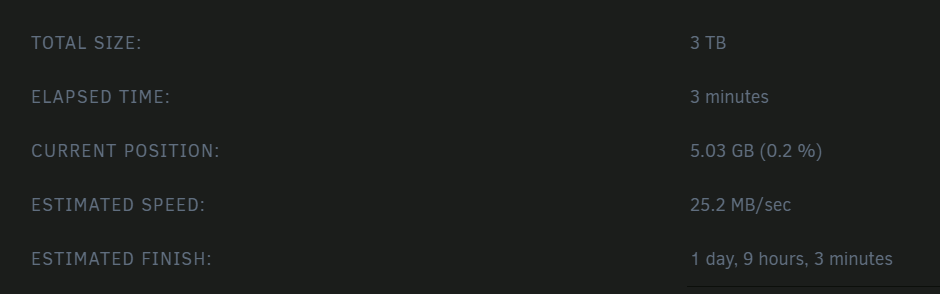
Hello all! I have had Unraid for a couple of years now and finally migrated to new hardware. I used to use a Dell C2100 with 12 hard drive bays and 2 internal SSD bays. I moved to a SuperMicro X8DT6 with 24 bays and 4 internal SSD connections. I watched a few @SpaceInvaderOne video's that have saved me more than once! I didn't however do my migration perfectly... I moved my drives over into the new server (with an additional 12 drives), plugged my USB stick in and let Unraid do the rest. Ever since then I've had issues with speed or just general weirdness. I am attaching my diagnostics in the hopes that someone can take a look and see some smoking gun items... I will ask to be gentle with my feeble mind. I am sure there are plenty of issues that maybe someone else would have seen and fixed or even never had in the first place... Two biggest issues I have are: 1. Either parity checking or a data rebuild after replacing a disk. I'm seeing speeds anywhere between 15MB/s to 28MB/s. I used to get an average of ~70MB/s 2. If I go to /mnt/user/Media/TV and try to see the contents of the directory, There's nothing... I SSH into the server, navigate to that folder and try and list out the directory and I see /bin/ls: reading directory '.': Structure needs cleaning I have done some research and I came across another post that suggested using the xfs_repair command. I wasn't sure which drive the issue was originating from so I ran the following command. for disk in /mnt/disk*; do echo "Checking $disk"; find "$disk/Media/TV" -type d -exec ls -ld {} \; ; done |grep clean I got several returns showing find: ‘/mnt/disk11/Media/TV/Star Trek The Next Generation’: Structure needs cleaning find: ‘/mnt/disk11/Media/TV/Seinfeld/Season 3’: Structure needs cleaning find: ‘/mnt/disk11/Media/TV/Modern.Family.S01.1080p.BluRay.x264-TENEIGHTY’: Structure needs cleaning find: ‘/mnt/disk11/Media/TV/Lost/Lost.S03’: Structure needs cleaning find: ‘/mnt/disk11/Media/TV/The Office (US)/Featurettes’: Structure needs cleaning find: ‘/mnt/disk11/Media/TV/The Office (US)/Season 6’: Structure needs cleaning I figured disk11 was the culprit. I tried to run xfs_repair on disk 11 and I got disk11: No such file or directory disk11: No such file or directory fatal error -- couldn't initialize XFS library I saw that Disk11 was showing as failed in the UnRAID gui so I removed it and am rebuilding currently. ( I have also added the Smart report from my old Disk11 just in case it's useful in some way) Any help provided would make me beyond grateful! chantry-server2-diagnostics-20240514-1722.zip chantry-server2-smart-Old Disk11.zip
-
Thanks @JorgeB! I found that to be the case. It's an old gaming laptop I gave to my son. Any ideas WHY it would be doing that? I see the error being dumped into the syslog faster than once a second. May 23 15:26:44 Chantry-Server nginx: 2023/05/23 15:26:44 [error] 2090#2090: *3088013 limiting requests, excess: 20.311 by zone "authlimit", client: 10.0.0.76, server: , request: "PROPFIND /login HTTP/1.1", host: "chantry-server"
-
Bueller? 🙂
-
Hey all! I have been seeing an issue for several months now and I have not been able to find the root cause. I even tried Chat GPT (Asked it to look at my syslog file and tell me what's causing the issue. It wasn't super helpful) My log directory keeps getting full and the only thing I can do to remedy is to delete old syslog files or restart my Unraid server. I wanted to know if there's someone on here that can take a look at the output from my diagnostics plugin as well as my syslog and tell me what I'm doing wrong? Thanks in advance for any help that's provided. chantry-server-diagnostics-20230508-1158.zip syslog
-
Alright, so I have done some research but haven't seen an exact answer that I think will work for me. I got a new server and I know I can just put the USB stick from my old server into the new one but I've been having issues with the current one and I want to completely rebuild. I am thinking about setting up the new server and then moving all my media and files over to the new one manually. Is there a best way to do this? Am I overthinking this? FYI - The issues I've been having are the following being dumped into my syslog constantly. Feb 20 10:37:57 Chantry-Server nginx: 2023/02/20 10:37:57 [error] 3646#3646: *117225 limiting requests, excess: 20.776 by zone "authlimit", client: 10.0.0.76, server: , request: "PROPFIND /login HTTP/1.1", host: "chantry-server" Feb 20 10:37:57 Chantry-Server nginx: 2023/02/20 10:37:57 [error] 3646#3646: *117231 limiting requests, excess: 20.665 by zone "authlimit", client: 10.0.0.76, server: , request: "PROPFIND /login HTTP/1.1", host: "chantry-server" Feb 20 10:37:57 Chantry-Server nginx: 2023/02/20 10:37:57 [error] 3646#3646: *117233 limiting requests, excess: 20.612 by zone "authlimit", client: 10.0.0.76, server: , request: "PROPFIND /login HTTP/1.1", host: "chantry-server" Feb 20 10:38:48 Chantry-Server kernel: vethbacf0a7: renamed from eth0 Feb 20 10:38:48 Chantry-Server kernel: docker0: port 1(veth42c3bb4) entered disabled state Feb 20 10:38:50 Chantry-Server avahi-daemon[4321]: Interface veth42c3bb4.IPv6 no longer relevant for mDNS. Feb 20 10:38:50 Chantry-Server avahi-daemon[4321]: Leaving mDNS multicast group on interface veth42c3bb4.IPv6 with address fe80::7cb8:1ff:fe47:fbd8. Feb 20 10:38:50 Chantry-Server kernel: docker0: port 1(veth42c3bb4) entered disabled state Feb 20 10:38:50 Chantry-Server kernel: device veth42c3bb4 left promiscuous mode Feb 20 10:37:57 Chantry-Server nginx: 2023/02/20 10:37:57 [error] 3646#3646: *117225 limiting requests, excess: 20.776 by zone "authlimit", client: 10.0.0.76, server: , request: "PROPFIND /login HTTP/1.1", host: "chantry-server" Feb 20 10:37:57 Chantry-Server nginx: 2023/02/20 10:37:57 [error] 3646#3646: *117231 limiting requests, excess: 20.665 by zone "authlimit", client: 10.0.0.76, server: , request: "PROPFIND /login HTTP/1.1", host: "chantry-server" Feb 20 10:37:57 Chantry-Server nginx: 2023/02/20 10:37:57 [error] 3646#3646: *117233 limiting requests, excess: 20.612 by zone "authlimit", client: 10.0.0.76, server: , request: "PROPFIND /login HTTP/1.1", host: "chantry-server" Feb 20 10:38:48 Chantry-Server kernel: vethbacf0a7: renamed from eth0 Feb 20 10:38:48 Chantry-Server kernel: docker0: port 1(veth42c3bb4) entered disabled state Feb 20 10:38:50 Chantry-Server avahi-daemon[4321]: Interface veth42c3bb4.IPv6 no longer relevant for mDNS. Feb 20 10:38:50 Chantry-Server avahi-daemon[4321]: Leaving mDNS multicast group on interface veth42c3bb4.IPv6 with address fe80::7cb8:1ff:fe47:fbd8. Feb 20 10:38:50 Chantry-Server kernel: docker0: port 1(veth42c3bb4) entered disabled state Feb 20 10:38:50 Chantry-Server kernel: device veth42c3bb4 left promiscuous mode Feb 20 10:38:50 Chantry-Server kernel: docker0: port 1(veth42c3bb4) entered disabled state Feb 20 10:38:50 Chantry-Server avahi-daemon[4321]: Withdrawing address record for fe80::7cb8:1ff:fe47:fbd8 on veth42c3bb4. Feb 20 10:38:54 Chantry-Server kernel: docker0: port 1(veth29df175) entered blocking state Feb 20 10:38:54 Chantry-Server kernel: docker0: port 1(veth29df175) entered disabled state Feb 20 10:38:54 Chantry-Server kernel: device veth29df175 entered promiscuous mode Feb 20 10:39:02 Chantry-Server kernel: eth0: renamed from vetha71675b Feb 20 10:39:02 Chantry-Server kernel: IPv6: ADDRCONF(NETDEV_CHANGE): veth29df175: link becomes ready Feb 20 10:39:02 Chantry-Server kernel: docker0: port 1(veth29df175) entered blocking state Feb 20 10:39:02 Chantry-Server kernel: docker0: port 1(veth29df175) entered forwarding state Feb 20 10:39:03 Chantry-Server avahi-daemon[4321]: Joining mDNS multicast group on interface veth29df175.IPv6 with address fe80::64ea:caff:fe53:d85d. Feb 20 10:39:03 Chantry-Server avahi-daemon[4321]: New relevant interface veth29df175.IPv6 for mDNS. Feb 20 10:39:03 Chantry-Server avahi-daemon[4321]: Registering new address record for fe80::64ea:caff:fe53:d85d on veth29df175.*. Feb 20 10:38:50 Chantry-Server kernel: docker0: port 1(veth42c3bb4) entered disabled state Feb 20 10:38:50 Chantry-Server avahi-daemon[4321]: Withdrawing address record for fe80::7cb8:1ff:fe47:fbd8 on veth42c3bb4. Feb 20 10:38:54 Chantry-Server kernel: docker0: port 1(veth29df175) entered blocking state Feb 20 10:38:54 Chantry-Server kernel: docker0: port 1(veth29df175) entered disabled state Feb 20 10:38:54 Chantry-Server kernel: device veth29df175 entered promiscuous mode Feb 20 10:39:02 Chantry-Server kernel: eth0: renamed from vetha71675b Feb 20 10:39:02 Chantry-Server kernel: IPv6: ADDRCONF(NETDEV_CHANGE): veth29df175: link becomes ready Feb 20 10:39:02 Chantry-Server kernel: docker0: port 1(veth29df175) entered blocking state Feb 20 10:39:02 Chantry-Server kernel: docker0: port 1(veth29df175) entered forwarding state Feb 20 10:39:03 Chantry-Server avahi-daemon[4321]: Joining mDNS multicast group on interface veth29df175.IPv6 with address fe80::64ea:caff:fe53:d85d. Feb 20 10:39:03 Chantry-Server avahi-daemon[4321]: New relevant interface veth29df175.IPv6 for mDNS. Feb 20 10:39:03 Chantry-Server avahi-daemon[4321]: Registering new address record for fe80::64ea:caff:fe53:d85d on veth29df175.*.
-
Is is possible to dump screenshots like a png or Jpeg into the import folder and have the container interpret the file or does this only work with PDF's? Thanks!



