





blackbox
Members
-
Joined
-
Last visited
Everything posted by blackbox
-
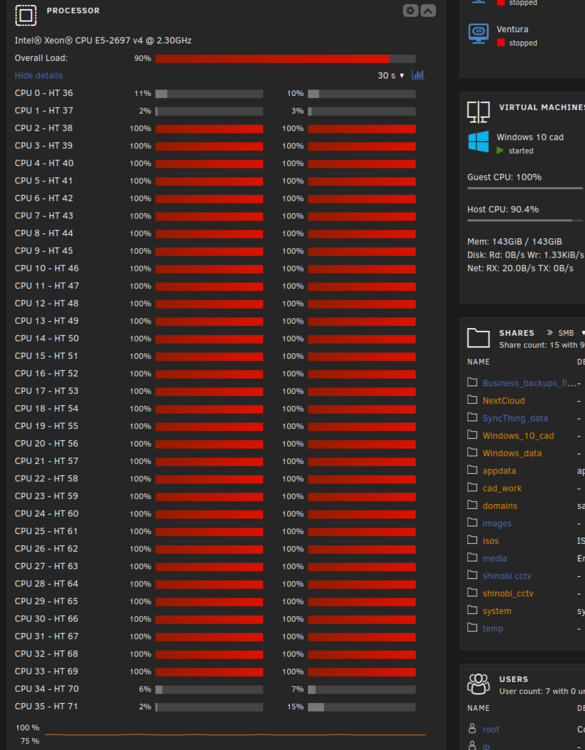
Randomly my windows 10 vm will just max out my cpus. sometimes a couple seconds up to 5 minutes. I wont even be using the vm and it will randomly do it. Any ideas on how I could start to figure out why the vm is doing that. The vm has a bunch of memory available to it and most of my cores as you can see.
-
Nevermind, I took the chance and unraid just added it back in. No issues.
-
I am not sure if this is a me issue or a apple server issue.

-
After the system did its ?rebuild? everything seemed to be fine again. no issues/smart warnings or anything with the hdd's. I turned off the auto start for the array for now on. I also shut down the vm and docker and moved around alot of my files. Domains, isos, got moved and I removed everything from the array that was not needed. I should have it setup where only a few things touch the array and everything else is on/limited to the ssd's.
-
I have a supermicro superserver. When I setup the server I added some ssds to it but just sat them inside the case for lack of better options. I recently purchased a 3.5 drive that lets me use the ssd in a normal drive bay spot. I have two ssds in the cache pool that are set to raid 1. What type of issues am I going to get into if I shutdown the server and just remove and replace the ssd but in a new connection position? Will it force me to format the drive? rebuild the array? what steps should I take before doing this? IF this works I plan to purchase another one of these bay drives for the other ssd on the pool.
-
I cannot seem to connect to the recovery server for any of the os versions. I followed the online tutorial and made sure I tried multiple nic settings. rerunning the docer after every change / attempt.
-
So I did the rebuild and from what I can tell everything is working. no more disabled drives. I have to be honest, that kind of freaked me out but that's why I choose Unraid. I actually purchased two replacement drives just to keep as backups in case something happens again. I post the diag file if someone wouldn't mind seeing if I have any issues that I don't know about. tower-diagnostics-20250308-2311.zip
-
I'm glad I asked. The whole point of this is just to get the most vm performance my hardware will allow. Thanks again for the help
-
I will do that. I was just going to add the m.2 to the array but limit it to its own vm share and try to copy my vdisk over to it or start a new vm on that share if the copy didnt work. Am I on the correct thinking for setting this up or is there a better way to give the vm the m.2 speed?
-
Correct. I was just using the m.2 slot that doesn't require the sata cable. One goes with the pcie slot directly and the other requires the cable for this card.
-
I could see that being a good reason but I don't think that's the case here. There really is no way for me to bump the drives or the connections on this setup.
-
Im running a supermicro superserver. Supermicro X10DRi-T4+ 2x Intel® Xeon® CPU E5-2697 v4 @ 2.30GHz - just upgraded Memory: 256 GiB DDR4 Multi-bit ECC - just upgraded intel arc 380 video card nvidia p2000 card I pass to the vm I only every used the server for all my media/data/backups. Its job has just been to do plex and storage and has been great at it. I recently started doing some cad work and decided running a Windows 10 vm was the best solution. I run linux on all my pc's. The problem is even with the new upgrades - its slow. I have given the windows basically every core except 0 and most of the ram I have along with the p2000 gpu. I started thinking that maybe the reason for the cpu's to hit this frequent 100% usage was that the vdisk was stored on a standard hdd. I decided I would get a pcie 3 expansion card and run a m.2 on it. https://www.amazon.com/dp/B07JKH5VTL?ref=fed_asin_title I shut unraid down for the first time in awhile and installed the card with m.2 and rebooted the server. The server detected the card and m.2 without a hitch but immediately started giving me drive errors on my array. one of my parity drives and disk 1 both were disabled. I removed the pcie card and I am now rebuilding the array but is there any way the hooking up of the card somehow messed up the array? tower-diagnostics-20250307-1745.zip
-
I appreciate you responding anyway.
-
Can you explain what you mean by you removed the iso files. If I remove them and try to boot the os it doesnt work. Just woundering what your actual steps were when you got this working.
-
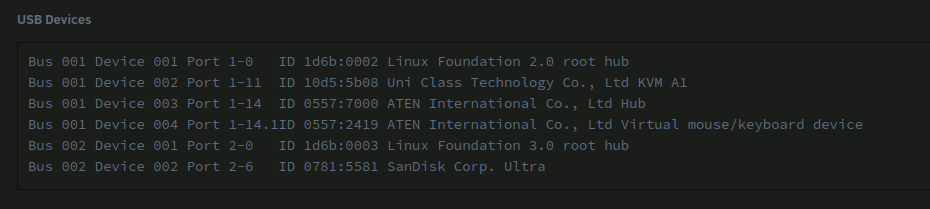
Hello everyone. I was hoping to get some help with usb passthrough. I am trying to get my 3d connexions mouse from my linux box to my unraid windows vm. Unraid version is 7.0 sever is a old super server – supermicro - intel cpu’s – new intel arc gpu windows 10 vm connection is done with Remmina over RDP. windows vm has the latest 3d conn.. drivers installed Server bios has VT-d enabled PC - arch linux box shows the mouse on lsusb Bus 003 Device 010: ID 046d:c626 Logitech, Inc. 3Dconnexion Space Navigator 3D Mouse Unraid does not show any usb devices that match under tools / system devices. In the VM setting I have: bios – OVMF USB Controller - 3.0 Qemu xhci (I have xhci handoff enabled in the server bios) VirtIO driver - is the latest version available. Other PCI Devices – None available. I have done a lot of searching but most of the information I have found on this is kind of old now. I was considering getting a drawling tablet as well if I can figure this passthrough stuff out. any help would be appreciated and as always thank you for your time.
-
Im running into a new problem with rsync transfer speeds. This is only on my local network from my linux pc to my Unraid server. I have a pfsense+ box. Unraid 7.0 beta 4. sudo rsync -vr --ignore-existing -e ssh /home/Videos/folder/"File 1"/ [email protected]:/mnt/user/media/folder/"file s" --progress - example of my code/script I have used the same flags / command for years now and never had an issue. I general get around 180mb transfer speeds. randomly I fire up the transfer and I get basically nothing. usually starts at 100kb then drops to like 3 kb. I randomly keep trying to see if it changes and it did once and I was able to transfer 39 files at normal speeds then it dropped the speed at file 40 and been back down to 3kb again ever since. I don't know enough about all this to know where to even start to look for a solution. google searching has a few things but nothing like what I am experiencing so i figured I would ask if anyone had any ideas.
-
Just made the adjustment. They were set at 2. Not sure why I did that. However, the same message still persists. even after a reboot of Emby and a full system reboot.
-
Thanks for the reply. With that option selected I am getting this error.

-
Hey everyone. Whats the proper way to give my main emby account unraid permissions to delete files so I don't have to keep going into the terminal to do it.
-
My Emby main account doesn't seem to have proper user rights to delete media directly from Emby. Whats the correct way to get my main Emby account these privileges? I understand chown when your a user at the system level but not sure about a specific program.
-
AHH ok. I was thinking that because you connect to the vm with vnc from unraid directly that it would have already have the ability. What did you mean by "if you dont want to invlove the host"?
-
I have a linux distro running as a vm on unraid. I'm using arch as my daily driver. I currently use RDP to connect to my windows pc with Remmina. Instead of logging into unraid then launching the vm in the browser is there an equivalent I can do with Remmina? Remmina has a few types of vnc plugins but I wasn't able to get it to connect. I wasn't sure if you could do a rdp style connection from linux to linux?.
-
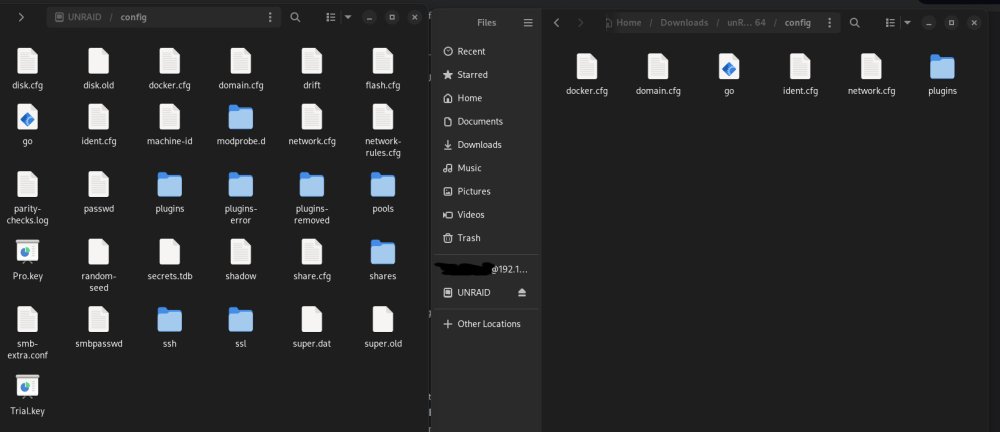
So I can get unraid to boot on a clean install but as soon as I swap the config file over it just doesnt want to boot off the drive. So I was thinking about just moving over select files and see what I can get to work. What do you guys think I can get rid of? Besides my pro key, i would like the drives in their order and shares data. I don't mind reloading all the docker images if i need to.
-
I have been putting this off but things are starting to break/wont update so I have no choice. I removed the USB drive and copied everything over to my PC. If I gnome-disk-utility the USB, remove the partitions, format and run the standard install process with the downloaded zip off the unraid website, how does unraid know the usb stick is the same one? I was tempted to swap the USB drive I am using out for a new one thats of better quality (the one im using is kind of old now) but I didnt want to kill a license until my drive failed. That got me thinking that if I did this how is unraid going to know the USB stick is the same once I have formatted everything? I am guessing all (most) USB drives have a number like a mac or just a S/n that unraid ties the license to?
-


