





DrSpaldo
Members
-
Joined
-
Last visited
Everything posted by DrSpaldo
-
Add me to the list. I have been having issues on and off since June. It started happening after updating Unraid from 6.9.2. I have since updated a few times with no great change, I am now running 6.12.3 I can't remember all the changes that I have made to the Unraid system itself along with the Frigate container. But it seems to have limited it recently to one crash/system freeze per week. Here is part of my journey
-
Ah ok, interesting. My Ubuntu VM is actually still running without issue. So maybe not that!
-
@Mbeco although it hasn't 100% fixed the issue (and I changed so many things in the process, they could also take part) but one of the top 3 potential issues that I feel it may be was the VM's I was running. I am running a Windows 10 VM & MacOS VM. I cannot tell you which was the most likely culprit but I lean towards Windows. For me, what I did was move both of the VM's over to another Proxmox server I had. Obviously this is not a solution, but, like you, I didn't have the time for weeks of downtime like people above have suggested. Because to truly work out what is causing the issue, you would need massive amounts of server downtime as well as your own time sitting there watching. If you can, I suggest turning off one of the VM's, or better still if you have spare hardware, move them over to a Proxmox instance and just see if that helps your situation. If it doesn't, then I can make suggestions on what I did for my docker troubleshooting & changes along the way... PS. I see you are using PhotoPrism. You should give a very nice project Immich a go. Although in early development, I have been very impressed so far. There is an Unraid community app as well.
-
Thanks for the reply & info @primeval_god
-
Absolutely. I have had no issues with Unraid for sometime, it started happening around the time I updated from one of the older versions but I can’t 100% confirm that. I wish I remembered everything I changed, because it was so much. I’m much more stable now, just maxing out once a week during my appdata/CA backup day. tomorrow if I get some time, I will go through all the things I changed to see if that helps you. How much RAM in total do you have an how many dockers / VM’s? How would they look for their system utilisation compared to your reasources?
-
What swap file size would you recommend if I had 48 gigs total ram? Does the swap file size count as a total across the entire system or is the number inputted per docker?
-
@MbecoI feel like you are going on the same crazy ride has I have been
-
I've noticed that during my weekly docker/appdata backup it looks like Unraid cannot stop the Frigate container and/or gives OOM errors. Any ideas of what may lead to this or what I can do to prevent this from happening? Jul 30 11:44:01 SpaldoUnraid kernel: oom-kill:constraint=CONSTRAINT_NONE,nodemask=(null),cpuset=f6bd84541f24695692d01c50b3d4f9190ec11f453d2e440fc68c2e13a3192478,mems_allowed=0,global_oom,task_memcg=/docker/f6bd84541f24695692d01c50b3d4f9190ec11f453d2e440fc68c2e13a3192478,task=frigate.capture,pid=378,uid=0 Jul 30 11:44:01 SpaldoUnraid kernel: Out of memory: Killed process 378 (frigate.capture) total-vm:33863704kB, anon-rss:31910812kB, file-rss:0kB, shmem-rss:504kB, UID:0 pgtables:62780kB oom_score_adj:0 Jul 30 11:44:02 SpaldoUnraid kernel: oom_reaper: reaped process 378 (frigate.capture), now anon-rss:0kB, file-rss:0kB, shmem-rss:0kB The above is some extracts from the syslog around the time that the machine was coming back to life after being frozen for a few hours. Of note, I could not connect to the Unraid machine via webgui or SSH. However, the MPV stream I have running from Frigate continued to work, regardless of issues I was having with connecting to Unraid itself...
-
Its my CCTV NVR, so it has to be on
-
In this instance, I am not sure. I just couldn't connect to the server in any way for 4 hours or so. I could not connect to see what the server was doing
-
@JorgeBI've noticed that it has not been happening as often, almost not at random like before. Except it has happened a couple times when I am doing my weekly docker/appdata backup. This week I have switched from the old CA version to the new one, unfortunately it happened again this week. Looking at the logs it seems to be another OOM error with my Frigate docker. See attached logs. Any ideas what I can do to prevent this from happening? Out of interest though, I usually run a camera stream from Frigate to my desktop, the entire time the stream did not stop while it should have been doing the backup, which means the container didn't stop? I couldn't get into the webui or SSH in during this time, only ping. spaldounraid-diagnostics-20230730-1453.zip
-
Thanks for the post @JorgeB. I've installed the swap file plugin. What would you recommend for monitoring the ram usage as well as the fragmented RAM?
-
So this morning I had the issue again. CPU at max and I couldn't do anything. However, I decided to just leave the server running as I didn't need it today. Between 6.30am and 2.45pm I could not use the server at all, couldn't load the webui or even connect via SSH. After that though, all back to 'normal'. I am just not sure how I can work out exactly what was happening at that time and what I can do to stop it from happening? spaldounraid-diagnostics-20230709-1609.zip
-
Will do
-
No, when the issue happens I can’t do anything really on the server. So near impossible to create the diagnostics as I will have to hard reset
-
Here they are, but, it is post reboot so I am not sure how much it helps? spaldounraid-diagnostics-20230705-2010.zip
-
Spoke too soon. Crashed today. Almost made 4 days
-
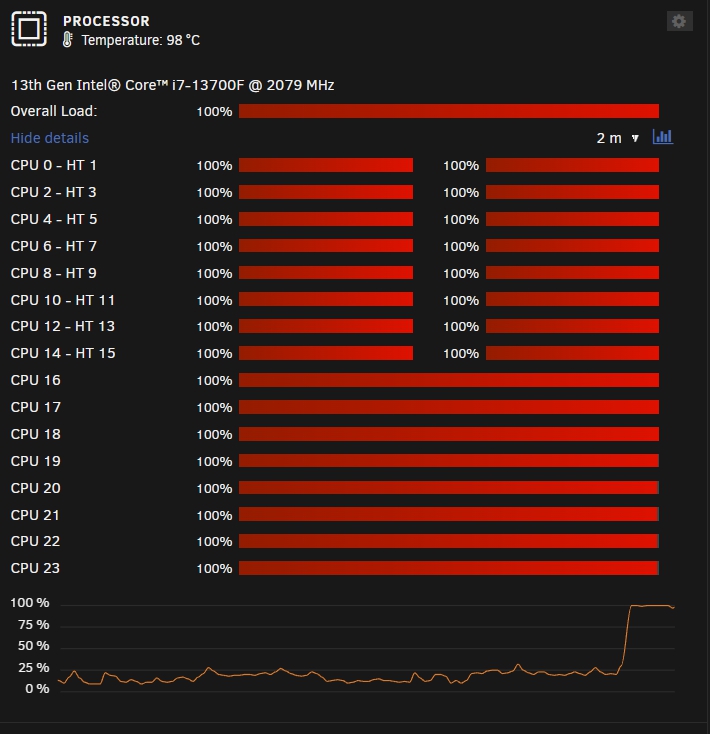
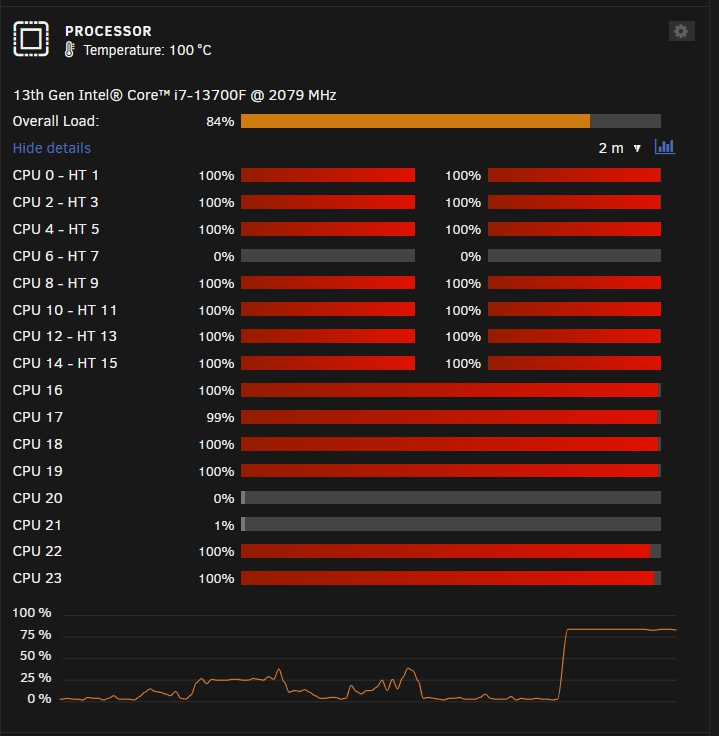
I've made so many changes that I have no idea what helped and what didn't. From memory, I've changed settings within Tips & Tweaks (vm.dirty_background_ratio to 3, vm.dirty_ratio to 6, changed the CPU scaling governor to performance), replaced my MB & CPU, replaced the SATA card, removed one of the HDD's, pinned all dockers to various CPU cores as well as isolating a few CPU cores. So since this post though, I have updated to 6.12.2 and changed some of the ram settings in VM's and dockers. In particular reduced my tmpfs size for the Plex & Frigate dockers. Touch wood, I have a 3 day uptime, which is the most for a long time.... I won't celebrate yet but let's hope these last changes are the ones that have done it. Of note & interest (maybe to the devs/other users); when the CPU maxed out to 100% and I completed the "/etc/rc.d/rc.nginx restart" command, the CPU dropped back to normal amounts, however, there was a catch, my RAM then maxed out and the system became totally unresponsive. The maxed out CPU at least let me issue some commands, all be it very very slowly. From my point of view, it is not something I am willing to risk happening, so it is likely I will create a second server and split some of my services to Proxmox and leave others on Unraid so the load is balanced.
-
It looks like there are quite a few users with similar situations and similar massive CPU usage isses, RAM issues and the server essentially stopping: https://forums.unraid.net/topic/86114-nginx-running-out-of-shared-memory/ https://forums.unraid.net/bug-reports/prereleases/612-rc5-server-at-100-cpu-usage-r2394/ The list keeps going on if you search for specific errors or messages. Unfortunately there appears to be limited assistance being offered by the Unraid team, I am not sure if there is a better way to get support?
-
Last month I updated from 6.9.2 (after staying on it for ages) to 6.11.5 then updated to 6.12.0 then 6.12.1. Since this time I have had ongoing issues with massive spikes in CPU usage. Usually 100% and it cannot recover. I have updated plugins, read 100 forum threads, changed settings within Tips & Tweaks (vm.dirty_background_ratio to 3, vm.dirty_ratio to 6, changed the CPU scaling governor to performance), changed my MB & CPU, changed SATA card, removed a HDD, pinned all dockers to various CPU cores, removed unraid access to a few cores, among various other things suggested in these forums... Still no fix. Today I ran the "/etc/rc.d/rc.nginx restart" command. It stopped the CPU from spiking, then maxed out my RAM?! Then the server froze after that and I had to hard reboot. Generally these spikes occur about once per day. Diagnostics attached. Does anyone have any other ideas? Example prior to CPU isolation: Example after CPU isolation: What HTOP looks like on one occasion: Old CPU: spaldounraid-diagnostics-20230701-1754.zip
.thumb.jpg.d0055dc9698588245bfcce8f113e805d.jpg)
.jpg.1dbf1ba61bc2a32733c55e3614e3f9c4.jpg)
-
I've found a few similar topics, so I am trying ideas in those as well. See attached updated process list using htop.
.thumb.jpg.962c30572958d7284affbc7e3e857918.jpg)
-
Hi, in the last couple of weeks I've noticed massive CPU usage spikes, which is bringing my server to a stand still. I pretty much have to reboot the server as even after 1-2 hours it won't recover from the CPU usage spikes. This appears to have happened after updating from Unraid 6.9.2 (after staying on it for ages) to 6.11.5. I noticed that 6.12.0 is now out, so I am happy to update and see if that will help. But, I was wondering if anyone has any ideas of what may be causing the issue or what I can try to fix it? See attached diagnostics and a few screenshots. Thanks spaldounraid-diagnostics-20230620-1108.zip
.jpg.fe865822422a1ac18db6b4a95a4c5e68.jpg)
.thumb.jpg.b0b5b9845cabb215f57b4500cc689c2a.jpg)
.thumb.jpg.6495517129f2a9803770f36f4ea48580.jpg)
-
Update; I turned off NginxProxyManager and the errors appear to have stopped. So I am not sure what was causing it, but, I don't need it anymore so I will just disable/delete that docker.
-
I've noticed after a couple of recent crashes that these kernel traps nginx errors are constantly repeating in my system log. They happen pertty much every second... Jun 11 12:03:43 SpaldoUnraid kernel: traps: nginx[26064] trap divide error ip:55ef2a656d54 sp:7ffeda639bb0 error:0 in nginx[55ef2a5f6000+14d000] Jun 11 12:03:44 SpaldoUnraid kernel: traps: nginx[26252] trap divide error ip:55ac22d97d54 sp:7fffcdc59de0 error:0 in nginx[55ac22d37000+14d000] Jun 11 12:03:45 SpaldoUnraid kernel: traps: nginx[26563] trap divide error ip:55766ce47d54 sp:7fff78848bc0 error:0 in nginx[55766cde7000+14d000] Jun 11 12:03:46 SpaldoUnraid kernel: traps: nginx[26992] trap divide error ip:55d38c557d54 sp:7ffd9d96f9a0 error:0 in nginx[55d38c4f7000+14d000] Jun 11 12:03:47 SpaldoUnraid kernel: traps: nginx[27163] trap divide error ip:5631a2314d54 sp:7ffd4822ea00 error:0 in nginx[5631a22b4000+14d000] Jun 11 12:03:48 SpaldoUnraid kernel: traps: nginx[27354] trap divide error ip:56390c418d54 sp:7ffcbbb8e930 error:0 in nginx[56390c3b8000+14d000] Jun 11 12:03:49 SpaldoUnraid kernel: traps: nginx[27521] trap divide error ip:55e602a32d54 sp:7ffd442aa420 error:0 in nginx[55e6029d2000+14d000] Jun 11 12:03:50 SpaldoUnraid kernel: traps: nginx[27755] trap divide error ip:5600cb68ad54 sp:7ffe274f86d0 error:0 in nginx[5600cb62a000+14d000] Jun 11 12:03:51 SpaldoUnraid kernel: traps: nginx[28000] trap divide error ip:5615067bcd54 sp:7ffc30517b30 error:0 in nginx[56150675c000+14d000] Jun 11 12:03:52 SpaldoUnraid kernel: traps: nginx[28181] trap divide error ip:559eda68dd54 sp:7fff1a219700 error:0 in nginx[559eda62d000+14d000] Jun 11 12:03:53 SpaldoUnraid kernel: traps: nginx[28361] trap divide error ip:55e70875bd54 sp:7ffd3915d8f0 error:0 in nginx[55e7086fb000+14d000] Jun 11 12:03:54 SpaldoUnraid kernel: traps: nginx[28531] trap divide error ip:555f3264cd54 sp:7ffe21e42950 error:0 in nginx[555f325ec000+14d000] Jun 11 12:03:55 SpaldoUnraid kernel: traps: nginx[28765] trap divide error ip:563823d88d54 sp:7ffc13ec87c0 error:0 in nginx[563823d28000+14d000] Jun 11 12:03:56 SpaldoUnraid kernel: traps: nginx[29013] trap divide error ip:56496bb42d54 sp:7ffcc2cec780 error:0 in nginx[56496bae2000+14d000] Jun 11 12:03:57 SpaldoUnraid kernel: traps: nginx[29189] trap divide error ip:561b86f91d54 sp:7ffc57dc3eb0 error:0 in nginx[561b86f31000+14d000] Jun 11 12:03:58 SpaldoUnraid kernel: traps: nginx[29370] trap divide error ip:5579820cbd54 sp:7fff264a8960 error:0 in nginx[55798206b000+14d000] Jun 11 12:03:59 SpaldoUnraid kernel: traps: nginx[29546] trap divide error ip:5566bd456d54 sp:7fffc24af260 error:0 in nginx[5566bd3f6000+14d000] Jun 11 12:04:00 SpaldoUnraid kernel: traps: nginx[29749] trap divide error ip:56177750cd54 sp:7ffc6a61a7d0 error:0 in nginx[5617774ac000+14d000] Jun 11 12:04:01 SpaldoUnraid kernel: traps: nginx[29989] trap divide error ip:556c51b40d54 sp:7ffc2c9bb970 error:0 in nginx[556c51ae0000+14d000] Jun 11 12:04:02 SpaldoUnraid kernel: traps: nginx[30207] trap divide error ip:55ca32eedd54 sp:7fff53b99310 error:0 in nginx[55ca32e8d000+14d000] Jun 11 12:04:03 SpaldoUnraid kernel: traps: nginx[30408] trap divide error ip:558c9901dd54 sp:7fff03857670 error:0 in nginx[558c98fbd000+14d000] Jun 11 12:04:04 SpaldoUnraid kernel: traps: nginx[30587] trap divide error ip:562fce4d8d54 sp:7ffdd176ead0 error:0 in nginx[562fce478000+14d000] Jun 11 12:04:05 SpaldoUnraid kernel: traps: nginx[30859] trap divide error ip:55e9e5729d54 sp:7ffe49fb8150 error:0 in nginx[55e9e56c9000+14d000] See diagnostics attached. Anyone have ideas what it could be related to? spaldounraid-diagnostics-20230611-1138.zip
-
Also, would it be difficult to put something like this into the container to make the directory list a little nicer? https://www.directorylister.com https://github.com/ramlmn/Apache-Directory-Listing


.jpg.4ab730fd57860b86d5dea9d89dcb8a05.jpg)
.jpg.1dbf1ba61bc2a32733c55e3614e3f9c4.jpg)
.jpg.acdc73ed54512075b69a5533758e7f34.jpg)
.jpg.fe865822422a1ac18db6b4a95a4c5e68.jpg)
.jpg.a7db6df5486c8714c370039e3729dca8.jpg)
.jpg.3fc52a40fc2ad88f3520344a337ff2cd.jpg)