





Kiwiconcord
Members
-
Joined
-
Last visited
Everything posted by Kiwiconcord
-
I am now getting the same issue
-
Upgrading drive resulting in reducing total number of HDD from 8 to 6, currently 2 parity and 6 array all 8TB moving to 2 parity and 4 array 18TB, I have replaced 2 parity and first array HDD by stopping array, shutting down, removing 8tb drive and adding 18tb, booting, assigning new 18TB to array, starting array and rebuilding. Not superfast but doing the job, and yes, I could do 2 HDD at a time but better safe. Once I replace 6 HDD this way, I will be left with 2 x 8tb HDD in array with files on. Now previously I have used Unbalanced plugin to move files across from 1 disk in array to another, however in the past I have found that some apps, example is Plex and paperless, they pick up the move and reindex as recently added, even though it is the same file in the same mount point to the app /mnt/user/media. Does anybody know a way to stop this? or a tool that does do this? Hoping someone has solved this issue already.
-
same problem on 6.12.4, when I scroll down the page the loading icon appears in the unassigned devices section, I don't have any unassigned devices. I have tried in firefox, chrome, edge and brave browsers same outcome. And agreed the only thing that resolves it (so far) short term is rebooting server.
-
So I am new to all this so sorry if ask/answered already some where, I have passthroughvpn up and running, I have NZBGET and Qbittorrent running through it successfully for a while (wish I had come here earlier, as wrote my own script to test connection and restart vpn and dependent containers). But have an issue I can't seem to find a resolve for. Installed Prowlarr, and working via passthroughvpn, but Prowlarr cant see the other arr's and visa, have the local network noted in the passthroughvpn, which is really interesting as the arrs can get to NZBGet and Qbittorent so not sure what is going on. Done some hunting but all I can find is to exception the local network which I have done, so any thoughts?
-
Keep get the following error, happening on most apps if I try and make a change to any config. - need help, docker: Error response from daemon: failed to create shim task: OCI runtime create failed: runc create failed: unable to start container process: exec: "/init": stat /init: no such file or directory: unknown. I have looked around and tried a number of items, including removing multiple apps and reinstalling, which I thought worked in fixing the problem, but then I made a change to a app and got it again. Any advice would be appreciated. kaha-diagnostics-20230830-1929.zip
-
Sorry forgot about the unlock required in the Docker pages, bit of a senior moment. Thanks
-
Here you go. debug-DOCKER (1).json
-
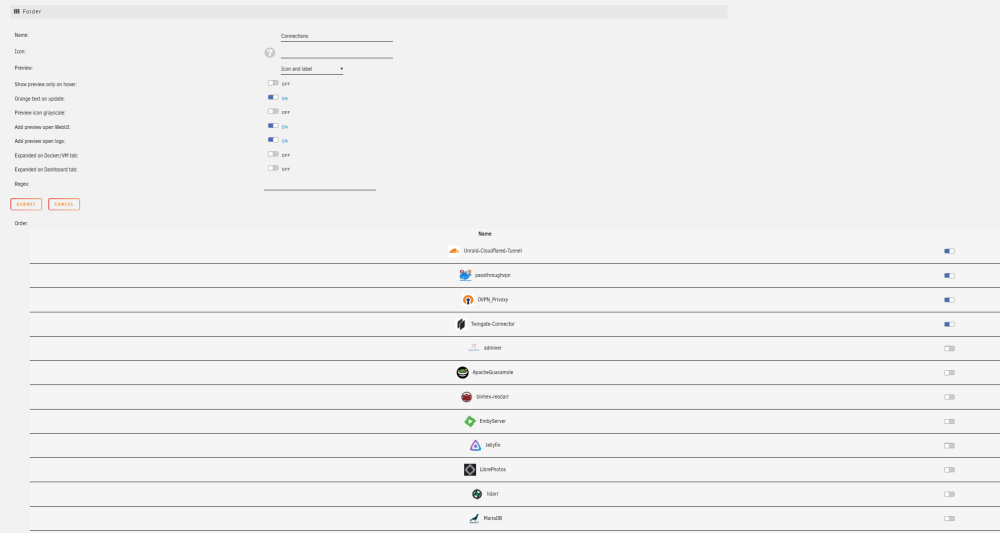
Installed this tonight and started by making a connections folder and reordering the containers so the top 4 are the ones I wanted in it and switched them one However on submit I get 2 which I selected in not appearing and 2 I didn't select appearing (see pic) Read the previous posts and have tried reordering but without luck, am I doing something wrong if so please let me know and if it is a reordering issue, let me know what and how I need to reorder? Cheers

-
Followed the instructions on - https://docs.unraid.net/unraid-os/manual/changing-the-flash-device/ Click replace key - acknowledge the blacklisting and get the syntaxError "SyntaxError: Unexpected number in JSON at position 1" please help -
-
Nevermind - for some reason the DNS settings, which had been working fine for years, weregone, so reentered and its back up and running now, very strange.
-
So this morning I started getting API Errors, can't communication, unexpected cert error, communication with server has timed out. Done the api restart, rebooted and uninstalled and reinstalled myserver plugin. When trying to log back in to plugin it tells me my password is wrong, so I reset password and still getting "Communication with has timed out". Latest issues showing up is "Unable to communicate with GitHub.com" ***************** Nevermind - for some reason the DNS settings, which had been working fine for years, weregone, so reentered and its back up and running now, very strange.
-
I am starting to think the same way, I have put in a new PSU and upped the wattage, and not only are the drives now working but the parity sync is running much faster than previously which I am not sure how that is possible but it performance is up by about 25-30%.
-
All drives connected to onboard controller, power wise they are connected directly to power supply no add on connectors (learnt that lesson early).
-
Over the last week I have had one parity and one array disk fail, I have tried to rebuild the currently drives as SMART was not showing any issues, both failed, I have switched cables and sata ports, still no luck. I have purchased 2 band new drives, I have managed to rebuild disk 4 of the array with a new drive, but Parity 1 still failing not sure why? Plus I have pulled the old drives out and put in another machine and run diagnostics and the drives are reporting as good?? Any thoughts? kaha-diagnostics-20220918-0958.zip
-
Console "xfs_repair -v /dev/md3" I tried in the console and it bomb out with the -n and the -v
-
Thanks, been through this and run xfs_repair - -----bad primary superblock - bad magic number !!! -----.....Sorry, could not find valid secondary superblock So question - is there anything stopping me from unassigning the drive, pulling it out and putting in another pc and fdisk'ing it and putting it back in and assigning so it rebuilds clean? Any down sides?
-
So had issue, where 2 drives went red, 1 parity and disk 3, dropped parity and added back, and it rebuilt and seems fine. Then did the same to Disk 3, it came up with a XFS corruption, so I did a XFS repair, then added back into array and it rebuilt yesterday. This morning I got all greens so look like it back, but still getting "Unmountable: Wrong or no file system". Any thoughts on what to do? kaha-diagnostics-20220712-0818.zip

-
Thanks, it wasn't just binhex vpn containers that I was having the issue with, it seem that all the instructions for older versions, did not state entering the port number into the "Container Variable: VPN_INPUT_PORTS" they only stated creating a new port in the docker. So thanks very much for the point in the right directions. Cheers
-
I have been working on this for some time today, everything seems to work with the vpn settings, the client docker is passing through the VPN Docker and picking up the VPN server IP no issues, traffic seems to be working the way it should. The only issue seems to be after setting up client Docker with Extra Parameters: "--net=container:(VPNDockerContainerName)" and Network Type: "None" and adding the port to pass through on the VPN Docker I can't get to the WebUI Client docker WebUI. I have follow a number of examples including Spaceinvader One's, I have tried multiple VPN dockers including, binhex-privoxyvpn, binhex-delugevpn and nzbgetvpn, and multiple client dockers with no luck. Any advice would be great. kaha-diagnostics-20220605-1655.zip
-
Yes it is all there on the emulated, so I have stopped array and added WSD0QVWE back as disk 3 and it is rebuilding, thanks really appreciate, last time I did something I didn't ask and I made it worse. Cheers
-
kaha-diagnostics-20220520-1533.zip
-
I was adding 2 x 8TB archive drives I want to use as Unassigned, I am a bit of a newbie, so something I did has dropped my disk 3 out of array and put it in Unassigned as Dev4. Don't know how to get it back again? Help please.
-
I replaced all cables last time and plug directly into power supply removing splitter, I am new to Unraid but not to IT, surely the connection issue is the fact that it is not seeing the drive as sdj anymore, as the same drive is in Unassigned Devices and mount point is sdk? If I reboot as I did last time this happened, it will remount to sdj then I will be able to reassign back to the array and run parity check and it will be fine until next time. Am I missing something but why is it assigning it a different mount point, and what is causing that?
-
So I think I followed all of the above advice, all new sata cables, and change the power cables over, reset the Parity drive to parity1, and re-enable, ran SMART test and everything looked ok. But it has happened again. (Logs and Diagnostics attached.) Your thoughts or advice would be much appreciated. kaha-diagnostics-20210915-1243.zip kaha-syslog-20210915-0237.zip
-
Help, new to Unraid - Parity drive has been disabled with 11484 errors, before I do anything please help with what I should do? Logs and Diagnostic attached please help kaha-syslog-20210907-0523.zip kaha-diagnostics-20210907-1523.zip


