





NasKaya
Members
-
Joined
-
Last visited
-
This is how my compose file lookes like: version: "2" services: deconz: image: deconzcommunity/deconz:latest container_name: deconz-community restart: always volumes: - /mnt/user/appdata/deconzcommunity:/opt/deCONZ/ devices: - /dev/serial/by-id/usb-dresden_elektronik_ingenieurtechnik_GmbH_ConBee_II_DE2139560-if00:/dev/ttyACM0 ports: - 80:80 - 443:443 - 6080:6080 environment: - DECONZ_WEB_PORT=80 - DECONZ_WS_PORT=443 - DECONZ_VNC_MODE=1 - DECONZ_NOVNC_PORT=6080 - DECONZ_UPNP=1 - DEBUG_INFO=1 - DEBUG_APS=0 - DEBUG_ZCL=0 - DEBUG_ZDP=0 - DEBUG_OTAU=0 networks: br0: ipv4_address: 192.168.12.8 networks: br0: external: true
-
At the moement when i restart the server i need to pull the image before i can compuse up. Is there a way that i dont need to pull every time i restart the server?
-
Okay alles klar. Danke für die Info Und danke für deine Hilfe
-
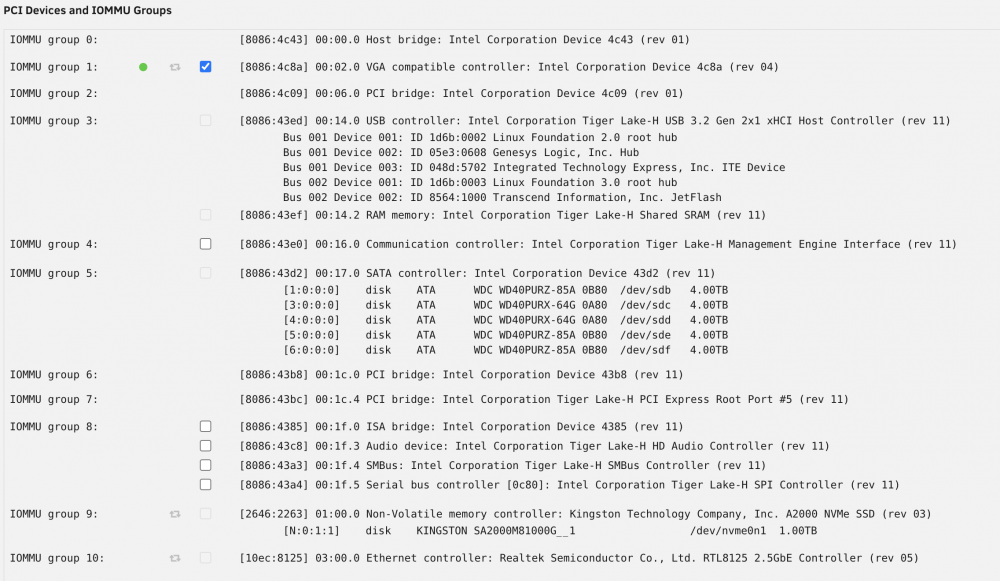
Hey, maybe someone here can help me. Im still new to Unraid, so i dont have the deep knowledge to get everything running. So i want to give my Windows 10 VM the GPU from my i9 11900k. Its the UHD 750. I was able to list the GPU with some comment in the sysconfig. And also configured unraid to run headless. I also checked the GPU under system devices. I will put a screenshot at the end. Then i selected the GPU for the VM in the settings alongside the normal VNC. I was able to install the intel driver. Windows know is showing the GPU inside device manager but with the error 43. I cant find a solution to fix the error 43. So i also dont get any output via hdmi. I dont have and docker app running. So docker cant use the GPU. Maybe someone can help
-
Habe nun beides gemacht, Also die Checkbox ist drin und auch video=efifb:off Leider steht ist der fehler immer noch 43. Habe auch aktuell keine Docker sachen laufen. Gibt es noch etwas was ich vielleicht falsch mache?
-
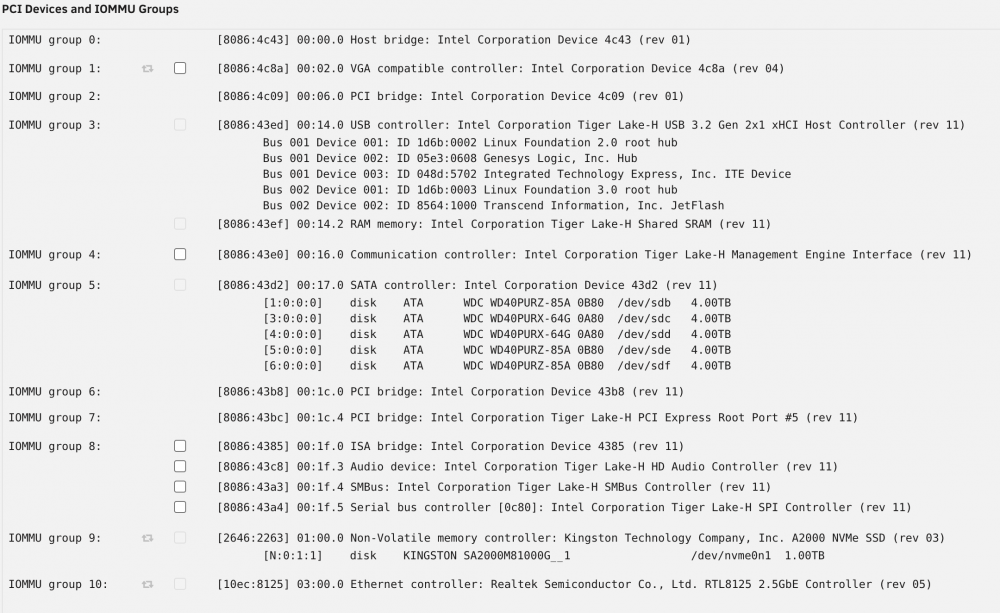
Habe jetzt mal nachgeschaut und es sieht so aus als wenn diese nicht ausgegraut ist. kannst du mit dem Bild was anfangen?
-
Ich werde es zuhause mal nachschauen ob diese ausgeraut ist. Hoffentlich bekomme ich es noch irgendwie hin. Danke schonmal für die Hilfe. Ich komme sonst nochmal zurück
-
Hey, was genau meinst du mit VFIO bind frei gemacht. Sry bin neu in der Unraid VM welt :D. Ich habe schon über eine startoption in der sys conf von unraid die Karte so bekommen das diese Angezeigt wird. Ich habe der VM dann die Karte und eine Virtuelle zugewiesen. Dann habe ich den neusten Windows treiber auf die VM installiert. Danach wurde im Gerätenmanager auch der richtige Name der GPU angezeigt. Also die 750er. Eine andere GPU gibt es in dem System nicht. Muss ich noch was im Bios einstellen?
-
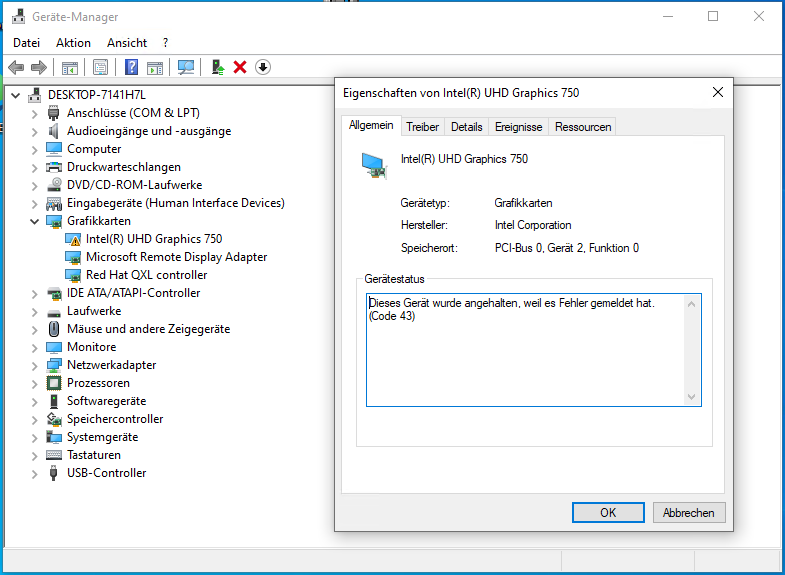
Hey, ich habe aktuell ein Problem mit meiner Windows 10 VM. Ich möchte gerne meine intel GPU durchschleifen. Ich habe es auch hinbekommen das diese im Gerätemanager angezeigt wird. Leider wird mir dort der Fehler 43 angezeigt. Und über HMDI bekomme ich auch kein Bild auf mein Monitor. Der Server läuft mit einem i9 11900k. Ich habe viel gelesen, dass die neuen 11th gen noch nicht richtig supportet sind. Gibt es trotzdem eine Lösung oder mache ich was Grundlegendes falsch? Anbei noch ein Screenshot von Gerätemanager
-
Indeed with a number it works. Thanks guys.
-
Hey guys, i want to run the Backup every Sunday at 03:00. I found this cron "0 3 * * SUN" but its not working. Am i missing something. Maybe someone can help
-
Hey thanks for the detailed answer I dont really get what i have to do here https://www.virten.net/2016/12/ssd-total-bytes-written-calculator/ Maybe i need to look it up a little better. Still learning. Also not so used to all the linux world Thanks for your help
-
Hey, what a great work. Thanks for this. I have some questions about some Topic. I just created my Unraid, so im a noob . So please be patient with me and maybe some of my questions So in the last days i saw a lot of random writes to my cache. I think the docker app pi-hole does a lot of it. But im not 100% sure. I just disabled it and it seems to be a bit less. So my first question is, how did you see the exact gb witten to your ssd? Im only able to see the total writes in the main section in unraid. And also, how can i see what type of format does my cache have. And how can i change it for the better one. Maybe there is a step by step guide? Unraid is so feature rich, so i need to start low Thanks again for the post here and the help for the community
-
I found my fix. In another topic i found a problem that the docker img is causing the writes. I now switched that img to the chache. Worked. Thanks for your help
-
I downgraded to 6.9.1, but still having that problem. In the dashboard i see that the writes are going up every 4 secound by somewhat 15. All docker app are stopped and no vm added at all. What is going on. With the file activiy plugin, nothing is showing. What can i do?


