





offroadguy56
Members
-
Joined
-
Last visited
Everything posted by offroadguy56
-
OK I'm pretty sure I found the problem. The AIO that I had on the P40 has leaked. I never caught it because the tubes ran outside the case and had leaked onto the carpet. But I caught it this time when I reseated the video card and saw a water droplet on the tube. I'm going to assume that the card is either shutting off from thermal runaway or it has already fried. I'll see if thermaltake will warranty the cooler. Thankfully they still sell coolers with the same mounting style.
-
Minor update. I renabled the resize bar in the XML. Unfortunately I am away from the server and cannot check the BIOS. When the VM boots device manager says everything is ok. But when i try and execute CLI nvidia-smi. It tells me: unabel to determine device handle for 0000:09:05:0 GPU is lost. Reboot to recover GPU. I tried rebinding the GPU to VFIO on boot and the GPU still isn't working correctly. Getting the same as above. I guess now that I've complained about it it has stopped working entirely. I'll see if I can reseat the card and I'll take a peak in the BIOS to confirm above 4G decode and etc.
-
I thought so too. but when i upgraded from unraid 6.x.x to 7.x.x and installed windows 11 (fresh install from windows 10). I didn't need above 4g xml settings anymore. BIOS has remained untouched. IDK if the Tesla P40 has audio. Its a data center card of the GTX 1080 era. I am aware of this, but as #1 above. For some reason I never had to do this with the new windows 11 VM and updated unraid. This weird problem exists when using i440x and Q35. Chatgpt wants to suggest that unraid or a docker is keeping control of the video card. Hence the VFIO binding attempt. From my experience the above 4g decoding would just fail outright if it wasn't set correctly. Current conditions has the video card work for some while. Then after some time it'll show errors in windows. And a VM restart won't bind the card to the VM. It'll only work for a few hours my guess after a full server restart.
-
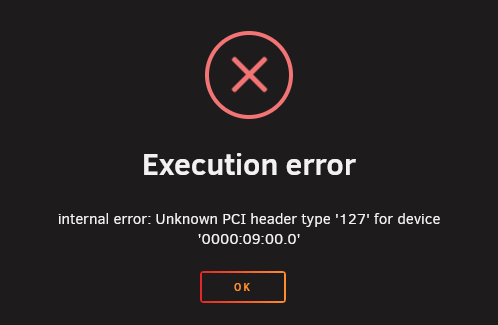
So I'm trying to get my windows VM to use my Tesla P40 video card. It was working fine in the past but now it is not. Nothing has changed between it working and not working (that i'm aware of). On a fresh restart of unraid I am able to boot the VM and use the video card as normal. After some time the video card becomes unusable. Windows inside the VM at this point will tell me everything is fine (the application using the card is the only one complaining) and device manager says everything is fine too. OR everything in Windows complains including device manager, saying something about error code 12. If I attempt to restart the VM after the video card error. I get this message: A search online said something about binding the video card to the VFIO on boot. So I did that and when I restarted unraid the entire server locked up when it attempted to launch the VM. I mean really weird stuff happened. SSH would fail but the webui would kind of load. sometimes not. commands on the console would take multiple minutes to execute. I managed to very quickly get into the VM settings and disable the VM service before the array could start allowing me to delete the libvirt.img and reset the VM settings. At that point I also disabled the VFIO binding not wanting to risk that again. So that is where I am at right now. If you need any more info let me know. waffle-diagnostics-20260423-1218.zip
-
Thanks a bunch. I've got disk6 rebuilding. Nightmare soon to be over.
-
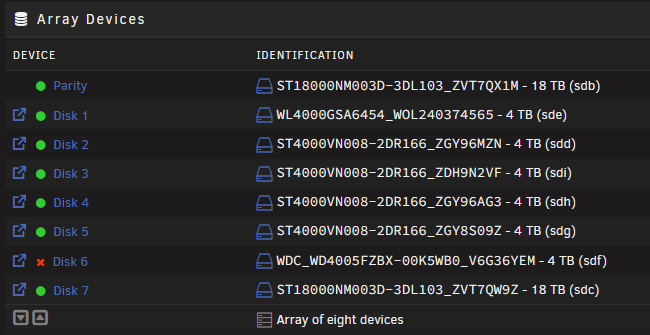
VM wrestling control away from the array was the issue. Started array, screenshotted VM settings, disabled VMs, deleted libvirt.img, stopped array, restarted array. That is where I am at now. I have disk 6 currently being emulated. Disks 3, 4 and 5 appear to be OK now. What I had done in restoring the cache drive was paste in my old libvirt.img. What you said with IDs changing makes sense now. Need to fix disk 6, then I manually set VMs back up. waffle-diagnostics-20260411-1700.zip
-
Linux still shows them connected under sdb to sdm. 8 drives show up under lsblk. Or am I seeing ghosts?
-
I have a 7 disk array + 1 parity. Unraid 7.1.2. I have been in the process of troubleshooting and recovering a corrupted zfs cache pool on the system. I backed up what I could outside of unraid and formatted the cache drives on unraid safemode. Cache drives are working as far as I can tell (2 drives striped). When I went into backup/restore appdata plugin to restore my dockers It told me directory could not be found. I checked my shares over SMB and windows errors out. I check on webUI and I'm told invalid path. I check on ls /mnt/disk3 and I'm told Input/output error. There have absolutely been unsafe shutdowns as the corrupted zfs pool would lock up unraid preventing a safe shutdown. Let me know how best to proceed. It's unfortunate that it's 4 disks instead of just 1. waffle-diagnostics-20260410-2000.zip
-
Thanks! I was curious why the device was loop2 instead of the original nvme0n1p1. I did try recsuing zero-log those devices, but was met with the "this isn't a btrfs file system" message.
-
Not sure how to troubleshoot this. I've had problems in the past when my cache was BTRFS. I would get periodic log tree corruptions. When Unraid began supporting ZFS I formatted the cache to ZFS and it was fine for many many months. Last month my Docker containers went down and I saw a BTRFS error in the server log. I disregarded it and restarted the server, everything fixed itself. It's happened again today and multiple restarts later, Docker will not start. Steps I've taken to remedy: rescue zero-log command (says no valid BTRFS found), restarts, reseating cache drive, reseating memory, confirming memory speed (too fast causes me problems), safe mode. Notes: The VM manager appears to be working just fine. I have a windows VM running exclusively on the cache drive and it appears unaffected. Browsing SMB shares located on the cache works fine too. Attached is my diag. Version 6.12.10. If URbackup has been doing its job I'll have proper backups of what I care about from the windows VM. I have appdata backup plugin running as well so docker container info is covered too. waffle-diagnostics-20241126-2103.zip
-
Trying to get this to work with reverse proxy. Currently using NPM. When I create a share link, the link is correct with my domain. But when I navigate to that link all I get in return is a blank page. After a little bit the browser returns "This site can't be reached". Navigating to the shared link with local IP address results in it working just fine. Photoprism is complaining about websockets not working. I've input their config in the proper place in NPM but it causes the proxy host to go offline. Does anyone have a working config for NPM? I am also looking at Traefik which was mentioned in photoprism's documentation. EDIT: I had websockets disabled in NPM. When I enabled it the proxy host went offline. I removed all the extra config from the advanced tab and re-enabled websockets and now that is correctly working. As for the blank page/page not loading issue, I had the docker form incorrectly configured. In the "PHOTOPRISM_SITE_URL" field the site url needs to exclude the port number. With those changes I am no longer experiencing any issues or warnings.
-
Pretty much. In a way it makes sense if it were an Unraid or Docker issue for it to affect all the containers, but instead it was only a select few. If your containers are communicating properly and all you are missing is the shortcut link to the webui, all you'd need to do is bookmark the webui by first navigating to it manually. My issue unfortunately meant my containers would not communicate with each other. No idea what the issue was.
-
I finally tried rolling back the docker image to a previous image. It's finally working now. Not sure what the issue was. Very strange to me to see it happen to multiple containers.
-
@joelonesI believe I found a fix for our problem. Through a lot of troubleshooting of network settings among other things. I completely forgot that the appdata backup plugin doesn't roll back the actual docker image. What I've done is rollback the problem docker containers to 2 months ago and they are working properly in the docker list and are able to communicate with each other. You might be able to get away with a more recent roll back, but for me it's good enough. What you'll need to do is click the container and select more info. It should take you to the docker page. Click tags then find an suitable previous version. on the right you'll see "docker pull ...." copy whats after docker pull and paste it into the repository field on the docker edit page in unraid. For example mine looks like "binhex/arch-privoxyvpn:3.0.34-3-02"
-
Linked above is another user with the same or similar problem to myself. The short of it is our IP address and port that we assigned on a custom network doesn't show up in the GUI. I can navigate manually to the ipaddress:port and access the webui. When I click the webui button on the container, nothing happens. The container won't communicate with other containers also. I have 3 broken containers; a vpn proxy, an indexer, and a download client. I feel the problem isn't just affecting the broken ones but the working ones as well. I have a 2nd indexer and download client and they too can't communicate with each other despite their appearance in the docker list being correct. Their webui work fine. I have cloud storage using a mariadb container and collab for documents, it's communication with those 2 containers seem to be unhindered. I have a reverse proxy running as well, as far as I can tell it is working perfectly fine and forwarding me to the correct services. For the other user, @joelones, it broke after an OS update. Rolling back didn't fix. For me it broke when I added a new drive to the array. I did an unbalance of the shares to move files to the new drive. I also ran docker safe new permissions as unbalance instructed me. Recent testing shows that newly installed containers will assign their default port and work standalone. But when I set them to a different port that change never reflects on the docker list nor when navigating to the webui. If I install a new container and utilize the Bridge network. It assignes the 172.17.0.x IP and the container port is as it states and the 192.168.1.x port is also correct showing the changed port from default. I did testing with my broken containers switching to Bridge network and they won't communicate with each other. Not with 172 or 192 IP address in their settings. You can check the other post for info I might have missed. But I think the meat of it is above. Attached is my diag. All my dockers run on the custom network. There are some on host or bridge. They were either required to be there to work or they didn't have functioning purpose to be on the custom network. I have full backups dating back to May of both docker and Unraid. Have held off on restoring a backup of Unraid until I can understand the problem better, and that it didn't fix the problem on the other post. Normally I have interest to troubleshoot and find the problem so it can be documented. At this point, I just want my services working again. If a nuke is what it takes, I've got backups. waffle-diagnostics-20240731-1235.zip
-
I've noticed that the ports for the problem docker containers are "???" when looking at the port allocations in the template. I removed one of the containers and it's image. Then reinstalled from saved template but changed the IP address. No luck. Tried again with different ports, no luck. There might be some kind of problem with the network affecting the ports. I installed a random container with a webui and it's default port was assigned appropriately. But when I change it or install another container the port remains the same as default. If I leave the container on the default docker network, 172.17.0.x, the port changes correctly on the 192.168.1.x network. My plex is running on host network, it shows "???" for the port. I haven't seen any issues with plex functionality.
-
Did some more testing. The docker container if you try to navigate to the webui on the phone it gives that "about:blank#blocked" in the address bar. If you manually navigate to the IP address it works just fine. This explains why the reverse proxy was working. One container is the vpn, 2nd is a download client, 3rd is an indexer. The indexer won't communicate with the downloader or vpn. I get "please check your DNS settings and ensure that IPv6 is working or disabled. Connection refused (<ip_address:port>)" when checking the vpn connection on the indexer. I get "unable to connect" when checking the downloader connection on the indexer. I have a 2nd but working indexer, same problems. I tried the bad indexer with a good downloader, same problems. Lastly I checked a good indexer with a good downloader and surprisingly it also has all the same connection errors. There is some weird stuff going on. Attached is my diagnostics. waffle-diagnostics-20240729-0836.zip
-
I am also having the same problem. It's happened to 3 of my containers. I've tried restoring a backup from 6/10/24 with appdata backup plugin. Problem persists. I deleted the container and reinstalled from template. No good. Tried changing the IP. No good. Unraid version 6.12.6 Not sure when it happened. The only thing that has changed was I added a new drive to the array and balanced some shares. I updated the dockers every couple of weeks. The docker data isn't even on the array, it's on a cache pool. Edit: forgot to mention. Webui doesn't work for 2 of the containers. Also for those 2, reverse proxy works just fine for some reason.
-
Roger that. Thanks for the assistance
-
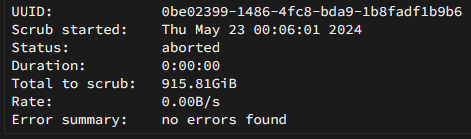
I've got ram back to recommended speeds of 3200. I found that it was at 4000 and I honestly don't remember setting it to 4000, I could have sworn I left it at 3600. To match the speed of the infinity fabric, or so I've read it helps performance/stability. Anyway, I ran scrub on the cache. And I don't see any indication of the server doing anything. Be aware the cache went into it's error state within a minute and scrub was ran while in error state. I see in the log: May 23 00:03:51 waffle ool www[23548]: /usr/local/emhttp/plugins/dynamix/scripts/btrfs_scrub 'start' '/mnt/cache' '' I don't see anything else and it's been several minutes. Here is what the scrub status block shows.
-
@JorgeBI've not had any issues with cache until I added that 2nd nvme. I also switched from xfs to btrfs for the cache drives. As far as I know I have not overclocked the RAM. I think the RAM was rated for 4000mhz but I've not been able to run it past whatever it is at right now (3666mhz? 3800?) I understand supported frequencies for the board and cpu, I'll adjust RAM to supported frequencies. How should I scrub and reset pool stats? Any downside to having the 2 nvme drives in the array along with the HDDs?
-
Having more issues with my cache drives. They're a 970 Evo and 970 Evo Plus in raid0. In the past the Evo Plus was getting zero-log corruptions and that was a simple command to fix along with an array restart. This all started when I issued a shutdown and changed the power strip the server was connected to. As far as I could tell the server was fully shut down before removing power. Right now I have appdata, system, and domains directories stored on the cache. I have a partial old backup of a VM on the array, and full backups of appdata on the array. No backup of system. I originally thought I would benefit from the cache drives, but really I only use it for the VM and quick docker container startups. My questions are; will my SSDs run full speed if they are adopted into the array? The array has a 4TB HDD parity drive. Second; How much do you believe is to be corrupted on the cache? Could I safely backup what left of the VM. I plan to move the entire VM image to the array as I am also having issues with the VM manager. Third; Is there anyway for me to fix the cache and continue current setup (though I still believe my best setup now is having the SSDs in the array)? The problems the bad cache drives are causing me: When I launch the VM I have it tells me it can't launch because the file system is read only. Right now VM manager is disabled while I trouble shoot the docker containers. I haven't tried launching the VM when the cache was in a good operating state yet. Docker stuff will run initially when unraid first boots. Docker containers will run fine for 5 minutes or up to about an hour. Once I get cache errors some of the containers will stop working while others will continue operating fine. While in an error state none of the containers will be able to restart, even the good ones, I get a generic server error or a code 403. Things of note: I'm aware of the low disk space. I'm currently removing old files to make room for the VM image. And I'm saving for more drives. I hear its possible to increase the parity drive size with some effort. Also, the parity drive has some SMART errors. I've run multiple deep scans and the errors have stopped. Still planning to replace this drive. The array is XFS waffle-diagnostics-20240521-1737.zip
-
I do have access to the ISO and I'm currently finishing backing up important files before I attempt fixes on the OS. I had URBackup running for some files but not all. My Windows 10 Pro VM is stored on my cache drive. The other day the Zero-Log corrupted again. I was able to rescue it as it was not the first time. However when starting up the VM, VNC would show Guest has not initialized display (yet). Again, seen this issue before and I fixed it in the past by creating a new VM template and manually referencing the old iso. However this time when windows boots I'm met with a BSOD that reads Bad System Config Info. Windows automatic repairs fail. Windows install disk repairs fail. There is one guide I followed. To use DISM and SFC to repair. I can't get the DISM commands to execute. Dism /Online /Cleanup-Image /RestoreHealth results in error 50. To fix that error I try dism /image:C: /cleanup-image /revertpendingactions which results in error 3 saying the image cannot be accessed. I've had to change the drive in the command from :😄 to :X: as I guess that's a recovery mode thing? As a result I'm greeted with error 2 instead. The rest of the search results to fix these errors include using software or tools not available in the recovery mode. I give up on DISM and try SFC now. SFC /scannow scans the disk and presents WIndows Resource Protection could not perform the requested operation. I try chkdsk /r next, this says Windows cannot run disk checking on this volume because it is write protected. Search results don't bring me to any solutions for this. Disk part says there are no disks listed. No partitions. The only volumes are the 2 ISO drives from the VM, ESD-ISO and virtio. I'm ready to write off the install and start fresh. I've backed up what I care about. But I hate giving up without exhausting all my options. If you'd like to give some things for me to try that would be neat.
-
Well the cache went unmountable again. The zero-log rescue command did bring it back again. But since the first time it's only been working for less than a day. Any idea to fix this? or should I backup my data and just wipe the cache pool and start fresh? It shouldn't be because of a full drive, it has 800gb free. Now I do have disk4 that has a duplicate of my VM vdisk. This drive is 80gb free I wonder if that is screwing up the cache pool.
-
I'll put this information to use. Hopefully I can prevent future screw ups on my part. Thanks again for the assistance. Y'all are great!

