





Giso
Members
-
Joined
-
Last visited
-
Hallo mgutt, danke für deine Antwort. Die cco Daten lagen wirklich ausserhalb von config. Ich habe es soweit hinbekommen Dank chatgbt das es erstmal wieder läuft und ich über Web auf nextcloud zugreifen kann und auch auf dem unraid auf die Dateien. Morgen mach ich noch feinarbeiten. Im Moment zeigt er mir noch nextcloud im docker als drittanbieter an und ein Web Zugang im picktogramm ist auch nicht zu sehen bzw kann ich auch noch nicht in die Einstellung für nexcloud im docker Mfg
-
Gibt es keinen Experten der sich das Problem mal ansehen kann?
-
Hallo zusammen, ich brauche Hilfe bei der Wiederherstellung meiner alten Nextcloud‑Installation auf Unraid. Ausgangslage: Unraid Version: 7.2.3 Nextcloud lief früher als Docker‑Container mit Image: lscr.io/linuxserver/nextcloud Nach einer Störung war der alte Container weg, ich habe Nextcloud vorübergehend außerhalb von Docker genutzt. Jetzt möchte ich wieder zurück zur Docker‑Variante mit dem linuxserver/nextcloud‑Image, die alten Daten und die alte Datenbank sollen weiterverwendet werden. Aktueller Stand: Neuer Container läuft mit: docker run -d \ --name=nextcloud \ --restart=unless-stopped \ -e PUID=99 \ -e PGID=100 \ -e TZ=Europe/Berlin \ -p 8080:80 \ -p 448:443 \ -v /mnt/user/appdata/nextcloud/:/config/ \ -v /mnt/user/nextcloud/:/data/ \ lscr.io/linuxserver/nextcloud:latest Webzugriff: https://MEINE-UNRAID-IP:448 Die Daten der Benutzer liegen in /mnt/user/nextcloud/ mit Unterordnern D..., G.., Kl... usw. (darin files, files_trashbin, uploads usw.). Konfiguration liegt in /mnt/user/appdata/nextcloud/config/. Ausschnitt aus config.php: php'dbtype' => 'mysql', 'dbname' => 'nextcloud', 'dbhost' => '192.168.xxx.xx:3306', 'dbport' => '', 'dbtableprefix' => 'oc_', 'mysql.utf8mb4' => true, 'dbuser' => 'nextcloud', Die Datenbank liegt also auf einem separaten MySQL/MariaDB‑Server (Host 192.168.xxx.xx, DB nextcloud, User nextcloud). Logauszug des neuen Containers (verkürzt): textLinuxserver.io version: 32.0.4-ls412 Initializing nextcloud 32.0.4.1 (this can take a while) ... Upgrading nextcloud from 32.0.3.2 ... Setting permissions Setting log level to debug Turned on maintenance mode Updating database schema Exception: Database error when running migration 33000Date20251209123503 for app core Index "mounts_user_root_path_index" does not exist on table "oc_mounts". Update failed Maintenance mode is kept active Resetting log level → Danach zeigt die Weboberfläche „Aktualisierung erforderlich“ bzw. Wartungsmodus. → occ‑Befehle im Container schlagen fehl, weil im Pfad kein occ gefunden wird. Ordnerstruktur im Container (docker exec -it nextcloud bash): text/config/ .migrations config.php.save data/ nginx/ php/ www/ /config/www/ index.html nextcloud/ /config/www/nextcloud/ apps/ config/ themes/ (KEIN occ, KEIN index.php, KEIN version.php etc.) Es sieht also so aus, als wären nur apps und config aus der alten Installation vorhanden, aber der eigentliche Nextcloud‑Core (PHP‑Dateien) fehlt oder wurde beim Versuch, neu zu installieren/zu updaten überschrieben. Was ich NICHT machen möchte: Keine Experimente direkt in der MySQL‑Datenbank ohne Anleitung. Keine Löschung der Daten in /mnt/user/nextcloud/ oder /mnt/user/appdata/nextcloud/config/. Kein weiteres „Herumprobieren“ mit zufälligen occ- oder SQL‑Befehlen. Was ich gerne erreichen möchte: Die bestehende Datenbank (nextcloud auf 192.168.xx.xx) weiterverwenden. Die bestehenden Daten im Share /mnt/user/nextcloud/ (Benutzerordner D..., G.., K... usw.) weiterverwenden. Einen sauberen linuxserver/nextcloud‑Container, der: wieder einen vollständigen Nextcloud‑Core unter /config/www/nextcloud hat, das Datenbank‑Schema korrekt auf den aktuellen Stand hebt (Fehler mit mounts_user_root_path_index behebt), und danach normal startet (Login der alten Benutzer möglich ist). Meine Frage an euch: Wie sollte ich konkret vorgehen, um den fehlenden Nextcloud‑Core nach /config/www/nextcloud zu bringen, ohne meine bestehende config und apps zu überschreiben? Welche genaue Nextcloud‑Version sollte ich dafür verwenden (passend zu 32.0.3.2 → 32.0.4.x)? Welcher tar/rsync‑Befehl ist hier empfohlen? Wie kann ich anschließend sicher die Datenbankmigration reparieren: z.B. mit occ db:add-missing-indices, occ maintenance:repair, occ upgrade – welche Befehle in welcher Reihenfolge sind hier sinnvoll, wenn der Fehler „Index mounts_user_root_path_index does not exist on table oc_mounts“ kommt? Gibt es ggf. ein bekanntes SQL‑Snippet, um diesen Index manuell auf der DB nextcloud anzulegen, falls occ erneut scheitert? Falls es sinnvoller ist: Würdet ihr eher eine frische Nextcloud‑Instanz (gleiche oder höhere Version) aufsetzen, diese mit derselben DB verbinden und dann occ upgrade laufen lassen? Oder würdet ihr einen „Rollback“ auf eine ältere Nextcloud‑Version empfehlen, die besser zum Datenbank‑Stand passt? Zusammenfassung: Alte Daten und DB sind noch da. Neuer linuxserver‑Container läuft, bricht aber beim DB‑Update ab. Nextcloud‑Core im Container ist unvollständig (kein occ). Ziel: Saubere Wiederherstellung mit vorhandener DB und Daten, ohne Datenverlust – brauche hier eine Schritt‑für‑Schritt‑Anleitung, insbesondere für das Neu-Einspielen des Cores und die richtige Reihenfolge der occ/SQL‑Befehle. Vielen Dank schon mal für jede Hilfe!
-
in welchen pfad befindet sich der Konfigurationsordner, ich boote eigentlich von einen Flash stick und da sind beide dateien vorhanden . oder verstehe ich da was falsch. bitte um genaue Anleitung Danke
-
Hallo Ich habe auch ein Update von Unraid Version 6.12.15 auf 7.2.3 durchgeführt und nun funtioniert die Communications Applikation nicht mehr, es werden keine Plugins oder apps angezeigt . Angeblich wäre es ein DNS Problem aber diese Auflösung funktioniert. Hat jemand eine Idee voran es liegen kann . Wenn ich zuruck auf Version 6.12.15 gehe funktioniert alles wieder, Danke Mfg
-
diese Installation info läuft bei mir auch duch, aber dann kommt eine Fehlermeldung und keine apps werden angezeigt. Fehlermeldung Download des Appfeeds fehlgeschlagen. das ganze fing nach den Update von 6.03 auf 7.1 an. ich komme einfach nicht weiter. Hatt jemand noch dieses Problem.
-
Hallo, Ich habe bereits die neue Version installiert. Gibt es ein Tool wo man genau die DNS Auflösung verfolgen kann bzw Konflikte beseitigt Igendwo muss doch das Problem liegen. Mfg Giso
-
Hallo Braindealer, das zurückspielen der Version hat bei mir leider nichts bewirkt
-
Hallo Braindealer, wie hast du CA auf die Version 2024-12-14 downgrade. Mfg
-
Hallo Alturismo, du hattest den Finger drauf, habe den Internetzugang über mobil Telefon hergestellt und die Apps in Unraid wurden sofort angezeigt ( und das mehrmal ausprobiert). Nun stell ich mir die Frage welche Einstellungen muß ich machen , dass ich weiterhin über die Fritzbox 7590 DSL Anschluß die Apps angezeigt bekomme. MFG Giso
-
Da muss ich mal schauen wie das bei der fritzbox 7590 geht. Mfg
-
Hallo Gemeinde, erstmal vielen Dank das ihr euch mein Problem annehmt. Wie ich bereits geschrieben, ich habe die Netzwerk Einstellung im Unraid von manuell auf statisch gesetzt, die DNS Einstellungen mit und ohne IP vom Fritzbox Router eingetragen. Dauerhaft hat alles nicht funktioniert um die Apps aus der CA anzuzeigen. Wenn ich den Cache vom Firefox Browser gelöscht und unraid neu gestartet habe.,dann hatte ich auch schon mal Glück ,dass die Apps aus AC angezeigt wurden. Das klappt aber nicht immer, auch wenn ich die gleichen Schritte ausführe. Wie in der ersten Post bereits gesagt, dass ganze trat erst auf als ich unraid von der 6. Version auf 7.01 und mein Konto von Basic auf pro geändert habe. Ich werde am Wochenende mal ein usb Stick mit Unraid Testversion erstellen und mal sehen was passiert. Mfg Giso
-
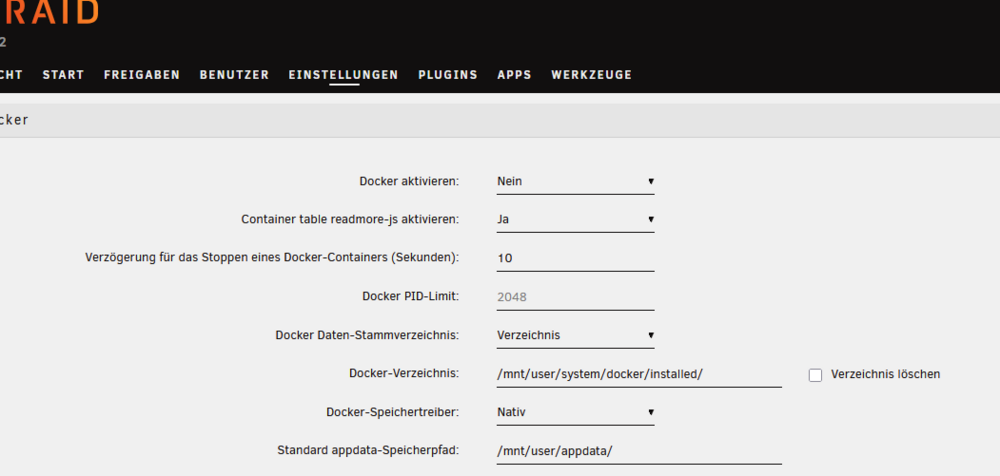
ich habe den docker dienst und die VM dienste auf nein gesetzt.
-
hallo Gemeinde, niemand eine Lösung für das o.g. Problem. Mfg
-
Hallo, ich habe jetzt so gut wie alles probiert. Fritzbox neues firmenware aufgespielt, cach geleert. In unraid netzwerk statisch eingestellt DNS wie bei der Fehlermeldung geändert. Alles hat nicht zum Erfolg geführt. Das komisch ist, dass manchmal die App. aus der AC angezeigt werden aber sobald ich aus den Reiter app wieder raus und neu öffne kommt der Fehler wieder. Im docker läuft ein nginx proxy manager kann von dort auch der Fehler auftreten. Mfg Giso

