





Everything posted by Thomas74
-
Thanks - I was afraid of that.
-
I recently switch from image to directory for dockers binaries, and today I wanted to move this directory to a different disk. - I disabled docker service - Used the browser file manager to move the binaries folder to a new drive - Updated the docker directory field with the new path - Started docker Only to get the following in my syslog: Aug 27 01:29:27 Algarheim rc.docker: PostgreSQL_Immich: Error response from daemon: error creating zfs mount: mount dockers/b4a9c54da4bcb37602736cae0ed3ccf67b8eacdf9af413eb9b67c4377a8e0fc7:/var/lib/docker/zfs/graph/b4a9c54da4bcb37602736cae0ed3ccf67b8eacdf9af413eb9b67c4377a8e0fc7: no such file or directory Aug 27 01:29:27 Algarheim rc.docker: Error: failed to start containers: PostgreSQL_Immich Aug 27 01:29:27 Algarheim rc.docker: immich: Error response from daemon: error creating zfs mount: mount dockers/cf5a190a69eb40fdf7e399223a083481920ed5f593faff03ed37ad50bfa85025:/var/lib/docker/zfs/graph/cf5a190a69eb40fdf7e399223a083481920ed5f593faff03ed37ad50bfa85025: no such file or directory Aug 27 01:29:27 Algarheim rc.docker: Error: failed to start containers: immich Aug 27 01:29:27 Algarheim rc.docker: mosquitto: Error response from daemon: error creating zfs mount: mount dockers/792caabe3e2806522d8e077d92f1bf61fd4d0cc89b3f6dada7a5cef4dcc35e1e:/var/lib/docker/zfs/graph/792caabe3e2806522d8e077d92f1bf61fd4d0cc89b3f6dada7a5cef4dcc35e1e: no such file or directory Aug 27 01:29:27 Algarheim rc.docker: Error: failed to start containers: mosquitto Aug 27 01:29:27 Algarheim rc.docker: MariaDB-Official: Error response from daemon: error creating zfs mount: mount dockers/009c98737f6609d55762ec5b27ae08e33de6828baf0cfb76be4ab4f0af176a9d:/var/lib/docker/zfs/graph/009c98737f6609d55762ec5b27ae08e33de6828baf0cfb76be4ab4f0af176a9d: no such file or directory Aug 27 01:29:27 Algarheim rc.docker: Error: failed to start containers: MariaDB-Official Aug 27 01:29:27 Algarheim rc.docker: homeassistant: Error response from daemon: error creating zfs mount: mount dockers/fdfc78fb4d41ca9896717082937712e9c471924e8c95b73ffb703ddc67aea3ed:/var/lib/docker/zfs/graph/fdfc78fb4d41ca9896717082937712e9c471924e8c95b73ffb703ddc67aea3ed: no such file or directory Aug 27 01:29:27 Algarheim rc.docker: Error: failed to start containers: homeassistant Aug 27 01:29:28 Algarheim rc.docker: PhotoPrism: Error response from daemon: error creating zfs mount: mount dockers/dfdc7fd4529f593adc9d3b38d2d2a1aa1d653b6453609f9f84565915175db695:/var/lib/docker/zfs/graph/dfdc7fd4529f593adc9d3b38d2d2a1aa1d653b6453609f9f84565915175db695: no such file or directory Aug 27 01:29:28 Algarheim rc.docker: Error: failed to start containers: PhotoPrism Aug 27 01:29:28 Algarheim rc.docker: nextcloud: Error response from daemon: error creating zfs mount: mount dockers/4e8eda93860de0484f0577e4750f465f053ca2673c1ef86078825173287321cb:/var/lib/docker/zfs/graph/4e8eda93860de0484f0577e4750f465f053ca2673c1ef86078825173287321cb: no such file or directory Aug 27 01:29:28 Algarheim rc.docker: Error: failed to start containers: nextcloud Aug 27 01:29:28 Algarheim rc.docker: Appdaemon: Error response from daemon: error creating zfs mount: mount dockers/35f459b40e343b19d0244470751aea1d2b4d9eb3a0b3067580a9ef18561d9768:/var/lib/docker/zfs/graph/35f459b40e343b19d0244470751aea1d2b4d9eb3a0b3067580a9ef18561d9768: no such file or directory Should I not be able to do what I am doing? Regards, Thomas
-
Aha ... Makes sense.
-
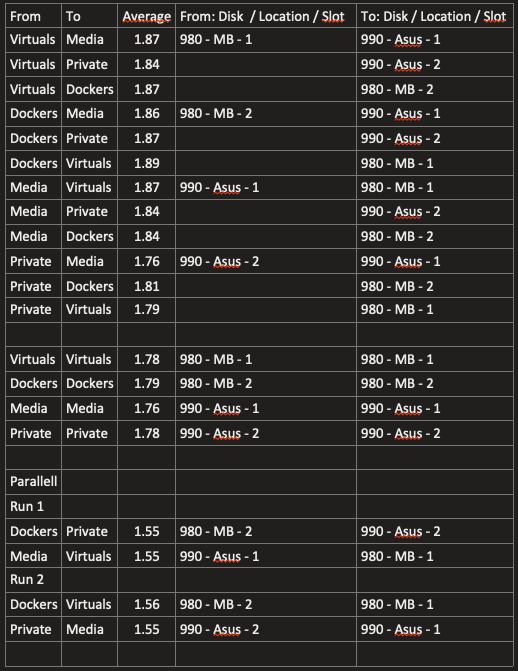
A more structured test using a 128 GB file: I am not sure I follow your argument that the cpu is the bottle neck because when I run two pv's in parallell I am getting an average of 3 GiB/s throughput? Watching htop I can see that the system is hitting 4 GB/s in disk R/W pr pv job. Wouldn't this suggest something else is capping?
-
Good point on rsync, and I've redone with pv as suggested. Giving the following observations: 1.79 GiB/s between the 990's (on the asus card) 1.19 GiB/s between the 980's (on the mb, one of which will be capped at gen3) 1.86 GiB/s from one 980 to one 990 Better then rsync, but I am not getting much more effect from the Asus and the 990's.



-
Thanks, and a some what embarrassing question. I got my head arround understanding this
-
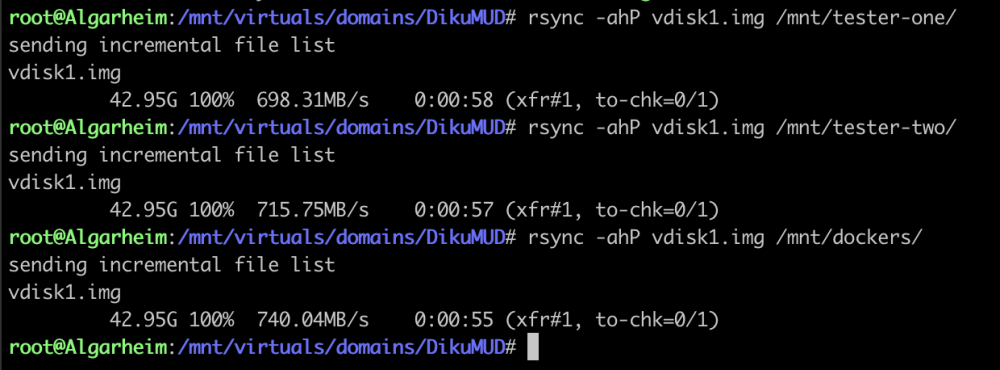
Hi. I have a rig with multiple M.2's and I must admit I was expecting a better throughput than what I am seeing now. I have the following rig: ASRock X570 Pro4 Ryzen 5800X 64 GB ram (out of which 50% is allocated to zfs via zfs.conf override) Graphics in Slot 3 Asus Hyper M.2 x16 Gen 4 in slot 1 (bifurcated 4x4) 2 x Samsung 990 Pro (in slot 1 and 2 on Asus) Samsung 980 Pro (in slot 1 on mb) Samsung 980 Pro (in slot 2 on mb) Now the response I'm getting from the system is very good, but when I tested the rig just now I belive I should be seeing better speeds. The following screenshot shows the following rsync jobs: 980-Slot-1 to 990-Slot-1 980-Slot-1 to 990-Slot-2 980-Slot-1 to 980-Slot-2 When testing all combinations of copying between the M.2 the numbers are almost identical (to within 1%). The screenshot shows a test with disks formated with zfs-encrypted (with compression), but I have mirrored the tests using xfs with the same results. Are there any hardware limitations I'm hitting or is this the expected level? //Thomas
-
The keyfile present in /root is identical to the one stored on my desktop. Loading from /root/ it fails, but when given the file from my desktop it starts. I have copied the contents from my desktop file and echo'ed into the keyfile - still the same.
-
Hi people. I stumbled over Spaceinvader One's latest videos on ZFS last week and I have now switch to ZFS on both my cache pools and I have updated one of my array drives to ZFS. It all works soooo smoothly and with snapshotting it gets real easy to make blunders I do have one issue atm: I have created a raidz of two drives (for longterm keeping of photos and documents) and yesterday I ran Unbalanced on the Photos share and copied (or moved?) all my photos from the array to the new raidz pool. I have not yet converted this folder on the raidz to a dataset. I then switched the primary storage on the share to the new raidz location and no secondary - and now it seems I have files both on the array and in the new raidz pool. Is this correct? I want to ask before I do anything else because I have lost data in these situations before Can I delete the data in /mnt/user/Photos?
-
Sorry for necro'ing this, but I have this exact problem. Could you share your solution?
-
Well that didn't take long: These are the last lines of the syslog: Dec 13 20:06:11 Algarheim emhttpd: spinning down /dev/sdi Dec 13 20:12:59 Algarheim kernel: docker0: port 1(vethd91a85e) entered disabled state Dec 13 20:12:59 Algarheim kernel: veth8207b51: renamed from eth0 Dec 13 20:12:59 Algarheim kernel: docker0: port 1(vethd91a85e) entered disabled state Dec 13 20:12:59 Algarheim kernel: device vethd91a85e left promiscuous mode Dec 13 20:12:59 Algarheim kernel: docker0: port 1(vethd91a85e) entered disabled state Dec 13 20:12:59 Algarheim kernel: docker0: port 1(vethee0e3aa) entered blocking state Dec 13 20:12:59 Algarheim kernel: docker0: port 1(vethee0e3aa) entered disabled state Dec 13 20:12:59 Algarheim kernel: device vethee0e3aa entered promiscuous mode Dec 13 20:12:59 Algarheim kernel: docker0: port 1(vethee0e3aa) entered blocking state Dec 13 20:12:59 Algarheim kernel: docker0: port 1(vethee0e3aa) entered forwarding state Dec 13 20:12:59 Algarheim kernel: eth0: renamed from veth52ba7c3 Dec 13 20:12:59 Algarheim kernel: IPv6: ADDRCONF(NETDEV_CHANGE): vethee0e3aa: link becomes ready
-
Thanks.
-
Thanks. I have changed the ssh config (some remnants of an old debug session I presume) - and will patiently await the next failure. Is there anyway to extend the log?
-
Hi. System has been running stable for many months now, and over the last two weeks I've had two lock ups. As I am running headless I cannot see any core messages on the screen, but after last lock-up I mirrored syslog to the usb drive. I do fear a hardware issue and would appreciate any help in nailing it down. Regards //Thomas algarheim-diagnostics-20231213-1938.zip
-
Will you be implementing a feature that will update all images within a folder?
-
You were indeed correct. Rearranged one and the folders popped up! Thank you so much.
-
Thank you so much for picking up this project. I think many rely heavily on this plugin. I am running 6.12.3 and I have an issue when creating a new folder. This is what I've done: Remove old plugin Installed yours Created a new folder an added MariaDB to it When I refresh my Docker-page the folder is not visible (I have rebooted Unraid, cleared my cache and tried a different browser) If I try to create a new one MariaDB is not available to be added (as I assume it is already in a folder). Is there something on my system that is failing since I cannot see folders?
-
Recreated docker image. Could not install any image (same error on all), and yes - those were running. But - the issue has been found : I run a couple of docker images on two pi's and I have set them up as contexts. Last week I changed some settings on them and I forgot to reset the context to "default". Hence everything I was trying to do from the dashboard was executed on one of my pi's. Lessons learned to remember to reset context!!!
-
None of these images are showing in the dashboard, and "zwave-js-ui" was removed many months ago. There seem to be disconnect between the Unraid docker service and "some other" docker service.
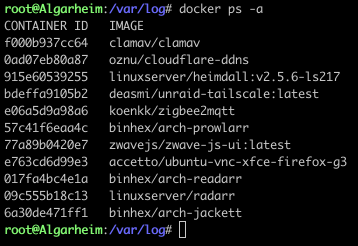 Executed docker stop on them all and recreated docker.img, then rebooted. Still getting "Error response from daemon: No such container" when installing a previous image. Please advise as I am unable to restore any of my services.Can someone explain how these can be running?
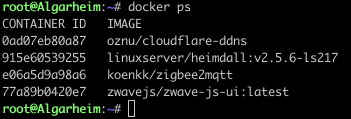 Deleted the docker.img, recreated it and when selecting just one app to be reinstalled (pihole) the first screen shows it downloading the image, and the text below it states "cannot find local image". Then this image pops up.
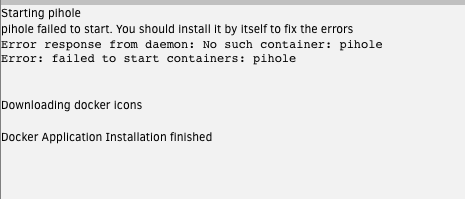 Good point, but no changes to the file since February and copies properly to other places, so no read errors. (Same for many of the other images also missing)Good. But how do we explain i.e. Tailscale image already running but not being present on the dashboard?





