





Everything posted by Thomas74
-
algarheim-diagnostics-20230601-1337.zip
-
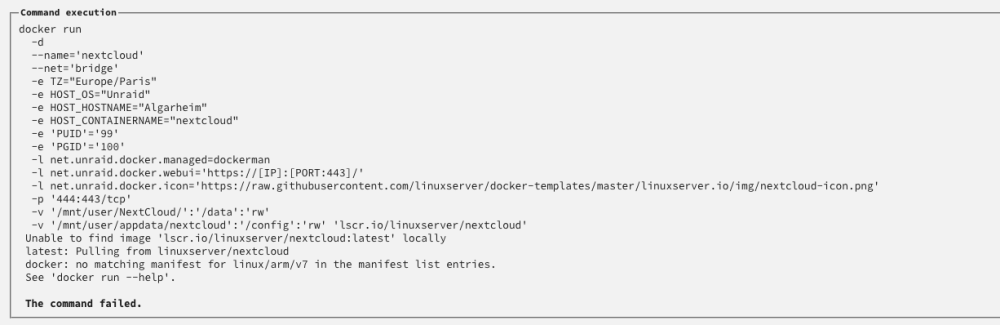
Woke up today and found that many of my dockers had been removed. When trying to reinstall I am getting the following error: No changes done on my side running 6.12.rc6 so any insights would be appreciated. This happens for multiple images. I am also seeing this error:

-
With the same symptoms (but I have no VM's) I stopped VM Manager and the Dashboard works again. I am running 6.12 rc6
-
Multiple reboots, yes. This started as a M2-issue, but now it's also hitting the array which I find strange. Planning on file system check, but need to let copy job from M2 finish.
-
Update: Were able to mount the M2 drive but whilst copying from that drive to the array I am now getting this error: Mar 24 09:47:02 Algarheim emhttpd: read SMART /dev/sdc Mar 24 09:47:06 Algarheim kernel: XFS (md4p1): Metadata corruption detected at xfs_dinode_verify+0xa0/0x732 [xfs], inode 0x11cb6dc8a dinode Mar 24 09:47:06 Algarheim kernel: XFS (md4p1): Unmount and run xfs_repair Mar 24 09:47:06 Algarheim kernel: XFS (md4p1): First 128 bytes of corrupted metadata buffer: Mar 24 09:47:06 Algarheim kernel: 00000000: 49 4e 81 f8 03 02 00 00 00 00 00 63 00 00 00 64 IN.........c...d Mar 24 09:47:06 Algarheim kernel: 00000010: 00 00 00 01 00 00 00 00 00 00 00 00 00 00 00 00 ................ Mar 24 09:47:06 Algarheim kernel: 00000020: 61 24 bd 9f 21 bd a9 64 55 a7 bc 8e 00 00 00 00 a$..!..dU....... Mar 24 09:47:06 Algarheim kernel: 00000030: 64 1c c8 ec 0d ee 51 79 00 00 00 00 00 19 df e2 d.....Qy........ Mar 24 09:47:06 Algarheim kernel: 00000040: 00 00 00 00 00 00 01 9e 00 00 00 00 00 00 00 01 ................ Mar 24 09:47:06 Algarheim kernel: 00000050: 00 00 00 02 00 00 00 00 00 00 00 00 83 a8 d9 b8 ................ Mar 24 09:47:06 Algarheim kernel: 00000060: ff ff ff ff 44 f6 0a 69 00 00 00 00 00 00 6a 9b ....D..i......j. Mar 24 09:47:06 Algarheim kernel: 00000070: 00 00 00 46 00 0e 66 b9 00 00 00 00 00 00 00 00 ...F..f......... Mar 24 09:47:12 Algarheim emhttpd: read SMART /dev/sdf Mar 24 09:47:15 Algarheim kernel: XFS (md4p1): Metadata corruption detected at xfs_dinode_verify+0xa0/0x732 [xfs], inode 0x11cb6dc8a dinode Mar 24 09:47:15 Algarheim kernel: XFS (md4p1): Unmount and run xfs_repair Mar 24 09:47:15 Algarheim kernel: XFS (md4p1): First 128 bytes of corrupted metadata buffer: Mar 24 09:47:15 Algarheim kernel: 00000000: 49 4e 81 f8 03 02 00 00 00 00 00 63 00 00 00 64 IN.........c...d Mar 24 09:47:15 Algarheim kernel: 00000010: 00 00 00 01 00 00 00 00 00 00 00 00 00 00 00 00 ................ Mar 24 09:47:15 Algarheim kernel: 00000020: 61 24 bd 9f 21 bd a9 64 55 a7 bc 8e 00 00 00 00 a$..!..dU....... Mar 24 09:47:15 Algarheim kernel: 00000030: 64 1c c8 ec 0d ee 51 79 00 00 00 00 00 19 df e2 d.....Qy........ Mar 24 09:47:15 Algarheim kernel: 00000040: 00 00 00 00 00 00 01 9e 00 00 00 00 00 00 00 01 ................ Mar 24 09:47:15 Algarheim kernel: 00000050: 00 00 00 02 00 00 00 00 00 00 00 00 83 a8 d9 b8 ................ Mar 24 09:47:15 Algarheim kernel: 00000060: ff ff ff ff 44 f6 0a 69 00 00 00 00 00 00 6a 9b ....D..i......j. Mar 24 09:47:15 Algarheim kernel: 00000070: 00 00 00 46 00 0e 66 b9 00 00 00 00 00 00 00 00 ...F..f......... Mar 24 09:47:30 Algarheim emhttpd: read SMART /dev/sde Mar 24 09:47:30 Algarheim emhttpd: read SMART /dev/sdb Mar 24 09:49:50 Algarheim kernel: mdcmd (59): set md_write_method 1 Mar 24 09:49:50 Algarheim kernel:
-
I really need some help now. Servers been running fine for nearly two years and today I got a disk error on my Samsung 980 M2. I kinda expected it since I have two and the other one failed a couple of months back. It was replaced and my server kept on running. Today I experienced a similar error on my second 980 (all though not identical - many loop2 errors and corruption messages) so I switched my docker.img over to the newly replaced M2 (now a 980 Pro) and thought everything was alright. Now all of a sudden I am getting errors on my 980 Pro as well (disk about 2 months old) and after a reboot it just became unmountable. I have attached the diag and would like to point out that me discovering the initial disk error was this afternoon. I have since upgraded to 6.12.rc2, but I am don't think that is the problem. Hopefully you can find something. Regards, Thomas unraid-20230324-0003.zip
-
@chvb Any chance for an image update for Kerio?
-
Spoke too soon it seems. Fail2ban are correctly banning IPs, but doing so within the container, and not on Unraid. Advice?
-
This fact never stop amazing me: Literarily 15 seconds after posting this, a thought hit me and I went into the container template and changed from bridge to host! Eureka! How come the answer seem to arrive just after "you've given up".
-
I am sure I must be missing something, but so far I have set up according to your instructions and f2b is reporting that my test ip gets banned. I can however still access the site. Looking a bit further I can see that f2b docker host is banning the IP within the f2b container, and not in the Unraid iptables. Wouldn't this indicate that the ip never would get blocked, as the actual traffic does not hit the f2b container? Or - as a I'm sure - I've missed something crucial.
-
Answering my own question: When using a variable as per their email it works as expected.
-
Yeah, I know. They are only letting the actual sponsor know how via an email. Suffice to say you have to pass a switch at startup, but when supplying this switch it fails to start on unraid.
-
PhotoPrism: is a server-based application for browsing, organizing and sharing your personal photo collection. Is there any way to let the docker image know that you are a sponsor?
-
Closing in on 48 hours stable since removing corefreq. Fingers crossed.
-
Adding to my investigations: those loglines seem to be related to the corefreq addon and since my cpu is not on their list I have removed the plugin. Could this perhaps have contributed to my lock-ups?
-
Ah... correct. I have attached the full syslog here containing the logging before the lock-up. I have run a full pass with memtest once and I have removed 1 ram chip at a time when a lock-up happens. Basically rotating all ram. Same result. I have also run with and without overclocking. syslog.tar.gz
-
Hi. Been running a Ryzen 5600G on ROG Strix 570-F for a while now and I'm experiencing random lock-ups where I have to hard kill the server to get it back up. Luckily - I've recovered every singel time speaking volumes of the robustness of Unraid. I do however have to try to find the cause and I have now reduced the amount of dockers to a minimum (Plex, MariaDB and Mosquitto) and I am running just 1 vm (Home Assistant). Furthermore I have reset the bios to default and removed all changes to Unraid. I have also upgraded to 6.10-rc2. Whilst waiting for a lock-up I peeked into the syslog and found some strange logging between Dec 18 00:53:02 and 01:44:40 (right before it locked-up last time) which I hope you guys could help me understand. (Diags attached) Any other insight into why my rig is not stable would be welcomed. For the record I've run a full pass with the latest memtest and I have replaced the motherboard. Hopefully something will pop up. //UlfThomas algarheim-diagnostics-20211218-2053.zip
-
I have this board and I’m having stability issues. Where is the setting for the idle control? Cannot find it.
-
Would this indicate that I should revert back to rc1?
-
Interresting
-
Tested with the above command whilst extracting sensor data. It does indeed report increasing temperatures: Composite: +42.9°C (low = -273.1°C, high = +81.8°C) Sensor 1: +42.9°C (low = -273.1°C, high = +65261.8°C) Sensor 2: +46.9°C (low = -273.1°C, high = +65261.8°C) Composite: +43.9°C (low = -273.1°C, high = +81.8°C) Sensor 1: +43.9°C (low = -273.1°C, high = +65261.8°C) Sensor 2: +52.9°C (low = -273.1°C, high = +65261.8°C) Composite: +43.9°C (low = -273.1°C, high = +81.8°C) Sensor 1: +43.9°C (low = -273.1°C, high = +65261.8°C) Sensor 2: +53.9°C (low = -273.1°C, high = +65261.8°C) Composite: +43.9°C (low = -273.1°C, high = +81.8°C) Sensor 1: +43.9°C (low = -273.1°C, high = +65261.8°C) Sensor 2: +54.9°C (low = -273.1°C, high = +65261.8°C) Composite: +43.9°C (low = -273.1°C, high = +81.8°C) Sensor 1: +43.9°C (low = -273.1°C, high = +65261.8°C) Sensor 2: +54.9°C (low = -273.1°C, high = +65261.8°C) Composite: +43.9°C (low = -273.1°C, high = +81.8°C) Sensor 1: +43.9°C (low = -273.1°C, high = +65261.8°C) Sensor 2: +46.9°C (low = -273.1°C, high = +65261.8°C)
-
Will perform tests later today. This is the output of 'sensors'. amdgpu-pci-0a00 Adapter: PCI adapter vddgfx: 906.00 mV vddnb: 993.00 mV edge: +33.0°C power1: 1000.00 uW nvme-pci-0300 Adapter: PCI adapter Composite: +41.9°C (low = -273.1°C, high = +81.8°C) (crit = +84.8°C) Sensor 1: +41.9°C (low = -273.1°C, high = +65261.8°C) Sensor 2: +42.9°C (low = -273.1°C, high = +65261.8°C) nct6798-isa-0290 Adapter: ISA adapter in0: 1.15 V (min = +0.00 V, max = +1.74 V) in1: 1000.00 mV (min = +0.00 V, max = +0.00 V) ALARM in2: 3.38 V (min = +0.00 V, max = +0.00 V) ALARM in3: 3.31 V (min = +0.00 V, max = +0.00 V) ALARM in4: 1.01 V (min = +0.00 V, max = +0.00 V) ALARM in5: 2.04 V (min = +0.00 V, max = +0.00 V) ALARM in6: 360.00 mV (min = +0.00 V, max = +0.00 V) ALARM in7: 3.38 V (min = +0.00 V, max = +0.00 V) ALARM in8: 3.33 V (min = +0.00 V, max = +0.00 V) ALARM in9: 896.00 mV (min = +0.00 V, max = +0.00 V) ALARM in10: 1.02 V (min = +0.00 V, max = +0.00 V) ALARM in11: 496.00 mV (min = +0.00 V, max = +0.00 V) ALARM in12: 1.02 V (min = +0.00 V, max = +0.00 V) ALARM in13: 392.00 mV (min = +0.00 V, max = +0.00 V) ALARM in14: 328.00 mV (min = +0.00 V, max = +0.00 V) ALARM Array Fan: 463 RPM (min = 0 RPM) Array Fan: 1124 RPM (min = 0 RPM) SYSTIN: -62.0°C (high = +80.0°C, hyst = +75.0°C) sensor = thermistor CPU Temp: +30.5°C (high = +80.0°C, hyst = +75.0°C) sensor = thermistor AUXTIN0: +79.0°C sensor = thermistor AUXTIN1: -62.0°C sensor = thermistor MB Temp: +26.0°C sensor = thermistor AUXTIN3: +84.0°C sensor = thermistor PECI Agent 0 Calibration: +32.5°C intrusion0: ALARM intrusion1: ALARM beep_enable: disabled nvme-pci-0900 Adapter: PCI adapter Composite: +31.9°C (low = -273.1°C, high = +81.8°C) (crit = +84.8°C) Sensor 1: +31.9°C (low = -273.1°C, high = +65261.8°C) Sensor 2: +34.9°C (low = -273.1°C, high = +65261.8°C)
-
Any suggestions as to how I would do this? Just plain copy jobs?
-
Indeed - which leads me to speculate that it might be a misread and not an actual temp reading perhaps?
-
Confirming the same: Running new dual m2’s (one for docker and one for vm’s) and they are both reporting 84 degree spikes. I have had no such reports on rc1, but several a day after rc2. They are both heat sinked and operates in the 35-42 range. Even more strange is that it always spikes directly to 84 - never more, never less - before normalizing. I’m running a Ryzen 5600G rig on an Asus ROG Strix X570-F board. Attaching the latest log entries: 08-11-2021 08:11 Unraid Dockers disk message Notice - Dockers disk returned to normal temperature Samsung_SSD_980_1TB_S649NF0R675515B (nvme1n1) normal 08-11-2021 07:39 Unraid Dockers disk temperature Alert - Dockers disk overheated (84 C) Samsung_SSD_980_1TB_S649NF0R675515B (nvme1n1) alert 08-11-2021 01:27 Unraid Virtuals disk message Notice - Virtuals disk returned to normal temperature Samsung_SSD_980_1TB_S649NF0R675513Z (nvme0n1) normal 08-11-2021 01:27 Unraid Dockers disk message Notice - Dockers disk returned to normal temperature Samsung_SSD_980_1TB_S649NF0R675515B (nvme1n1) normal 08-11-2021 00:56 Unraid Dockers disk temperature Alert - Dockers disk overheated (84 C) Samsung_SSD_980_1TB_S649NF0R675515B (nvme1n1) alert 07-11-2021 23:54 Unraid Virtuals disk temperature Alert - Virtuals disk overheated (84 C) Samsung_SSD_980_1TB_S649NF0R675513Z (nvme0n1) alert 07-11-2021 22:53 Unraid Virtuals disk message Notice - Virtuals disk returned to normal temperature Samsung_SSD_980_1TB_S649NF0R675513Z (nvme0n1) normal 07-11-2021 22:22 Unraid Virtuals disk temperature Alert - Virtuals disk overheated (84 C) Samsung_SSD_980_1TB_S649NF0R675513Z (nvme0n1) alert 07-11-2021 20:21 Unraid Dockers disk message Notice - Dockers disk returned to normal temperature Samsung_SSD_980_1TB_S649NF0R675515B (nvme1n1) normal 07-11-2021 19:50 Unraid Dockers disk temperature Alert - Dockers disk overheated (84 C) Samsung_SSD_980_1TB_S649NF0R675515B (nvme1n1) alert 07-11-2021 17:49 Unraid Virtuals disk message Notice - Virtuals disk returned to normal temperature Samsung_SSD_980_1TB_S649NF0R675513Z (nvme0n1) normal 07-11-2021 16:18 Unraid Virtuals disk temperature Alert - Virtuals disk overheated (84 C) Samsung_SSD_980_1TB_S649NF0R675513Z (nvme0n1) alert //UlfThomas


