





wildfire305
Members
-
Joined
-
Last visited
-
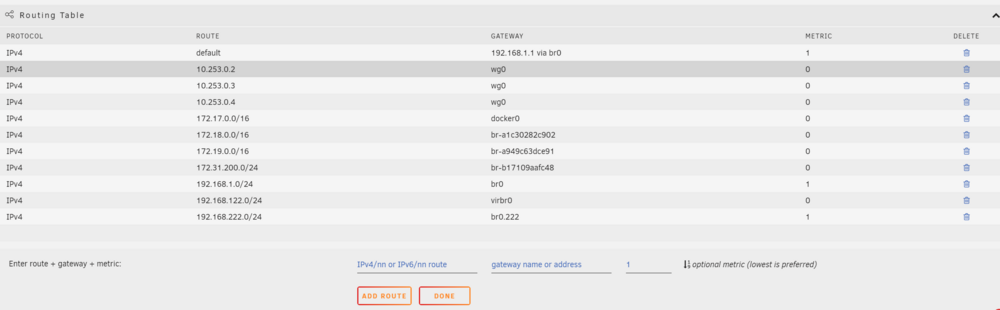
Update: for future generations who may arrive here looking for the same solution. The custom routing table is not maintained or persistent after reboot. I used the userscripts plugin to add this command at start of array. #!/bin/bash ip route add 192.168.222.0/24 dev br0.222
-
At the very least it should have a notice that they are not persistent. I just found this out the hard way and my search led me hear to a 5 year old post.
-
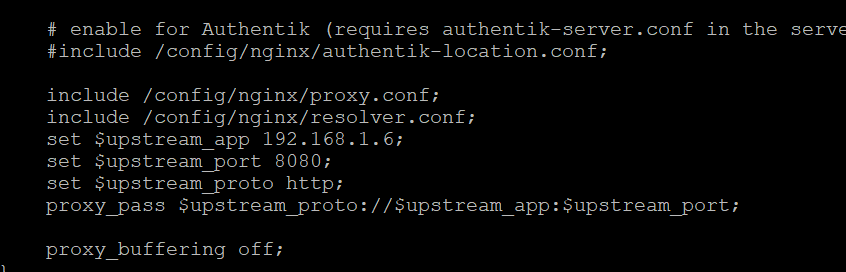
Okay I did it! I put apache guacamole in the proxynet I configured swag to look at that docker for the service. On the guacamole.subdomain.conf file Then I added this: at the end of the routing table in the settings -> network Now I can access guac at guac.myverysecretdomainname.org. In turn the routing table was the key to allow the guac docker to talk to the VM on the separate vlan

-
I did try the --net proxynet - it didn't seem to like that.

-
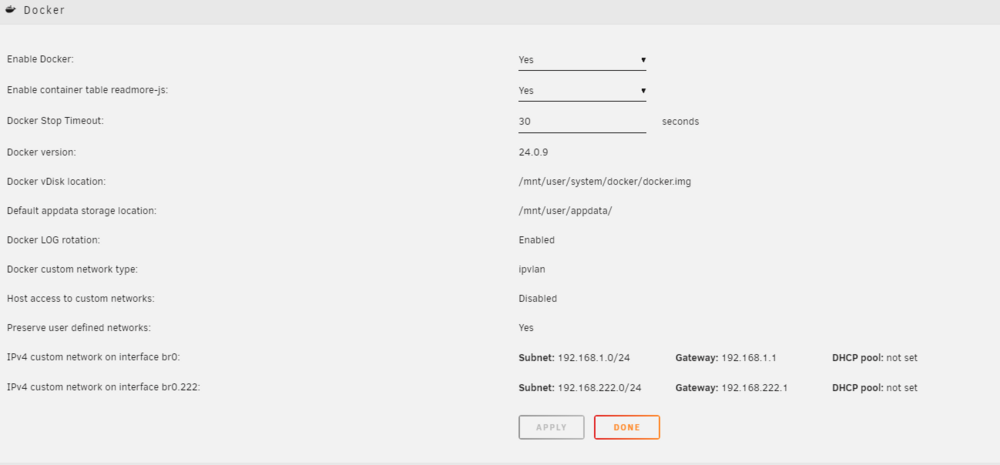
Here is the docker networking settings I am currently using. I switched from the old default macvlan to ipvlan as directed a while back.
-
I really appreciate your help. I have a lot to review. I will post my advanced network config when I have a minute. Would a cheating way be to add an additional swag container on the vlan 222 and route requests to it at the router level work? If that method even works, it probably wastes resources and isn't scalable, but on a home server...scale isn't that important.
-
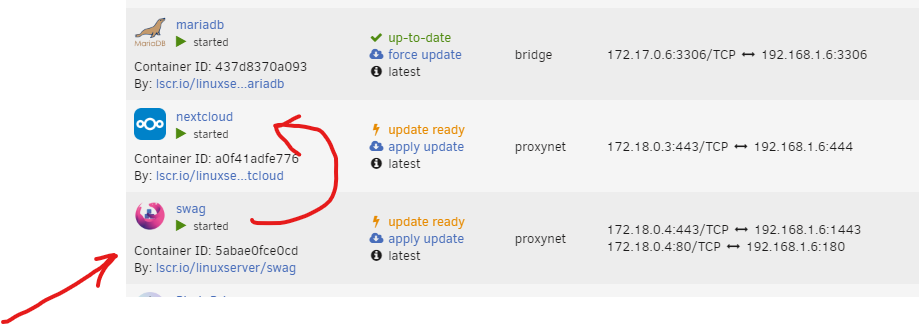
in the above example requests to nextcloud.mydomain.org are routed through swag into nextcloud. The swag container has access to nextcloud container. All of my domain routing hits the swag container. How do I get traffic from swag at vms.mydomain.org through apacheguacamole and into the vm (on separate vlan). I currently have apaceguacamole assigned to the other vlan and I was able to access the vm on that vlan from another computer on that vlan. from the console of the swag container I am unable to ping the apacheguacamole container (expected). I assume, but haven't tried to just put the IP address for the guac container in the swag proxy.confs file for apacheguacamole and see if it works. Will that actually work? I think I'm missing a bridge or firewall rule or something to make the connection between these two. Or is the correct answer a second swag container on the vlan answering requests to that subdomain?

-
I have that set up already using swag container. But I don't know how to bridge the gap between swag on one docker network to Apache guacamole on a separate vlan
-
What type of connection do you have to these drives? I have a couple of servers with raid controllers flashed to IT mode and use 8087 to 4 SATA connectors. I have had two of those special SATA cables fail. I have never found any of those cables that I felt were good quality. They usually throw crc failures in SMART data on the disks when they fail.
-
Hi all, I have successfully set up my first domain and I'm running several services outside of my network through swag. There is one item that intrigues me and I need a little help with direction. I have successfully set up a Windows vm with a program that quite a few of my friends want to use. It is a program that doesn't require Internet and is based locally on the windows vm. I have also set up Apache guacamole and can easily connect to that vm. The next step I completed was isolation of the vm and Apache guacamole docker onto their own vlan to prevent access to my local home network. So it looks like this: home network=192.168.1.x separate vlan 222 for vm and Apache guacamole=192.168.222.x How do I connect clients using a subdomain (i.e. vms.domain.org) to Apache guacamole on a separate vlan using my existing Swag setup (set up on proxynet using spaceinvaderones instructions)? I'm missing the step or process or what I even need to do to "build a bridge" between the two containers swag on the one network and Apache guacamole on the other. I have no issue configuring swag for other dockers on the same network, and have passed through many services this way. I have a unifi router if that information helps and that is controlling the vlan. I have a filtering rule to cut the vm off from the Internet. The vlan it is on is already isolated from the main network (needed to prevent any access from the vm to home network). So in summary, I want to route all traffic from vms.domain.org to Apache guacamole serving vms on a separate vlan through an existing swag container that is already servicing the domain requests.
-
This worked on two of the three servers. I added a reboot in between disable/enable. The third one was resolved by watching the disks that woke up from manual spin down command with find . -mmin -30 This showed that some metadata on existing old files was being modified by an hourly rclone process. Not sure why OneDrive has started modifying metadata on files, but since it gets modified, rclone syncs the changes. If there are no changes the disks don't wake up.
-
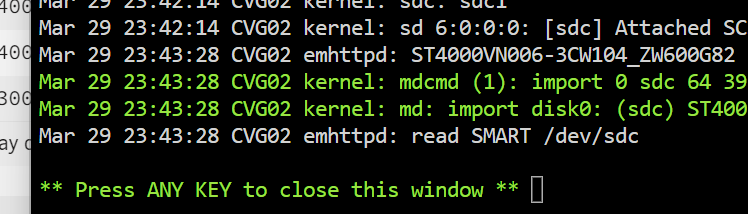
This is what I mean when the command to sleep the disks isn't showing up. Usually if I have something keeping the disks awake, I see a lot of "spinning down" followed by "read SMART" when the disks are awoken by the process reading files. I'm not seeing the spinning down and the reads/writes are not increasing in count.
-
The one server I was considering downgrading (cvg05) has now started sleeping on its own. That server only has an rsnapshot container running and a speed test container. The other containers are not used unless the primary server is down and they are started manually. It has no external shares and it pulls backups through ssh from other servers on the network once a day and has no external shares enabled. Nothing is able to write to it by design because it is a backup server, therefore the disks sleep after the backups complete and they stay asleep until the next daily backup. It uses a small SSD cache for appdata, domains, system. It has one VM that boots debian and displays a webpage on a monitor. The other two servers disks remain awake and the drives are not being commanded to sleep according to the disk logs. I can usually see if I have a thing that is keeping the disks awake in the disk logs by seeing them spin up and down, but that isn't showing up. I had previously moved all highly active file activity to a always on zfs pool and the array is now just WORM policy type stuff. My array disks on both servers are only supposed to wake up during Media Streaming activity. This has been a working design for me for the six months prior to the 6.12.9 upgrade.
-
cvg02 and cvg05 have been power cycled since upgrade, tonyserver has not. cvg02-diagnostics-20240329-2344.zip cvg05-diagnostics-20240329-2343.zip tony-diagnostics-20240329-2344.zip
-
After updating to 6.12.9 on all three of my servers, their drives will not spin down automatically. These servers previously spun down as expected after the time-out. Two of them are used once a day and only need to spin up at that time. No configuration changes were made besides updating all plugins before upgrading. Considering downgrading one as part of the diagnosis. Is there a bug in 6.12.9 for disk sleep? Getting diagnostics soon...



