





IMTheNachoMan
Members
-
Joined
-
Last visited
Everything posted by IMTheNachoMan
-
Is there an 'unraid way' to send emails from the terminal? I have a script I wrote that backs up my data to a cloud provider using rclone. The script emails me an HTML table with the status: what was backed up, deleted, etc... The mail command isn't found so before I install it I wanted to see if there is a proper way to do this?
-
I'm on the inside of software development so I know what it takes to develop, launch, and maintain a product. Ha. I could. But -- and I am assuming that Limetech doesn't have enough $ to operate at peak efficiency -- me paying more doesn't help the bigger problem. I do have a yearly process to donate to various tools I use so maybe I'll add Unraid to the list.
-
I don't. I know y'all are busy. And, if I am being honest, I think y'all way undercharge for Unraid so I am sure you have more work than you have resources/developers to do. So I understand it takes time to incorporate user changes. I've been working on another enhancement to the rclone plugin with a webUI for creating/configuring jobs. I'll hold on developing that until y'all release the new update. Thanks!
-
Got it. Thank you! Can you elaborate on what adaption? I can make changes if there is a different way I need to do something? I just started using Unraid and don't fully understand the code architecture. Happy to make changes as needed.
-
I am not sure. I am just a regular user too. Maybe you can thumbs up the PR in GitHub? Not sure that'll help. I don't know how to reach the official developers to ask them...
-
I submitted the PR a while ago. They haven't replied to it. https://github.com/limetech/webgui/pull/958 I've been using it on my install and it works great. Hopefully they merge it.
-
Before anyone calls me out for this, yes, I am posting this in a few places to get a wide spectrum of feedback. Right now I have 3 computers. That's how I have always done it. But I recently learned I can pass-through GPU to a VM which opens up some possibilities. I don't know if I will actually do it but if I did I am trying to figure out what kind of system spec I would need for a single system powerful enough to handle replacing my 3 individual ones. Right now I have: HP Pro Desk 600 G4 Specs: i5-8500 32 GB RAM (max 64) 256 GB NVME (pool) 4 TB HDD (array disk) Use: Unraid Samba storage for my home devices Docker containers (SyncThings and Plex) I have a very small movie library so I don't need a lot of power or storage (as long as I can do HW transcoding) HP T730 Thin Client pfSense Intel NUC Specs: 6th generation i5-6250U 16 GB RAM 128 GB m.2 for OS Use: Basic web browsing and web development Must drive 3 monitors: 1x DP, and 2x HDMI My thought would be to get one system to run Unraid, with VMs for pfSense and my main desktop with GPU passthrough for the 3 monitors. What kind of computer/system/server spec would I need? Thoughts?
-
Can't you just create a volume mapping in your Docker config? But won't you lose a lot of data if you reboot?
-
Got it. Thank you!
-
Got it. Thanks. I couldn't find anything that said "Global Share Settings" and I found a few different places to set minimum free space so I wasn't sure. Plus what I see on that screen doesn't look like his screenshots so I wanted to make sure. Thanks!
-
First, I have to say that the more I use unRAID the more I love it. 60 bux is just not enough for how awesome and capable unRAID is. The IGD support thread sticky is from 2016 and has 7 pages -- going through it was a bit chaotic. I couldn't confirm if it does or doesn't work and didn't want to muddy that thread. I have an HP Pro Desk 600 G4 with: i5-8500 32 GB RAM Intel® UHD Graphics 630 2x DP and 1x HDMI out Will I be able to create a Windows 10 VM and passthrough through the processor graphics with all 3 video outs so I can run 3x monitors? I'm not gaming -- just emails and web development.
-
I think I am missing something. Isn't /tmp of unraid already in RAM? So wouldn't setting /transcode in container to /tmp in unraid already have Plex use RAM for transcoding?
-
Where is this setting? I cannot find anything that matches the screenshot? What am I missing?
-
Why do you have this? Where did you see to add this? I have the same graphics and I don't see anywhere that I need to use that?
-
I am an idiot. I am an idiot. I am an idiot, hey, hey, hey, hey. Thanks!
-
Ah. Got it. Thank you!
-
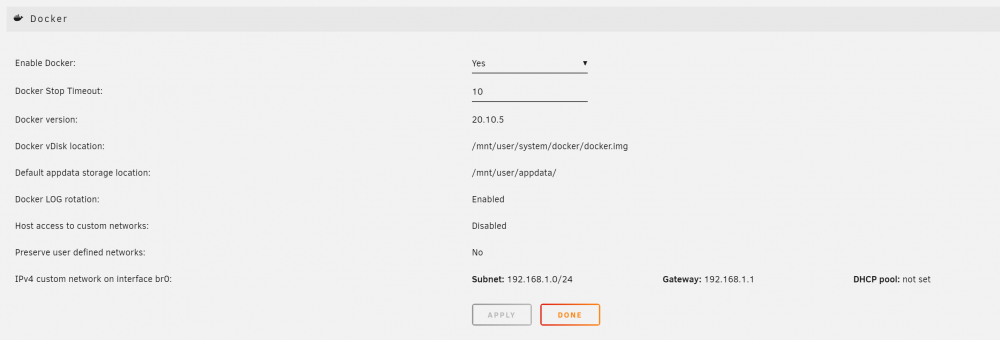
I moved to a new unRAID box but I did not copy settings over (for reasons). On my new setup, Docker settings show that it is using the same IP/subnet as my main/home network. I swear it wasn't like this on my previous install. When I set containers to bridged, they are not getting internal IPs. I feel like I am missing something or doing something wrong?

-
When you add a container you specify things like the repo, port mapping, volume mapping, etc... Where is that information stored? In what file?
-
When you add a container you specify things like the repo, port mapping, volume mapping, etc... Where is that information stored? In what file?
-
I just did a new install and they were both enabled/on by default.
-
I forgot now, but aren't Docker and VM enabled by default on a new install? I feel like it was when I installed...
-
Great. Thank you!
-
Yes.
-
I'm running unRAID on an Intel NUC with: 128 GB M.2 SSD 2 TB SATA HDD I am moving my unRAID server to another computer and moving the 2 TB SATA HDD with it. The 128 GB SSD needs to stay in the Intel NUC. The mover has ran and there isn't anything on the 128 GB SSD. I don't know what steps I need to take to do this properly? My initial thought was to change all my share configurations to not use cache. Is that all?
-
Okay so I think I am missing something. The hostname is getting set but two Docker containers both using Bridge network can't resolve each other's hostnames. When I was using Docker Compose all I had to do was set the hostname and then another container could resolve the IP of that container using hostname. Is there a way to get this to work with unRaid?


