





mike_2246
Members
-
Joined
-
Last visited
Everything posted by mike_2246
-
Server seems to run until I load up Resilio Sync.
-
got it, Atached. syslog-10.0.1.199.log
-
Looking at Settings - Syslog Server - Local Syslog Server is set to enabled and when I look in the folder that is specified there is nothing there. is there a manual download or something like with the Diag Logs?
-
I thought I turned on syslog
-
amsfs01-diagnostics-20250303-1127.zip Here are updated Logs, I believe it has something to do with Resilio Sync Docker
-
has been stable for a year or so, lately it seems like the GUI freezes after 5-10min after booting. I tried a new flash drive and made sure a parity sync wasn't running. not sure what else to checkamsfs01-diagnostics-20250219-1532.zip
-
ok, Thanks. no subtitles but didn't expect audio transcoding to spike 4 cpu cores to 70% on 1 transcode. If I use my P2200 my cpu stays below 10%
-
got it working with a 8700G, 2 Streams 4k to 1080 GPU Load says 14% but CPU 0-4 all spike to 70%. Plex dashboard does say HW transcoding. is this normal?
-
Can the mem test be started from unraid or do I need a Bootable diag usb? 99% of time it runs headless and has been fine for a long time. Only hooked up monitor to see if I could see any error since web ui wasn't loading. Since replacing usb boot drive and updating to latest .10 I believe it's stayed on longer than it has been. I don't think any dockers or vms are using the 1050, plex uses the 2200 and I haven't run tdarr in about a year.
-
the last few days I can reboot server and it works fine for a few hours and then eventually cannot access web interface until a hard reboot. I tried to hook up Keyboard/Monitor/Mouse and after lock up screen doesn't wake. I tried to replace the flash drive as 1 time during the lockup the screen said it couldn't see the flash drive or flash was corrupt. Logs attached. tower-diagnostics-20240522-1357.zip
-
nevermind, figured out it was ZFS Master plugin
-
My Drives used to sleep, now I realized they've been staying on and there's constant small reads. I tried to upgrade to latest version (OS). Turned on Docker, then Turned off VM. Not really sure what else to try.
-
Did you ever solve this? having the same issue with no dockers pointing to array.
-
Tried to do this using SpaceInvader but he used such an old version of unraid it didn't work for me or I did something wrong. Is there a new method for doing a VM Win 11 Install direct to NVME on 6.12.3? or is there no speed difference
-
having trouble with this on Unraid 6.12.3 Unraid Unassigned Dev 1 - MP2280G41.47000-512GB_581PP38623190078 (nvme8n1) VM Manual - /dev/disk/by-id/ata-MP2280G41.47000-512GB_581PP38623190078 Sata
-
is it possible to rename a zpool?
-
Got everything setup through NordLYNX (give me better speed then qbittorrent with ovpn). What's the easiest way to now then connect to Qbit or any of the Arr programs remotely with wireguard? (wireguard setup and connects to everything but the VPN'd dockers) Only way I have working now which is a hassle is RDP through a VM to get me on the LAN
-
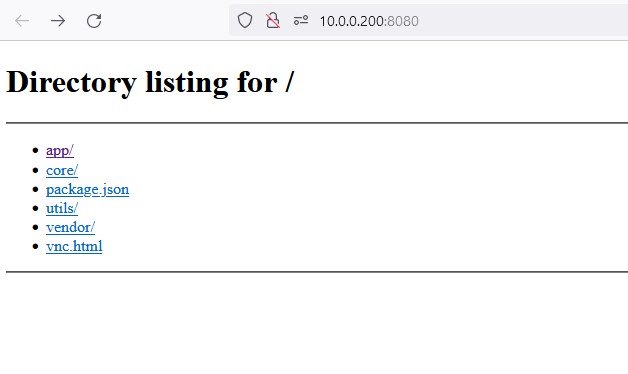
got it, had to type in 10.0.*.*:8080/vnc.html. just doing 8080 didn't work
-
got everything cloned like yours. qbit runs in :8181 chrome opens with :8080 but give me this...
-
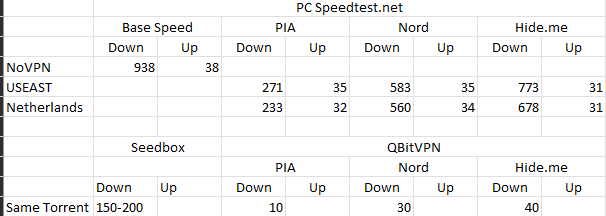
I'll try that for testing, Thanks! whole point of this is I'm trying to get away from my monthly fee seedbox but getting horrible speeds on unraid docker w/VPN, I'm not expecting to get actual Up/Down speeds without VPN but I'd think that I should get more than 30/40 download speeds. Just a big hit going from Seedbox with great speed to 30/40 lol
-
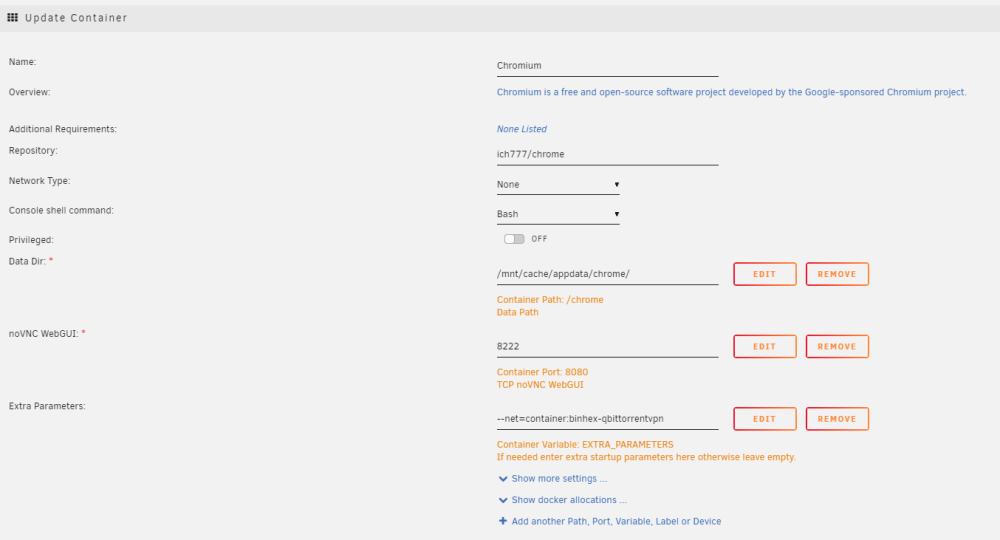
pretty sure i'm just doing it wrong, still can't connect to the 172.17**:8222 or 10.0**:8222


-
and this will work with Chromium? really don't wanna deal with the pain of influx either lol. just want to do a simple speedtest
-
Chromium ich777 Speedflux Speedtest Tracker
-
yes, added port in binhexvpn that matched port of speedtest docker or chrome docker.
-
That's what I tried but none of the speedtest dockers or chrome docker will connect when I do that.


