





pawael
Members
-
Joined
-
Last visited
-
Hi,I know this thread is very old but in my case the problem is still current. I use 1 zfs array with one hdd and one parity hdd and I use a mirrored zfs pool with 2 ssd. All my vms, libvirt, docker engine and container data reside on the ssd pool. But still when parity check is running the web ui is extremely slow sometimes with no response and my linux debmatic vm (1 core, 1GB ram) is crashing (Log: shutting down, reason=crashed). First I used a HP Microserver Gen 10+ with 4c/8t Xeon CPU. Now I use the Ugreen DXP6800 pro with 10c/12t and 8GB ram (32GB are on the way). But both machines have the same behavior. Does someone have an idea why this happens while all virtualization is running on a ssd pool? edit: After parity check everything runs flawlessly
-
Hi toghether, I hope this is the right section. If not please route it to the correct section. If my problem is already in discussion please lead me to the right direction. Thanks in advance. I have the following problem: I'm using for all my containers the macvlan network. Everything is working fine. I'm able to use the services like virtual machines, I can reach all containers via static ip and dns names. But I'm not able to get a certificate in nginxpm (error: There is a server found at this domain but it returned an unexpected status code Invalid domain or IP. Is it the NPM server? Please make sure your domain points to the IP where your NPM instance is running.). I set up a port forwarding in my unifi controller for 80 and 443 to the ip address of my nginxpm container. In the container console I'm able to ping my other containers and addresses on the internet and the domain I want to set up in nginx. I cannot find my mistake and I hope someone can help me here. Thanks in advance PaWäl
-
Tja, nachdem ich hier alles so schön beschrieben habe und durch meine Einstellungen gegangen bin, ist mir mein Fehler aufgefallen: Beim erstellen des VLAN wird das native Netzwerk abgefragt und ich habe wohl übersehen das korrekt zu setzen. Nachdem ich das gemacht habe, ist nun alles gut. Kann geschlossen werden
-
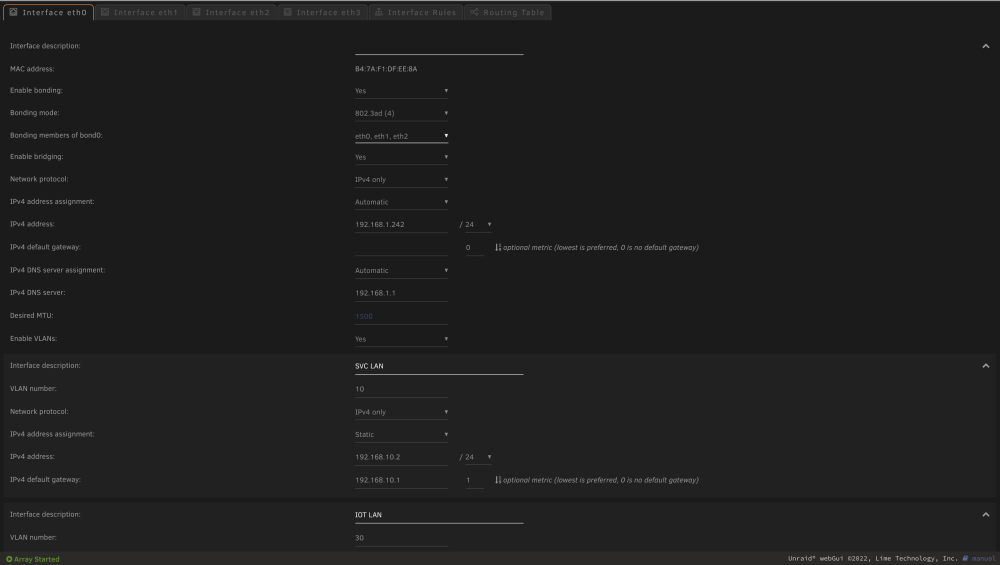
Hallo zusammen, ich hoffe, ich habe das richtige Forum ausgewählt, wenn nicht, dann entschuldige ich mich und bitte um Verschiebung in das richtige Forum. Ich habe wohl ein Problem beim einrichten eines LACP Bonds bei Unraid in Verbindung mit Unifi und hoffe, mir kann jemand helfen. Ich habe schon gesucht und mir Videos angeschaut, aber entweder wird nur über Bonds gesprochen oder über VLAN, aber meine Wunschkonfiguration hat wohl noch keiner so umgesetzt. Falls doch, würde ich mich über einen Hinweis an die korrekte Stelle freuen. Da es schwer ist, das ganze so zu beschreiben, reiche ich fehlende Informationen natürlich gerne nach. Mein Problem: Ich habe einen HP Microserver mit 4 Netzwerkkarten und habe 3 Karten als LACP eingerichtet (auch auf dem Switch). Das funktioniert auch so weit. Die 4. Karte soll alleine bleiben, da ich diese für den Unifi Container und als Fallback nutzen möchte. Ich habe also ein LACP Bond mit 3 Karten erstellt. Als IP Adresse holt sich der Server eine IP aus dem 1er Netz (eigentlich möchte ich das gar nicht). Darunter habe ich 2 VLAN erstellt. Ich möchte nun, dass ich den Unraid Server über das 10er Netz erreiche und er sich auch über DHCP dort eine Adresse besorgt. Das klappt so weit auch (leider kann ich Unraid nicht dazu bewegen eine fixed IP, die ich über Unifi gesetzt habe, zu nehmen, er nimmt dennoch einfach eine freie Adresse). Allerdings ist die Verbindung extrem langsam. Ich habe dieses config testweise bei Proxmox abgebildet, hier klappt das einwandfrei. Versuche ich den Unraidserver nun über seinen Namen zu erreichen, ist dieser nicht erreichbar, ich muss über die IP Adresse gehen oder einen DNS Eintrag im USG setzen. Die eingerichteten Netze funktionieren in meinen Dockercontainern wie gewünscht. Was mache ich falsch? Kurz zusammengefast: 4 Netzwerkkarten, 3 in einem LACP Bond. Auf dem LACP Bond sind 2 VLAN eingerichtet. Der Server soll nur über eine bestimmte Adresse aus einem Netz erreichbar sein und auch aus dem Netz rausgehen. Die verschiedenen Netze sollen in Docker verwendet werden, die Dockercontainer dürfen ins Internet (das klappt). Ich hoffe, ich habe mich verständlich ausgedrückt. Ich habe meine Netzwerkconfiguration angehangen. Vielen Dank im Voraus. network.cfg

-
I found the "mistake": I did not setup a dns server in the container. After adding the parameter --dns 192.168.30.1 under the extra parameters and everything works fine.
-
Hi, I use unraid on my HPe Microserver Gen10+ with 4 NICS. I aggegated 3 NICs and added 3 VLAN (10.0/24, 20.0/24 and 30.0/24) on my UBNT Switch. On the unraid config I aggregated the 3 NICs too and added the same vlans. Everything seems to work fine. The containers are in their designated subnets. But after configuring my firewall I realized that some services are not working anymore. For example my Homematic discovery in Home assistant or my push notifications triggered by node red. Home Assistant, Node Red and Homematic are in the same vlan. While I was checking my firewall logs I saw a deny entry which makes no sense for me. Home Assistant and all other containers are using the 192.168.1.1 gateway instead of the subnet gateway. So the homematic discovery only woks when I allow the connection to the 192.168.1.1 gateway. Even they are in the same subnet. The same with my node red notifications. Instead of using the 192.168.30.1 as the subnet gateway the container is using 192.168.1.1 and is being blocked by my firewall rule. When I open the containers console and enter ip r the result seems correct (default via 192.168.30.1 dev eth0 192.168.30.0/24 dev eth0 scope link src 192.168.30.204) I see more entries of other containers and all want to use the 192.168.1.1 gateway I set the 192.168.30.1 gateway in the vlan setting in unraid. I cannot see any mistakes. Does somebody has any idea what is wrong? thanks in advance
-
Hallo zusammen, ich wollte mich noch einmal zurück melden: Nachdem Unraid wunderbar auf meinem Microserver läuft und ich mir die CAs für das Sichern von VMs und Containern angeschaut, eingerichtet und für gut befunden habe, habe ich den Rest per Lucky Backup eingerichtet. vielen Dank für die Tips. Eine Frage hätte ich noch: Kann man irgendwo sowas wie einen feature request stellen oder Vorschläge machen, was in Unraid noch kommen sollte? Mir wäre eine Backuplösung direkt vom Hersteller für sämtliche Daten inklusive VMs und container, die gestoppt, gesichert und wieder gestartet werden sehr lieb. Eben alles an einem Platz. Ich weiß nicht, wie andere das sehen, aber ich wäre auch bereit dafür zu zahlen, denn ein gutes Backup ist einfach Pflicht. Vielleicht gibt es das sogar schon von einem Drittanbieter und ich kenne es noch nicht, dann würde ich mich über einen Hinweis freuen.
-
Danke für eure Antworten. Ich konnte leider noch nicht im Detail schauen, da ich ja leider noch nicht meinen Stick habe. Aber ich denke, das ist es, was ich suche. Sobald ich starten kann, weiß ich ja, wo ich ansetzen kann
-
@mguttVielen Dank für die schnelle Antwort. Das klingt sehr gut. Ist es hierbei auch egal, wenn ich für meine Container einen separaten Share anlege und die Daten dort ablege? Da ich ja noch grüne Wiese habe, kann ich das Szenario ja auch in Ruhe testen
-
Hallo zusammen, ich bin noch neu im Thema Unraid und suche schon seit Tagen im Netz, allerdings finde ich keine Antwort. Da mein Stick noch nicht angekommen ist und das System somit noch nicht aufgesetzt ist, habe ich jetzt noch grüne Wiese. Ich werde Unraid auf einem HP Microserver Gen10+ einsetzen und möchte als Backupziel meine alte Synology DS214 verwenden. Hierbei ist es mir wichtig, dass neben der reinen Daten auch meine VMs (ganz wichtig meine Homematic CCU VM) und die Daten der Docker Container gesichert werden. Ich habe schon mehrfach von LuckyBackup gelesen und mir auch YT Videos angeschaut. Allerdings läuft LB ja auch in einem Container. Was mir nicht klar ist, aber wichtig: Ich nutze unter anderem HomeAssistant im Docker, welcher fleißig in Datenbanken schreibt. Somit möchte ich zum Zeitpunkt des Backups sicher stellen, dass Container beendet sind, das gemountete /config Verzeichnis weggesichert wird und nach Abschluss der Container wieder gestartet wird. Die Containereinstellungen sind mir nicht wichtig, die Config kenne ich. Irgendwie habe ich den Eindruck, dass dies für sämtliche NAS OS und auch für fertige Systeme wie QNAP (ich habe noch eine, die ich ablösen werde mit Unraid) oder Synology ein Problem darstellt. Um es kurz zusammenzutragen, was passieren soll: Ein Job, welcher z.B. Samstags läuft, welcher meine normalen Daten sichert Ein Job, welcher z.B. Sonntags läuft, um meine VMs und Container zu beenden, zu sichern und danach wieder zu starten Wichtig wäre mir hier auch, dass eine Versionierung sowie eine Komprimierung verfügbar sind. Meine Frage: Gibt es sowas in der Art? Ich habe auch schon gelesen, dass einige User Unraid in einer VM auf Basis von ESXi laufen lassen. Dies kann ich allerdings nicht umsetzen, da ich zum einen Link Aggregation verwende, was meines Wissens eine vSphere Lizenz erfordert, welche für den Privatbereich unerschwinglich ist und zum Anderen auch VEEAM (korrigiert mich bitte, wenn ich es falsch im Kopf habe) nicht ohne vSphere sichert. Hyper-V fällt ebenfalls raus, da USB Passthrough ebenfalls nicht mit Bordmitteln verfügbar ist. Ich weiß, es gibt schon etliche Threats zum Thema Backup, allerdings konnte ich noch nichts finden, was mir in meiner Situation weiter hilft. Sollte ich etwas übersehen habe, bitte ich um Entschuldigung und würde mich über einen Link freuen. Ich danke im Voraus Liebe Grüße PaWäl


