





Liqwid_Kirk
Members
-
Joined
-
Last visited
Everything posted by Liqwid_Kirk
-
So that worked. It booted, I logged into the new unraid os. What does that mean? Should I completely wipe my original USB and reload a earlier flash backup? Is my USB completely screwed?
-
I will try that and let you know. If that doesn't work, I was thinking of trying an older flash backup. My other alternative was taking components as all my motherboard slots are full. Have two GPU's plus a USB hub and a SATA expansion card. So was thinking of taking out the second GPU and swapping the USB hub and SATA card, seeing if that works. One thing at a time though. I'll try the different USB first
-
So, after I flashed the usb drive with a backup from ealrier yesterday morning, the server just jumps immediately into the bios. Nothing I do makes it go past that.
-
Hello, My server crashed today. I am unsure as to what the hell happened. Everything was good up until we had a power outage. I have my server on battery back. Was able to preform clean shutdown before the battery ran out. When I rebooted, the gui never came back up. After a couple of times trying to get it back up, I was able to get into safe mode gui. I then stupidly thought it would be a good idea to shutdown and try to flash the USB with backup zip of the flash drive. Now, I can't even get it to boot at all. Also 4 of my drives have disappeared from the bios. I have a SATA expansion card and I think the MB is no longer reading the expansion card. I think my motherboard is fucked but I hope not. I was able to download the diagnostic zip when I was in safe mode if the helps Any advice would be appreciated gallifrey-diagnostics-20250730-1916.zip
-
Quick question. I set up Pihole with a custom br0 fixed IP address. I have a TP link Omada network setup, and in my Omada Controller my servers IP address has changed to the Pihole containers IP address and I can't access the Unraid GUI from the local IP address anymore. My server and laptop are on two different VLANs. I was able to access before setting up Pihole. Any settings in Unraid I have to change?
-
Here is a few things that might help logs.gtar
-
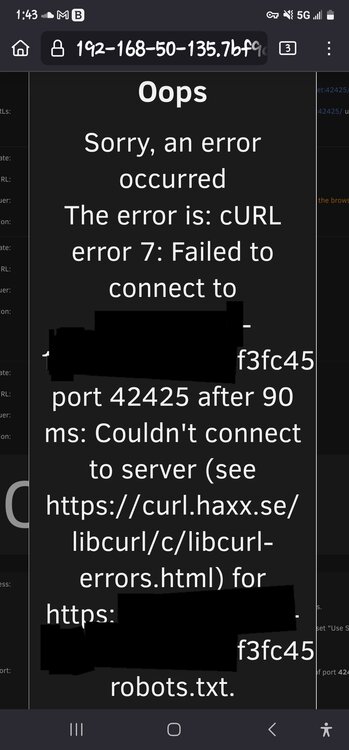
Hello, My ISP recently gave me a new modem and updated my public IP address. Since then, I have not been able to access the Unraid GUI through Connect. I have my port forwarding all setup, nothing changed there. When I run the port check, I get a cURL error 7 message. I've tried changing the port and still get it. Any help would be appreciated. Let me know if there is anything that I need to post like logs. I will get them Side note - When I got the new modem, I put it into bridge mode as I have a tp-link Omada setup, router, switches, and controller.
-
As soon as I can get the OS to boot I will try those for sure.
-
I need some help diagnosing what is going on with my server. Any help would be greatly appreciated. The server has been acting strange lately. The mover wasn't moving files from the cache drive to the array. I also had one of the twon nvme drives dissappear on me. In my investigation I read that the mover problem could have been attributed to bad ram that fails the memtest. So I made the diagnostics zip so that I could ask you guys to help me out with it. Unfortunately I am nowhere the server right now to even follow up. I am out of country on vacation and the night before I left is when it decided to completely crash on me. I cannot remember if the diagnostic zip was taken before or after i upgrade unraid to 7.0 Again, any insight into what might of caused my server to completely crash on me would be amazing. Thanks in advance gallifrey-diagnostics-20250130-1020.zip
-
Thanks for the help, seems to have worked. Sent from my SM-S908W using Tapatalk
-
I will work on that as soon as I get home. Just so I understand about the RAM, I should slow the speed of the RAM to match the 4 of 4 speeds for the Zen3 5000 series?
-
Hello, I have been having issues with my server intermittingly crashing. Not too sure why, any help would be apricated. I'll include the syslog and diagnostics as wellsyslog-192.168.50.135.loggallifrey-diagnostics-20230310-0959.zip
-
That is also happening to me. I'm also getting this message when I try to go to the container and update it individually "Configuration not found. Was this container created using this plugin?" Any help would be appreciated
-
Just have a quick question, anyone else have the issue of NGINX proxy host for authelia go offline as soon as they save the advanced config? If so, how did you fix it? **Fixed**
-
I guess I should have said that I can no longer access the webUI as well and none of my clients can access the servewr anymore either. That was my bad, sorry about that.
-
Hello everyone, A little while ago I started getting this error Pretty sure it started right after I updated to 6.10.2. Anyone else have this issue?
-
It's all good, I am still pretty new to the OS and also trying to figure out how to search issues in the forum. I did see a post that mentioned the append part. I stubbed a pci-e controller a while ago and realized what to do. It works fine now. The windows VM boot just fine now. Thanks for all your help
-
Where do you add it in the syslinux config?
-
So I am having an issue with my nvidia gpu that is passed through to my windows 10 VM. Everything was working fine, shut my machine down. Next time I boot it up, I get a black screen and my log file is full. I get this error in the VM log "2022-04-28T01:17:44.019508Z qemu-system-x86_64: vfio_region_write(0000:10:00.0:region1+0x158a80, 0xff2067b2ff2067b2,8) failed: Device or resource busy" when I check my Syslog, I have this error "Apr 27 21:17:44 Gallifrey kernel: vfio-pci 0000:10:00.0: BAR 1: can't reserve [mem 0xb0000000-0xbfffffff 64bit pref]" and it fills up the whole log file. Still pretty new to this, so if there is anything I need to post, some one please let me know. Any help would be appreciated gallifrey-syslog-20220428-0136.zip
-
I did change the password for elasticsearch, but I made it the same in the TA container
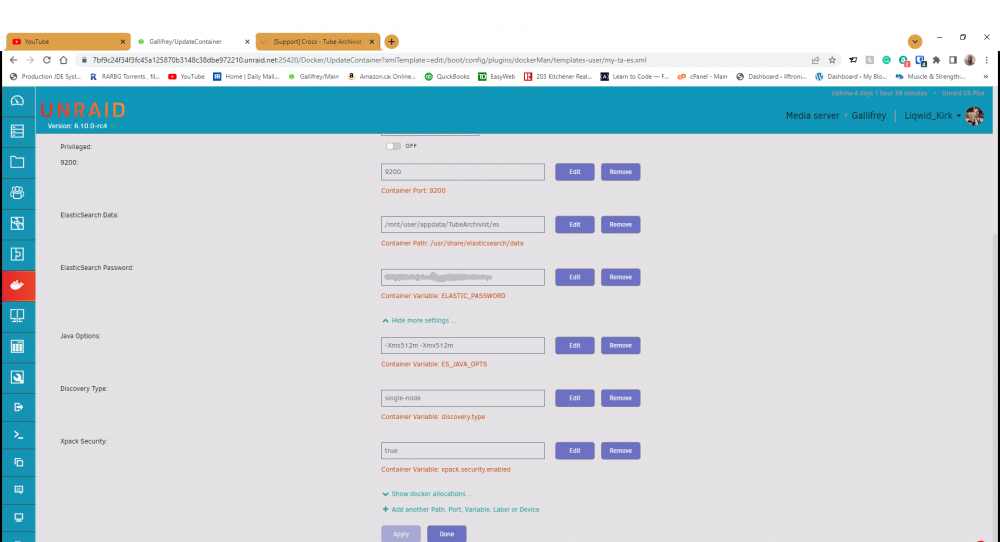
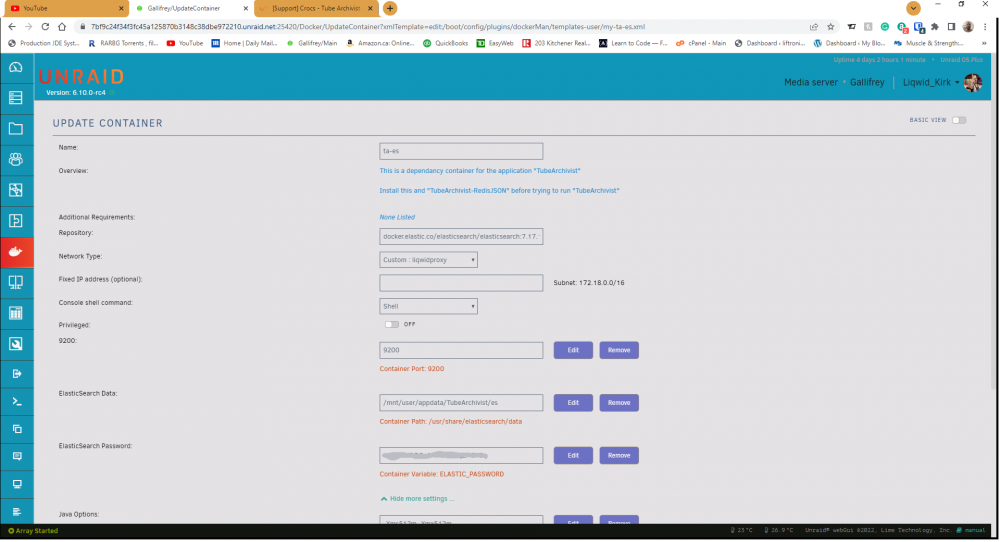
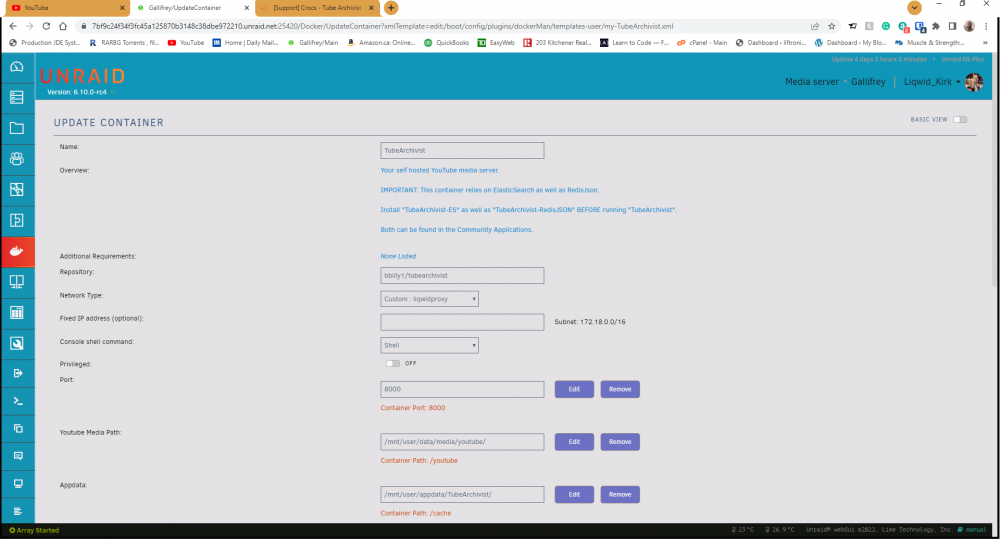
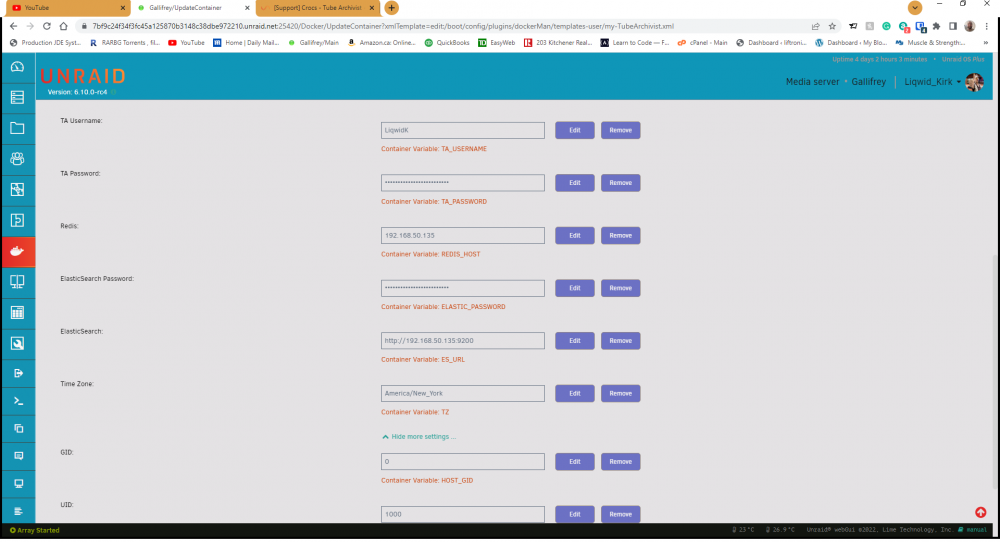
-
How do you change the permissions for the appdata? Also, do I add the UID and GID permissions to the ES container itself?
-
Quick question. Installed all the containers and I keep having an issue with the ElasticSearch Container not starting Here are the logs {"type": "server", "timestamp": "2022-03-28T19:52:35,597-04:00", "level": "INFO", "component": "o.e.p.PluginsService", "cluster.name": "docker-cluster", "node.name": "97fe1207fe92", "message": "loaded module [x-pack-enrich]" } {"type": "server", "timestamp": "2022-03-28T19:52:35,598-04:00", "level": "INFO", "component": "o.e.p.PluginsService", "cluster.name": "docker-cluster", "node.name": "97fe1207fe92", "message": "loaded module [x-pack-eql]" } {"type": "server", "timestamp": "2022-03-28T19:52:35,598-04:00", "level": "INFO", "component": "o.e.p.PluginsService", "cluster.name": "docker-cluster", "node.name": "97fe1207fe92", "message": "loaded module [x-pack-fleet]" } {"type": "server", "timestamp": "2022-03-28T19:52:35,598-04:00", "level": "INFO", "component": "o.e.p.PluginsService", "cluster.name": "docker-cluster", "node.name": "97fe1207fe92", "message": "loaded module [x-pack-graph]" } {"type": "server", "timestamp": "2022-03-28T19:52:35,598-04:00", "level": "INFO", "component": "o.e.p.PluginsService", "cluster.name": "docker-cluster", "node.name": "97fe1207fe92", "message": "loaded module [x-pack-identity-provider]" } {"type": "server", "timestamp": "2022-03-28T19:52:35,599-04:00", "level": "INFO", "component": "o.e.p.PluginsService", "cluster.name": "docker-cluster", "node.name": "97fe1207fe92", "message": "loaded module [x-pack-ilm]" } {"type": "server", "timestamp": "2022-03-28T19:52:35,599-04:00", "level": "INFO", "component": "o.e.p.PluginsService", "cluster.name": "docker-cluster", "node.name": "97fe1207fe92", "message": "loaded module [x-pack-logstash]" } {"type": "server", "timestamp": "2022-03-28T19:52:35,599-04:00", "level": "INFO", "component": "o.e.p.PluginsService", "cluster.name": "docker-cluster", "node.name": "97fe1207fe92", "message": "loaded module [x-pack-ml]" } {"type": "server", "timestamp": "2022-03-28T19:52:35,600-04:00", "level": "INFO", "component": "o.e.p.PluginsService", "cluster.name": "docker-cluster", "node.name": "97fe1207fe92", "message": "loaded module [x-pack-monitoring]" } {"type": "server", "timestamp": "2022-03-28T19:52:35,600-04:00", "level": "INFO", "component": "o.e.p.PluginsService", "cluster.name": "docker-cluster", "node.name": "97fe1207fe92", "message": "loaded module [x-pack-ql]" } {"type": "server", "timestamp": "2022-03-28T19:52:35,600-04:00", "level": "INFO", "component": "o.e.p.PluginsService", "cluster.name": "docker-cluster", "node.name": "97fe1207fe92", "message": "loaded module [x-pack-rollup]" } {"type": "server", "timestamp": "2022-03-28T19:52:35,600-04:00", "level": "INFO", "component": "o.e.p.PluginsService", "cluster.name": "docker-cluster", "node.name": "97fe1207fe92", "message": "loaded module [x-pack-security]" } {"type": "server", "timestamp": "2022-03-28T19:52:35,601-04:00", "level": "INFO", "component": "o.e.p.PluginsService", "cluster.name": "docker-cluster", "node.name": "97fe1207fe92", "message": "loaded module [x-pack-shutdown]" } {"type": "server", "timestamp": "2022-03-28T19:52:35,601-04:00", "level": "INFO", "component": "o.e.p.PluginsService", "cluster.name": "docker-cluster", "node.name": "97fe1207fe92", "message": "loaded module [x-pack-sql]" } {"type": "server", "timestamp": "2022-03-28T19:52:35,601-04:00", "level": "INFO", "component": "o.e.p.PluginsService", "cluster.name": "docker-cluster", "node.name": "97fe1207fe92", "message": "loaded module [x-pack-stack]" } {"type": "server", "timestamp": "2022-03-28T19:52:35,601-04:00", "level": "INFO", "component": "o.e.p.PluginsService", "cluster.name": "docker-cluster", "node.name": "97fe1207fe92", "message": "loaded module [x-pack-text-structure]" } {"type": "server", "timestamp": "2022-03-28T19:52:35,601-04:00", "level": "INFO", "component": "o.e.p.PluginsService", "cluster.name": "docker-cluster", "node.name": "97fe1207fe92", "message": "loaded module [x-pack-voting-only-node]" } {"type": "server", "timestamp": "2022-03-28T19:52:35,602-04:00", "level": "INFO", "component": "o.e.p.PluginsService", "cluster.name": "docker-cluster", "node.name": "97fe1207fe92", "message": "loaded module [x-pack-watcher]" } {"type": "server", "timestamp": "2022-03-28T19:52:35,602-04:00", "level": "INFO", "component": "o.e.p.PluginsService", "cluster.name": "docker-cluster", "node.name": "97fe1207fe92", "message": "no plugins loaded" } {"type": "server", "timestamp": "2022-03-28T19:52:35,676-04:00", "level": "ERROR", "component": "o.e.b.ElasticsearchUncaughtExceptionHandler", "cluster.name": "docker-cluster", "node.name": "97fe1207fe92", "message": "uncaught exception in thread [main]", "stacktrace": ["org.elasticsearch.bootstrap.StartupException: ElasticsearchException[failed to bind service]; nested: AccessDeniedException[/usr/share/elasticsearch/data/nodes];", "at org.elasticsearch.bootstrap.Elasticsearch.init(Elasticsearch.java:170) ~[elasticsearch-7.17.1.jar:7.17.1]", "at org.elasticsearch.bootstrap.Elasticsearch.execute(Elasticsearch.java:157) ~[elasticsearch-7.17.1.jar:7.17.1]", "at org.elasticsearch.cli.EnvironmentAwareCommand.execute(EnvironmentAwareCommand.java:77) ~[elasticsearch-7.17.1.jar:7.17.1]", "at org.elasticsearch.cli.Command.mainWithoutErrorHandling(Command.java:112) ~[elasticsearch-cli-7.17.1.jar:7.17.1]", "at org.elasticsearch.cli.Command.main(Command.java:77) ~[elasticsearch-cli-7.17.1.jar:7.17.1]", "at org.elasticsearch.bootstrap.Elasticsearch.main(Elasticsearch.java:122) ~[elasticsearch-7.17.1.jar:7.17.1]", "at org.elasticsearch.bootstrap.Elasticsearch.main(Elasticsearch.java:80) ~[elasticsearch-7.17.1.jar:7.17.1]", "Caused by: org.elasticsearch.ElasticsearchException: failed to bind service", "at org.elasticsearch.node.Node.<init>(Node.java:1093) ~[elasticsearch-7.17.1.jar:7.17.1]", "at org.elasticsearch.node.Node.<init>(Node.java:309) ~[elasticsearch-7.17.1.jar:7.17.1]", "at org.elasticsearch.bootstrap.Bootstrap$5.<init>(Bootstrap.java:234) ~[elasticsearch-7.17.1.jar:7.17.1]", "at org.elasticsearch.bootstrap.Bootstrap.setup(Bootstrap.java:234) ~[elasticsearch-7.17.1.jar:7.17.1]", "at org.elasticsearch.bootstrap.Bootstrap.init(Bootstrap.java:434) ~[elasticsearch-7.17.1.jar:7.17.1]", "at org.elasticsearch.bootstrap.Elasticsearch.init(Elasticsearch.java:166) ~[elasticsearch-7.17.1.jar:7.17.1]", "... 6 more", "Caused by: java.nio.file.AccessDeniedException: /usr/share/elasticsearch/data/nodes", "at sun.nio.fs.UnixException.translateToIOException(UnixException.java:90) ~[?:?]", "at sun.nio.fs.UnixException.rethrowAsIOException(UnixException.java:106) ~[?:?]", uncaught exception in thread [main] "at sun.nio.fs.UnixException.rethrowAsIOException(UnixException.java:111) ~[?:?]", "at sun.nio.fs.UnixFileSystemProvider.createDirectory(UnixFileSystemProvider.java:397) ~[?:?]", "at java.nio.file.Files.createDirectory(Files.java:700) ~[?:?]", "at java.nio.file.Files.createAndCheckIsDirectory(Files.java:807) ~[?:?]", "at java.nio.file.Files.createDirectories(Files.java:793) ~[?:?]", "at org.elasticsearch.env.NodeEnvironment.lambda$new$0(NodeEnvironment.java:300) ~[elasticsearch-7.17.1.jar:7.17.1]", "at org.elasticsearch.env.NodeEnvironment$NodeLock.<init>(NodeEnvironment.java:224) ~[elasticsearch-7.17.1.jar:7.17.1]", "at org.elasticsearch.env.NodeEnvironment.<init>(NodeEnvironment.java:298) ~[elasticsearch-7.17.1.jar:7.17.1]", "at org.elasticsearch.node.Node.<init>(Node.java:429) ~[elasticsearch-7.17.1.jar:7.17.1]", "at org.elasticsearch.node.Node.<init>(Node.java:309) ~[elasticsearch-7.17.1.jar:7.17.1]", "at org.elasticsearch.bootstrap.Bootstrap$5.<init>(Bootstrap.java:234) ~[elasticsearch-7.17.1.jar:7.17.1]", "at org.elasticsearch.bootstrap.Bootstrap.setup(Bootstrap.java:234) ~[elasticsearch-7.17.1.jar:7.17.1]", "at org.elasticsearch.bootstrap.Bootstrap.init(Bootstrap.java:434) ~[elasticsearch-7.17.1.jar:7.17.1]", "at org.elasticsearch.bootstrap.Elasticsearch.init(Elasticsearch.java:166) ~[elasticsearch-7.17.1.jar:7.17.1]", "... 6 more"] } ElasticsearchException[failed to bind service]; nested: AccessDeniedException[/usr/share/elasticsearch/data/nodes]; Likely root cause: java.nio.file.AccessDeniedException: /usr/share/elasticsearch/data/nodes at java.base/sun.nio.fs.UnixException.translateToIOException(UnixException.java:90) at java.base/sun.nio.fs.UnixException.rethrowAsIOException(UnixException.java:106) at java.base/sun.nio.fs.UnixException.rethrowAsIOException(UnixException.java:111) at java.base/sun.nio.fs.UnixFileSystemProvider.createDirectory(UnixFileSystemProvider.java:397) at java.base/java.nio.file.Files.createDirectory(Files.java:700) at java.base/java.nio.file.Files.createAndCheckIsDirectory(Files.java:807) at java.base/java.nio.file.Files.createDirectories(Files.java:793) at org.elasticsearch.env.NodeEnvironment.lambda$new$0(NodeEnvironment.java:300) at org.elasticsearch.env.NodeEnvironment$NodeLock.<init>(NodeEnvironment.java:224) at org.elasticsearch.env.NodeEnvironment.<init>(NodeEnvironment.java:298) at org.elasticsearch.node.Node.<init>(Node.java:429) at org.elasticsearch.node.Node.<init>(Node.java:309) at org.elasticsearch.bootstrap.Bootstrap$5.<init>(Bootstrap.java:234) at org.elasticsearch.bootstrap.Bootstrap.setup(Bootstrap.java:234) at org.elasticsearch.bootstrap.Bootstrap.init(Bootstrap.java:434) at org.elasticsearch.bootstrap.Elasticsearch.init(Elasticsearch.java:166) at org.elasticsearch.bootstrap.Elasticsearch.execute(Elasticsearch.java:157) at org.elasticsearch.cli.EnvironmentAwareCommand.execute(EnvironmentAwareCommand.java:77) at org.elasticsearch.cli.Command.mainWithoutErrorHandling(Command.java:112) at org.elasticsearch.cli.Command.main(Command.java:77) at org.elasticsearch.bootstrap.Elasticsearch.main(Elasticsearch.java:122) at org.elasticsearch.bootstrap.Elasticsearch.main(Elasticsearch.java:80) For complete error details, refer to the log at /usr/share/elasticsearch/logs/docker-cluster.log ** Press ANY KEY to close this window ** A little help would be appreciated. Thanks
-
I'm running it in the unraid terminal
-
No, that worked. It was the login attempt after, still gave the same error
-
Still gave me the same error





