





Teknowiz
Members
-
Joined
-
Last visited
Everything posted by Teknowiz
-
Finally had some time to look into it. It seems the culprit was a misconfigured entry in the go file. Spent hours troubleshooting with assistance from Gemini and arrived at conclusion Gemini indicated: Based on that and it suggestion to try editing the go file, determined I had a script for pulse agent that was missing & at the end causing issues with boot up sequence. Added the & at the end and rebooted and issue resolved. Lots of other posts about getting stuck at bootup on 7.3.1 at exact same stage as me so hopefully helps someone narrow down their issue. #!/bin/bash # Start the Management Utility /usr/local/sbin/emhttp # Pulse Agent (Pushed to background with &) bash /boot/config/plugins/pulse-agent/start-pulse-agent.sh &
-
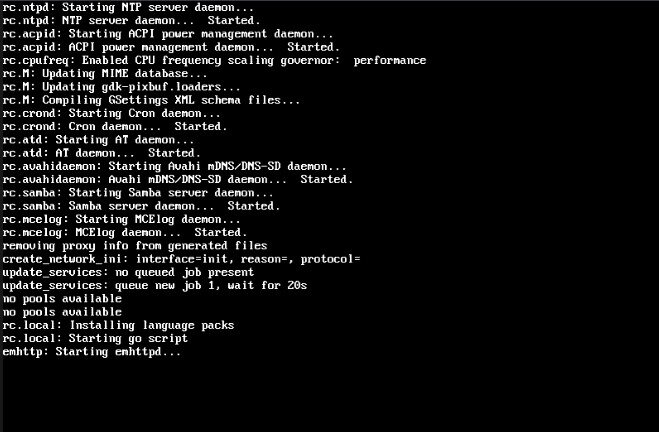
Updated from 7.3 to 7.3.1 and having one issue. It seems after the update the Unraid Gui version no longer works as expected. On the system it gets stuck at boot process at stage of showing "emhttp: Starting emhttpd...". It never gets past that to load the GUI. However remotely accessing the server to access the GUI works fine. At first I thought something corrupted so tried several times to reimage the flash drive but same issue. Tried previously posted trick of deleting super.dat and Pool config files from config directory but that did not fix it either. Anyone run into this issue?
-
Confirmed working now with latest version.
-
Confirmed, the workaround on that link of adding /login at the end of url works fine. Thanks.
-
I am also running into same issue with just getting stuck with 3 dots loading splash, I was trying everything I could to fix it thinking its something with my config that changed but seems to be container issue. Anyone find a fix?
-
I am running into this issue on Windows using both Chrome and Edge browsers. Even rebooted the server and tried with array offline but same issue. Same issue on Windows using Chrome and Edge browsers. Got around it by pressing more options on the update screen instead of reading change log. That takes you to another page where there is an option to push the update and that seemed to work fine.
-
Thank you very much for the help, I went with Option 1: Reduce Container Subnet Scope and set it to 192.168.1.0/24 and now it works perfectly. Have been trying to figure out this for months and wasn't able to so really appreciate it.
-
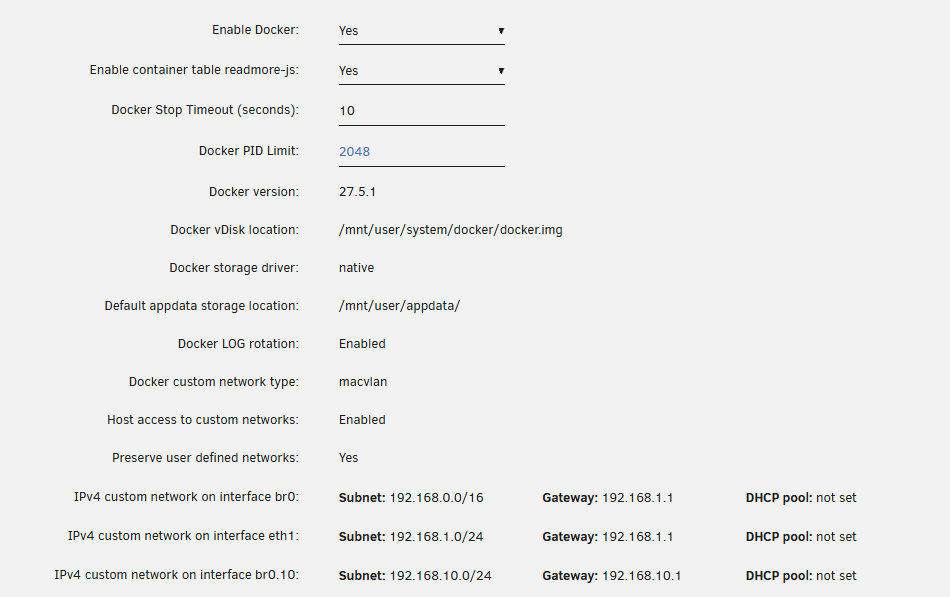
Thanks for the help. Host access to custom enabled to allow traffic across is already enabled. I disabled Docker and enabled again and now form Unraid I can ping 192.168.10.10. Ip route from Unraid shows: Tower:~# ip route default via 192.168.1.1 dev shim-br0 default via 192.168.1.1 dev br0 metric 1 default via 192.168.1.1 dev eth1 proto dhcp src 192.168.1.223 metric 1005 default via 192.168.10.1 dev br0.10 proto dhcp src 192.168.10.242 metric 1066 172.17.0.0/16 dev docker0 proto kernel scope link src 172.17.0.1 192.168.0.0/16 dev shim-br0 proto kernel scope link src 192.168.1.2 192.168.0.0/16 dev br0 proto kernel scope link src 192.168.1.2 metric 1 192.168.1.0/24 dev vhost1 proto kernel scope link src 192.168.1.223 192.168.1.0/24 dev eth1 proto dhcp scope link src 192.168.1.223 metric 1005 192.168.122.0/24 dev virbr0 proto kernel scope link src 192.168.122.1 linkdown ip addr show eth0 output: Tower:~# ip addr show eth0 6: eth0: <BROADCAST,MULTICAST,UP,LOWER_UP> mtu 1500 qdisc mq master br0 state UP group default qlen 1000 link/ether 74:19:f8:15:f5:23 brd ff:ff:ff:ff:ff:ff arp -a output: Tower:~# arp -a ? (172.17.0.3) at 02:42:ac:11:00:03 [ether] on docker0 core.jumnim (192.168.1.72) at bc:24:11:04:48:7b [ether] on vhost1 pi.hole (192.168.1.71) at b8:27:eb:35:3e:e0 [ether] on vhost1 unifi.jumnim (192.168.1.1) at 94:2a:6f:f2:08:25 [ether] on shim-br0 Desktop.jumnim (192.168.1.24) at 8c:c6:81:f1:40:9b [ether] on vhost1 ? (172.17.0.2) at 02:42:ac:11:00:02 [ether] on docker0 ? (192.168.1.30) at 84:47:09:23:07:c5 [ether] on vhost1 unifi.jumnim (192.168.1.1) at 94:2a:6f:f2:08:25 [ether] on vhost1 But from Docker app (Nextcloud as an example), ping fails and its ip route shows: root@9d7ef8fde8b7:/# ip route default via 192.168.1.1 dev eth0 192.168.0.0/16 dev eth0 scope link src 192.168.1.9 root@9d7ef8fde8b7:/# Issue seems like on Docker side but not sure what I am doing wrong. Dockers settings are below, any other ideas on what could be the issue?
-
I am having issues with Unraid being unable to to ping or access ips outside of the same sub-net. Initially only docker apps had this issue but while I was playing around with the settings now it seems I can't even get Unraid server itself from command line to ping the other networks (unraid on 192.168.1.x ip and other networks are on 192.168.10.x or 192.168.30.x sub-net). Other devices from same sub-net as Unraid can ping those other networks fine so does not seem firewall issue and unraid itself can ping the gateway ips of the other networks such as 192.168.10.1 but then fails to ping any other ips on the same network such as 192.168.10.10. Any ideas what could be the issue?
-
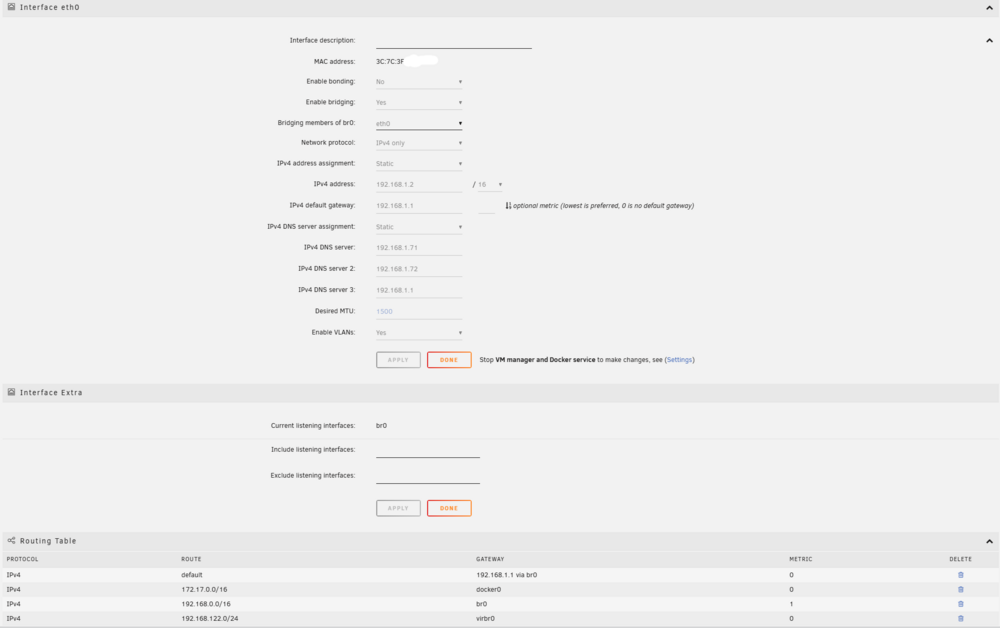
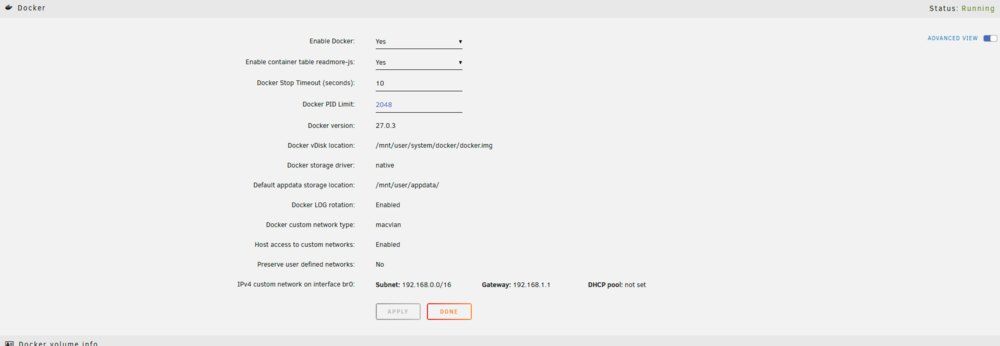
Thanks, my network type is same. Not sure what other settings I need to look at as most are default. Below are my settings, any suggestions from anyone on what to change to fix routing to a different VLAN? The issue seems Docker network settings related as pings from one docker running on base subnet to another seems to fail.
-
I am running into an issue that I can't seem to fix no matter what settings I try. When I try to use Nginx Proxy manager to proxy to an IP outside its subnet mask (Nginx is on a 192.168.1.0/24 subnet same as Unraid with services being accessed being on other subnets and Vlans), it always seems to throw error 502 Bad Gateway on services are on a different VLAN/Subnet but works fine if I set them on same subnet. Tried with multiple apps and services and made sure Unraid network type set to macvlan and custom network access enabled. From unraid CLI I can ping the ip address on the different subnet so it does not seem routing related issue. Any ideas what could be causing this?
-
I seem to be running into the same issue where I can't access Unraid server on any Docker Containers running on it from other VlANs. Other devices can be access fine that are on same VLAN as Unraid server so it does not seem firewall related but rather something on Unraid settings although the issue seemed to start after migrating from PfSense to Unifi UDM Pro (kept same VLAN and network settings as well as firewall rules). Any ideas what could be the issue?
-
Well seems I finally manged to stabilize the system by changing following settings using Tips and Tweaks addon: Disable NIC Flow Control? Yes Disable NIC Offload?Yes Normal CPU Scaling Governor: Performance Previously I had NIC related settings at default and Normal CPU Scaling Governor set to on demand but now with those settings system becomes unresponsive randomly. Not sure which of the 3 settings is actually causing the issue as disabling C states in bios and just disabling NIC related settings or setting docker lan network type to ipvlan don't seem to fix the problem. Also odd system ran for long time with those settings without issues and with latest build of Unraid it becomes unstable. At lest system seems to be functional again without needing new hardware.
-
System still unstable with no useful info on logs even when stored in flash. Recreated install form scratch on fresh USB without even backing up config and still crashes. Tried new power supply same result. Disconnected LSI HBA card and all hard drives and still crashes. Ran CPU stress test from Ubuntu live CD for 24+ hours at 100% CPU load without single crash. Ran Memtest86+ for 3+ days without any errors being detected. Still no cluse what issue could be as all feasible hardware issues seem to be ruled out at this point. Contemplating taking out the 2 NVME drives next to see if that helps. Any suggestions what else to try. My only other alternative is get new intel cpu and board at this point.
-
Already tried running with bare minimum in safe mode with no docker or vm service enabled and still crashes. Odd thing is no crash or errors while running memtest or in ubuntu while doing CPU stress test. I would think hardware issue would cause crash in any boot environment. More logs attached from more crashes over nigh but this time there seems to be some errors that I don't recognize. I wonder if its my HBA card or a corrupted file system that could be causing the issue.
-
Flash syslog seems to have logged data but nothing sticks out to me as source of the instability.
-
Got this so far on remote syslog server up to system becoming non responsive again. Don't seem to have much to go on it other than samba errors..
-
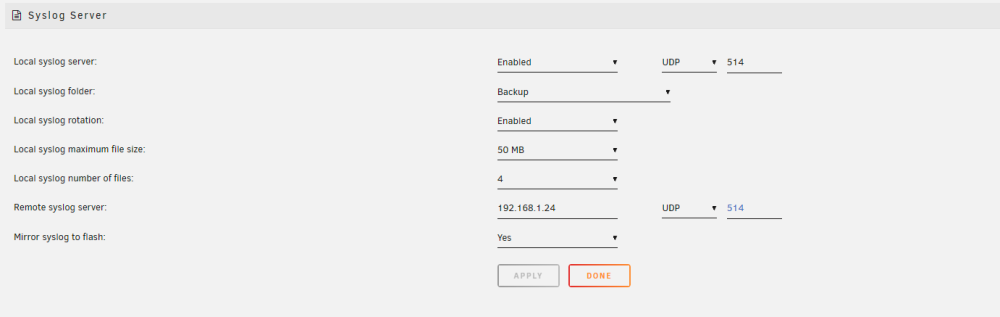
Mirror option was already enabled but didn't seem to capture crash details on diagnostics log unless it gets stored somewhere else on the flash. It crashed again also after enabling remote syslog but remote log entries showed nothing out of ordinary prior to crash, just bunch of kernel messages regarding usb connect disconnect events for the mouse.
-
I enabled remote syslog and started logging to my desktop, will see if it records anything on the next crash/hang. I wish Unraid would store logs on flash so it would survive the reboot.
-
Did 3 more passes of Mem test and all past. Ran CPU stress test for 4 hours from ubuntu live CD with 100% CPU load and all passed. Restarted the system after testing to Unraid in safe mode and with Docker and VMs all disabled and system hung again after short time of parity check. Not sure what else to test hardware wise anymore. Attached is another diagnostics log in case anyone is able to identify the source of the stability.
-
Thanks, will try that. Also potentially planning to boot into like a Linux live CD and run some CPU diagnostics.
-
Well it looks like Plex docker was not source of the issue. Instead of hourly freeze or reboot now it seems to last 6-8 hours and then still hangs or reboots. Getting frustrated with this issue with logs not showing any source of the problem and constant crashes causing lot of parity data issues but not able to complete parity check to repair before another crash. Any ideas on enabling any other logging or troubleshooting. I have tried memtest and it passed, tried disabling DOCP memory profile so it lowers the RAM speed back to stock, disabled C-STATE completely in Bios but issue still persists. I even removed the new parity drive installed last week but still had same issue.
-
I may have narrowed the issue down to Plex server official docker being the issue or possibly it combined with AMD igpu transcoding. Disabled the Plex container and server was up 12+ hours which is longer than I had managed before since start of the issue. Will see if other Plex containers are more stable or temporarily keep Plex disabled to see if system is back to full stability.
-
My issue seems possibly Plex related, had installed official Plex docker right before issue started. Disabled that container and system has been stable for 12+ hours. If you have Plex see if disabling it helps.
-
I am facing the same issue on a Ryzen system, I wonder if its related to recent release of Unraid.



