





SakabaRihiro
Members
-
Joined
-
Last visited
-
No problem! I had a look at the Git repository to confirm which version updated the minimum required Unraid version, then went to the commit just before that for the older PLG file that's compatible.
-
You can install v2026.05.01. Plugin URL: https://raw.githubusercontent.com/DerekChan65535/unraid-disk-activity/7ea21b677da4416f9c627662f453631fa76e4f87/disk.activity.plg
-
If you're still having this issue, update the repository for the container. The template still uses gcr.io/cadvisor/cadvisor which is for versions prior to v0.53 ghcr.io/google/cadvisor is the container repository for >=v0.53 Using the latest version from ghcr.io/google/cadvisor (v0.60.5) fixed this issue for me, no changes to cadvisor settings needed. Raised https://github.com/selfhosters/unRAID-CA-templates/pull/690 to fix the template.
-
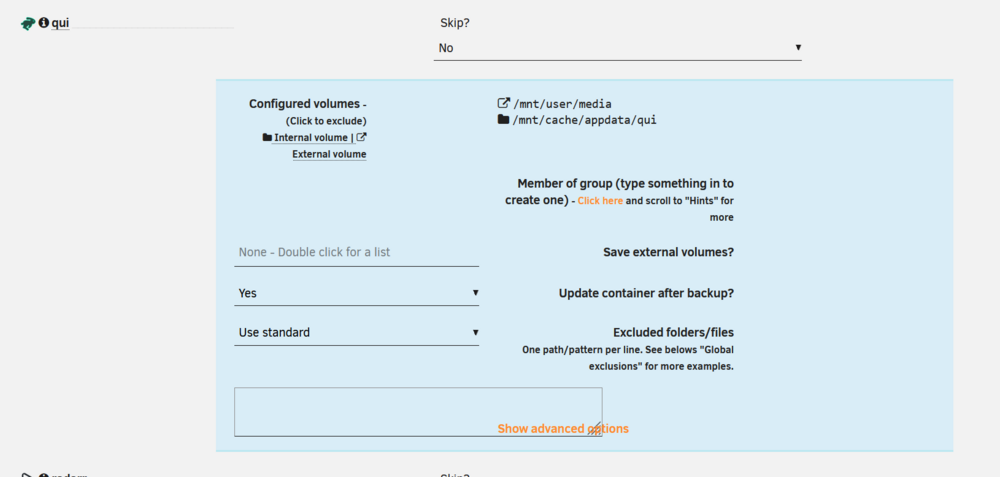
Found a fun little UI bug. \ Turns out I wasn't saying 'Yes' to updating the container after backup, I was saying 'Yes' to saving external volumes, which is 20TB of media. Cache filled and server crashed. Might also be a good idea to have the option to save the log files to a location other than /tmp as since this stores in RAM, they are lost on a reboot.
-
Yeah, it's a minor bug and only affects old versions, but thought you might want to know. Unlikely many people would be affected by it, most users that are will probably migrate from the original FolderView to this fork in another 3 years 🤣
-
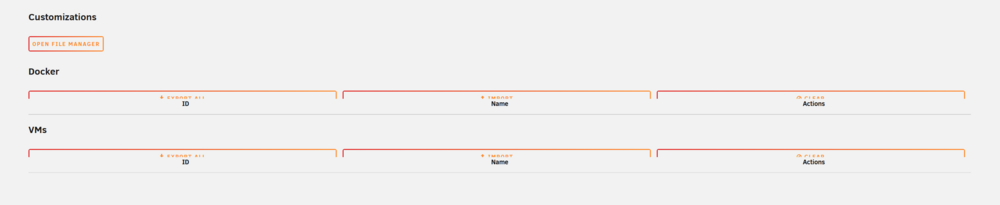
Minor visual bug: Buttons cut off when using the plugin in Unraid 7.1.4 Updating to Unraid 7.2.4 fixes this.
-
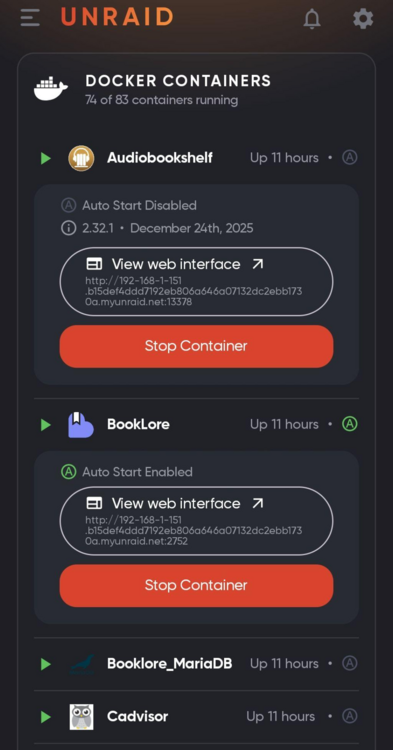
Apologies, I was mistaken. I set some containers to auto-start, then I installed the plugin. I was using Unraid 7.1.4 with FolderView2, then installed FolderView3 and updated to Unraid 7.2.4, and noticed the inaccuracies in NZB360 with the auto-start labelling (example screenshots attached). Upon further checking (which I should have done before my previous post), this is the case even without FolderView3 installed, even after toggling auto-start on and off with FolderView3 uninstalled and clearing NZB360 cache. For the containers that show in NZB360 as autostart being enabled, disabling autostart and refreshing NZB360 results in the container showing as autostart disabled (correctly), but then toggling autostart back on still results in autostart being shown as disabled. The bug lies with either NZB360 (most likely) or the Unraid API, not with this plugin. Thanks for your work on this plugin. Do you plan to maintain it long term? Also just wondering if you're familiar with coding, or relying on the Claude output and reading over the output, but unsure of how to write the code independently. AI is a tool, and some people speak overly highly of it and other speak overly negatively, but when used appropriately I don't see an issue with it; I doubt you'd cause a Huntarr level situation 🤣.

-
Thanks for this! Held off on 7.2 until I could use FolderView. Glad to see toggling autostart now actually works consistently, a very nice change! It doesn't appear to be reflecting the autostart state via the Unraid API however. I have set most of my containers to autostart, but when I use NZB360 and look at my containers, most have 'A' greyed out and say autostart is disabled. Is this something you'd be able to fix without too much effort?
-
Hey @homeRAID Sorry to say I never got to the bottom of it. The hardware and setup was for a friend who I was assisting, as it's their first NAS. They're now using the machine at their home, so I don't have direct access to the machine any more. In the end, they decided using the system as both a NAS and as a VM so they didn't require a separate PC for general usage wouldn't be a good fit for them as we couldn't find how to make it consistently boot the VM successfully, so they bought a separate machine for general usage. If you do ever get to the bottom of it, please let me know.
-
Only odd starts worked for me, even ones would pummel the lowest core at 100%. Check if it's the same for you, if it is, kill the VM on an odd start then start it again and it should work without requiring the host system to be restarted. Issue noted by me in my comment in April.
-
Thanks, any idea what caused the bug? Checked my friends server, and it's happening for them as well (also on 2025.06.07 using the same cron schedule), but not my backup server with 2025.05.23.
-
Apologies, I phrased that poorly. What I meant to ask is if moving on a schedule works for anyone who has 'force move cron schedule' enabled. I know that the force move should run mover.old, but having the force move on a cron schedule enabled is what causes age_mover to fail for me.
-
Tried starting up a small set of docker containers, the system died again. Tried with another set instead, system died. Tried with another and the system again died. Then tried with some others, system was stable. Started others, system was stable. Eventually re-enabled all containers, system has been up for a couple of weeks now without issues. I have no idea what the cause was, I changed nothing.
-
Just so you know it's not an isolated case, I have the same issue when I have the following set: Logs show: This impacted standard hourly moves and the 'Move Now' button. I have mover tuning set to run hourly, but runs weren't occurring. /tmp/ca.mover.tuning has no new logs since June 10, there were no changes to my setup other than updating to 2025.06.07, no changes to my mover tuning settings have happened in a month or so until now due to noticing this issue. Disabling force moving on a schedule allows the non-forced hourly moves to occur. Does the force move cron schedule allow standard moving to work for anyone on 2025.06.07?


-
My apologies, since you stated I thought you didn't want to republish the plugins since you don't have capacity to take on maintenance, and was responding to the comment hoping you would be able to add them back. I wasn't aware you had changed your mind regarding republishing them. No offence was intended.



