





bthoven
Members
-
Joined
-
Last visited
Everything posted by bthoven
-
okay. I found the solution. I have to edit my vm and change the Primary vDisk location from manual to auto. I don't know why it happened.
-
I just faced the same error for my Debian VM. Could you please explain in more details how to solve the problem? update: I found the solution. I have to edit my vm and change the Primary vDisk location from manual to auto.
-
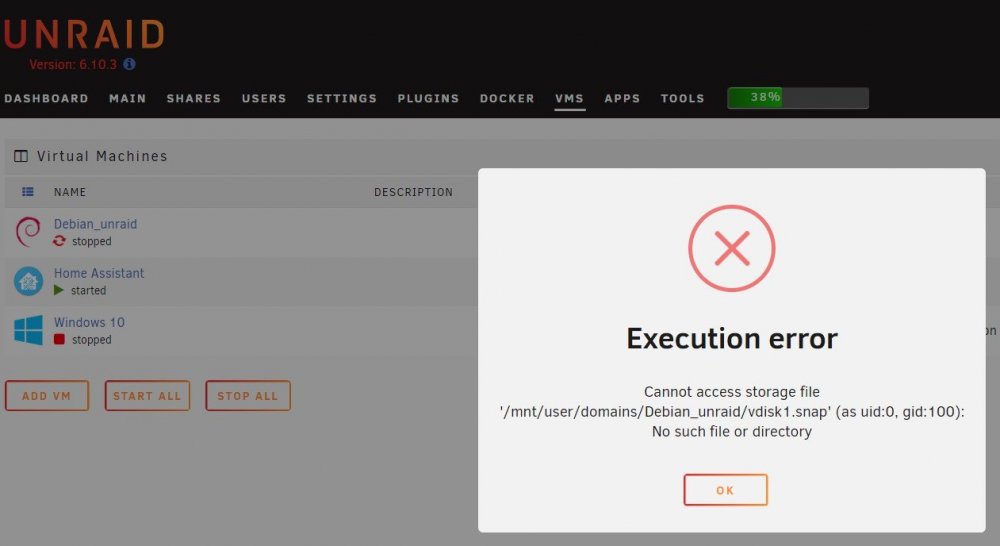
My Unraid recently has unusually high CPU usage from time to time. I can't figure it out why; so I reboot my Unraid server, and found that I no longer be able to start my Debian VM. I don't know what went wrong and how to remedy this problem. The vdisk1 is still in the /CACHE/domains/Debian-unraid/ folder. FYI, I use VM backup to back it up every night. If it needs to be restored from this backup, any suggestion how to do it properly...thank you.
-
Thank you. They were errors/warnings happened several weeks back. Will see if it happens again.
-
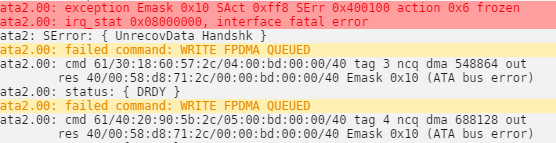
I got a lot of these error and warning in my log records. How can I interprete them? Thank you
-
Thanks. It was my fault. I forgot the login must only be 'abc' as stated on the git page. It is working if I login with abc/mypassword. Is it possible to assign my own login name? I tried USER and USERNAME variable on the docker, but it didn't work.
-
Just updated my Calibre docker and I no longer be able to login after entering login and password. It displays: connecting to sesman ip 127.0.0.1 port 3350 sesman connect ok sending login info to session manager, please wait... login failed for display 0 Anyone experienced this behavior? I attached the log file here. Calibre_log.txt
-
I'm not sure this is the right place to post my question because I can't create a new topic under the application support/plugins section. I've created 2 user scripts, say script A and B, under CA User Scripts plugin. Script B is supposed to be called by several scripts with passing arguments. In this case, Script A will call script B and also pass 4 arguments to B. I know how to do it under native Debian bash script, but I don't know how to acheive this under CA User Scripts plugin. Would appreciate any guidance. update: I found the solution, to call other script defined in CA User Script, e.g. to call script named "subscriptB": sh /boot/config/plugins/user.scripts/scripts/subscriptB/script arg1 arg2 arg3 .....
-
My trial Unraid will expire in 5 days and I want to buy personal key, now but after filling in every thing, the proceed button can't be pressed to proceed with payment. Do I have to wait till the trial key expires before I can make a purchase? Microsoft Edge (chromium) browser. Update: it worked fine with Chrome.
-
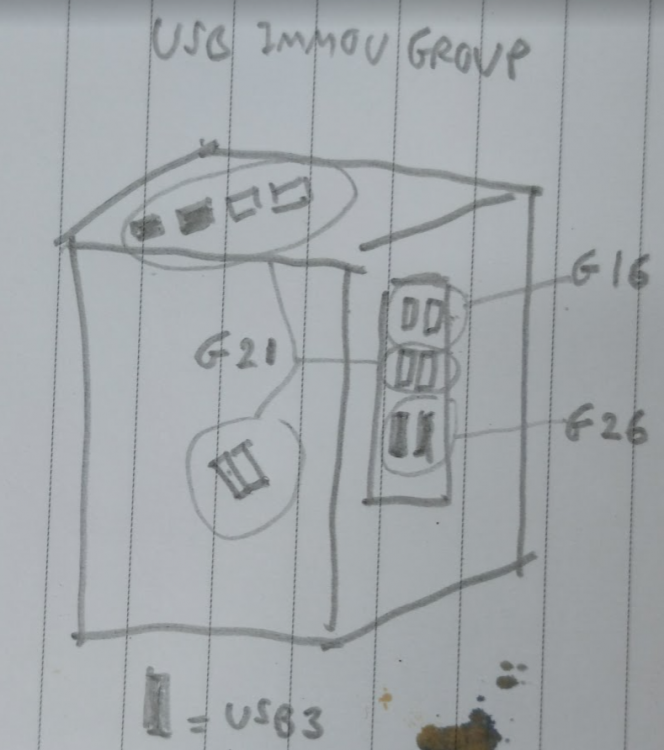
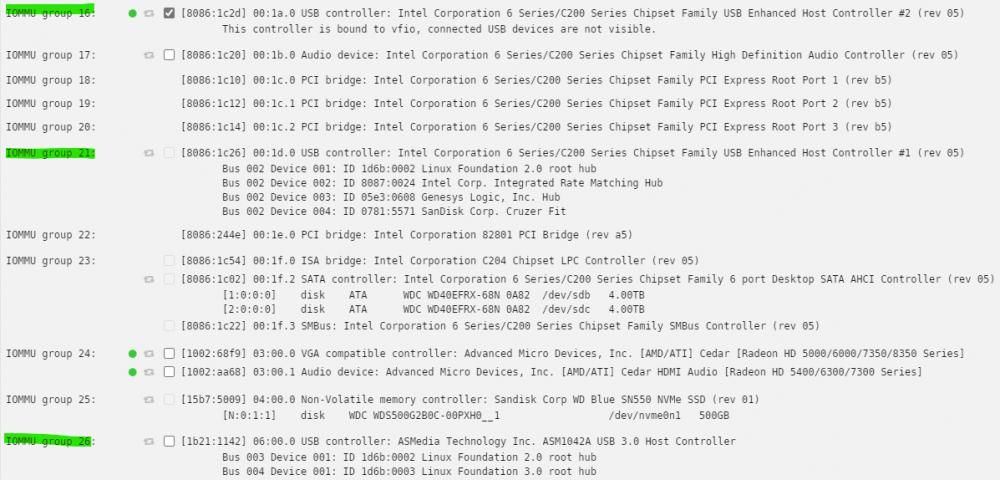
I attach a list of IMMOU groups on my server here. I did not use ACS override. I did plug my usb drive to every port in order to identify which physical usb ports belong to which group, and the result is as the drawing attached here. I'm sure the drawing is right because I did try plugging my usb drive to every port 3 times. I have 12 physical usb ports: - 2 usb2 and 2 usb3 on top of the case - 2 usb2 inside the case where one of the port have my Unraid boot drive - 4 usb2 ports at the backpane - 2 usb3 ports at the backpane Physically inside the CPU box, the mainboard has 1 usb2 and 1 usb3 connectors. For the usb2 connector, I connect a splitter usb hub board which splits it into two connectors, one of which connects to the 2 usb ports on top of the case, the other one connects to a 2-port usb header (1 port has my Unraid boot drive). The usb3 connector on mainboard connects to the 2-port USB3 on top of the case. As shown in the drawing and IMMOU list, Group 16 is already bound to vfio and passthrough to my Win11 VM, these two ports are for mouse and keyboard. Group 26 covers 2 usb3 ports at backpane, not being used. What looks strange to me is Group 21 which covers all internal case usb2 ports, usb2 and usb3 ports on top of the case, and the remaining usb2 ports on the backpane. I intend to also passthrough all the usb ports on the top of the case to my Win11 VM, but it is not possible now because they belong to the same group as my unraid boot drive usb. My question are, - is it possible that one IMMOU group covers both usb2 and usb3 ports? - will the ACS override, either with downstream or multifunction option enabled, splits the ports further, to individual port?, so that I have more flexibility in passing through them?
-
I'm not sure what I did. It is now not paused by itself.
-
Thanks. So I won't use vbios.
-
My server has 10 cores 20 threads, 6-thread pairs are dedicated to my Windows 10 VM. I already set my Win10 to never sleep and hibernation off. My SSD cache, btrfs format, uses only 20%. I also run full balance. The VM still goes to sleep after a short idle duration. My other VMs, e.g. debian, homeassistant, never paused itself. I can resume the VM without problem, but it would be a problem because I passthrough my only GPU card and usb (mouse/keyboard). I have to use either my phone or ipad to go into Unraid web and resume it. Any solution for this issue? Thanks
-
I've been reading all the past answers, but I'm not sure they're still the up-to-date answers. I've been running Win10 VM with my only PCIE Asus AMD gpu (HD5450) passthrough (no iGPU), without using VBIOS. Windows automatically recognize the GPU card. It didn't recognize the GPU sound, so installing AMD official driver solves the problem. Do I still need vbios to gain something more? Thank you


