





bthoven
Members
-
Joined
-
Last visited
Everything posted by bthoven
-
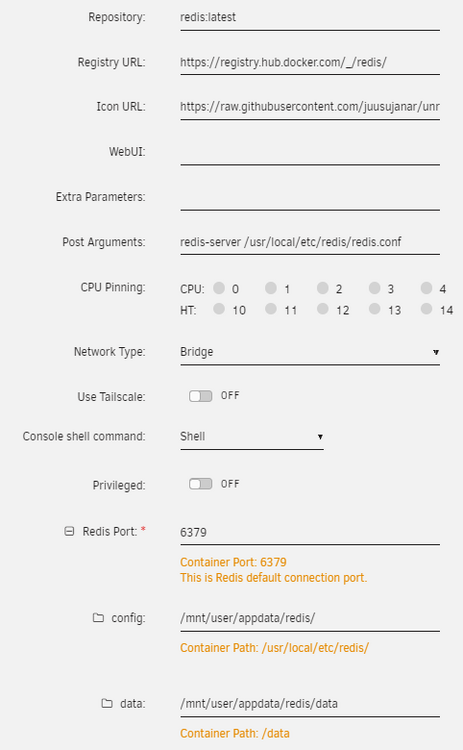
Just started my redis journey. After hours of experimentation, I use following template to make Redis use my customs redis.conf file: My redis.conf settings are: # NETWORKING bind 0.0.0.0 port 6379 protected-mode no # SECURITY requirepass ..yourpass... # MEMORY MANAGEMENT maxmemory 512mb maxmemory-policy allkeys-lru # PERSISTENCE save 900 1 save 300 10 save 60 10000 appendonly yes appendfilename "appendonly.aof" appendfsync everysec # LOGGING loglevel notice logfile "" # DATABASES databases 16 # SNAPSHOT LOCATION dir /data Please note that your password should not have any special characters to use it easily with redit command line to run redis command line from unraid host, you can start with command: docker exec -it redis redis-cli -u redis://default:yourpassword@localhost:6379/0 It will give the following prompt, and you are now ready to issue Redis command, e.g. config get maxmemory redis-cli -u redis://default:yourpassword/0 Warning: Using a password with '-a' or '-u' option on the command line interface may not be safe. localhost:6379> CONFIG GET maxmemory 1) "maxmemory" 2) "536870912" localhost:6379>
-
I've been using Luckybackup for years and I really love it. When I run it interactively, I can see the elapsed time reported at the end of the output display after the backup has completed. However, this information is missing in the email log file. How can I include the elapsed time for each backup job within a profile, as well as the total elapsed time for the entire profile, in the email log file? Thank you.
-
I'm running the latest plugin. Recently, I have lost my internet connection twice. When the internet was restored, I also lost the Tailscale connection. Restarting Tailscale through the plugin GUI did not resolve the issue, so I had to reboot my Unraid system to restore the connection. I'm using Headscale 0.26.1 as its controller on Unraid. Is there a way to reconnect it without rebooting Unraid? Thank you.
-
The container that I run (tailscale DERP), if running on a VPS server, needs to map var/run/tailscale/tailscaled.sock to the bare-metal tailscale client on the same VPS, to make the "verify clients" function work. That is working fine on VPS. However, if I want to run the same DERP server as a container on Unraid, initially, I thought I could map the socket to the Tailscale plugin's socket, but I can't because Docker can't access/see the Tailscale plugin socket. The solution could be to turn "Tailscale Use" on in my DERP docker template in order to have another Tailscale client running alongside my derp server inside the same container. By checking the DERP container console, the socket is stored at /opt/unraid/tailscale/tailscaled.sock My question is how to make derp container use tailscale socket at /opt/unraid/tailscale/tailscaled.sock instead of at /var/run/tailscale/tailscaled.sock
-
I use Haproxy on pfSense to reverse proxy my nextcloud container on Unraid. I got the same error if I access it by nextcloud.mydomain.com; but no such error if using its local IP to access. Still can't find a solution to this.
-
If your Calibre container "web server" port is 8086 and you map port, say, 8088 to container port 8086, "Sharing on the Net", in Calibre GUI, has to be with container port 8086; but in your MoonReader app, you have to specify "your unraid server local IP:8088/opds". So if your Unraid server local IP is 192.168.2.99, put 192.168.99:8088/opds in MoonReader app. This setting will work, if your device is connected to your local network. If you are outside and VPN to your local network, it still works. If you are outside and you don't VPN to your local network, you have to have a public domain name that points to your home public IP. There are extra steps to set it up.
-
Thanks a lot. I got stuck for hours due to this setting.
-
From the log, your mail sent from your corporate mail reaches your mail server, but can't find the receiver address there. How did you add your account to your local mailserver? Are you able to send a mail to yourself with your @athome email address, i.e., from [email protected] to xxxx or [email protected]?
-
have you checked the mail log of your mailserver?
-
Today I use tailscale command to accept routes (tailscale set --accept-routes), after entering the command, my unraid did not respond to the command and I no longer be able to access my unraid either my its local IP or tailnet IP. What should I do?
-
here it is...thanks. bthoven-unraid-tailscale-diag-20241108-091212.zip
-
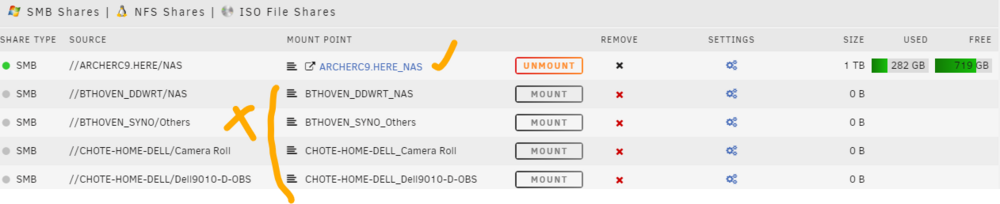
Just installed tailscale plugins. Set network bios to no. While my tailnet devices can now see all SMB drives on other devices, the "SMB Shares" on Unraid can no longer see smb share by device names. Instead, unraid can see those devices only by their hostnames as defined on my pfsense static IP setting. Is it a normal behavior when running tailscale on unraid?
-
Running the Tailscale client on pfSense has been smooth, and with it set as a subnet router, accessing local services remotely is a breeze. Currently, there's no need for it to function as an exit node. I'm tempted by the idea of trying out Tailscale plugins on Unraid, despite some users reporting side effects. It seems these issues can be mitigated and avoided. I'm curious about the extra advantages of installing the Tailscale plugin on my Unraid system. Could you shed some light on this? Thank you.
-
Thanks.
-
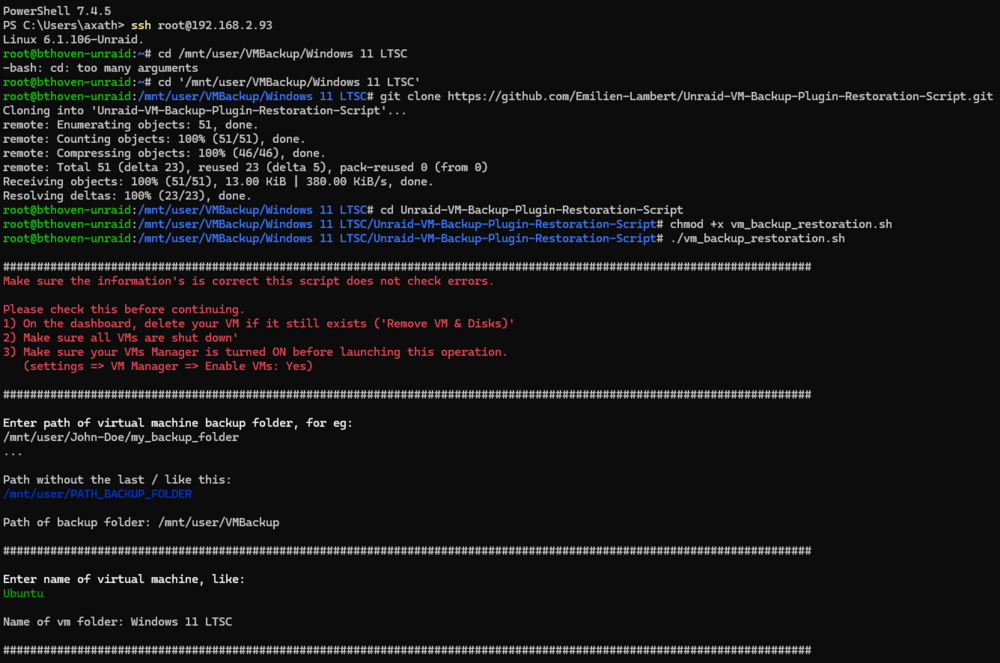
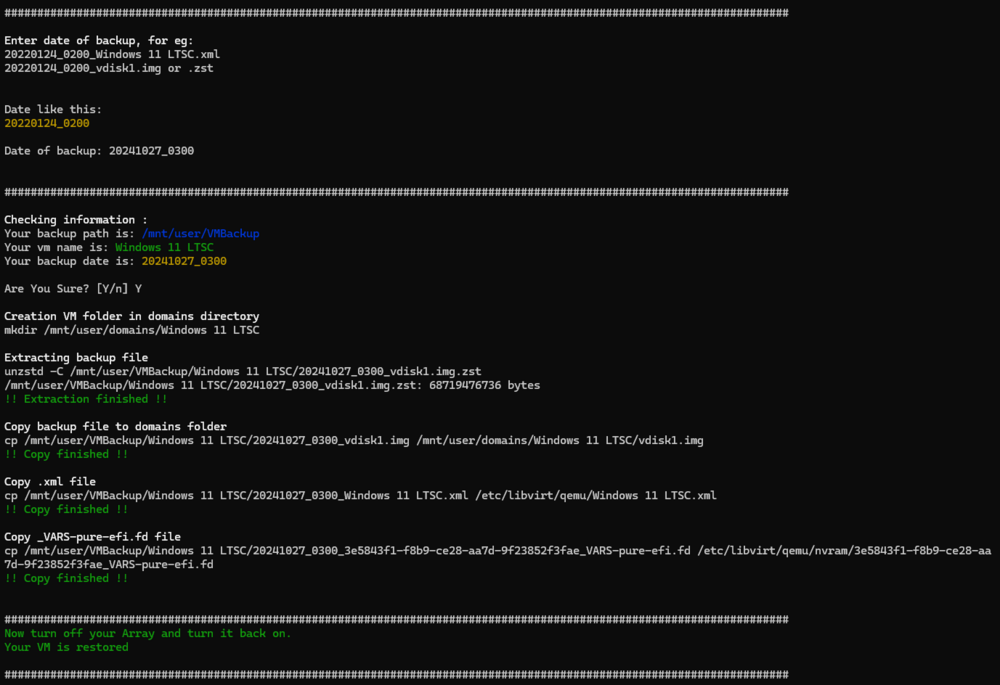
Thank a lot for your script at https://github.com/Emilien-Lambert/Unraid-VM-Backup-Plugin-Restoration-Script I messed up my Windows VM and used your script to recover it successfully. After restoring completed, stop and start array. Here are the screenshots of the process Note: My VM backup is in a folder /mnt/user/VMBackup/Windows 11 LTSC

-
I just added a new nvme ssd to my single cache unraid. So now I have a raid 1 cache pool. The main cache age is almost 3 years old and its endurance remaining is 61%. The new cache or cache 2 is a brand new mirror drive. Swapping my cache 2 to be a main cache would make any difference? I'm afraid my old main cache will corrupt much sooner than the cache 2. What is the safest way to swap these 2 cache drive, if I have to? Do I have to swap physical slots too? The main cache is plugged to the onboard nvme slot. The new cache is on the pcie 4x 3.0 to m2 card adapter. Thanks
-
It's not a server-grade PSU, but it provides ample power for my Unraid setup. Thank you.
-
Corsair CV450.
-
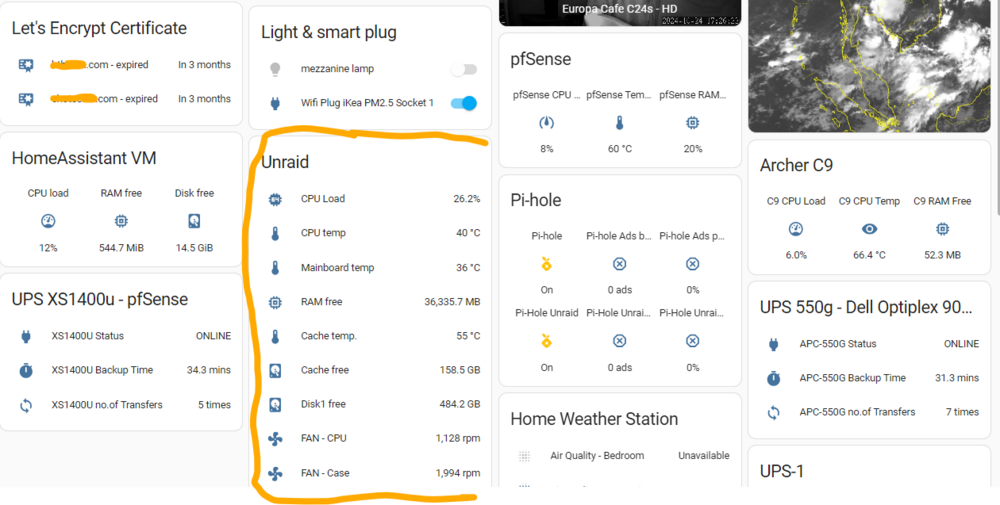
Thanks a lot for sharing this useful app. I'll definitely try it. My unraid is also powered by Cosair PSU. I'm looking forwards to your future development. I'm using Glances docker container on Unraid and Glances integration on Home Assistant (that provides 1000+ entities) for this purpose.
-
Thanks for the tips. I can't remember what I did, but I found all my client public keys are in /root/.ssh/authorized_keys. Unraid: 6.12.11
-
If you have an Amazon Kindle email ([email protected]) and your ebooks are epub, then you can simply email your book to your Kindle email with your Calibre "sharing book by email" function. Your Kindle book reader will then automatically download it from Amazon cloud. Off course, your Kindle reader must have wifi turned on.
-
You have to delete that vlan network (e.g. br0.1), and create it again, but now with "metric" value lower than you main lan network (br0).
-
Hi, thanks a lot for your docker. I've been using it for years. However, from time to time, I got 429 error, even visitor limit is set to 1000 and no way it will ever reach 1000 messages a day, even bursting up to 60, because messages are automatically sent from my server on certain rare conditions. I'm not sure what else I need to do.
-
Thank you for the professional script. I've identified the cause of the error. Normally, when I navigate to Main-->SMB share and select the mounted disk (which shows as mounted with disk capacity and free space), I expect to see all the folders/files within the remote disk. However, this time, I only saw the folders/files of the Unraid root directory, which explains why the script couldn't locate the backup folder. I resolved the issue by unmounting and then remounting the disk, after which everything functioned normally. I ran the script manually, and it operated correctly. The reason for the disk's sudden change in behavior is unclear to me.
-
I have an external HDD attached to my wifi AP via its usb port. I've made it automounted to Unraid as a SMB shared remote disk. I use this HDD for backups of some applications data with User Script plugin. Most of the time, the backup script works without problem; but sometimes it seems the HDD did not wake up in time, thus the backup script can't find the disk. Below are log entries showing both the successful (on 22 April) and unsuccessful (on 23 Apr) backups: Full logs for this script are available at /tmp/user.scripts/tmpScripts/joplin-server-backup/log.txt Script Starting Apr 22, 2024 02:00.01 Full logs for this script are available at /tmp/user.scripts/tmpScripts/joplin-server-backup/log.txt {"id":"KpnPiVgWIy7m","time":1713726237,"expires":1713769437,"event":"message","topic":"joplin_postgres","message":"Joplin Postgres db was backed up to Archer C9 external drive"} Script Finished Apr 22, 2024 02:03.58 Full logs for this script are available at /tmp/user.scripts/tmpScripts/joplin-server-backup/log.txt Script Starting Apr 23, 2024 02:00.02 Full logs for this script are available at /tmp/user.scripts/tmpScripts/joplin-server-backup/log.txt /tmp/user.scripts/tmpScripts/joplin-server-backup/script: line 8: /mnt/remotes/BTHOVEN_DDWRT_NAS/joplin_backup/postgres/2024-04-23.bak: No such file or directory {"id":"1wprdYCMYCX7","time":1713812402,"expires":1713855602,"event":"message","topic":"joplin_postgres","message":"Joplin Postgres db was backed up to Archer C9 external drive"} find: '/mnt/remotes/BTHOVEN_DDWRT_NAS/joplin_backup/postgres': No such file or directory Script Finished Apr 23, 2024 02:00.02 Is there any simple script command to wake my remote disk up before running backup script command? Thanks


