





billhickok
Members
-
Joined
-
Last visited
Everything posted by billhickok
-
I'm not entirely sure. I'm trying to find other users with a similar issue of Unraid not showing up and randomly disappearing from the network. Similar threads conclude it could be a flash drive problem. I never had this issue before installing 6.12.14, but it could just be a coincidence. Whenever I power cycle or cold boot the server, there's a 50/50 chance I'm able to connect. I will try a new flash drive.
-
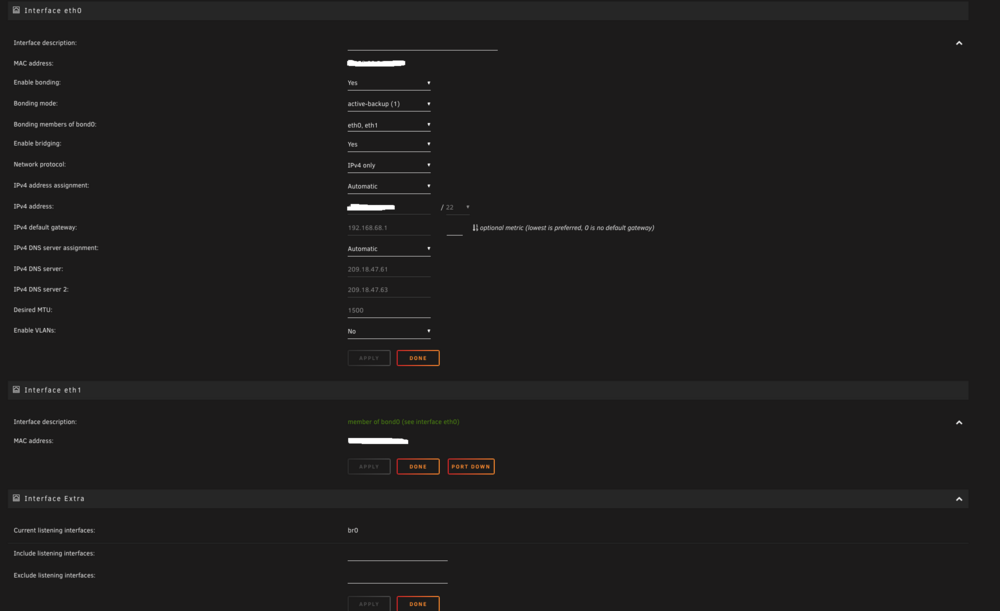
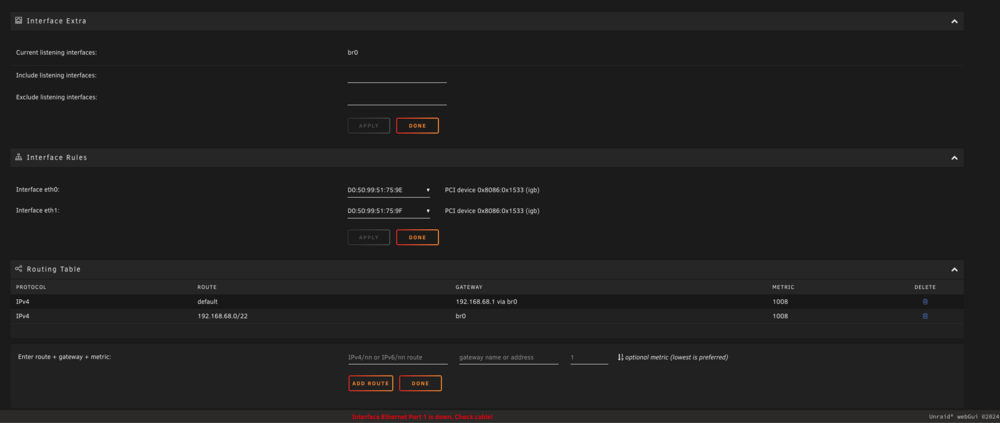
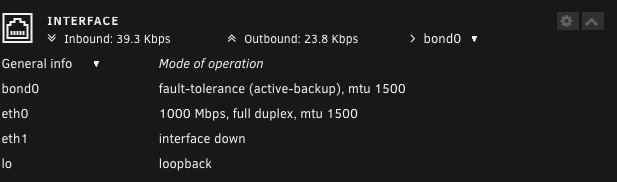
I was not able to get a signal to the monitor. My Unraid server reset and I was able to login for the time being. Attached are the diagnostics after the reset. The disk rebuild was cancelled but the drive is still in emulated mode. I don't want to re-initiate the disk rebuild until my network issue is fixed, just in case my server disappears again. Should I migrate my flash drive data onto a new one? Please advise. I have also attached images of my Unraid network settings, for reference. unraid-diagnostics-20241211-1940.zip
-
Since I can't access my server to download the diagnostics, I will order a D-Sub cable to try to get a video signal to my monitor. I should also add that pinging my server fails. Also, Asrock's IPMI java console fails to launch. Will update this thread if I can get a video signal.
-
OK I believe I may be having 2 separate issues that popped up after installing 6.12.14. The other issue I've been having since updating: my Unraid server randomly disappears from my network. So I took your advice and re-seated everything and found that one of my drives was a little loose in the hotswap socket. Prior to re-seating, I got a "read error" on that disk, and Unraid disabled it. After re-seating it, I proceeded to rebuild the disk. 30 minutes into the disk rebuild, my Unraid server disappeared from my network and now I cannot access it at all. I have tried different ethernet cables and ethernet ports, but nothing. In my network dashboard app on my phone, all I see is my Asrock mobo. I can log into the GUI through IPMI and see that the server is powered on. I also have options to power cycle or power off my server. I already backed up my flash drive's data onto a new flash drive, but I have not installed it yet. I'm not sure what to do at this point. I assume the disk rebuild is still happening in the background? It gave me an ETA of ~10 days when I started it (14TB drive.) I'm reluctant to shut down the server, since I'm not sure if it will interrupt the rebuild and possibly harm the disk. I have created a separate thread for this issue here:
-
I've been having an issue with my Unraid server randomly disappearing from my network, after upgrading to 6.12.14. I've also been having read error issues with 1 of my disks. I noticed that one of my drives was a little loose in the hotswap socket. After re-seating it, I proceeded to rebuild the disk. 30 minutes into the disk rebuild, my Unraid server disappeared from my network and now I cannot access it at all. I have tried different ethernet cables and ethernet ports, but nothing. In my network dashboard app on my phone, all I see is my Asrock motherboard. I can log into the GUI through IPMI and see that the server is powered on. I also have options to power cycle or power off my server (orderly shutdown.) I already backed up my flash drive's data onto a new one. I read this may be the issue with Unraid not showing up on my network. I have not installed the new flash drive yet however. I'm not sure what to do at this point. I assume the disk rebuild is still happening in the background after losing access to my Unraid server? It gave me an ETA of ~10 days when I started it (14TB drive.) I'm reluctant to shut down the server through IPMI, since I'm not sure if it will interrupt the rebuild and possibly harm the disk. My Unraid mobo is a ASRock E3C224D4I-14S. Any help is appreciated.
-
I've been having nothing but issues with my Unraid server after upgrading to 6.12.14. Downgrading back to 6.12.13 doesn't fix it. I can no longer transfer files through my Mac, it just fails and gives me an error message. After failing to transfer, the server just freezes and disconnects, and takes around 20 minutes to become responsive again. Also when I restart or cold boot the server, sometimes it doesn't show up on my network and I have to force-power off the system. I posted a thread here: My mobo uses a RTL8211E GLAN but I never installed or uninstalled any related Realtek drivers or plugins prior to this.
-
I'm having an issue where I can no longer transfer files larger than a few gigs to my Unraid server via my Mac. First off, transfers are now extremely slow after this update. The first few GB transfers normally and then it slows down to a halt for a few minutes, then proceeds to fail. I get the message through macos finder "The operation can't be completed because an unexpected error occured (error code 100060)". This happens 100% of the time with large files. Everything is hardwired with ethernet. I have tried both restarting my Unraid server, as well as my Mac multiple times. This has only started happening after upgrading Unraid to 6.12.14 from 6.12.13. It has been working perfectly for the past few years until this update. After dealing with this issue for a week, I downgraded back to 6.12.13 but the issue remains. Is this a driver/plugin issue? My Unraid mobo is a ASRock E3C224D4I-14S with a RTL8211E IPMI Dedicated GLAN. Computer is a M1 Max Mac Studio running the latest macOS Sequoia 15.1.1. Diagnostics are attached. unraid-diagnostics-20241206-1840.zip
-
It may be that. This 18TB I'm having issues with was formatted with the latest version of macOS (Sonoma) and my other drives were formatted on earlier versions (Ventura or earlier.) I'll reformat an empty 12TB I have laying around and will see if I run into the same issue with Unraid.
-
Interesting. I have a few smaller external drives (all WD Easystores), ranging from 12-14TB, and I never had an issue with utilizing them while directly connected to my Unraid server. They show the correct storage space and are all formatted the same way (HFS+ done through macOS' Disk Utility). Possibly the 18TB and larger drives aren't compatible formatted in this file system.
-
Diagonistics attached, thanks. unraid-diagnostics-20231204-2105.zip
-
I'm having an issue with Unraid not properly recognizing the available space on an 18TB external drive, freshly formatted to Mac OS Extended (Journaled HFS Plus). It is only showing 400GB free, when the drive is actually completely empty. I have posted my issue in a separate thread here, but it might be better suited posted in this thread? Mounting the drive in either macOS Sonoma or Windows 10 shows only the main partition (18TB free space.) Only in Unraid does it show the drive partitioned out like in the above image, with only 400GB free space available. This seems to only happen when formatting to HFS+ (Mac OS Extended Journaled.) I formatted the drive to exFAT (in macOS) and Unraid now shows the correct size of 18TB free. Formatting it back to HFS+, the same issue arises. I've had major issues in the past with very large drives formatted to exFAT, so I prefer to keep the drive formatted to HFS+. Any clue why this is happening?
-
I'm not sure how to check that in Unraid, but I made sure not to create any additional partitions when formatting the drive under macOS. When I click on the WD_easystore_264D-part1 link in Unraid under Disk Devices, it just asks me if I want to change the mount point. Mounting the drive in either macOS Sonoma or Windows 10 shows only the main partition (18TB free space.) Only in Unraid does it show the drive partitioned out like in the images I posted, with only 400GB free space available. This seems to only happen when formatting to HFS+ (Mac OS Extended Journaled.) I formatted the drive to exFAT (in macOS) and Unraid now shows the correct size of 18TB free. Formatting it back to HFS+, the same issue arises. I've had issues in the past with very large drives formatted to exFAT so I prefer to keep the drive formatted to HFS+. Maybe this question is better suited for the Unassigned Devices thread? I have a feeling this might be an issue with the plugin not properly recognizing very large external drives formatted to HFS+? I will post my issue in that thread as well.
-
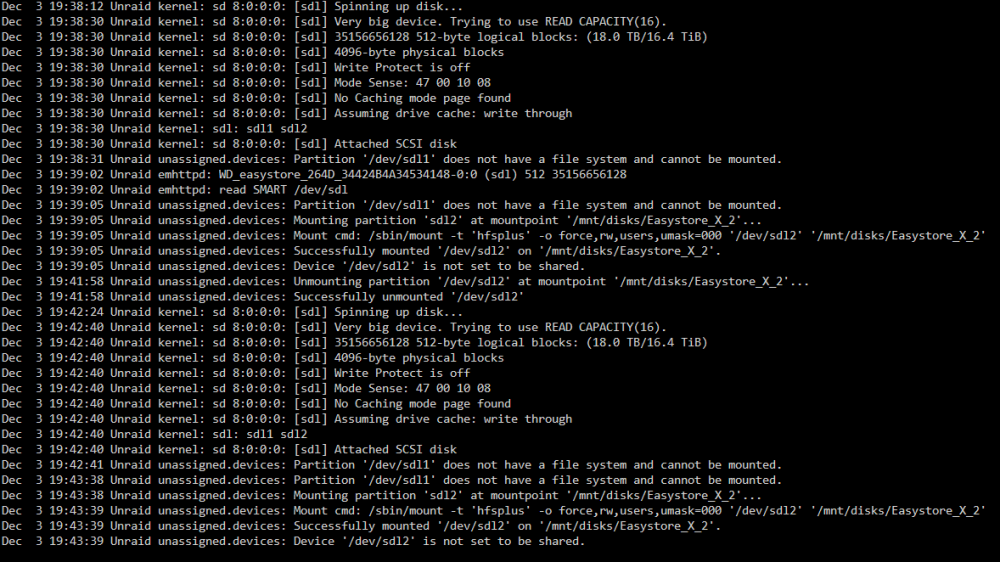
I have an 18TB external drive connected to the USB 3.0 port on my Unraid server, and I am trying to transfer files from my server to the HDD using Krusader. It's a 18TB WD Easystore external, newly formatted to Mac OS Extended (Journaled HFS Plus). When mounting the drive through Unraid, it only shows 400GB available, even though it is empty. Accessing the drive through Krusader also only shows 400GB available. When I try to transfer more than 400GB to the drive, it tells me insufficient space is available. Here's an image of the log when I mount the drive: I have several other external HDD's I've mounted and transferred to successfully in the past, all formatted the same way, but this 18TB drive is the first time I've encountered this issue. Any clue what's happening?

-
Thank you. I went into the settings and disabled both, ran the mover again, and that seemed to clean out most of the cache drive. I still have ~1 GB of the cache disk used however. When I check the location of each share, /mnt/user/appdata/binhex-krusader is the only folder still both on the array and cache drive, even though I stopped krusader and disabled docker prior. All of the other shares are solely on the array. I assume I should be good to swap out the cache drive now and worst case, I can just rebuild/reinstall krusader, in case the appdata didn't properly make it's way over?
-
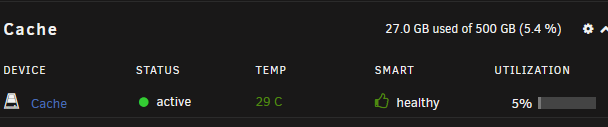
So reading further, I set every share to "Yes" to use the cache pool, then I initiated the Mover. I made sure to turn off all dockers and VM's. It ran for around 30 minutes. After it was finished moving, nothing seemed to happen to the data on the cache drive? The data is still present. I then set every share to "No" and still nothing. This is how it looks after modifying the shares and initiating the mover: From what I read, isn't this supposed to move all the data from the cache drive to the array? What's going on here?
-
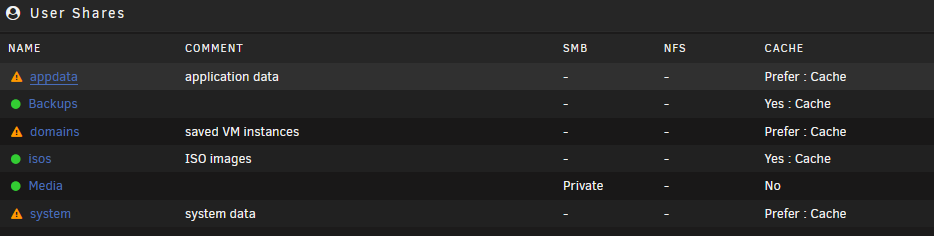
I want to remove my cache drive completely and replace it with another data drive. I am nearly out of space in my array and I've never really used my cache drive, outside of storing system files. I've searched this forum and I just want to confirm the exact steps to take. Unraid version is 6.11.5, and I have system files allocated to the cache disk as such: I've come across this post but I am not sure if this encompasses all the steps I need to take before removing the cache drive: Your help is appreciated!
-
I'm having an issue where external HDD's sometimes refuses to appear under the Main tab on my Unraid server. I have both the Unassigned Devices and Unassigned Devices Plus plugins installed. When I plug in any external HD, sometimes the drive will show up under the Main Tab, and sometimes nothing. I've tried 5 different external HFS+ drives and I experience the same behavior with each. When the drive doesn't appear, replugging either the drive's USB or power cable doesn't do anything. The only working solution I've found is a complete reboot of the Unraid system, which is inconvenient. I'm on a freshly built system running Unraid version 6.9.2. Any ideas on what other things I can try (besides a system reboot) to have external drives show up under Unassigned Devices?
-
Thanks, will do.
-
I have both the Unassigned Devices and Unassigned Devices Plus plugins installed. When I plug in any external HD, sometimes the drive will show up under the Main Tab, and sometimes nothing. I've tried 5 different external HFS+ drives (WD Easystores). When the drive doesn't appear, replugging either the drive's USB or power cable doesn't do anything. The only solution I've that works is a complete reboot of the Unraid system, which is inconvenient. I'm on a freshly built system running Unraid version 6.9.2. Any ideas on what other things I can try (besides a system reboot) to have external drives show up under Unassigned Devices?
-
Whenever I try transferring large files from my 2020 M1 Mac to my Unraid server SMB share, it prematurely aborts and I get an error code 100060 in Finder. When this happens, my internet access on my Mac gets cut off completely and this requires me to unplug/plug my Ethernet adapter to get the internet working again. Sometimes I get this error near the beginning of the transfer and sometimes it happens after transferring large amounts of data (100-300 GB.) I am connected directly to the Unraid server with ethernet. I wanted to give AFP a shot instead of SMB but of course, this functionality was removed recently from Unraid. I've been trying to figure this issue out for days and have tried different solutions to no avail, including: -Using an older MacBook Pro computer. -Using different USB to Ethernet adapters. -Turning on "Enhanced macOS interoperability" in the SMB settings. -Turning off NetBIOS/SMBv1 in the SMB settings. -Turning on File Sharing on my Mac, adding the Unraid share, and making sure SMB is enabled. -Rebooting the Mac and the Unraid server numerous times throughout all of this. I also tried the Client Signing solution posted in this thread, but it did not help. Running: Unraid 6.9.2 (newly built server) 2020 M1 MacBook Air running macOS Big Sur 11.6 TP-Link UE300 USB to Ethernet adapter, connected to an Anker PowerExpand USB-C hub SMB share settings are set to Export and Private I vaguely remember this same issue occurring many years ago with my older MacBook Pro and a different FreeNAS server. I kept getting errors in Finder when transferring data. It seems SMB has never played nice with macOS. Anyone have any idea what's going on and know a possible fix?


