





FrodoTheMagicUnraid
Members
-
Joined
-
Last visited
Everything posted by FrodoTheMagicUnraid
-
Ah thank you very much, it worked!
-
Hi all, I just purchased my license key as I do not have access to the internet for a traditional install. I follow the step and get a key file URL, I paste that in the Key file URL part of the web GUI for my unraid machine, but it doesnt seem to work. I saw online, someone had a similar Error (4) issue and they were told to paste the key file URL to the config file Basic.Key file. I tried that too, but no luck. I have attached the diagnostic. Any advice? Thank you! hash-diagnostics-20220323-1846.zip
-
That is correct, my unraid server has zero internet access. Are you sure I need it to apply the license via an internet connection?
-
Hey! Thanks for the reply! I do need access to internet to initiate a trial: That is why I would rather buy the license key online at work, but as I mentioned in my OP the payment keeps getting declined because of some sort of non-updated security issue at unraids end. Rather than trying to struggle through getting internet detected on my hacky set-up, can I not just purchase a license key? It seems a lot simpler an option.

-
Hey there! Thanks for the reply! No I am not able to start an unraid trial, because for my internet I tether my phones data, and my unraid machine cannot detect that internet. I have been unable to make it work via the bridge process. Thats why I am trying to purchase the license key directly so I can do that update work and then transfer the usb to my home pc.
-
I have been trying to purchase a copy of unraid all day. I cannot do it via the traditional trial method due to broadband in my area being really expensive, so I have to use my phone as a tethered internet source but my unraid machine wont detect the internet that way. I tried bridging my internet on my phone but that didn't seem to work either. So I need to purchase the key and do a manual set-up and hope it works given all the little random technology niggles so far! But whenever I try to purchase a copy of unraid my card gets declined. I have tried multiple times throughout the day. I phoned my bank and they said it was because unraid.net have some sort of non-updated security protocol that is stopping me from buying from unraids end and it was not actually my bank that blcoked it. So they suggested I get in touch to mention that. If you check my posting history, I have been trying to get unraid going since last year but a mixture of hardware issues, internet problems and and now this is stopping me moving forward! Is that something that can be fixed relatively quickly? Otherwise if the good people at unraid wanted to hit me up with a license key in the DMs, it would be much appreciated even if just for me to see if I can get it working as I note there is a no refund policy otherwise 😇! I dont have a paypal account sadly. Thank you!
-
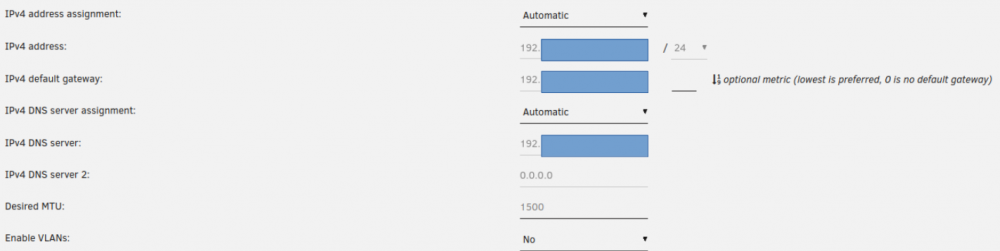
I am a total noob when it comes to networking and unraid. I am struggling to register my trial key because my unraid machine cannot connect to the internet. I made a post here, but I am thinking the issue is more a DNS setting than a hardware or speed issue. Can anyone offer any advice?

-
Sorry if this is a stupid question, but does that mean I need a new router? I have a switch I just picked up (https://www.tp-link.com/uk/business-networking/unmanaged-switch/tl-sg105s/), could that be used instead of a router, or do I need both? Or maybe even a new switch too? If I do need a new router/switch, what should I be looking for in terms of speed? Thank you, both!
-
So I did a bit more digging, I noticed my router had this sim slot, so I popped my SIm in there. I then saw this in my settings... So maybe the issue is actually the router? The router I am using is a TPLink Archer MR200: https://www.tp-link.com/uk/home-networking/3g-4g-router/archer-mr200/ But I am really getting out of my area of expertise now!! Any ideas?

-
Is there anything you would suggest I do to test this out? If that is the problem is thee any other way for me to do this? I couldnt even pay for a premium account at work and then use the code, because it wont be able to check if its a valid key. Surely I cant be the only person in this boat! Should I maybe make a separate post for the question? I am just really keen to get this up and running this weekend before work kills me again! Thank you again!
-
Actually, just a thought, the way I connect to the internet is via my mobile and tethering data (regular broadband internet is too expensive for me atm), could this be causing the issue? I have no other issues with my internet connection with this approach.
-
Hey there! Thank you again for your help! So, I tried a few things. I tried another cable/ports, nothing changed. So, I also tried using a Switch (not sure if this is correct, but I connected a cable from the router to the switch and then one cable from the switch to my regular machine and one cable from the switch to my unraid machine). No luck!! I have attached another diagnostics file, in case you can see something I cannot. hash-diagnostics-20220312-1501.zip
-
* I just tried reseting my unraid machine, PC, router and cache but for some reason still no luck! Any help would be really appreciated, kind of hoping to get this up and running this weekend if possible TY!
-
Hey! Thank you again for the reply. So I replaced one cable, and that was the cable going from my router to my unraid macine. I had a cable that was "Cat5e UTP Patch" so used that instead. After I connected it, I refreshed my unraid registration page and nothing had changed. I have attached another diagnostics output. Thanks again! hash-diagnostics-20220310-0229.zip
-
Actually, just a thouoght, would using a switch instead of a router simplify/fix this? I might be able to get my hands on one today...
-
So, after setting IPv4 DNS server assignment to static, I entered the below as you suggested: After that I apply and go to the registration page which hasn't changed:


-
hash-diagnostics-20220309-1544.zip
-
Hey! Thank you for such a quick response (and the steps on how to attach the diagnostics file!)! Just to make sure I am entering the command correctly, before I enter it on my unraid machine I enter "root" for my login and then type the above. That then gives me the below error:
-
I am not able to register my Trial Key. I have everything wired up. I am able to log into the unraid web UI by using my IP address. I can see my unraid machine IP in my router web UI settings as well as the IP address of my current machine. My unraid IP begins with 192 if that matters. The router I am using is a regular home router (TP Link MR200). But when I registered my trial key, I got an error reading "Cannot connect to key-server". I am indeed connected to the internet, but for some reason unraid cannot detect it. I did some searching and I noticed both my unraid machine and unraid web UI date were both different and wrong, so I fixed that in the BIOS and in the unraid settings. Turned off the unraid machine and then turned it back on - but the error message is still there. I also tried to reset my internet router, but that didnt seem to change anything either. Apologies if this is a stupid question, I am very much stretching myself with this project. I am not use to network configuration stuff! Any thoughts?
-
Could I also tack on to my earlier question, if I purchased a Gigabit Ethernet Network Switch, would this eliminate the need for any static IP configurations? And would the set-up be Unraid Machine > Ethernet cable > Ethernet Network Switch > Ethernet Cable > PC? Or would I require a router? I do actually have a router tucked away in a box somewhere, but I am just trying to save desk real estate. If using one is necessary/makes set-up easier, then it might be worthwhile me dusting off.
-
So, to be honest, I am getting a little lost at this stage. I was looking at some tutorials and noticed that there is the option to set static IP when installing unraid onto a USB to use as a boot drive (under the "Customize" option). Would re-installing unraid on a USB make my like easier at this stage to set the unraid static IP? Then (I think) all I would need to do is on ubunutu select the manual option for ip4. If that is accurate, how do I determine which values to use as an IP here and when setting a static IP on my boot drive! Sorry for such school boy questions, I am a just a graphic designer trying to understand this complex unraid world!
-
Thank you for this! Does it matter what numbers I use here? Sorry if that is another stupid question.
-
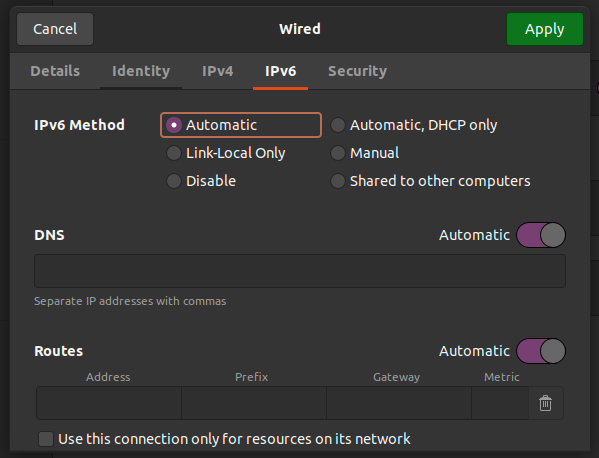
Not exactly sure how to do that, for the non server PC I am using Ubunutu. The only mention I could see of "DHCP" in my settings was the below, do I check "Automatic, DHCP only". You also mention I convert both machines to static IPs, how would I do that to my machine with unraid? Sorry for all the noob questions, I have literally been trying to set up unraid for weeks! Thanks again!
-
Ah ha! It worked! It is asking me for "Tower login:", and I believe at this stage I control server via another PC? Or should I enter something here? Can I confirm, I have one ethernet cable going directly from one machine to another (I am not using a router or a port switch), is this okay? At the moment I have left my unraid machine at "Tower login:". When I type http://tower/ into my other PC in a firefox brower I get an error message "The requested URL could not be retrieved"... Thank you both for your help, this is more progress than I have made in the last few weeks!
-
Hey there! I dont recall even having that option when I was installing unraid on my usb stick 😓. I am pretty sure it wasnt even an option... How do I do that? You mean install the drive in another PC and rename the folder name EFI- to EFI? I tried this, but it told me I needed to disable Secure Boot, but when I select "Legacy Support - Enable" it tells me "Secure Boot option may only be enabled if Legacy Support option is disabled". The "Secure Boot" option is already showing as enabled.... Thank you!

