






JonasH
Members
-
Joined
-
Last visited
-
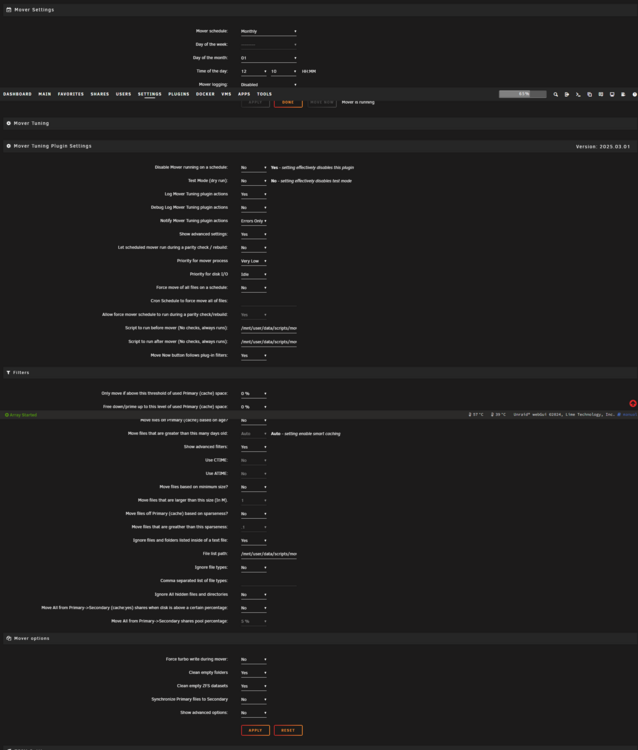
Is it possible to fully disable the cron job for this? I disabled the built-in Unraid Mover, but the Mover Tuning schedule still seems active. I’d like to disable that as well, because I only want the mover to run when I manually trigger /usr/local/sbin/age_mover start from my script.
-
How does it work if i use the native zfs snapshot for the vm? If I delete it the snapshot does not show up anymore under the vm, but it is still present on the dataset. I can still see it in ZFS Master. Should it not be deleted automatically?
-
Thank you! It is working now, but this maybe needs a more elegant solution.
-
Normally it should keep all files on the cache when possible \ until full and overflow only to the array if necessary. If files are on the array for any reason and space is free on the cache, it should move them to the cache. Now there is an issue where files are moved from the cache to the array.
-
I'm not sure if I understand this correctly. I actually just want the standard behavior of the mover as it was before and how it behaves with the mover from Unraid. What do I have to set so that the files remain in the cache as they should with a Cache Prefer share?
-
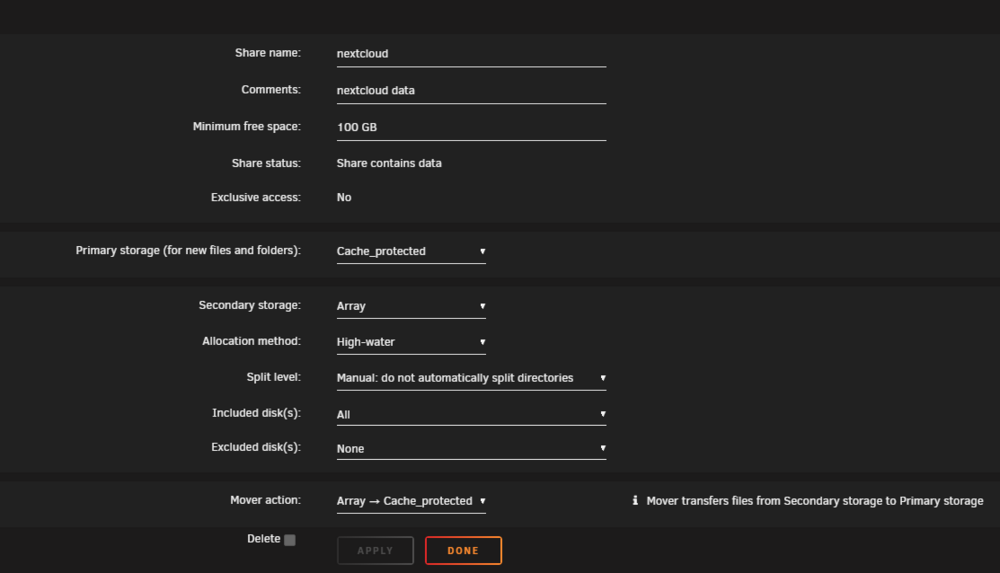
I have an issue with the latest version. It started to move files from a prefer cache share to the array for no reason since the update. Here is my configuration: For example with my nextcloud share i see this in the logs: 07:16:19.764 Primary storage: cache_protected - size: 900GiB - used: 34 % (321GiB) 07:16:19.765 Secondary storage: user0 07:16:19.770 Share Information: Name: nextcloud - Path: /mnt/*/nextcloud 07:16:19.774 Moving threshold: 0% (0B) ; Freeing threshold: 0% (0B) 07:16:19.775 Mover action: user0->cache_protected (cache:prefer). Pool is above moving threshold percentage: 34% >= 0%. 07:16:19.776 => Will smart move newest files from user0 to cache_protected until freeing threshold. Older files will be moved from cache_protected to user0. 07:18:09.791 Updated Filtered filelist: /tmp/ca.mover.tuning/Filtered_files_2025-03-03T071617.list for nextcloud 07:18:10.746 ************************************************************ ANALYSING MOVING ACTIONS *********************************************************** 07:18:10.792 Deciding the action (move/sync/keep) for each file. There are 247573 files, it can take a while... 07:22:42.868 A total of 247569 files representing 325GiB will be moved/synced: 07:22:42.871 - 247569 files representing 325GiB will be moved/sync from cache_protected to secondary 07:22:42.876 *********************************************************** LET THE MOVING SHOW BEGIN ! ********************************************************* 07:22:43.855 Moving "/mnt/cache_protected/./nextcloud/appdata_ocua1beakw9a/richdocuments/remoteData/discovery" to /mnt/user0/ 07:22:57.214 247568 files remaining from caches to array 325GiB 07:22:57.251 Moving "/mnt/cache_protected/./nextcloud/appdata_ocua1beakw9a/richdocuments/remoteData/capabilities" to /mnt/user0/ 07:22:57.362 Deleting empty dir /mnt/cache_protected/nextcloud/appdata_ocua1beakw9a/richdocuments/remoteData 07:23:05.138 247567 files remaining from caches to array 325GiB It should not move it. The share is set like this:
-
JonasH changed their profile photo
-
I have the same issue.
-
How do I remove it completely? Do I need to manually remove some files like with other docker containers in the appdata folder? Do I need to remove something in the /proc folder?
-
Habe es leider mit der F4 nicht probiert. Nur mit der neuesten F5. Habe noch vor der ersten Unraid Installation gleich das Bios geupdatet. Ja ist egal. Finde es nur einfacher. Also bei mir war es ohne nvme_core.default_ps_max_latency_us=5500 auch sehr oft. Mindestens einmal pro Minute. Mit ist es viel weniger gewesen. Da waren es bei mir vielleicht alle 6 Stunden dann einmal. Kam aber auch auf die Aktivität der SSD an. Viele Read/Write Vorgänge = mehr Fehlermeldungen. Normalerweise sind diese Meldungen auch alle harmlos, aber halt nervig.
-
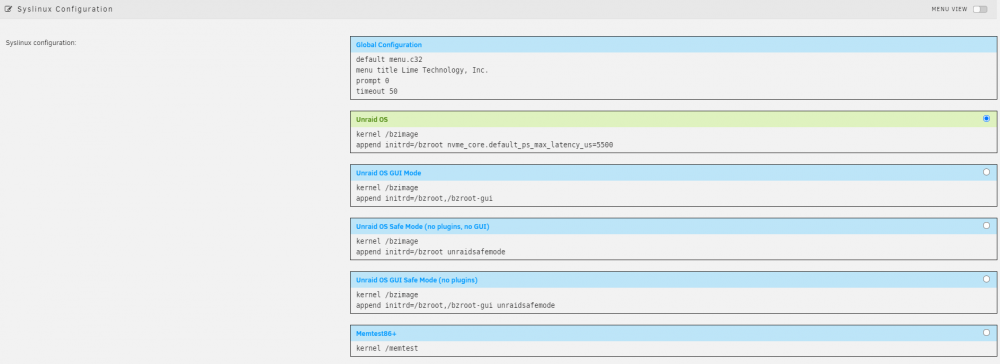
Du kannst das ohne Config Editor machen, indem du auf deinen USB Stick "Flash" klickst. Bei mir sah es dann so aus: Leider hat es den Fehler nicht vollständig behoben, ist aber viel seltener aufgetreten. Mein BIOS ist auf der neuesten Version und zurück geht nicht mehr. Das Problem liegt wirklich an der WD Nvme. Das Einzige was bei mir geholfen hat war, CEC 2019 im BIOS zu deaktivieren und alle Stromsparmaßnahmen wie C-States, niedrige Lüfterdrehzahl, etc. manuell zu aktivieren. Bei ASPM dann alles aktivieren außer PCH ASPM. Das löst den Fehler nämlich aus. Du kannst auch CEC 2019 aktiviert lassen und einfach softwareseitig ASPM deaktivieren mit pcie_aspm=off, aber dann ist ASPM glaube ich für alle Gerätearten deaktiviert. Ich hatte keine Lust mehr mich damit rumzuschlagen. Habe die WD verkauft und mir eine Kioxia Exceria Plus G2 gekauft. Dazu dann noch das Glück zwei Samsung 970 Evo Plus von der alten "besseren" Generation zu bekommen. Damit keinerlei Probleme mehr und alles läuft stabil.
-
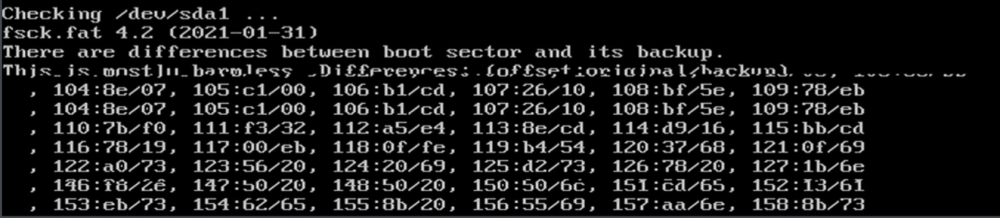
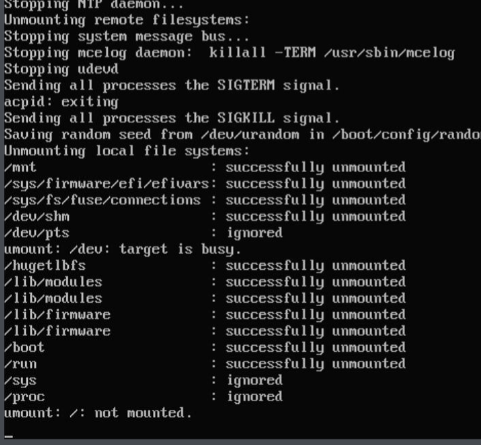
Hello everyone! I get this everytime on boot. I'm on Unraid 6.10-rc2. It can only be seen briefly: Is this normal? Also I get this on shutdown: Why does it not unmount? I think I've never seen that with Unraid 6.9.2. I did a new install of 6.10-rc2. Any advice would be appreciated!
-
Same problem. Tried everything to fix it.
-
Same problem on version 6.10.0-RC2
-
You need to add this to your syslinux. It prevents the nvme drive to go in the deepest sleep mode. Remove pci=noaer, because it only hides the problem. nvme_core.default_ps_max_latency_us=5500
-
Hatte ich auch mit dem C246M-WU4 und einer WD SN750, sobald im Bios PCH ASPM aktiviert ist. Tritt wohl bei manchen NVME SSDs auf, weil der Stromsparmodus nicht richtig gesetzt wird. Keine Ahnung warum WD das nicht behebt. Habe überlegt eine Samsung Evo Plus zu kaufen, da diese das Problem nicht haben soll. Die neue Version dieser SSD ist für mich aber leider zu langsam. Also weitergesucht und das Problem endlich behoben. Man muss das hier zum Kernel hinzufügen: nvme_core.default_ps_max_latency_us=5500




