





mjeshurun
Members
-
Joined
Everything posted by mjeshurun
-
Hi Friends, I have a subscription to Adguard VPN and they recently created a Linux client to connect to their service. I would actually prefer to connect to the VPN using a docker container, but I couldn't find a docker VPN client that supports IPsec-IKEv2 on the Unraid community app store, which is a requirement, because that's the only protocol Adguard VPN currently supports. Is there a VPN container on the community app store that supports this VPN protocol? If not, I guess my another solution is for me to install the Adguard VPN client in a Linux VM. The question is, is it possible to route a docker container's external internet traffic through a VPN connection installed on a VM? Hope someone can help 🙏
-
Hi friends, Can anyone comment if it's possible to run a headless Linux instance inside a docker container? Hope someone can help 🙏
-
Hi Friends, Is there a docker container (or another way) that allows to connect to commercial IPSEC VPN services, so that I can proxy through it a few of my docker container's external internet traffic? I have a subscription to Adguard VPN and they have support for direct router connections over IPSEC. Unfortunately, they still don't allow connections with the Wireguard protocol, although they are supposed to enable that in an unknown future date.
-
Thank you very much @ich777. Your plugin worked for me and I can now see the pwm controllers for my device with the Dynamix Fan Auto Control 🙏🙏 @PeterDB, thank you for your willingness to help, and I truly apologize for the mistake I made in regard to my motherboard brand/model, which lead to me wasting your time by trying to assist me 🙏🙏
-
Hi @PeterDB After starting the sensors-detect terminal scan you mentioned, I realized I made a mistake regarding my motherboard brand and model. At first, I mistakenly thought I am using the Asus ROG Strix Z490-I, because that's the original motherboard I used and that the box I found in my computer tools box. However, I forgot that two years ago I had to replace the Asus motherboard due to failure and I replaced it with a Gigabyte Z490I AORUS ULTRA. Can your workaround also work for Gigabyte motherboards? When I ran the sensors-detect scan this is the result I got. It didn't mention the NCT6775. Only the coretemp. Now follows a summary of the probes I have just done. Just press ENTER to continue: Driver `coretemp': * Chip `Intel digital thermal sensor' (confidence: 9) Do you want to generate /etc/sysconfig/lm_sensors? (yes/NO): yes Copy prog/init/lm_sensors.init to /etc/init.d/lm_sensors for initialization at boot time. You should now start the lm_sensors service to load the required kernel modules. Unloading i2c-dev... OK Sorry for the noob question, but do you think this alternative method can work for my motherboard? https://gist.github.com/bakman2/e801f342aaa7cade62d7bd54fd3eabd8 My sensors-detect test returned positive for the ITE family of Super I/O chips: Some Super I/O chips contain embedded sensors. We have to write to standard I/O ports to probe them. This is usually safe. Do you want to scan for Super I/O sensors? (YES/no): yes Probing for Super-I/O at 0x2e/0x2f Trying family `National Semiconductor/ITE'... No Trying family `SMSC'... No Trying family `VIA/Winbond/Nuvoton/Fintek'... No Trying family `ITE'... Yes Found unknown chip with ID 0x8688
-
Good to know you didn't experience any issues Could this solution be relevant to fix our problem in a better way than the workaround? https://www.cyberciti.biz/faq/howto-linux-get-sensors-information/
-
Wonderful. Thank you very much for the feedback 🙏 During the time since you've enabled the workaround, did the change lead to any related issues?
-
Hello Friends, I'm happy to find this thread. My Unraid 6.10.12 server is running on an Asus ROG Strix Z490-I Gaming motherboard and it also doesn't show the PWM controller information on the Dynamix Fan Auto Control plugin settings. Before deciding whether to use the workaround mentioned by @PeterDB, I wanted to ask a small question. I remember seeing that in this motherboard's GUI bios settings, there is a dedicated settings area for fans controls. Does this mean this motherboard can automatically adjust the fans speed depending on the computer's workload (thus not needing the Dynamix Fan Auto Control plugin), or will these automatic speed adjustments happen only after the motherboard receives a command from the OS (or in this case, a command sent from the Dynamix Fan Auto Control plugin)?
-
Hi @Geck0, Can you please elaborate on the filechange plugin you mentioned? 🙏 I didn't find this plugin on UnRAID's community app store.
-
Hi Friends, I have been using OpenHAB using Docker on Unraid for a few years now and it worked great. However, two days ago I updated the openhab container from 4.1.1 to 4.1.2 and I'm now having problems with the Broadlink Binding not being recognized by the system, even though the .jar file is in the /mnt/user/appdata/openhab/addons folder. This also causes the Thing I created for my RM4 Pro controller to show an ERROR: HANDLER message. As such I deleted the Thing and wanted to re-add it, but OpenHAB doesn't load the Broadlink binding, so I can't scan for my device. Most of my openhab appdata folder and files are set with UNKNOWN ownership so I also changed the ownership of the Broadlink binding jar file to UNKNOWN and gave it -rwxrwxrwx permissions, but that didn't help and the binding is still not recognized by the system. Does anyone have any ideas how to fix this? Hope someone can help 🙏
-
Unfortunately, no.
-
Wish I could help, but I don't have any more ideas.
-
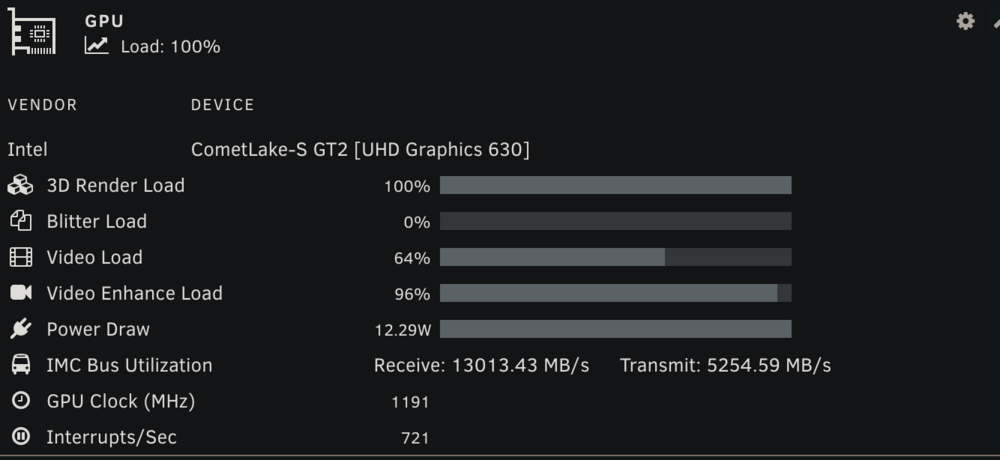
Should be supported on Unraid. You can try to install the Hotio Jellyfin container and see if that works. As you can see, transcoding works for me.
-
For me transcoding is working with an intel iGPU using the method I mentioned with the Hotio Jellyfin container. What intel CPU gen are you using?
-
you're right. Since i'm following this thread, I must have switched to the Hotio container at some point, but I don't remember when and why. In any case, I think the linuxserver container should also allow using the iGPU for transcoding with the settings I sent you.If I remember correctly, when I installed Hotio's Jellyfin container about two years ago, this setting line was there by default. But from what I see now, new container installs don't have this setting by default.I believe you need to add this line to the container settings.
 If you prefer not to pay for a personal domain, you can create a free subdomain with duckdns.I use NginxProxyManager in conjunction with Cloudflare to create an SSL certificate for the Jellyfin subdomain on my personal domain.Hi friends, I have a subscription to Adguard VPN that recently added support to use their service with an ipsec protocol connection on routers and other non-official apps systems. https://adguard-vpn.com/kb/general/set-up-adguard-vpn-on-your-router/ Since I don't want all my home traffic to run through the VPN (the way it works when setting the VPN connection on the router), I would like to configure a docker container on Unraid to run the ipsec VPN connection to Adguard VPN and thus route only certain containers through this VPN connection. So far I only found docker apps that allow connection to VPN services using the Openvpn/Wireguard protocols. Can someone please recommend a docker container that would allow me to connect to VPN services using the ipsec protocol?Has anyone managed to switch the webui to vuetorrent lately? I'm getting the webui black screen error saying "Unacceptable file type, only regular file is allowed" when I try to switch.I can confirm this solution. Yesterday I wanted to create a time machine backup, but when I tried to use network type: Host or Bridge my mac couldn't find any time machine device. Only after I switched the network type to custom br0 I was able to find the time machine device in the mac time machine settings.Thank you very much! This helped 🙏Hello friends, Can someone please explain how I can use the privoxy service with sonarr/radarr? 🙏 What proxy type should I use (http(s), socks4, socks5)? Do I need to enter more information (i.e. username, password, ignored addresses) along with the server ip address and the privoxy port (8118)? Should I bypass proxy for local addresses?




