





cpxazn
Members
-
Joined
-
Last visited
Everything posted by cpxazn
-
Thanks, although it took a long time, I was able to recover at least 90% of the data.
-
Lesson learned. Thanks for checking, I had already shipped disk5 back for RMA. Maybe one improvement here would be to improve the message to say that this would wipe parity as well. I thought this would perform something like a preclear before mounting and rebuilding from parity.
-
Thanks for your input. I'm preparing for the worst, but just hanging onto a sliver of hope that disk5 is recoverable since I'm still not sure how that data got wiped. I have already replugged the cables for the drives and all drives are showing properly in the array. Parity is setup correctly so shouldn't be an issue there.
-
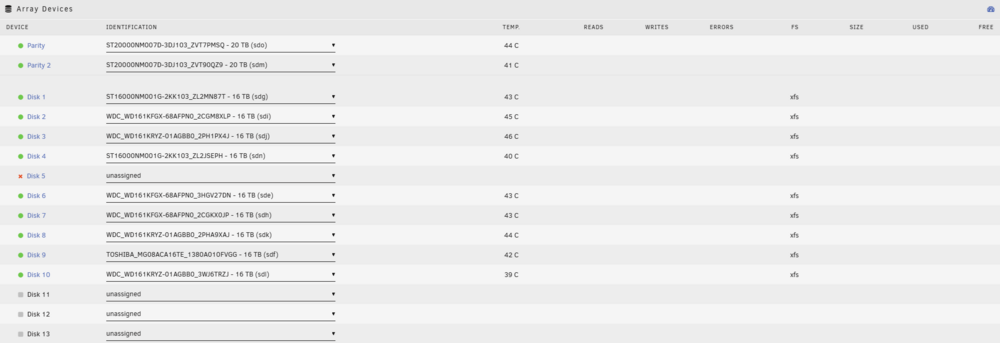
I'm running Unraid 6.12.10 I had 2 drive failed recently, but also have 2 parity drives disk4 dropped off the array, but came back on it's own, but when array is started, it showed that contents are emulated from parity. I see no SMART errors. disk 5 died, still waiting for replacement drive to arrive In order to fix issue number 1, I tried to retrigger a rebuild from parity, but did something stupid. It was not automatically triggering a rebuild from parity when starting the array, and I saw that disk4 was showing unmountable and it showed a format button. Being the genius that I am, I decided to format the drive, hoping that it would format, mount, then trigger rebuild from parity (I should have just googled how). Clearly I could not be any more wrong. After the format and realizing that parity rebuild did not trigger, I stopped the array, unassigned disk4, started and stopped the array, then reassigned disk4, which then triggered parity rebuild. After the rebuild finished, I noticed that all data on disk4 and disk5 are gone. The data on disk4 was not too important for me, but I would like to recover data from disk5. Now here are a few things that I noticed After formatting disk4, for some reason disk5 is showing that data is wiped as well. Was this a result of me formatting disk4? During the parity rebuild of disk4, I noticed some xfs errors being thrown in syslog for disk4 and disk5 which can be seen in the attached logs. After the rebuild, I unmounted, mounted in maintenance mode, then ran the xfs_repair -v /dev/mdXp1 command for all of the drives, but it did not bring back any of the lost data. Any chance that the data on disk5 is still recoverable? daniel-nas-diagnostics-20241202-2234.zip

-
I caught frigate in the act with docker stats...now to figure out how to fix it CONTAINER ID NAME CPU % MEM USAGE / LIMIT MEM % NET I/O BLOCK I/O PIDS 5f97175ae55c frigate 673.73% 20.16GiB / 31.11GiB 64.80% 980MB / 58.8MB 149MB / 602kB 1238
-
Was looking up some things on google about Home Assistant memory leaks and one post came up about frigate and using vaapi, which I switched to recently because people said it was recommended for encoding. Will try to change it back and see if it stops the hanging.
-
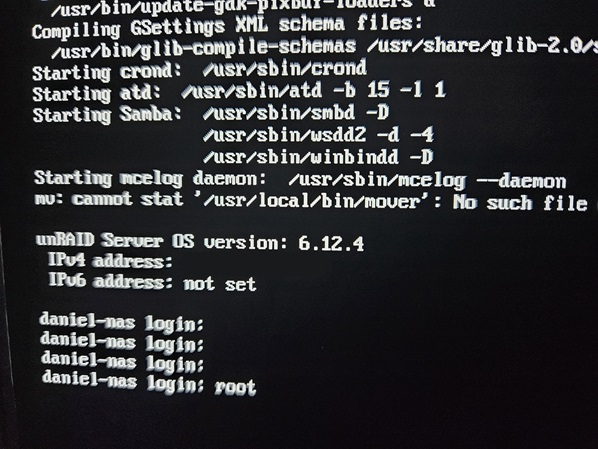
I've had my unraid setup running for quite some time now, but recently started experiencing some lockups where the GUI and shares are not accessible through the network. I have run parity check at least 5 times now and have not been able to complete because the system locks up every time before completion. Since I can't access through the network, I try to login directly on the server itself but it hangs after I input root as the user. I have tried replacing both RAM sticks since I had spares lying around, but the server is still crashing. Originally I was running 6.12.6 when I ran into this problem, but i downgraded back to 6.12.4 because I thought it was the problem, but I'm still experiencing the same issues. I noticed that very rarely, the server will actually recover itself and becomes accessible again. Most of the time when I press the power button to initiate shutdown, it will pass the graceful shutdown period and hang on the force shutdown, and I usually have to hard shutdown. As i was writing this post, I finally got some information on the error because previously, I couldn't find any sort of information related to the issue, but my server actually recovered itself just now, and the Fix Common Issues plugin threw me a useful error. I have 32GB of RAM total so some process must be memory leaking. One change I made recently was adding a VM for Home Assistant, but I have that capped at 4GB of RAM. Not sure if the attached diagnostics logs would be able to help identify which process is causing the problem. daniel-nas-diagnostics-20231223-0924.zip

-
I'm using a PRIME Z790-P WIFI which does have Realtek NIC but not sure if its 8125. Not sure if it makes a difference, but it's not currently hooked up at the moment, I'm actively using the Mellanox ConnectX-2. Currently it has been running parity check for the past day, so can't reproduce and generate any new diag yet.
-
I seem to be having strange problems going from 6.12.4 to 6.12.6. Everything comes up initially. The first issue that I ran into on this version was when I started updating primary/secondary storage for my shares. The whole GUI went unresponsive. I used ssh to initiate shutdown, and it responded with the initiating shutdown message, but never actually shutdown so I had to force shutdown. After that, I rolled back to 6.12.4 and everything was fine again. I upgraded back to 6.12.6 and kicked off a parity check, things started to hang again. Console/logs start throwing nginx gateway errors. I'm no longer able to stop the array. I can no longer SSH, and am unable to finish generating diagnostics logs, which seems to freeze at ip command. I've been using unraid for a couple of years but it's my first time running into these kinds of issues after an upgrade. I'll stick to 6.12.4 for now.
-
I'm having this same problem recently which I never had in the past. In the past, I was able to move file across shares through user directory instantly as long as source and target were both on cache. Now I'm seeing the copy and delete behavior that @johnsanc is mentioning. I've tried both on Windows 11 and Krusader and both have the same issue. Edit: I just did a test without user directory, and tested directly from rootshare/cache/source-dir to rootshare/cache/target-dir, and it's still doing a copy/delete Edit: Also wanted to mention that I was on btrfs (raid5) in the past, but now I'm on zfs (raidz and compression on), in case that makes a difference.
-
Whenever I drag a folder into VLC to queue a playlist, for some reason it triggers rehashing for all files in that directory. I've seen at least 20 b3sum processes get kicked off by this which kills server performance. Is there a reason why the plugin thinks the files have been modified? EDIT: This is with automatic protection enabled. b3sum processes will run even when parity check is running.
-
Good news, exchanged both the motherboard and the processor and I no longer see those errors anymore.
-
Good to know that Micro Center is flexible with returns. I originally had the issues with 6.11.5 which threw kernel errors in syslog before crashing, then I upgraded to 6.12.0-rc5 and now I still get mce errors here and there, but the hard crash usually has no errors associated with it.
-
I think I may just go exchange the CPU and motherboard for a new one at micro center. Hoping they will let me since I already threw away the CPU box.
-
I just checked /var/log/mcelog and I see a bunch of errors. Is there any way to determine whether this is a CPU or Motherboard issue? mcelog: failed to prefill DIMM database from DMI data Kernel does not support page offline interface Hardware event. This is not a software error. MCE 0 CPU 8 BANK 0 TSC c9fa45464b ADDR 149a9c617b87 TIME 1684100730 Sun May 14 17:45:30 2023 MCG status: MCi status: Corrected error MCi_ADDR register valid MCA: Instruction CACHE Level-1 Instruction-Fetch Error STATUS 8400004000040150 MCGSTATUS 0 MCGCAP c16 APICID 20 SOCKETID 0 MICROCODE 113 CPUID Vendor Intel Family 6 Model 183 Step 1 Hardware event. This is not a software error. MCE 0 CPU 8 BANK 0 TSC c9fa486d08 ADDR 3ffffff811e7fe0 TIME 1684100730 Sun May 14 17:45:30 2023 MCG status: MCi status: Corrected error MCi_ADDR register valid MCA: Instruction CACHE Level-1 Instruction-Fetch Error STATUS 8400008000040150 MCGSTATUS 0 MCGCAP c16 APICID 20 SOCKETID 0 MICROCODE 113 CPUID Vendor Intel Family 6 Model 183 Step 1 Hardware event. This is not a software error. MCE 0 CPU 8 BANK 0 TSC cacc37c105 ADDR 149a9c60d3a4 TIME 1684100731 Sun May 14 17:45:31 2023 MCG status: MCi status: Corrected error MCi_ADDR register valid MCA: Instruction CACHE Level-1 Instruction-Fetch Error STATUS 8400008000040150 MCGSTATUS 0 MCGCAP c16 APICID 20 SOCKETID 0 MICROCODE 113 CPUID Vendor Intel Family 6 Model 183 Step 1 Hardware event. This is not a software error. MCE 0 CPU 8 BANK 0 TSC 38baf480b69 TIME 1684101616 Sun May 14 18:00:16 2023 MCG status: MCi status: Corrected error MCA: Instruction CACHE Level-1 Instruction-Fetch Error STATUS 8000004000020150 MCGSTATUS 0 MCGCAP c16 APICID 20 SOCKETID 0 MICROCODE 113 CPUID Vendor Intel Family 6 Model 183 Step 1
-
So after testing, I'm not 100% disklocation is the root cause. I think something else caused the disklocation plugin to get corrupted. I'm still seeing a bunch of errors in my logs, and just an hour ago, my server completely froze without a trace of any error logs, and the console screen was still stuck on login. These are the recent errrors that I am seeing. daniel-nas-syslog-20230514-2030.zip
-
I think my disklocation plugin got corrupted somehow and was causing problems. The plugin settings page itself couldn't even open. I deleted the disklocation database and reinstalled the plugin, currently testing.
-
Recently I upgraded my my RAM, Motherboard, and CPU from DDR4->DDR5, i7-12700k->i7-13700k. The unraid setup ran fine for a couple of days, but this morning, I woke up and found that the server crashed. Every time I start it up, it crashes again within 30 minutes. I ran memtest and it passed. I upgraded BIOS, disabled docker, scrubbed btrfs cache pool but it's still crashing. XMP is disabled, and nothing is overclocked. Currently I'm testing disabling wireguard to see if that helps. Below is the error that I am getting. The errors seems to be a bit different each crash. Any help or suggestions would be appreciated. 7:44 AM Crash May 13 07:44:12 daniel-nas kernel: invalid opcode: 0000 [#2] PREEMPT SMP NOPTI May 13 07:44:12 daniel-nas kernel: CPU: 8 PID: 7800 Comm: find Tainted: G D 5.19.17-Unraid #2 May 13 07:44:12 daniel-nas kernel: Hardware name: ASUS System Product Name/PRIME Z790-P WIFI, BIOS 0812 02/24/2023 May 13 07:44:12 daniel-nas kernel: RIP: 0010:get_cached_acl+0x1c/0x63 May 13 07:44:12 daniel-nas kernel: Code: 01 00 00 00 e9 79 43 19 00 c3 cc cc cc cc 0f 1f 44 00 00 55 53 e8 fb f8 ff ff 48 89 c5 e8 dd 44 e5 ff 48 8b 5d 00 48 85 db 74 <37> f6 c3 01 75 32 8b 13 85 d2 74 23 8d 4a 01 89 d0 f0 0f b1 0b 74 May 13 07:44:12 daniel-nas kernel: RSP: 0018:ffffc90008d27c18 EFLAGS: 00010297 May 13 07:44:12 daniel-nas kernel: RAX: 0000000000000000 RBX: ffff888196cc8c48 RCX: 0000000000038900 May 13 07:44:12 daniel-nas kernel: RDX: ffff888101e58000 RSI: 0000000000008000 RDI: ffff888196cc8c48 May 13 07:44:12 daniel-nas kernel: RBP: ffff888196cc8c58 R08: 0000000000000002 R09: 0000ffffffffffff May 13 07:44:12 daniel-nas kernel: R10: 281d2f771de95511 R11: 0000000000000fe0 R12: 00000000000041ff May 13 07:44:12 daniel-nas kernel: R13: ffff888196cc8c48 R14: 0000000000008000 R15: 0000000000000000 May 13 07:44:12 daniel-nas kernel: FS: 000014f559c41740(0000) GS:ffff88885f400000(0000) knlGS:0000000000000000 May 13 07:44:12 daniel-nas kernel: CS: 0010 DS: 0000 ES: 0000 CR0: 0000000080050033 May 13 07:44:12 daniel-nas kernel: CR2: 000000000045e048 CR3: 000000011cd2c004 CR4: 0000000000770ee0 May 13 07:44:12 daniel-nas kernel: PKRU: 55555554 May 13 07:44:12 daniel-nas kernel: Call Trace: May 13 07:44:12 daniel-nas kernel: <TASK> May 13 07:44:12 daniel-nas kernel: get_acl+0x1a/0xcc May 13 07:44:12 daniel-nas kernel: generic_permission+0xd7/0x1d2 May 13 07:44:12 daniel-nas kernel: inode_permission+0xbe/0x131 May 13 07:44:12 daniel-nas kernel: may_open+0xbf/0x105 May 13 07:44:12 daniel-nas kernel: path_openat+0x921/0xaa9 May 13 07:44:12 daniel-nas kernel: do_filp_open+0x55/0xb8 May 13 07:44:12 daniel-nas kernel: ? cp_new_stat+0x144/0x174 May 13 07:44:12 daniel-nas kernel: ? getname_flags+0x29/0x152 May 13 07:44:12 daniel-nas kernel: ? kmem_cache_alloc+0x11a/0x143 May 13 07:44:12 daniel-nas kernel: do_sys_openat2+0x6c/0xd9 May 13 07:44:12 daniel-nas kernel: do_sys_open+0x3a/0x5a May 13 07:44:12 daniel-nas kernel: do_syscall_64+0x68/0x81 May 13 07:44:12 daniel-nas kernel: entry_SYSCALL_64_after_hwframe+0x63/0xcd May 13 07:44:12 daniel-nas kernel: RIP: 0033:0x14f559d4923f May 13 07:44:12 daniel-nas kernel: Code: 89 4c 24 58 f6 c2 40 75 32 89 d0 45 31 d2 25 00 00 41 00 3d 00 00 41 00 74 21 80 3d a2 b3 0e 00 00 74 45 b8 01 01 00 00 0f 05 <48> 3d 00 f0 ff ff 0f 87 85 00 00 00 48 83 c4 78 c3 48 8d 84 24 80 May 13 07:44:12 daniel-nas kernel: RSP: 002b:00007fff8e790260 EFLAGS: 00000202 ORIG_RAX: 0000000000000101 May 13 07:44:12 daniel-nas kernel: RAX: ffffffffffffffda RBX: 00007fff8e7903dc RCX: 000014f559d4923f May 13 07:44:12 daniel-nas kernel: RDX: 00000000000b0900 RSI: 0000000000458a00 RDI: 000000000000000a May 13 07:44:12 daniel-nas kernel: RBP: 0000000000458900 R08: 0000000000444d20 R09: 0000000000000073 May 13 07:44:12 daniel-nas kernel: R10: 0000000000000000 R11: 0000000000000202 R12: 0000000000000000 May 13 07:44:12 daniel-nas kernel: R13: 0000000000000000 R14: 0000000000444c90 R15: 0000000000000003 May 13 07:44:12 daniel-nas kernel: </TASK> May 13 07:44:12 daniel-nas kernel: Modules linked in: udp_diag xt_connmark xt_comment iptable_raw xt_mark ipvlan xt_nat veth xt_CHECKSUM ipt_REJECT nf_reject_ipv4 xt_tcpudp ip6table_mangle ip6table_nat iptable_mangle vhost_net tun vhost vhost_iotlb tap xt_conntrack nf_conntrack_netlink nfnetlink xfrm_user xfrm_algo xt_addrtype br_netfilter xfs md_mod tcp_diag inet_diag nct6775 nct6775_core hwmon_vid efivarfs iptable_nat xt_MASQUERADE nf_nat nf_conntrack nf_defrag_ipv6 nf_defrag_ipv4 wireguard curve25519_x86_64 libcurve25519_generic libchacha20poly1305 chacha_x86_64 poly1305_x86_64 ip6_udp_tunnel udp_tunnel libchacha ip6table_filter ip6_tables iptable_filter ip_tables x_tables af_packet 8021q garp mrp bridge stp llc mlx4_en mlx4_core r8169 realtek wmi_bmof x86_pkg_temp_thermal intel_powerclamp coretemp kvm_intel kvm crct10dif_pclmul crc32_pclmul crc32c_intel ghash_clmulni_intel aesni_intel crypto_simd cryptd intel_cstate intel_uncore i915 iosf_mbi drm_buddy i2c_algo_bit ttm drm_display_helper i2c_i801 May 13 07:44:12 daniel-nas kernel: i2c_smbus drm_kms_helper btusb nvme btrtl ahci btbcm nvme_core btintel libahci drm bluetooth mpt3sas intel_gtt agpgart ecdh_generic raid_class input_leds ecc joydev led_class i2c_core scsi_transport_sas syscopyarea sysfillrect vmd sysimgblt fb_sys_fops thermal fan wmi video backlight tpm_crb tpm_tis tpm_tis_core tpm acpi_tad acpi_pad button unix [last unloaded: md_mod] May 13 07:44:12 daniel-nas kernel: ---[ end trace 0000000000000000 ]--- May 13 07:44:12 daniel-nas kernel: RIP: 0010:__btrfs_qgroup_reserve_meta+0x30/0x69 May 13 07:44:12 daniel-nas kernel: Code: 56 45 89 c6 41 55 44 0f b6 e9 41 54 44 89 e9 41 89 d4 55 89 f5 53 48 89 fb e8 14 ff ff ff 85 c0 0f 9e c1 83 f8 86 0f 95 c2 84 <d1> 75 29 45 84 f6 75 24 48 89 df e8 7f b1 ff ff 85 c0 78 18 44 89 May 13 07:44:12 daniel-nas kernel: RSP: 0018:ffffc900047c3c38 EFLAGS: 00010282 May 13 07:44:12 daniel-nas kernel: RAX: 0000000000000000 RBX: ffff8881aa3c8800 RCX: 0000000000000001 May 13 07:44:12 daniel-nas kernel: RDX: 0000000013730be0 RSI: ffff8881016b9800 RDI: ffff8881aa3c8800 May 13 07:44:12 daniel-nas kernel: RBP: 0000000000004000 R08: 0000000000000000 R09: 0000000000000000 May 13 07:44:12 daniel-nas kernel: R10: 0000000000001000 R11: 0000000000004000 R12: 0000000000000002 May 13 07:44:12 daniel-nas kernel: R13: 0000000000000001 R14: 0000000000000000 R15: ffff88819c4ae358 May 13 07:44:12 daniel-nas kernel: FS: 000014f559c41740(0000) GS:ffff88885f400000(0000) knlGS:0000000000000000 May 13 07:44:12 daniel-nas kernel: CS: 0010 DS: 0000 ES: 0000 CR0: 0000000080050033 May 13 07:44:12 daniel-nas kernel: CR2: 000000000045e048 CR3: 000000011cd2c004 CR4: 0000000000770ee0 May 13 07:44:12 daniel-nas kernel: PKRU: 55555554 May 13 07:46:16 daniel-nas kernel: BUG: kernel NULL pointer dereference, address: 0000000000000020 May 13 07:46:16 daniel-nas kernel: #PF: supervisor read access in kernel mode May 13 07:46:16 daniel-nas kernel: #PF: error_code(0x0000) - not-present page May 13 07:46:16 daniel-nas kernel: PGD 20a8df067 P4D 20a8df067 PUD 2cfe1c067 PMD 0 May 13 07:46:16 daniel-nas kernel: Oops: 0000 [#3] PREEMPT SMP NOPTI May 13 07:46:16 daniel-nas kernel: CPU: 8 PID: 10702 Comm: find Tainted: G D 5.19.17-Unraid #2 May 13 07:46:16 daniel-nas kernel: Hardware name: ASUS System Product Name/PRIME Z790-P WIFI, BIOS 0812 02/24/2023 May 13 07:46:16 daniel-nas kernel: RIP: 0010:xfs_btree_get_block+0x5/0x37 [xfs] May 13 07:46:16 daniel-nas kernel: Code: 48 8b 40 38 c3 cc cc cc cc 48 8b 40 40 c3 cc cc cc cc 0f 1f 44 00 00 e8 b5 ff ff ff 48 8b 40 08 c3 cc cc cc cc 0f 1f 44 00 00 <f6> 47 20 02 74 11 0f b6 47 48 ff c8 39 f0 75 07 31 c0 48 89 02 eb May 13 07:46:16 daniel-nas kernel: RSP: 0018:ffffc9000b347c40 EFLAGS: 00010256 May 13 07:46:16 daniel-nas kernel: RAX: ffff88886a547c68 RBX: 0000000000000000 RCX: 0000000000000000 May 13 07:46:16 daniel-nas kernel: RDX: ffffc9000b347c88 RSI: 0000000000000000 RDI: 0000000000000000 May 13 07:46:16 daniel-nas kernel: RBP: ffffc9000b347cd0 R08: ffffc9000b347cf8 R09: ffffc9000b347cec May 13 07:46:16 daniel-nas kernel: R10: ffffc9000b347d00 R11: 0000000000000000 R12: ffff88815eb50000 May 13 07:46:16 daniel-nas kernel: R13: ffffc9000b347d00 R14: 0000000000000000 R15: ffffffffffffffff May 13 07:46:16 daniel-nas kernel: FS: 00001542d3294740(0000) GS:ffff88885f400000(0000) knlGS:0000000000000000 May 13 07:46:16 daniel-nas kernel: CS: 0010 DS: 0000 ES: 0000 CR0: 0000000080050033 May 13 07:46:16 daniel-nas kernel: CR2: 0000000000000020 CR3: 0000000361baa002 CR4: 0000000000770ee0 May 13 07:46:16 daniel-nas kernel: PKRU: 55555554 May 13 07:46:16 daniel-nas kernel: Call Trace: May 13 07:46:16 daniel-nas kernel: <TASK> May 13 07:46:16 daniel-nas kernel: xfs_btree_insrec+0xfb/0x448 [xfs] May 13 07:46:16 daniel-nas kernel: ? xfs_dabuf_map.constprop.0+0x56/0x299 [xfs] May 13 07:46:16 daniel-nas kernel: ? path_put+0x12/0x1b May 13 07:46:16 daniel-nas kernel: ? terminate_walk+0x20/0x6e May 13 07:46:16 daniel-nas kernel: ? xfs_da_read_buf+0x66/0xff [xfs] May 13 07:46:16 daniel-nas kernel: ? xfs_dir3_block_read+0x33/0xa6 [xfs] May 13 07:46:16 daniel-nas kernel: ? xfs_dir2_block_getdents+0x74/0x21c [xfs] May 13 07:46:16 daniel-nas kernel: ? xfs_readdir+0x137/0x190 [xfs] May 13 07:46:16 daniel-nas kernel: ? iterate_dir+0x94/0x146 May 13 07:46:16 daniel-nas kernel: ? __do_sys_getdents64+0x6b/0xd8 May 13 07:46:16 daniel-nas kernel: ? compat_filldir+0x1b2/0x1b2 May 13 07:46:16 daniel-nas kernel: ? do_syscall_64+0x68/0x81 May 13 07:46:16 daniel-nas kernel: ? entry_SYSCALL_64_after_hwframe+0x63/0xcd May 13 07:46:16 daniel-nas kernel: </TASK> May 13 07:46:16 daniel-nas kernel: Modules linked in: udp_diag xt_connmark xt_comment iptable_raw xt_mark ipvlan xt_nat veth xt_CHECKSUM ipt_REJECT nf_reject_ipv4 xt_tcpudp ip6table_mangle ip6table_nat iptable_mangle vhost_net tun vhost vhost_iotlb tap xt_conntrack nf_conntrack_netlink nfnetlink xfrm_user xfrm_algo xt_addrtype br_netfilter xfs md_mod tcp_diag inet_diag nct6775 nct6775_core hwmon_vid efivarfs iptable_nat xt_MASQUERADE nf_nat nf_conntrack nf_defrag_ipv6 nf_defrag_ipv4 wireguard curve25519_x86_64 libcurve25519_generic libchacha20poly1305 chacha_x86_64 poly1305_x86_64 ip6_udp_tunnel udp_tunnel libchacha ip6table_filter ip6_tables iptable_filter ip_tables x_tables af_packet 8021q garp mrp bridge stp llc mlx4_en mlx4_core r8169 realtek wmi_bmof x86_pkg_temp_thermal intel_powerclamp coretemp kvm_intel kvm crct10dif_pclmul crc32_pclmul crc32c_intel ghash_clmulni_intel aesni_intel crypto_simd cryptd intel_cstate intel_uncore i915 iosf_mbi drm_buddy i2c_algo_bit ttm drm_display_helper i2c_i801 May 13 07:46:16 daniel-nas kernel: i2c_smbus drm_kms_helper btusb nvme btrtl ahci btbcm nvme_core btintel libahci drm bluetooth mpt3sas intel_gtt agpgart ecdh_generic raid_class input_leds ecc joydev led_class i2c_core scsi_transport_sas syscopyarea sysfillrect vmd sysimgblt fb_sys_fops thermal fan wmi video backlight tpm_crb tpm_tis tpm_tis_core tpm acpi_tad acpi_pad button unix [last unloaded: md_mod] May 13 07:46:16 daniel-nas kernel: CR2: 0000000000000020 May 13 07:46:16 daniel-nas kernel: ---[ end trace 0000000000000000 ]--- May 13 07:46:16 daniel-nas kernel: RIP: 0010:__btrfs_qgroup_reserve_meta+0x30/0x69 May 13 07:46:16 daniel-nas kernel: Code: 56 45 89 c6 41 55 44 0f b6 e9 41 54 44 89 e9 41 89 d4 55 89 f5 53 48 89 fb e8 14 ff ff ff 85 c0 0f 9e c1 83 f8 86 0f 95 c2 84 <d1> 75 29 45 84 f6 75 24 48 89 df e8 7f b1 ff ff 85 c0 78 18 44 89 May 13 07:46:16 daniel-nas kernel: RSP: 0018:ffffc900047c3c38 EFLAGS: 00010282 May 13 07:46:16 daniel-nas kernel: RAX: 0000000000000000 RBX: ffff8881aa3c8800 RCX: 0000000000000001 May 13 07:46:16 daniel-nas kernel: RDX: 0000000013730be0 RSI: ffff8881016b9800 RDI: ffff8881aa3c8800 May 13 07:46:16 daniel-nas kernel: RBP: 0000000000004000 R08: 0000000000000000 R09: 0000000000000000 May 13 07:46:16 daniel-nas kernel: R10: 0000000000001000 R11: 0000000000004000 R12: 0000000000000002 May 13 07:46:16 daniel-nas kernel: R13: 0000000000000001 R14: 0000000000000000 R15: ffff88819c4ae358 May 13 07:46:16 daniel-nas kernel: FS: 00001542d3294740(0000) GS:ffff88885f400000(0000) knlGS:0000000000000000 May 13 07:46:16 daniel-nas kernel: CS: 0010 DS: 0000 ES: 0000 CR0: 0000000080050033 May 13 07:46:16 daniel-nas kernel: CR2: 0000000000000020 CR3: 0000000361baa002 CR4: 0000000000770ee0 May 13 07:46:16 daniel-nas kernel: PKRU: 55555554 May 13 07:46:20 daniel-nas kernel: smartctl_type[10761]: segfault at ffffffffffffff8d ip 000014dc4fd5d931 sp 00007ffed3c52b70 error 7 in ld-2.36.so[14dc4fd4b000+27000] May 13 07:46:20 daniel-nas kernel: Code: ff 0f 84 72 03 00 00 89 75 90 45 8b 77 14 4d 8d 6f 30 48 85 db 0f 84 19 08 00 00 48 8d 35 f4 03 02 00 48 89 df e8 ef 02 01 00 <48> b9 00 00 00 00 00 00 04 00 48 89 8d 78 ff ff ff 85 c0 74 2d 48 12:19 PM Crash May 13 12:19:44 daniel-nas kernel: BUG: kernel NULL pointer dereference, address: 0000000000000004 May 13 12:19:44 daniel-nas kernel: #PF: supervisor read access in kernel mode May 13 12:19:44 daniel-nas kernel: #PF: error_code(0x0000) - not-present page May 13 12:19:44 daniel-nas kernel: PGD 1ab3eb067 P4D 1ab3eb067 PUD 1ab3ed067 PMD 0 May 13 12:19:44 daniel-nas kernel: Oops: 0000 [#1] PREEMPT SMP NOPTI May 13 12:19:44 daniel-nas kernel: CPU: 8 PID: 12423 Comm: dockerd Not tainted 5.19.17-Unraid #2 May 13 12:19:44 daniel-nas kernel: Hardware name: ASUS System Product Name/PRIME Z790-P WIFI, BIOS 0812 02/24/2023 May 13 12:19:44 daniel-nas kernel: RIP: 0010:folio_migrate_flags+0xa/0x111 May 13 12:19:44 daniel-nas kernel: Code: f8 03 75 03 83 cb 02 49 8b 4c 24 08 89 ea 89 df e8 e7 ec fd ff 5b 5d 41 5c 41 5d c3 cc cc cc cc 0f 1f 44 00 00 55 48 89 fd 53 <48> 8b 06 48 89 f3 0f ba e0 08 73 05 f0 80 4f 01 01 48 8b 03 a8 02 May 13 12:19:44 daniel-nas kernel: RSP: 0018:ffffc90001d0fa48 EFLAGS: 00010246 May 13 12:19:44 daniel-nas kernel: RAX: ffffea000937f880 RBX: ffffffff811a67b9 RCX: 0000000000000000 May 13 12:19:44 daniel-nas kernel: RDX: ffffea000937f848 RSI: 0000000000000004 RDI: ffffea000937f880 May 13 12:19:44 daniel-nas kernel: RBP: ffffea000937f880 R08: 0000000000000000 R09: 0000000000000000 May 13 12:19:44 daniel-nas kernel: R10: 0000000000002498 R11: ffff8881ace770d0 R12: 0000000000000001 May 13 12:19:44 daniel-nas kernel: R13: 0000000000000000 R14: ffff8881c3605800 R15: ffffc90001d0fc07 May 13 12:19:44 daniel-nas kernel: FS: 000014c7579bc700(0000) GS:ffff88885f400000(0000) knlGS:0000000000000000 May 13 12:19:44 daniel-nas kernel: CS: 0010 DS: 0000 ES: 0000 CR0: 0000000080050033 May 13 12:19:44 daniel-nas kernel: CR2: 0000000000000004 CR3: 00000001a0296005 CR4: 0000000000770ee0 May 13 12:19:44 daniel-nas kernel: PKRU: 55555554 May 13 12:19:44 daniel-nas kernel: Call Trace: May 13 12:19:44 daniel-nas kernel: <TASK> May 13 12:19:44 daniel-nas kernel: ? mark_page_accessed+0xa/0x12 May 13 12:19:44 daniel-nas kernel: ? mark_extent_buffer_accessed+0x41/0x51 May 13 12:19:44 daniel-nas kernel: ? find_extent_buffer+0x3a/0x44 May 13 12:19:44 daniel-nas kernel: ? read_block_for_search+0xb3/0x27d May 13 12:19:44 daniel-nas kernel: ? btrfs_search_slot+0x6f7/0x7c5 May 13 12:19:44 daniel-nas kernel: ? btrfs_lookup_match_dir+0x35/0x6c May 13 12:19:44 daniel-nas kernel: ? btrfs_lookup_xattr+0x76/0xab May 13 12:19:44 daniel-nas kernel: ? btrfs_getxattr+0x6c/0x113 May 13 12:19:44 daniel-nas kernel: ? vfs_getxattr_alloc+0x96/0x117 May 13 12:19:44 daniel-nas kernel: ? cap_inode_getsecurity+0x92/0x25d May 13 12:19:44 daniel-nas kernel: ? vfs_getxattr+0xa5/0x138 May 13 12:19:44 daniel-nas kernel: ? do_getxattr+0x39/0x10f May 13 12:19:44 daniel-nas kernel: ? getxattr+0x72/0xb3 May 13 12:19:44 daniel-nas kernel: ? virt_to_slab+0x5/0x19 May 13 12:19:44 daniel-nas kernel: ? memcg_slab_free_hook+0x4b/0xf9 May 13 12:19:44 daniel-nas kernel: ? user_path_at_empty+0x42/0x4f May 13 12:19:44 daniel-nas kernel: ? kmem_cache_free+0xdb/0x176 May 13 12:19:44 daniel-nas kernel: ? user_path_at_empty+0x42/0x4f May 13 12:19:44 daniel-nas kernel: ? path_getxattr+0x6a/0xb1 May 13 12:19:44 daniel-nas kernel: ? do_syscall_64+0x68/0x81 May 13 12:19:44 daniel-nas kernel: ? entry_SYSCALL_64_after_hwframe+0x63/0xcd May 13 12:19:44 daniel-nas kernel: </TASK> May 13 12:19:44 daniel-nas kernel: Modules linked in: udp_diag xt_connmark xt_comment iptable_raw xt_mark ipvlan veth xt_CHECKSUM ipt_REJECT nf_reject_ipv4 ip6table_mangle ip6table_nat iptable_mangle vhost_net tun vhost vhost_iotlb tap xt_nat xt_tcpudp xt_conntrack nf_conntrack_netlink nfnetlink xfrm_user xfrm_algo xt_addrtype br_netfilter xfs md_mod tcp_diag inet_diag nct6775 nct6775_core hwmon_vid efivarfs iptable_nat xt_MASQUERADE nf_nat nf_conntrack nf_defrag_ipv6 nf_defrag_ipv4 wireguard curve25519_x86_64 libcurve25519_generic libchacha20poly1305 chacha_x86_64 poly1305_x86_64 ip6_udp_tunnel udp_tunnel libchacha ip6table_filter ip6_tables iptable_filter ip_tables x_tables af_packet 8021q garp mrp bridge stp llc mlx4_en mlx4_core r8169 realtek wmi_bmof x86_pkg_temp_thermal intel_powerclamp coretemp kvm_intel kvm crct10dif_pclmul crc32_pclmul crc32c_intel ghash_clmulni_intel aesni_intel crypto_simd cryptd intel_cstate intel_uncore i2c_i801 i2c_smbus i915 nvme nvme_core btusb btrtl ahci btbcm libahci btintel May 13 12:19:44 daniel-nas kernel: iosf_mbi bluetooth drm_buddy i2c_algo_bit ttm drm_display_helper drm_kms_helper ecdh_generic ecc input_leds drm joydev mpt3sas led_class intel_gtt agpgart i2c_core raid_class scsi_transport_sas syscopyarea sysfillrect sysimgblt vmd fb_sys_fops fan thermal wmi video backlight tpm_crb tpm_tis tpm_tis_core tpm acpi_tad acpi_pad button unix [last unloaded: mlx4_core] May 13 12:19:44 daniel-nas kernel: CR2: 0000000000000004 May 13 12:19:44 daniel-nas kernel: ---[ end trace 0000000000000000 ]--- May 13 12:19:44 daniel-nas kernel: RIP: 0010:folio_migrate_flags+0xa/0x111 May 13 12:19:44 daniel-nas kernel: Code: f8 03 75 03 83 cb 02 49 8b 4c 24 08 89 ea 89 df e8 e7 ec fd ff 5b 5d 41 5c 41 5d c3 cc cc cc cc 0f 1f 44 00 00 55 48 89 fd 53 <48> 8b 06 48 89 f3 0f ba e0 08 73 05 f0 80 4f 01 01 48 8b 03 a8 02 May 13 12:19:44 daniel-nas kernel: RSP: 0018:ffffc90001d0fa48 EFLAGS: 00010246 May 13 12:19:44 daniel-nas kernel: RAX: ffffea000937f880 RBX: ffffffff811a67b9 RCX: 0000000000000000 May 13 12:19:44 daniel-nas kernel: RDX: ffffea000937f848 RSI: 0000000000000004 RDI: ffffea000937f880 May 13 12:19:44 daniel-nas kernel: RBP: ffffea000937f880 R08: 0000000000000000 R09: 0000000000000000 May 13 12:19:44 daniel-nas kernel: R10: 0000000000002498 R11: ffff8881ace770d0 R12: 0000000000000001 May 13 12:19:44 daniel-nas kernel: R13: 0000000000000000 R14: ffff8881c3605800 R15: ffffc90001d0fc07 May 13 12:19:44 daniel-nas kernel: FS: 000014c7579bc700(0000) GS:ffff88885f400000(0000) knlGS:0000000000000000 May 13 12:19:44 daniel-nas kernel: CS: 0010 DS: 0000 ES: 0000 CR0: 0000000080050033 May 13 12:19:44 daniel-nas kernel: CR2: 0000000000000004 CR3: 00000001a0296006 CR4: 0000000000770ee0 May 13 12:19:44 daniel-nas kernel: PKRU: 55555554 4:55 PM Crash May 13 16:55:39 daniel-nas kernel: traps: smartctl[31759] general protection fault ip:14f579809496 sp:7ffdb96eba60 error:0 in libc-2.36.so[14f5797ab000+16b000] May 13 16:56:09 daniel-nas kernel: traps: smartctl_type[313] general protection fault ip:150cb512ffa8 sp:7ffe75298bd0 error:0 in libc-2.36.so[150cb4fee000+16b000] May 13 16:57:29 daniel-nas kernel: BUG: kernel NULL pointer dereference, address: 0000000000000000 May 13 16:57:29 daniel-nas kernel: #PF: supervisor read access in kernel mode May 13 16:57:29 daniel-nas kernel: #PF: error_code(0x0000) - not-present page May 13 16:57:29 daniel-nas kernel: PGD 0 P4D 0 May 13 16:57:29 daniel-nas kernel: Oops: 0000 [#1] PREEMPT SMP NOPTI May 13 16:57:29 daniel-nas kernel: CPU: 9 PID: 18760 Comm: shfs Not tainted 5.19.17-Unraid #2 May 13 16:57:29 daniel-nas kernel: Hardware name: ASUS System Product Name/PRIME Z790-P WIFI, BIOS 1002 03/31/2023 May 13 16:57:29 daniel-nas kernel: RIP: 0010:fuse_get_req+0x1b/0x1f7 May 13 16:57:29 daniel-nas kernel: Code: fb 5a 57 00 48 83 c4 18 5b 5d c3 cc cc cc cc 0f 1f 44 00 00 41 56 41 89 f6 41 55 49 89 fd 41 54 41 89 f4 55 53 48 83 ec 30 48 <8b> 2f 65 48 8b 04 25 28 00 00 00 48 89 44 24 28 31 c0 f0 ff 85 34 May 13 16:57:29 daniel-nas kernel: RSP: 0018:ffffc9000150bbf8 EFLAGS: 00010246 May 13 16:57:29 daniel-nas kernel: RAX: 0000000000000000 RBX: ffffc9000150bd00 RCX: 0000000000000001 May 13 16:57:29 daniel-nas kernel: RDX: 0000000000000000 RSI: ffffc9000150be30 RDI: 0000000000000000 May 13 16:57:29 daniel-nas kernel: RBP: 0000000000000000 R08: 0000000000000068 R09: 0000000000000000 May 13 16:57:29 daniel-nas kernel: R10: ffffc9000150be30 R11: ffffc9000150bc00 R12: ffffc9000150be08 May 13 16:57:29 daniel-nas kernel: R13: ffff888161fc9400 R14: ffff88815ecfbe00 R15: ffff88818af32100 May 13 16:57:29 daniel-nas kernel: FS: 0000149fac7c56c0(0000) GS:ffff88885f440000(0000) knlGS:0000000000000000 May 13 16:57:29 daniel-nas kernel: CS: 0010 DS: 0000 ES: 0000 CR0: 0000000080050033 May 13 16:57:29 daniel-nas kernel: CR2: 0000000000000000 CR3: 00000001a19c8005 CR4: 0000000000770ee0 May 13 16:57:29 daniel-nas kernel: PKRU: 55555554 May 13 16:57:29 daniel-nas kernel: Call Trace: May 13 16:57:29 daniel-nas kernel: <TASK> May 13 16:57:29 daniel-nas kernel: ? fuse_copy_one+0x3f/0x51 May 13 16:57:29 daniel-nas kernel: ? fuse_dev_do_write+0x57/0xaa1 May 13 16:57:29 daniel-nas kernel: mntget+0x1c/0x25 May 13 16:57:29 daniel-nas kernel: dget+0x12/0x1b May 13 16:57:29 daniel-nas kernel: ? path_put+0x12/0x1b May 13 16:57:29 daniel-nas kernel: ? terminate_walk+0x20/0x6e May 13 16:57:29 daniel-nas kernel: ? path_lookupat+0xec/0xfe May 13 16:57:29 daniel-nas kernel: ? fuse_dev_write+0x60/0x7e May 13 16:57:29 daniel-nas kernel: ? do_iter_readv_writev+0x93/0xdd May 13 16:57:29 daniel-nas kernel: ? do_iter_write+0x80/0xc4 May 13 16:57:29 daniel-nas kernel: ? vfs_writev+0x79/0xbd May 13 16:57:29 daniel-nas kernel: ? futex_wake+0x7d/0x149 May 13 16:57:29 daniel-nas kernel: ? __fget+0x33/0x41 May 13 16:57:29 daniel-nas kernel: ? __fget_light+0x3d/0x4c May 13 16:57:29 daniel-nas kernel: ? do_writev+0x7f/0xf0 May 13 16:57:29 daniel-nas kernel: ? do_syscall_64+0x68/0x81 May 13 16:57:29 daniel-nas kernel: ? entry_SYSCALL_64_after_hwframe+0x63/0xcd May 13 16:57:29 daniel-nas kernel: </TASK> May 13 16:57:29 daniel-nas kernel: Modules linked in: xt_connmark xt_comment iptable_raw xt_mark udp_diag veth xt_CHECKSUM ipt_REJECT nf_reject_ipv4 ip6table_mangle ip6table_nat iptable_mangle vhost_net tun vhost vhost_iotlb tap ipvlan xt_nat xt_tcpudp xt_conntrack nf_conntrack_netlink nfnetlink xfrm_user xfrm_algo xt_addrtype br_netfilter xfs md_mod tcp_diag inet_diag nct6775 nct6775_core hwmon_vid efivarfs iptable_nat xt_MASQUERADE nf_nat nf_conntrack nf_defrag_ipv6 nf_defrag_ipv4 wireguard curve25519_x86_64 libcurve25519_generic libchacha20poly1305 chacha_x86_64 poly1305_x86_64 ip6_udp_tunnel udp_tunnel libchacha ip6table_filter ip6_tables iptable_filter ip_tables x_tables af_packet 8021q garp mrp bridge stp llc mlx4_en mlx4_core r8169 realtek wmi_bmof x86_pkg_temp_thermal intel_powerclamp coretemp kvm_intel kvm crct10dif_pclmul crc32_pclmul crc32c_intel ghash_clmulni_intel aesni_intel crypto_simd cryptd intel_cstate intel_uncore nvme ahci i2c_i801 i2c_smbus nvme_core libahci btusb i915 btrtl btbcm btintel May 13 16:57:29 daniel-nas kernel: bluetooth iosf_mbi drm_buddy i2c_algo_bit ttm drm_display_helper ecdh_generic ecc drm_kms_helper input_leds drm joydev mpt3sas led_class intel_gtt agpgart vmd raid_class i2c_core scsi_transport_sas syscopyarea sysfillrect sysimgblt fb_sys_fops fan thermal wmi video backlight tpm_crb tpm_tis tpm_tis_core tpm acpi_tad acpi_pad button unix [last unloaded: mlx4_core] May 13 16:57:29 daniel-nas kernel: CR2: 0000000000000000 May 13 16:57:29 daniel-nas kernel: ---[ end trace 0000000000000000 ]--- May 13 16:57:29 daniel-nas kernel: RIP: 0010:fuse_get_req+0x1b/0x1f7 May 13 16:57:29 daniel-nas kernel: Code: fb 5a 57 00 48 83 c4 18 5b 5d c3 cc cc cc cc 0f 1f 44 00 00 41 56 41 89 f6 41 55 49 89 fd 41 54 41 89 f4 55 53 48 83 ec 30 48 <8b> 2f 65 48 8b 04 25 28 00 00 00 48 89 44 24 28 31 c0 f0 ff 85 34 May 13 16:57:29 daniel-nas kernel: RSP: 0018:ffffc9000150bbf8 EFLAGS: 00010246 May 13 16:57:29 daniel-nas kernel: RAX: 0000000000000000 RBX: ffffc9000150bd00 RCX: 0000000000000001 May 13 16:57:29 daniel-nas kernel: RDX: 0000000000000000 RSI: ffffc9000150be30 RDI: 0000000000000000 May 13 16:57:29 daniel-nas kernel: RBP: 0000000000000000 R08: 0000000000000068 R09: 0000000000000000 May 13 16:57:29 daniel-nas kernel: R10: ffffc9000150be30 R11: ffffc9000150bc00 R12: ffffc9000150be08 May 13 16:57:29 daniel-nas kernel: R13: ffff888161fc9400 R14: ffff88815ecfbe00 R15: ffff88818af32100 May 13 16:57:29 daniel-nas kernel: FS: 0000149fac7c56c0(0000) GS:ffff88885f440000(0000) knlGS:0000000000000000 May 13 16:57:29 daniel-nas kernel: CS: 0010 DS: 0000 ES: 0000 CR0: 0000000080050033 May 13 16:57:29 daniel-nas kernel: CR2: 0000000000000000 CR3: 00000001a19c8006 CR4: 0000000000770ee0 May 13 16:57:29 daniel-nas kernel: PKRU: 55555554 May 13 16:57:40 daniel-nas kernel: traps: qbittorrent-nox[20426] trap int3 ip:152f0fd5d290 sp:152f0b9fbdd0 error:0 in libtorrent-rasterbar.so.2.0.8[152f0fa59000+39b000] May 13 16:57:40 daniel-nas kernel: traps: sh[3717] general protection fault ip:42fec0 sp:7ffe4b587580 error:0 in bash[426000+c5000] May 13 16:57:40 daniel-nas kernel: mce: [Hardware Error]: Machine check events logged
-
I backed up and reformatted the pool, but every time I start the array, I still get btrfs errors. Scrub and btrfs check do not return any errors. All SMART health are passing for the cache drives. Not exactly sure what's causing these errors. Oct 12 12:53:47 daniel-nas root: mount: /etc/libvirt: wrong fs type, bad option, bad superblock on /dev/loop3, missing codepage or helper program, or other error. Oct 12 12:53:47 daniel-nas root: dmesg(1) may have more information after failed mount system call. Oct 12 12:53:47 daniel-nas root: mount error Oct 12 12:53:47 daniel-nas emhttpd: shcmd (33653): exit status: 1 Oct 12 12:53:47 daniel-nas emhttpd: nothing to sync Oct 12 12:53:47 daniel-nas kernel: BTRFS error (device loop3): bad fsid on block 22036480 Oct 12 12:53:47 daniel-nas kernel: BTRFS error (device loop3): bad fsid on block 22036480 Oct 12 12:53:47 daniel-nas kernel: BTRFS error (device loop3): failed to read chunk root Oct 12 12:53:47 daniel-nas kernel: BTRFS error (device loop3): open_ctree failed daniel-nas-diagnostics-20221012-1257.zip
-
So the memtest completed without any issues. Running btrfs check on all 5 drives returns similar errors Opening filesystem to check... Checking filesystem on /dev/sdd1 UUID: 827b699d-5ce4-4987-a44c-9bb0a4055ada [1/7] checking root items [2/7] checking extents ref mismatch on [7393788952576 544768] extent item 0, found 1 data backref 7393788952576 parent 7446032334848 owner 0 offset 0 num_refs 0 not found in extent tree incorrect local backref count on 7393788952576 parent 7446032334848 owner 0 offset 0 found 1 wanted 0 back 0x15a0bf30 backpointer mismatch on [7393788952576 544768] extent item 7393935491072 has multiple extent items ref mismatch on [7393935491072 262144] extent item 1, found 2 backref disk bytenr does not match extent record, bytenr=7393935491072, ref bytenr=7393935683584 backref bytes do not match extent backref, bytenr=7393935491072, ref bytes=262144, backref bytes=12288 backpointer mismatch on [7393935491072 262144] ERROR: errors found in extent allocation tree or chunk allocation [3/7] checking free space tree there is no free space entry for 7393788952576-7393789497344 cache appears valid but isn't 7393781088256 [4/7] checking fs roots [5/7] checking only csums items (without verifying data) there are no extents for csum range 7393788952576-7393789497344 csum exists for 7393624522752-7393878589440 but there is no extent record ERROR: errors found in csum tree [6/7] checking root refs [7/7] checking quota groups skipped (not enabled on this FS) found 2946302922752 bytes used, error(s) found total csum bytes: 2824465988 total tree bytes: 4455694336 total fs tree bytes: 918994944 total extent tree bytes: 245547008 btree space waste bytes: 636103196 file data blocks allocated: 3249394266112 referenced 2938461696000 Currently I am running a btrfs restore to backup before running a check --repair, but I don't know if I have to run restore multiple times for each drive in the array to get all data? I couldn't find anything searching google on how restore command works if you have an array.
-
I upgraded to 6.11.1 recently, but don't think that is the cause of my issue. After the upgrade, everything was running fine for about 1.5 days, but today I found a few dockers unresponsive and having issues creating new files on shares. I'm seeing quite a bit of btrfs errors in the syslogs. I'm unable to successfully run scrub/balance as those will error within 1 minute of running. Currently I'm running a memtest to see if that's the problem, however I think it may be a drive problem. If it does end up being a drive problem, how can I tell which drive needs replacing, and once I figure that out, can I just update the drive assignment to point to a new empty drive, and run a balance? daniel-nas-diagnostics-20221011-1814.zip
-
This ended up being my solution.
-
I've seen many posts about server side move not working for people, but unfortunately I haven't seen any kind of solution yet. People recommend using krusader or mc, but it's a hassle and more of a workaround than a solution. If only we could exclude directories from mover, it would solve my problems. Just curious what do have enabled/disabled in SMB settings? I'm wondering if some setting there is affecting.
-
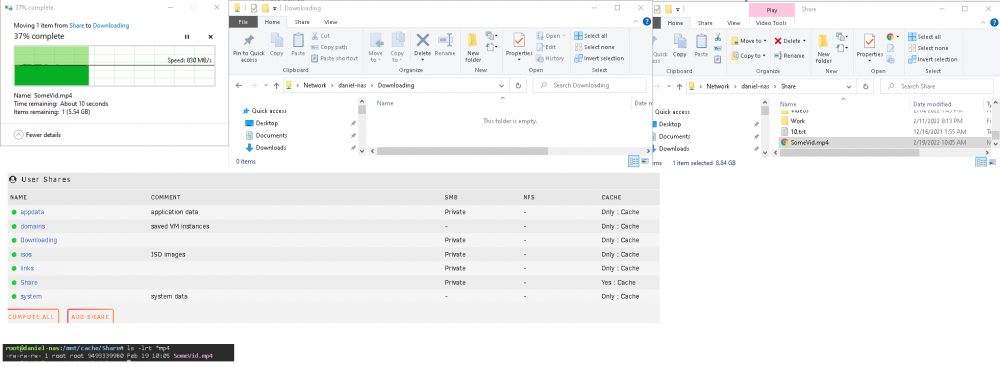
Windows 10. I just tested again and it is definitely doing a network transfer. Tried transferring a file from "Share" to "Downloading" shares and it's not instant.
-
It is setup that way and works fine, however the issue is with the files in Downloads directory. Moving files from Downloads to Games/Videos/Software is moving across shares via smb, so it moves through the network. Moving 500GB through network can take some time, and I don't feel like using a VM or krusader is a good solution to this problem.



