





FirbyKirby
Members
-
Joined
-
Last visited
Everything posted by FirbyKirby
-
Can anyone help me remove Dynamix System Autofan? At least, I think that's my issue. I'm trying to remove this dashboard widget. After some research, I believe this is related Dynamix System Autofan, though it was not installed on my server (I may have installed it in the past.) I tried installing it, and then uninstalling it, but this widget remains. Is there a manual method to remove it by chance?

-
Good point, I do indeed: 3x M.2 NVMe 1x NVIDIA GTX 4060 1x Mellanox 2-port QSFP+ (with DAC for 10 GbE.) Additionally, though they're not spun up, I've got 5x SATA drives (3x HDD and 2x SSD).
-
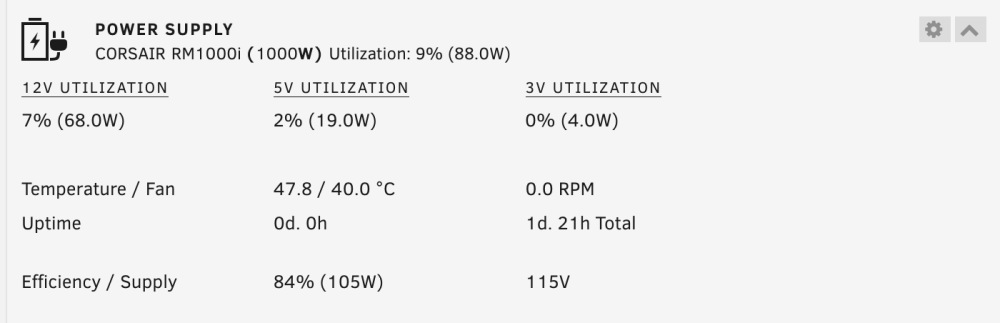
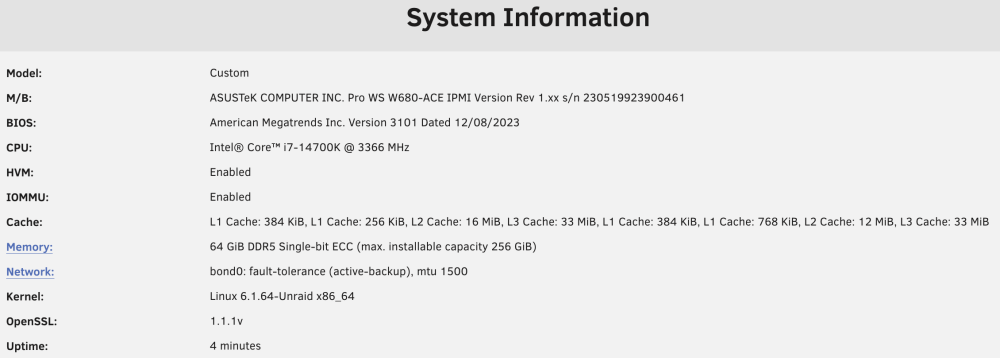
@Neo78 and @preepe, here's a look at my power consumption reported in Unraid after boot. The array is down and thus docker and VM services down as well. Nothing else significant is running. And here's system info for reference.
-
I'll join you in the "unraid drive won't boot" boat. I just completed a major server upgrade using this motherboard and this is the only remaining hardware issue I have. My experience is similar to yours @firstTimer, but I'll add that it's more intermittent, and it's getting worse. When I first booted after assembly, the drive booted without any issue. But as I've been adjusting BIOS setting (based on previous posts in this thread, for example,) and updating firmware, the issue seems to have gotten worse. But it's been intermittent and gradual enough that I can't pinpoint what I did to break things. But, at this point, after a cold boot, it almost never boots the Unraid drive and instead falls back to the BIOS. I then need to cycle anywhere between roughly 1 and 10 times before the drive will properly boot. I think soft resets are better then hard resets (CTRL+ALT+DEL vs reset switch,) but again, I can't be sure. "Discard and Exit" actions from the BIOS almost never work. One trick that often works for me is to try and catch the boot menu, rather then let if fall into BIOS on a cold start or power cycle. This took me a little while to figure out, but F8 works on the logo screen to pull up the boot menu. Sometimes, the unraid disk will be in the menu and you can bypass the BIOS. In terms of "things I've tried" I can say that I've fiddled quite a bit with the CSM (Compatability Support Module.) Turning this on gets Unraid to boot pretty reliably (maybe 100% of the time) but always in legacy mode, and I need UEFI for GPU pass-through, so it's a no-go for me. I've also fiddled with plenty of boot settings in the BIOS such as extending the delay on logo screen, turning on/off USB Legacy Support, and Enabling/Disabling Fast Boot (thanks @Daniel15 for your advice here as I know others in the thread have suggested this to make Unraid boot, but it's not working for me, unfortunately.) I've also tried every USB port on the motherboard without any change in behavior. Let's compare notes a bit more on setups. For example, what USB drive are you using @firstTimer? Maybe it's specific to the drive. I'm using a SanDisk Cruzer Blade 64GB (started with an 8GB, but I purchased a replacement and migrated as a troubleshooting step because I was worried the drive was failing.) What BIOS version are you on? I've updated to the latest (3101).
-
I should add that my first attempt to manually run mover failed miserably. Pressing "the button" in the GUI did nothing. The log never even showed a mover event. Upon research, I found this post. I have the same boot error, and I've had the mover tuning plugin for years. So, I removed it and re-installed it from the app store. Witch didn't fix the issue (still have the bad softlink.) So, since I don't need the tuning right now, just removed the mover tuning plugin altogether. That got mover working again. That's what I've been using when this hang started. I don't think it's relevant, but thought I would share (and I'd love to find a way to get that link fixed since I DO need mover tuning once the server is back up and running from the upgrade.)
-
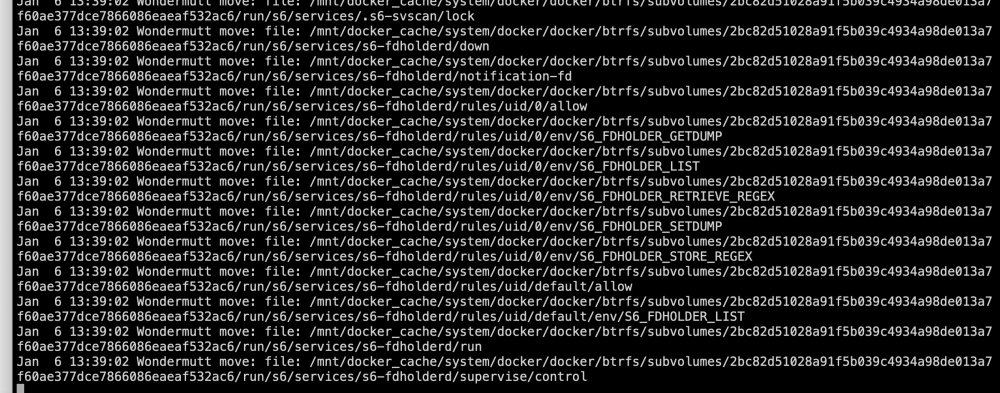
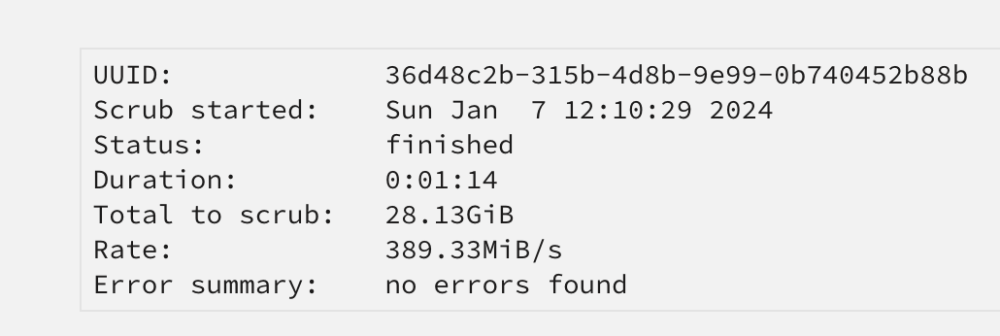
I'm in the middle of a big server HW upgrade (don't worry, I have backups of everything.) I'm near the end of the process without any major hardware issues. My last major step was to migrate some old btrfs cache drives to new ZFS NVMe drives. I'm following the new-ish SIO video that demonstrates how to migrate a drive to ZFS by using the mover to move everything to the array first, and then back to the newly formatted (on in my case, just new) ZFS pool. However, after a long time, when I return to the machine, mover is still running. I turned on mover logging before the operation, and I can see that hours before I returned to the server, mover's last log entry was an unknown btrfs file in the cache drive. At this point, I attempted to stop mover manually using the "mover stop" command at the CLI witch seemed to work. However, when I went to stop the array for a reboot (seemed like a good first step) the drives would not unmount. Manually calling "umount -l /mnt/docker_cache/" again, seemed to work (returned no errors) but I was unable to stop the array. Ended up doing a hard shutdown. After a night of parity check (no errors), I did a btrfs scrub on the 2 cache drives I have (no errors.) I can also confirm that docker and VM services were both stopped before manually starting the mover (per the SIO video,) so I dont think there were in use file issues. Could it be a permissions thing? Attached are my diagnostics after completing parity check and having the mover run again and get stuck again (stopped at what I think is about the same place, though the web browser based log doesn't show the exact place the mover stopped last night, but the diagnostics seem like they're at the same place.) I'll admit, I don't fully understand what these files are (something to do with the btrfs FS?) Barring y'all's advice, my next best guess is to give up, and remove the old cache drives from the server, adjust my shares mappings to use the new ZFS drives (as planned) and restore my shares from backup (I backed up all the shares on the cache drives for just this type of contingency.) But I'd really like to know why this happened so I can prevent it in the future? Maybe a permissions thing? wondermutt-diagnostics-20240107-0936.zip
-
I was able to solve this using the thread https://forums.unraid.net/topic/102194-priority-of-active-backup-bond/. Linking here so others may benefit.
-
Just wanted to close the loop on this thread in case anyone else comes to it. I had the same question/problem, and did exactly as @jonp suggested and it worked perfectly for me. Thank you.
-
Thanks for the update and the photos. I'm quite jealous of that deeper depth. I'd give quite a bit for a few extra inches beyond the 20" maximum I have today. The RM41300 is quite well laid out for versatility, and those dual hot-swap cages are very nice.
-
@Smitty2k1, thank you for the excellent photos. They give me the information I need. There is less room under that cage then I imagined for cable management. But to your point, it's does it's job of giving a large quantity of drives in a cheap "no frills" case.
-
I had not even considered this. Thank you! It turns out, the one I was looking at in 12.7mm is not compatible with UHD. In fact, as far as I can find (at least on Amazon so far) there are no 12.7mm slim optical drives that support UHD disks. This will require more research.
-
Thanks! Yes, I discovered this and the additional cage accessory a day or so ago. And just like you, I expect I'll run into the same issue of GPU compatibility with an additional 5x3.5" cage accessory (though I've been leaning to a non-hot swap option with a 120mm fan at the front of the case since I don't strongly value the tray-less hot swap feature.) That's what led me to your initial posts of an external storage solution for expansion. Admittedly, it's too much to ask of any vendor to create a case that can have a drive capacity as large as 16x3.5" drives AND fit a full size video card AND maintain a maximum depth under 20 inches. But at least the Chenbro lets you choose between those two options. And frankly, with just the single 3x5.25" cage that the case is sold with today, the case can still fit 10x3.5" drives appropriately outfitted, just as you've done. I can't speak for everyone, but to me at least, that's still an impressive amount of drive space. I'm migrating to unRAID from a 2-bay synology with 3 TB total storage. So when I imagine what I can reasonably create with 10 bays, I'm not sure I'll ever need the additional 6 bays. Very good point. I had planned to add that fan because I intend to fill out the internal 4x3.5" cage first and then add to the 5x3.5" cage in the 3x5.25" bay, and I was worried about airflow across those 4 stacked drives. It's a pity that you can't add an 80mm fan in front of the 4x3.5" drive cage AND populate it with drives (but as is the story it seems with this Chenbro, compromises are necessary.) Interestingly, this is one feature the Silverstone clone seems to have added, and I applaud them for it (though I don't quite think it's worth 2x the Chenbro price.) If I go with this case, I intend to add this drive as well (for blu-ray and DVD rips) but I've seen two different sizes marketed for slim optical drives. Would you be so kind as to share the drive you selected? Or at least comment on the thickness of the drive? I've seen 9.5mm and 12.7mm drives (like this one.)
-
Thanks for chiming in with your picture an description. This certainly helps my decision making. Also, let me take the opportunity to thank you for your previ1ous posts in this thread on adding external storage to an unRAID server via HBA and external "disk shelf," JBOD, and/or DAS (as I gather all those things get somewhat interchangeably used.) I read them all and it helped my understanding immensely. With my limited space, your feedback made me feel better about being able to expand in the future using a separate enclosure. Though I'll admit that after some cursory searches, there is an odd vacuum of purpose built JBOD enclosures at a depth less then 20 inches. You'd think that my use case would not be so uncommon (people with short depth requirements who want to grow up and take more "U's" rather then grow deep.) But the market would beg to differ. But, I don't want to delay my project because I haven't solved a problem in the future that I don't have right now. And frankly, if I do choose the RM42300, it's flexible enough that, if I'm careful and clever with accessory selection, and give up on supporting large GPUs, I think I can fit up to 16 3.5" drives safely into it.
-
Yea, that case seems like it'll be great for that need. And while I can't tell from photos, it looks like the way the cage is designed, you have some room under them for cable management/hiding, which I bet will be nice. Thanks in advance for the recon work!
-
I'm very interested in your experiences with this case. I too am considering it for a short depth (20") wall mount rack and I agree that the internet seems to have very little information about it. Besides your general experiences with the case (cable routing, build quality, ease of assembly, airflow, etc.) I'm particularly interested in the clearances around the PCIe cards. I would never expect to fit a full sized GPU into this case given it's total length and with the HD cage as it is, but I'm curious to know exactly how long of a GPU could fit in this case safely. Rosewill doesn't seem to give any measurements around this area and so I'm having to guess based on the size of an ATX motherboard. Additional photos of the interior of your final build would be really valuable. For reference, besides the Rosewill RSV-R4200U, I'm also considering the classic Chenbro RM42300 and what seems to me to be a more expensive clone of the Chenbro RM42300 by Silverstone, the RM41-506 (or one of it's variants.) All are short depth cases that have very similar features.





