





mad9
Members
-
Joined
-
Last visited
-
I have the same issue... Solution works?
-
Hi, can someone explain me, how to run the restore.sh? I want to migrate from openhab2.x. Prerequesites: Openhab has to be stopped but the docker needs to run.
-
Hi All. a little update after the holidays.... i tried a lot to make it run, and finally it works but not stable the screen freezes quite often. I made it run with Unraid 6.10 rc2; UEFI Bios; modified "go" (see further down) and ghost82 instruction on q35-6.0 Now i need to find out how to make it more stable. go file--> #fix video for VM echo 0 > /sys/class/vtconsole/vtcon0/bind echo 0 > /sys/class/vtconsole/vtcon1/bind echo efi-framebuffer.0 > /sys/bus/platform/drivers/efi-framebuffer/unbind EDIT: added a part of the syslog: Dec 28 22:22:42 MadUnraid kernel: amdgpu 0000:0b:00.0: amdgpu: amdgpu: finishing device. Dec 28 22:22:42 MadUnraid kernel: Console: switching to colour dummy device 80x25 Dec 28 22:22:46 MadUnraid kernel: amdgpu: cp queue pipe 4 queue 0 preemption failed Dec 28 22:22:46 MadUnraid kernel: amdgpu 0000:0b:00.0: amdgpu: Fail to disable thermal alert! Dec 28 22:22:46 MadUnraid kernel: amdgpu 0000:0b:00.0: AMD-Vi: Event logged [IO_PAGE_FAULT domain=0x001a address=0xfed82c00 flags=0x0020] Dec 28 22:22:46 MadUnraid kernel: amdgpu 0000:0b:00.0: AMD-Vi: Event logged [IO_PAGE_FAULT domain=0x001a address=0xfed82c20 flags=0x0020] Dec 28 22:22:46 MadUnraid kernel: amdgpu 0000:0b:00.0: AMD-Vi: Event logged [IO_PAGE_FAULT domain=0x001a address=0xfed82c40 flags=0x0020] Dec 28 22:22:46 MadUnraid kernel: amdgpu 0000:0b:00.0: AMD-Vi: Event logged [IO_PAGE_FAULT domain=0x001a address=0xfed82c60 flags=0x0020] Dec 28 22:22:46 MadUnraid kernel: amdgpu 0000:0b:00.0: AMD-Vi: Event logged [IO_PAGE_FAULT domain=0x001a address=0xfed82c80 flags=0x0020] Dec 28 22:22:46 MadUnraid kernel: amdgpu 0000:0b:00.0: AMD-Vi: Event logged [IO_PAGE_FAULT domain=0x001a address=0xfed82ca0 flags=0x0020] Dec 28 22:22:46 MadUnraid kernel: amdgpu 0000:0b:00.0: AMD-Vi: Event logged [IO_PAGE_FAULT domain=0x001a address=0xfed82cc0 flags=0x0020] Dec 28 22:22:46 MadUnraid kernel: amdgpu 0000:0b:00.0: AMD-Vi: Event logged [IO_PAGE_FAULT domain=0x001a address=0xfed82ce0 flags=0x0020] Dec 28 22:22:46 MadUnraid kernel: [drm] free PSP TMR buffer Dec 28 22:22:46 MadUnraid kernel: [drm] amdgpu: ttm finalized Dec 28 22:22:46 MadUnraid kernel: vfio-pci 0000:0b:00.0: vgaarb: changed VGA decodes: olddecodes=io+mem,decodes=io+mem:owns=none Dec 28 22:22:46 MadUnraid kernel: br0: port 3(vnet35) entered blocking state Dec 28 22:22:46 MadUnraid kernel: br0: port 3(vnet35) entered disabled state Dec 28 22:22:46 MadUnraid kernel: device vnet35 entered promiscuous mode Dec 28 22:22:46 MadUnraid kernel: br0: port 3(vnet35) entered blocking state Dec 28 22:22:46 MadUnraid kernel: br0: port 3(vnet35) entered forwarding state Dec 28 22:22:47 MadUnraid kernel: vfio-pci 0000:0b:00.0: vfio_ecap_init: hiding ecap 0x19@0x270 Dec 28 22:22:47 MadUnraid kernel: vfio-pci 0000:0b:00.0: vfio_ecap_init: hiding ecap 0x1b@0x2d0 Dec 28 22:22:47 MadUnraid kernel: vfio-pci 0000:0b:00.0: vfio_ecap_init: hiding ecap 0x26@0x410 Dec 28 22:22:47 MadUnraid kernel: vfio-pci 0000:0b:00.0: vfio_ecap_init: hiding ecap 0x27@0x440 Dec 28 22:22:47 MadUnraid kernel: vfio-pci 0000:0b:00.1: enabling device (0000 -> 0002) Dec 28 22:22:48 MadUnraid avahi-daemon[22747]: Joining mDNS multicast group on interface vnet35.IPv6 with address fe80::fc54:ff:fed4:bd48. Dec 28 22:22:48 MadUnraid avahi-daemon[22747]: New relevant interface vnet35.IPv6 for mDNS. Dec 28 22:22:48 MadUnraid avahi-daemon[22747]: Registering new address record for fe80::fc54:ff:fed4:bd48 on vnet35.*.
-
From the git. https://raw.githubusercontent.com/SpaceinvaderOne/Macinabox/84a82e54ae5f596f492ead2f2d98767029e2826a/bootloader/OpenCore.img.zip I dont see any issues, but where should i look?
-
Reistalled but before i test the passthrough, i found a miner problem that i can not shut down the vm properly. It automaticly goes again to the boot menu and restarts Any ideas?
-
I am not in uefi mode... but i am curious how to check that?
-
I am thinking to change the grafic card to the Primary PCIEXPRESS slot.... I am now in the secondary and nothing in the primary. I wanted to buy a more powerful grafic card in the future. Do you think this can have any effect?
-
Hi Ghost82, Unraid crashed on me.... since then it does a parity check, AND my mac vm is i think broken... very laggy and wierd startup data maybe i will reinstall the vm. What do you think?
-
No. I am connected actually with hdmi.
-
Done. And Freeeeeze again after 4-5 minutes
-
Here is the fileKerstin’s iMac Pro.ioreg
-
The VM just froze on me... I ll try to get the file....
-
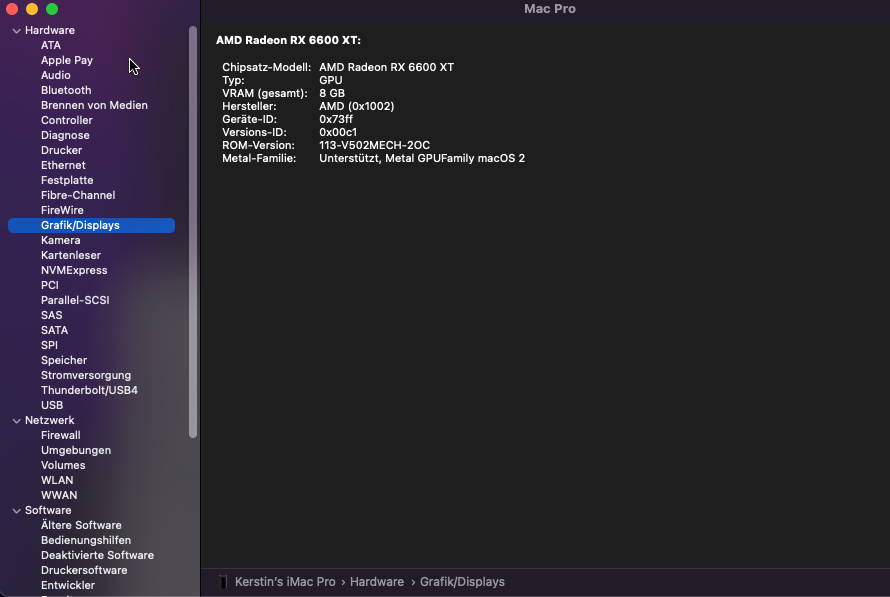
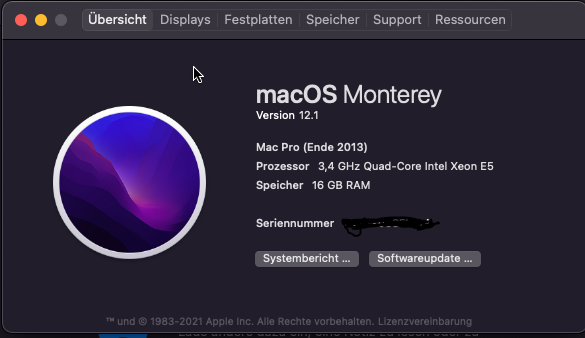
It boots but i think the grafic card is not shown on mac. This is my xml: <?xml version='1.0' encoding='UTF-8'?> <domain type='kvm' id='3' xmlns:qemu='http://libvirt.org/schemas/domain/qemu/1.0'> <name>Macinabox Monterey</name> <uuid>5a5df932-a694-4115-87c8-33a5c8a8b09f</uuid> <description>MacOS Monterey</description> <metadata> <vmtemplate xmlns="unraid" name="Windows 10" icon="default.png" os="osx"/> </metadata> <memory unit='KiB'>16777216</memory> <currentMemory unit='KiB'>16777216</currentMemory> <memoryBacking> <nosharepages/> </memoryBacking> <vcpu placement='static'>8</vcpu> <cputune> <vcpupin vcpu='0' cpuset='8'/> <vcpupin vcpu='1' cpuset='24'/> <vcpupin vcpu='2' cpuset='10'/> <vcpupin vcpu='3' cpuset='26'/> <vcpupin vcpu='4' cpuset='12'/> <vcpupin vcpu='5' cpuset='28'/> <vcpupin vcpu='6' cpuset='14'/> <vcpupin vcpu='7' cpuset='30'/> </cputune> <resource> <partition>/machine</partition> </resource> <os> <type arch='x86_64' machine='pc-q35-4.2'>hvm</type> <loader readonly='yes' type='pflash'>/mnt/user/system/custom_ovmf/Macinabox_CODE-pure-efi.fd</loader> <nvram>/etc/libvirt/qemu/nvram/5a5df932-a694-4115-87c8-33a5c8a8b09f_VARS-pure-efi.fd</nvram> </os> <features> <acpi/> <apic/> </features> <cpu mode='host-passthrough' check='none' migratable='on'> <topology sockets='1' dies='1' cores='4' threads='2'/> <cache mode='passthrough'/> <feature policy='require' name='topoext'/> </cpu> <clock offset='utc'> <timer name='rtc' tickpolicy='catchup'/> <timer name='pit' tickpolicy='delay'/> <timer name='hpet' present='no'/> </clock> <on_poweroff>destroy</on_poweroff> <on_reboot>restart</on_reboot> <on_crash>restart</on_crash> <devices> <emulator>/usr/local/sbin/qemu</emulator> <disk type='file' device='disk'> <driver name='qemu' type='raw' cache='writeback'/> <source file='/mnt/user/domains/Macinabox BigSur/macos_disk.img' index='1'/> <backingStore/> <target dev='hdc' bus='sata'/> <boot order='1'/> <alias name='sata0-0-2'/> <address type='drive' controller='0' bus='0' target='0' unit='2'/> </disk> <controller type='pci' index='0' model='pcie-root'> <alias name='pcie.0'/> </controller> <controller type='pci' index='1' model='pcie-root-port'> <model name='pcie-root-port'/> <target chassis='1' port='0x8'/> <alias name='pci.1'/> <address type='pci' domain='0x0000' bus='0x00' slot='0x01' function='0x0' multifunction='on'/> </controller> <controller type='pci' index='2' model='pcie-root-port'> <model name='pcie-root-port'/> <target chassis='2' port='0x9'/> <alias name='pci.2'/> <address type='pci' domain='0x0000' bus='0x00' slot='0x01' function='0x1'/> </controller> <controller type='pci' index='3' model='pcie-root-port'> <model name='pcie-root-port'/> <target chassis='3' port='0xb'/> <alias name='pci.3'/> <address type='pci' domain='0x0000' bus='0x00' slot='0x01' function='0x3'/> </controller> <controller type='pci' index='4' model='pcie-root-port'> <model name='pcie-root-port'/> <target chassis='4' port='0x13'/> <alias name='pci.4'/> <address type='pci' domain='0x0000' bus='0x00' slot='0x02' function='0x3'/> </controller> <controller type='pci' index='5' model='pcie-root-port'> <model name='pcie-root-port'/> <target chassis='5' port='0xa'/> <alias name='pci.5'/> <address type='pci' domain='0x0000' bus='0x00' slot='0x01' function='0x2'/> </controller> <controller type='pci' index='6' model='pcie-to-pci-bridge'> <model name='pcie-pci-bridge'/> <alias name='pci.6'/> <address type='pci' domain='0x0000' bus='0x01' slot='0x00' function='0x0'/> </controller> <controller type='virtio-serial' index='0'> <alias name='virtio-serial0'/> <address type='pci' domain='0x0000' bus='0x02' slot='0x00' function='0x0'/> </controller> <controller type='sata' index='0'> <alias name='ide'/> <address type='pci' domain='0x0000' bus='0x00' slot='0x1f' function='0x2'/> </controller> <controller type='usb' index='0' model='ich9-ehci1'> <alias name='usb'/> <address type='pci' domain='0x0000' bus='0x00' slot='0x07' function='0x7'/> </controller> <controller type='usb' index='0' model='ich9-uhci1'> <alias name='usb'/> <master startport='0'/> <address type='pci' domain='0x0000' bus='0x00' slot='0x07' function='0x0' multifunction='on'/> </controller> <controller type='usb' index='0' model='ich9-uhci2'> <alias name='usb'/> <master startport='2'/> <address type='pci' domain='0x0000' bus='0x00' slot='0x07' function='0x1'/> </controller> <controller type='usb' index='0' model='ich9-uhci3'> <alias name='usb'/> <master startport='4'/> <address type='pci' domain='0x0000' bus='0x00' slot='0x07' function='0x2'/> </controller> <interface type='bridge'> <mac address='52:54:00:bb:e4:63'/> <source bridge='br0'/> <target dev='vnet1'/> <model type='e1000-82545em'/> <alias name='net0'/> <address type='pci' domain='0x0000' bus='0x03' slot='0x00' function='0x0'/> </interface> <serial type='pty'> <source path='/dev/pts/1'/> <target type='isa-serial' port='0'> <model name='isa-serial'/> </target> <alias name='serial0'/> </serial> <console type='pty' tty='/dev/pts/1'> <source path='/dev/pts/1'/> <target type='serial' port='0'/> <alias name='serial0'/> </console> <channel type='unix'> <source mode='bind' path='/var/lib/libvirt/qemu/channel/target/domain-3-Macinabox Monterey/org.qemu.guest_agent.0'/> <target type='virtio' name='org.qemu.guest_agent.0' state='connected'/> <alias name='channel0'/> <address type='virtio-serial' controller='0' bus='0' port='1'/> </channel> <input type='tablet' bus='usb'> <alias name='input0'/> <address type='usb' bus='0' port='1'/> </input> <input type='mouse' bus='ps2'> <alias name='input1'/> </input> <input type='keyboard' bus='ps2'> <alias name='input2'/> </input> <hostdev mode='subsystem' type='pci' managed='yes'> <driver name='vfio'/> <source> <address domain='0x0000' bus='0x0b' slot='0x00' function='0x0'/> </source> <alias name='hostdev0'/> <rom file='/mnt/user/virtual systems/vbios/MSI.RX6600XT.8192.210610.rom'/> <address type='pci' domain='0x0000' bus='0x06' slot='0x01' function='0x0' multifunction='on'/> </hostdev> <hostdev mode='subsystem' type='pci' managed='yes'> <driver name='vfio'/> <source> <address domain='0x0000' bus='0x0b' slot='0x00' function='0x1'/> </source> <alias name='hostdev1'/> <address type='pci' domain='0x0000' bus='0x06' slot='0x02' function='0x0'/> </hostdev> <memballoon model='none'/> </devices> <seclabel type='dynamic' model='dac' relabel='yes'> <label>+0:+100</label> <imagelabel>+0:+100</imagelabel> </seclabel> <qemu:commandline> <qemu:arg value='-usb'/> <qemu:arg value='-device'/> <qemu:arg value='usb-kbd,bus=usb-bus.0'/> <qemu:arg value='-device'/> <qemu:arg value='************************'/> <qemu:arg value='-smbios'/> <qemu:arg value='type=2'/> <qemu:arg value='-cpu'/> <qemu:arg value='Penryn,kvm=on,vendor=GenuineIntel,+invtsc,vmware-cpuid-freq=on,+pcid,+ssse3,+sse4.2,+popcnt,+avx,+aes,+xsave,+xsaveopt,check'/> </qemu:commandline> </domain>
-
So you think i could load a different rom of a reference card to the vm? Do i understand correct?
-
UnraidVNC without gpu passthrough. i have downloaded the latest lilu and whatevergreen files, i just looking for a tutorial to insert them properly.
