





beantje
Members
-
Joined
-
Last visited
Everything posted by beantje
-
Hey, I have turned on this options, And now it happend again so I hope you can see what went wrong Thanks beanserver-diagnostics-20260329-0911.zip
-
Hi, my unraid hangs from time to time, a reboot solves it now i have made a diagnostics right after the reboot? can we still see what happend? thanks beanserver-diagnostics-20260326-0847.zip
-
the gui don't but i gave it different name in gui, but the poolname was already set in that zfs pool and that cant be changed so in the end you have 2 different pool names in gui, but still 2 same underneath and that makes problem
-
yes import worked once i rebooted it could not import because there where 2 pools with name "mainstorage" then things got mixed up, wrote zfs info on wrong disk or something like that
-
well it happend after i imported pool with same name from different unraid, had to test first before doing on my main straight away
-
this is the best i could get but still LightshotSchermafbeeldingVastgelegd met Lightshot
-
i created new pool with different name ( but the hard disk have pool name same as the other one ) it worked until i restarted and now it does not want to import my pool mainstorage anymore... oot@:~# zpool import -d /dev/mapper pool: mainstorage id: 18075257269857129199 state: UNAVAIL status: One or more devices contains corrupted data. action: The pool cannot be imported due to damaged devices or data. see: https://openzfs.github.io/openzfs-docs/msg/ZFS-8000-5E config: mainstorage UNAVAIL insufficient replicas raidz1-0 UNAVAIL insufficient replicas sdh1 ONLINE sdc1 ONLINE sdf1 ONLINE sdd1 ONLINE sde1 UNAVAIL invalid label sdg1 UNAVAIL invalid label whatever i do i can't repair this ... lost 60TB i did not format anything yet, but i spend whole day trying
-
and now the main pool is messed up, cant get it back to work :/ god damn
-
did not work, unraid wont accept same pool name twice, and im not able to copy 140TB
-
I need some help with adding an existing pool to Unraid. This pool comes from another Unraid server and was encrypted by Unraid itself. The password is the same as the one used for my other pools. I have already done a few test runs. Sometimes the pool could be added, but after a reboot I always had to manually import the pool again. In addition, the Unraid dashboard keeps showing “Format disk” on the front page, which feels quite risky. Now I would like to perform the migration properly for real. Both pools are currently named mainstorage. Is it possible to rename one of the pools and then safely import it into Unraid? https://prnt.sc/r1AeXY9hr2Gz
-
oh okey, will switch to smb only! thanks
-
Hey, So my smb shares stop working, When I restart it's back, But would like to solve the problem. I have attached my diagnosis while smb shares not working backupbean-diagnostics-20260129-1451.zip
-
yeah thanks for reply, but that docker does not work, i used it to get the appid, but still i don't manage to set it up thanks tho
-
is it possible to run other game then provided? like to use this appID https://github.com/loric-games/elysium-server-docker/blob/main/server.sh
-
i just installed https://raw.githubusercontent.com/UnRAIDES/unRAID-NerdTools/main/plugin/NerdTools.plg selected rar2fs works just fine Current Version 7.2.3
-
I did swap the PSU before all this shit happend, Going to replace that one, thanks
-
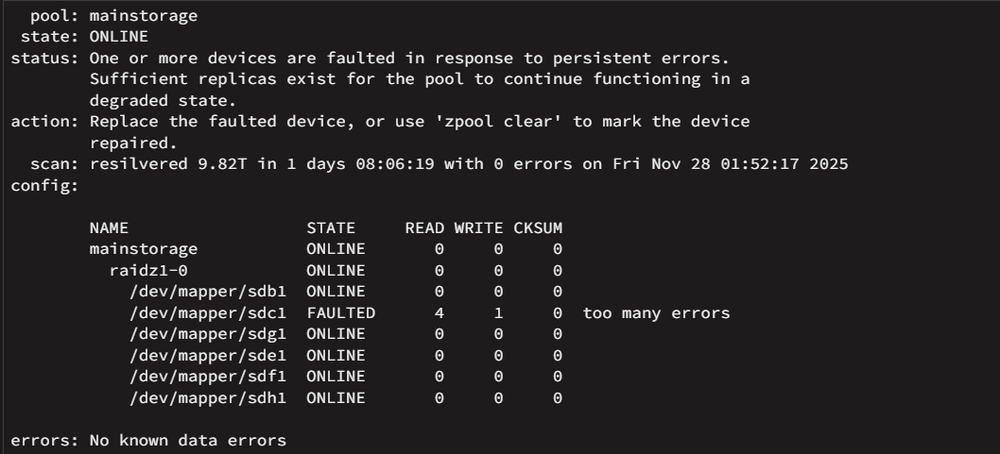
Hi everyone, I’ve been struggling with recurring issues on my ZFS setup. My main storage pool keeps throwing errors every now and then. To rule out hardware problems, I’ve already: replaced all the RAM, installed a new HBA card, and swapped out all the cables. Despite that, the issue keeps coming back (see attached photo). After a reboot, the affected drive comes back online and everything seems to work fine again. Unfortunately, the diagnostics I captured are from after the reboot, so the issue itself isn’t visible anymore. Still, maybe someone can spot something that might explain why this keeps happening? Thanks in advance for taking a look and sharing your thoughts! beanserver-diagnostics-20251203-1129.zip
-
Thank you all for the replies—I really appreciate it. I ended up just doing a reinstall and checking over my shares. Thanks again for the help; everything's back up and running now, and it all seems to be working well!
-
Hi everyone, I recently discovered an unwanted presence on my network—another server I was running got compromised, and the intruder managed to access my Unraid server. I noticed them browsing through some folders before I was able to shut things down. I've since deleted the breached server, but I'm concerned about the integrity of my Unraid system. I’ve checked the logs and didn’t notice anything unusual or persistent after a reboot, but I’d really appreciate it if someone with more experience could take a look and let me know if anything suspicious stands out. Logs are attached. Thanks in advance for your help! beanserver-diagnostics-20250425-0833.zip
-
i have fixed this, and for now it seems im having fast speeds, THANKS
-
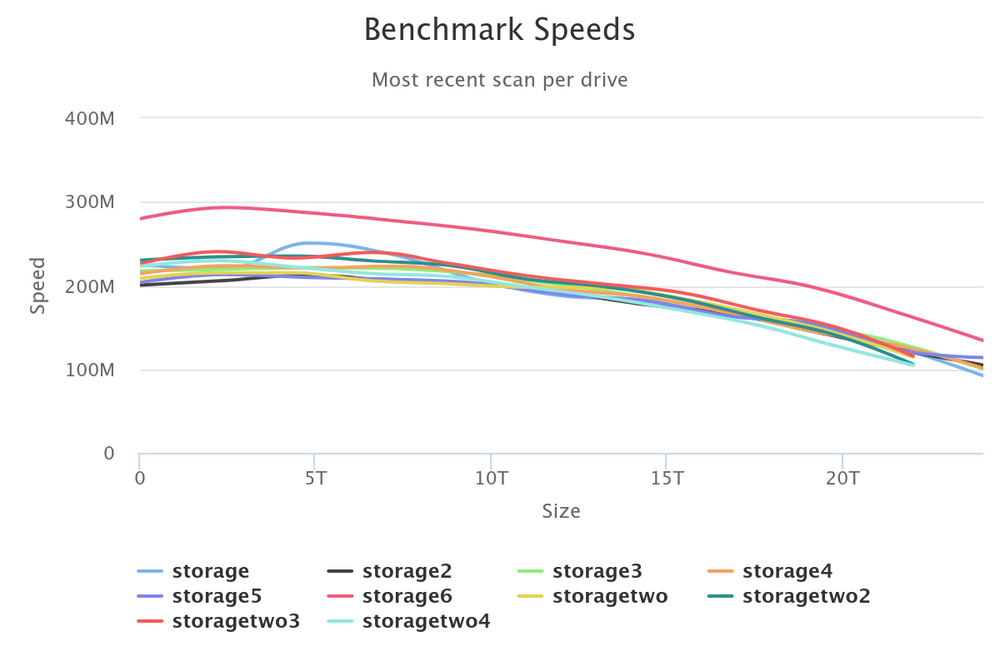
When I transfer files, open a RAR file, or access a folder, everything runs slowly. Additionally, when I ran a test, I received a speed cap warning. I appreciate the insight! I'll check this out—thanks!
-
this?
-
When accessing certain files, I noticed a significant drop in response speed. After running a speed test, I discovered that bandwidth was being capped on the following drives: storagetwo (sdc) storagetwo2 (sdd) storage3 (sdh) This limitation is affecting performance. Any insights on how to resolve this? beanserver-diagnostics-20250309-2140.zip
-
well i tried again, but stopped the transfer, so i don't see the logs from before im first trying to find out how to delete the duplicates now. no space to run again
-
I have used unbalenced to move data from disk1 to other disks, its done but disk1 is not empty, and i have no space left as it duplicated the files? any idea how to fix this?

