





uldise
Members
-
Joined
-
Last visited
Everything posted by uldise
-
Hi, i just setup this docker some days ago, and look like it's working. Sad to see only 2 concurrent connections in free licence, but time will tell if i can live with that.. one question (and sorry if it was answered already..) - i have such a two lines at the Client side log: Sat Sep 22 10:13:08 2018 ROUTE remote_host is NOT LOCAL Sat Sep 22 10:13:08 2018 C:\WINDOWS\system32\route.exe ADD <IP> MASK 255.255.255.255 <GW> where <IP> is my VPNServer public IP, <GW> is client side default gateway. i'm not routing all internet through VPN, and wondering why this route is needed? for me it would be nice if i can route my VPNs server external address through VPN.. Would it be possible?
-
@Socrates happy to see you got it sorted happy unRAIDing if you have any more questions, just ask, i will try to answer, if i can
-
about plopKExec: - download this iso and place inside your ESXi server near unRAID VM vmx file. https://download.plop.at/plopkexec/plopkexec.iso - you have CDRom already in your VM, choose iso file instead of Host Device, and check Coonect. thats all. when boot, ESXi should boot your iso(if not, force boot into BIOS and choose cdrom as first boot device), then plopKExec will find your unRAID USB and continue boot from that.
-
i recommend you to stay with that plopKExec(https://www.plop.at/en/plopkexec/download.html) to avoid confusion with your VMDK. it boots the same fast as from your flash. BTW, are you prepared your Flash as per instruction? https://wiki.unraid.net/USB_Flash_Drive_Preparation
-
but what is a NIC Adapter Type on ESXi side? just cheked on my server, i'm using VMXNET 3. i read your message on the other thread too.. can you boot in GUI mode and then see it from the ESXi Console?
-
what NIC are you using? which driver are you assign to NIC on ESXi side? your other VMs on the same ESXi server and the same ESXi vSwitch are working?
-
@jonp Thanks for white theme! much better for my eyes now one more think to consider, i asked it before, but didn't get an answer: why text size on forums lists are smaller than inside any topic?
-
Yes, but how user will access this folder from client browser? a small example - i'm running some app over a browser and want to upload some file to this app. i hit Open button, it opens standard Open dialog. how i can browse from here to the client filesystem? on standard RDP, you can map say your drive C to the Remote filesystem and access it through \\tsclient\c. but if you open your guac connection from Ubuntu from example?
-
OK, finally got it to work.. and yes, if web-sockets is not used, printing will not work! here are fragment of my Apache virtual site: ProxyPass /websocket-tunnel ws://YOURIP:PORT/guacamole/websocket-tunnel ProxyPassReverse /websocket-tunnel ws://YOURIP:PORT/guacamole/websocket-tunnel ProxyPass / http://YOURIP:PORT/guacamole/ flushpackets=on ProxyPassReverse / http://YOURIP:PORT/guacamole/ keep in mind about order - first you need to specify web-socket section, and then the main page section - according to guac docs, they wrote you need to do it vice-versa... BUT, their Docs don't contain any examples with sub-domain at all.. So, fingers crossed for me! @Taddeusz, my next question is about file exchange between host and client. what is a recommended way? cos Clients are connected to server from various locations, so i'm not sure, how to map client local drive to upload/download files to server..
-
Hi, i just updated my main server to unRAID 6.5.3.. and still no go with printing.. BUT one think i noticed in the catalina.out file, maybe that's related: 15:46:45.778 [http-nio-8080-exec-10] INFO o.a.g.t.h.RestrictedGuacamoleHTTPTunnelServlet - Using HTTP tunnel (not WebSocket). Performance may be sub-optimal. i'm using guac as subdomain - guac.mydomain.com for example. if i read guac documentation about proxies, i cant find a guide how to proxy Websocket to subdomain. Any ideas?
-
understand, may be this will be a reason to me to move to something newer. i have a second unRAID server with version 6.4.1 currently installed, will try to setup guac docker here and then i will report back.
-
just tried to print from Windows machine with latest Chrome installed - result is the same.. when i logout from guac, then i see pdf in the downloads, but it's corrupt.. do i need some more config to my Docker to get it to work? and yes, i'm on unRAID 6.1.9 still...
-
i'm at v67, but i dont mind its version related.. i will try later on Windows machine, may be it's my Ubuntu..
-
Yes, thanks, i tried already some tweaks on css, and it works.. and i successfully added DUO support too. BUT printing for me is not working. it should open an pdf file, but it just displays 'waiting for replay' and nothing happening, but when i log out from Guac then i see a save as dialog in my browser with that PDF. looks like save as dialog opens something behind them main window? very weird... i'm on Ubuntu workstation, tried Chrome and Firefox, the same for both. Any help welcome
-
Hi, installed this Docker today, works ok for me - tried VNC and RDP protocols.. and i agree that web interface seem some old-school. but have some questions @Taddeusz - i have an interest for remote printing too, so i have to install some specific version? - are there any chances to get new 1.0.0 version? i'm interested in two factor OTOP authentication. if i understand correctly, it will be available in new version (from there? https://github.com/apache/guacamole-client) - have anyone tried some re-branding? it's possible via extension.. And Thanks @Taddeusz, for this docker! Uldis
-
with entire content you mean all unRAID shares? if Yes, then use External Storage on Nextcloud with storage type Local. and map according folder to Docker in Docker params prior to do that.
-
if you replace IPs to your internal IP https://192.168.0.100:9980, and specify correct server name?
-
i mean, collabora is ok then.. and you have problem with you ngix reverse proxy, cos if you enter https://xxxoffice.duckdns.org, you should see this the same "OK". sorry, i have no ngix experience at all, i have an Apache as main webserver.
-
if you inside your LAN open https://192.168.1.66:9980, what do you get? as i wrote, i get blank page with small text "OK" in the left upper corner.
-
i think your port settings is just fine. first - if you access Nextcloud over https, then Collabora must be on https too. second - can you sucessfully open https://xxxoffice.duckdns.org from outside? for me, it opens just a blank page, but no error. if no, you should set your reverse proxy to do so.
-
sorry, don't know about proxynet.. i'm running Apache as my mine webserver, and NextCloud and Collabora are on separate sub-domains, and Apache just acts as proxy to them.
-
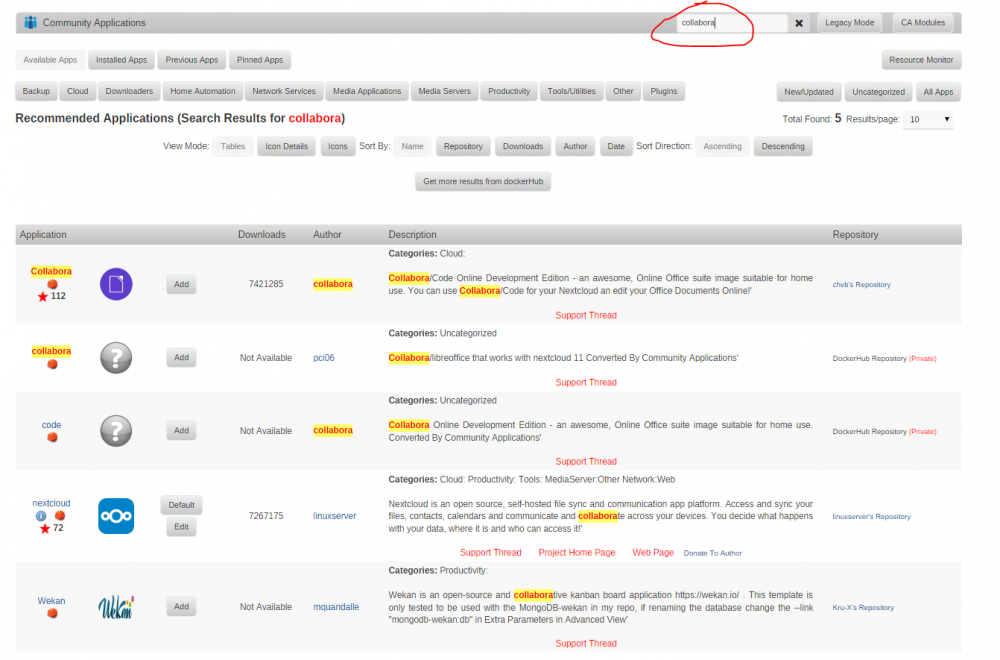
look at image, if you wanna more results, then click "Get more results from Dockerhub" in the middle, but i think you don't wanna that..
-
are you running these commands on unRAID Host? i think, this is wrong, you need to run them with your Apache. Do you have an Apache Docker container?
-
i will not. as i wrote, i use additional subdomain for collabora.
-
Yes, i'm running collabora on addition subdomain. and i have no idea, if you can run collabora without subdomain, e.g. xxxx.myfirewall.co/collabora..

