OrdinaryButt
Members
-
Joined
-
Last visited
Everything posted by OrdinaryButt
-
I found a single line config solution: "min protocol = SMBv2_02" This specifically enables 2.02 (I am going to assume that 2.002 is either a bug in the syslog print or something similar). "...=SMB2" or skipping the line forces minimum ver2.10 I have confirmed SMBv1 is down with a SMBv1 client. Thanks to those who tried to help, not to those that suggested buying a new printer or giving up on this.
-
This makes no sense. I have clearly discovered a bug. With NetBIOS enabled (allegedly means SMB v1 allowed), if the log had said SMB v1 protocol is selected, I would be done by now. By the log says 2_02 is selected. Also, scanner works fine with Windows 7 and SMB v1 disabled (allegedly 2.02 min version) The bug could be simply erroneous log report print (which will not solve my problem), but it is still a bug and should be addressed. Hopefully a decent developer will pick this up and look into it.
-
Look the screenshot above. Scanner is requesting 2.002, server replies with protocol 2_02 selected, not v1.
-
I did more tests. With NetBIOS enabled (allegedly unRAID opened for SMB v1, The scanner connects and server responds with "selected protocol SMB 2.02" (see attached screenshot). Further more, I powered up my dusty Windows 7 machine, DISABLED SMB v1, confirmed it got disabled after reboot, and the scanner has no issue connecting to the Windows 7 share. So I don't know exactly what is going on here but it isn't as black and white as it was thought thus far. I opened a support ticket and was told the forum was the best place to get support (I didn't quiet like this answer). Is any one of you unRAID developer?

-
Ok, so it seems like "min protocol = SMB2" does the same thing as "NetBIOS=NO" or at least it has the same effect for me. With the line removed from Extra config, once I set NetBIOS=NO, the scanner lost access and I confirmed with older Windows 7 machine with SMBv2 disabled that does not want to connect. So I am back at square zero. Need a way to allow SMB v2.002 to be allowed.
-
So in the "Samba Extra Config" I had this line: min protocol = SMB2 I deleted it, and the scanner got access. How can I check for sure SMBv1 is off?
-
I couldn't find any references to this 2.02 version. I tried enabling v1 on unRAID with this line in the SAMBA extra config but it seems wrong: "min protocol = SMB1" EDIT: Removing the whole line seems like opening up SAMBA to lower SMB version and the scanner now works. I really do not like the idea of keeping v1 open. Any idea who can help with this?
-
Oh crap. I hope you wrong. I will research it later.
-
Nothing to do with drivers. It looks to me like the SMB handshake fails. Scanner is requesting SMB v2.002 and Unraid is responding with "no protocol supported".
-
Sorry, I should have been more clear. It is a Mulfti Function Printer, scan to SMB network folder is what I am trying to achieve.
-
Thank you, that did it. It looks like the printer is requesting SMB v2.002 but Unraid is rejecting it as "no protocol supported". I have "min protocol = SMB2" in the config. Any idea how to proceed with this or who to ask? Sep 1 07:10:33 QVC smbd[26867]: Allowed connection from 192.168.9.223 (192.168.9.223) Sep 1 07:10:33 QVC smbd[26867]: [2022/09/01 07:10:33.933008, 3] ../../source3/smbd/oplock.c:1429(init_oplocks) Sep 1 07:10:33 QVC smbd[26867]: init_oplocks: initializing messages. Sep 1 07:10:33 QVC smbd[26867]: [2022/09/01 07:10:33.933058, 3] ../../source3/smbd/process.c:1957(process_smb) Sep 1 07:10:33 QVC smbd[26867]: Transaction 0 of length 62 (0 toread) Sep 1 07:10:33 QVC smbd[26867]: [2022/09/01 07:10:33.933080, 3] ../../source3/smbd/process.c:1549(switch_message) Sep 1 07:10:33 QVC smbd[26867]: switch message SMBnegprot (pid 26867) conn 0x0 Sep 1 07:10:33 QVC smbd[26867]: [2022/09/01 07:10:33.935118, 3] ../../source3/smbd/negprot.c:636(reply_negprot) Sep 1 07:10:33 QVC smbd[26867]: Requested protocol [NT LM 0.12] Sep 1 07:10:33 QVC smbd[26867]: [2022/09/01 07:10:33.935145, 3] ../../source3/smbd/negprot.c:636(reply_negprot) Sep 1 07:10:33 QVC smbd[26867]: Requested protocol [SMB 2.002] Sep 1 07:10:33 QVC smbd[26867]: [2022/09/01 07:10:33.935217, 3] ../../source3/smbd/negprot.c:757(reply_negprot) Sep 1 07:10:33 QVC smbd[26867]: reply_negprot: No protocol supported ! Sep 1 07:10:33 QVC smbd[26867]: [2022/09/01 07:10:33.935388, 3] ../../source3/smbd/server_exit.c:249(exit_server_common) Sep 1 07:10:33 QVC smbd[26867]: Server exit (no protocol supporte
-
I am trying to connect a stupid printer scanner, that supposedly supports SMBv2 but it simply fails to connect to the share (tried with hostname, IP, public or private share, all lower case). The device doesn't tell me what fails, the Unraid general log doesn't list attempted connection. I am hoping I can find a log that tells me what is wrong.
-
I believe I started it manually thru console then created account thru web gui.
-
*Please don't suggest "buy a new scanner" etc* I have a multi function printer/scanner (MFP) that can scan to SMB but unfortunately only supports protocol v1. If I remember correctly, that had some security issues and probably it is not a good idea to enable it on unRAID. What are my options to enable somehow a sandboxed single folder as SMB v1? A docker perhaps? Spinning a VM just for that would be too much. Alternatively, the MFP can send documents to email. Anyway easy way to spin up local email server that can automatically save attachments to a share? I know I could do it thru MS PowerApps but would rather not touch the cloud as it is never ending maintenance.
-
Thanks. I definitely missed the turbo mode option in the 2 months of learning and testing. However, that doesn't answer the subject line question - everything else identical, will dual parity be slower than single parity? New question: Can I manually activate turbo mode when knowing a large data transfer will take place than de-activate it at the end?
-
I am currently transferring 500GB from unassigned drive (onboard SATA) directly to a disk of the array (also onboard SATA) via Krusader. Both disks are capable of doing 160-100MB/s and both parities can do 270-200MB/s (all numbers from recent pre-clear). The files are mostly large (gigabytes) and should be sequentially written to the unassigned disk. It started transfer at 90MB/s and then slowed down to 45 within 15 minutes. There is nothing else using the disks and CPU is hoovering around 25% (not much else running). After the noticed slow down, I started pre-clear on another drive (USB3.0) that should be able to do easily over 120MB/s (based on copying some files) but it is only doing it ~45-50MB/s. Am I getting penalized because of the dual parity or is something else going on? CPU: i7 6700T Mobo: Gigabyte G150-GSM with 5 out of 6 SATA ports in use + M.2 Cache (currently also in idle).
-
Reporting a bug: Ignore file types will ignore any file name that also ends with the same letters as the ignored parameter. Example, ignore ".ts" does not move a file with name "Bets.mp4". Same goes for "ts" filter. Dozens of files ending with "-ts.extension" didn't move. I will only provide logs, if you can't replicate it on your end.
-
Why not just replacing this 6tb drive first, assuming you have parity drives?
-
I need to ignore move of couple folders from a Share (rest of the Share must be moved daily). Full details in this thread. Quick example: /mnt/user/MyShareName/newsShow1 contains: ShowName1 SXXEXX YYYY-MM-DD.mkv /mnt/user/MyShareName/newsShow2 contains: ShowName2 SXXEXX YYYY-MM-DD.mkv I see "Ignore files listed inside of a text file", will this work with a wild card (*) such as: /mnt/user/MyShareName/newsChannel2/ShowName1*.mkv Or even better, anything that has "news" in the file path?
-
Not yet, I'll check it out.
-
You did not understand me, missed "some of the recordings". I still need to move the rest so your suggestion is not solution.
-
So I record TV with TVHeadend and some of the recordings (like news) we only keep for 3-4 days, then automatically get deleted. Unfortunately, TVHeadend can only record to one folder and moving files around is a headache. It would be a waste to copy them from Cache to array nightly and then delete them in couple days. Can I somehow tell the mover to ignore specific folder inside a Share? EDIT: I still have plenty of other recordings that need to be moved from Cache to Shares. SOLUTION: I did try the mover plugin but I could not get it to work right. Then I discovered I was wrong about the TVHeadend - it car record to different directories (new recording profile for each). So I created a share with "Cache only" and will be using that for the time being.
-
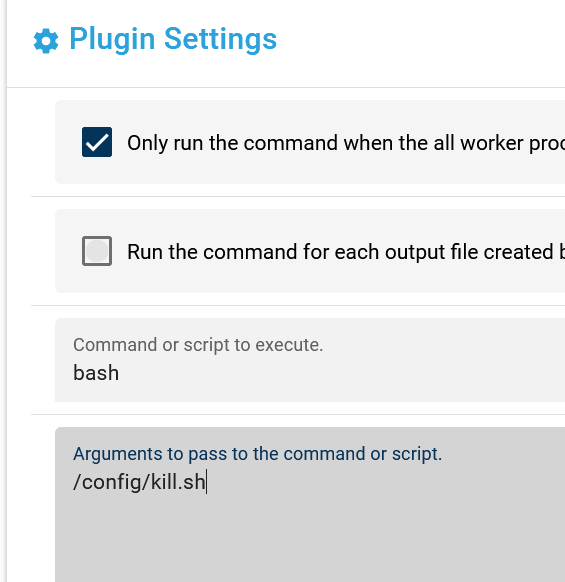
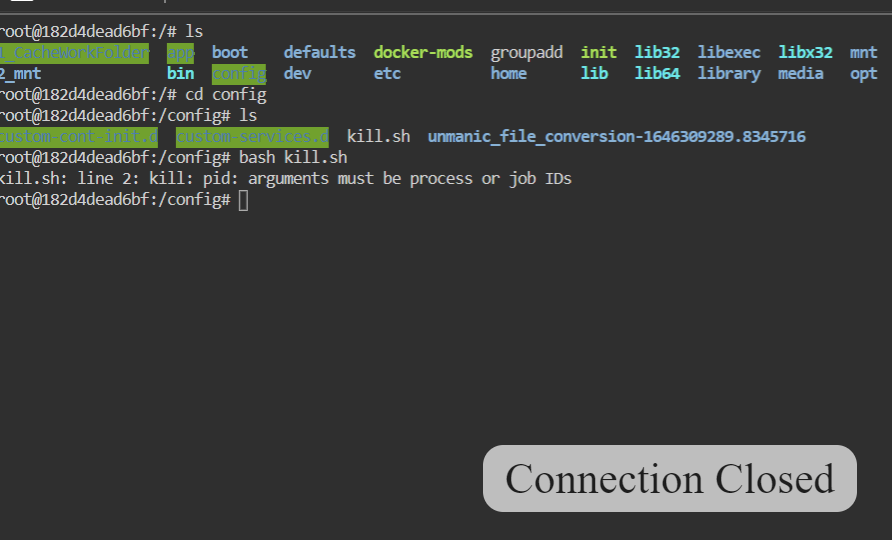
No, it does not have windows CRLF. I can run the script (if you can even call it that) in console with same command: bash /config/kill.sh It waits, then self destructs the docker.
-
sleep 60 kill pid 1
-
Sorry, I did miss this part but I have to admit, the wording is a bit unusual. I think it will do the trick though. I would be nice to know what I did wrong with the kill PID method. I tried simply executing a script with bash command and it didn't run (same commands works fine in CLI). Here is the log: 2022-03-02T05:46:25:INFO:Unmanic.Plugin.postprocessor_script - Execute command 'bash /config/kill.sh'. 2022-03-02T05:47:25:ERROR:Unmanic.PluginExecutor - [FORMATTED] - Exception while carrying out 'postprocessor.task_result' plugin runner 'postprocessor_script' Traceback (most recent call last): File "/usr/local/lib/python3.8/dist-packages/unmanic/libs/unplugins/executor.py", line 272, in execute_plugin_runner runner(data) File "/config/.unmanic/plugins/postprocessor_script/plugin.py", line 161, in on_postprocessor_task_results exec_subprocess(cmd, args) File "/config/.unmanic/plugins/postprocessor_script/plugin.py", line 87, in exec_subprocess raise Exception("Failed to execute command: '{}'".format(full_command)) Exception: Failed to execute command: 'bash /config/kill.sh'