





extremeaudio
Members
-
Joined
-
Last visited
Everything posted by extremeaudio
-
So how do i shut down the server? Or should I pull it out while live?
-
I get the message "Flash drive corrupted or offline, post your diagnostics on the forum" Attached herewith akserver-diagnostics-20231008-1839.zip
-
Even tried using another sata cable. Could it be a bad port on the mobo?
-
diagnostics attached. Docker isnt starting and gives a message saying array needs to be started for docker. But array is already started. EDIT: Sorry, array is stuck at starting, and the cache disk seems to be holding it up. diagnostics-20230228-1251.zip
-
Warning: stream_socket_client(): unable to connect to unix:///var/run/docker.sock (Connection refused) in /usr/local/emhttp/plugins/dynamix.docker.manager/include/DockerClient.php on line 712 Couldn't create socket: [111] Connection refused Warning: Invalid argument supplied for foreach() in /usr/local/emhttp/plugins/dynamix.docker.manager/include/DockerClient.php on line 898 Warning: stream_socket_client(): unable to connect to unix:///var/run/docker.sock (Connection refused) in /usr/local/emhttp/plugins/dynamix.docker.manager/include/DockerClient.php on line 712 Couldn't create socket: [111] Connection refused Warning: Invalid argument supplied for foreach() in /usr/local/emhttp/plugins/dynamix.docker.manager/include/DockerClient.php on line 967 Docker keeps stopping. Deleted the image once and recreated but happened again. Any suggestions?
-
As title suggests, the plugin said it detects hardware errors. I have replaced a sata expander just recently. Dont know why the error is still there. Diag attached. akserver-diagnostics-20230112-1414.zip
-
Never mind. I think the container was updating or it was awaiting a reboot. After a reboot the data is all restored. WHEW!
-
In the ztncui documentation they say Copy data of ztncui (/opt/key-networks/ztncui/etc) and ZT controler (/var/lib/zerotier-one). Where do I find this in unraid?
-
Update 3: Copied the contents of the old cache disk over to the new disk. Unassigned the cache disk. Started array. Stopped the array. Assigned the new cache disk with the exact contents as the old cache disk. Started the array. Docker tab looks fine with all the dockers. All dockers start including the ztncui one. But unable to get to the web UI.
-
Update 2: I am able to access the contents of the old cache disk by putting it in a usb housing. But somehow it wont work connected to the regular disk slot. Can all dockers work exactly as earlier if the contents are copied over to the new disk? Will it make a difference that I already tried creating dockers using the new disk? Should I disable and re enable docker or something?
-
Update: I installed the dockers using the user templates and they have retained their userdata. I reinstalled portainer too and that contained the stack with the code as above. I deployed that stack and deployed successfully. But when I go to the zerotier gui the networks information is lost. Where would that be stored if at all?
-
So my cache disk is undetectable. I use backup appdata plugin and that has a backup from a few days ago. I installed a new cache disk and did a restore. After that I restarted docker and then went to the docker tab but the page is blank. If i go to add container, I can see user templates under there. Is this the correct way to restore? Also need help with a docker I installed using portainer - I am hosting my own zerotier controller. The instalation of the same isnt through community applications. It is installed using stacks through portainer as described here - I'm not very good with docker. Is there a chance I can recover this docker data? Because that has all my zerotier networks etc. Would be very painful to lose those. How should I reinstall this to recover the previous data? Below are the contents of the stack version: "3" services: ztncui: image: keynetworks/ztncui container_name: ztncui environment: - USER_UID=99 #adjust to your system - USER_GID=100 #adjust to your system - NODE_ENV=production - HTTPS_PORT=3443 - ZTNCUI_PASSWD=password #change this volumes: - ztncui:/opt/key-networks/ztncui/etc - zt1:/var/lib/zerotier-one ports: - 3443:3443 #dashboard port - 3180:3180
-
Thanks guys! Saved by the skin of my teeth this time around.
-
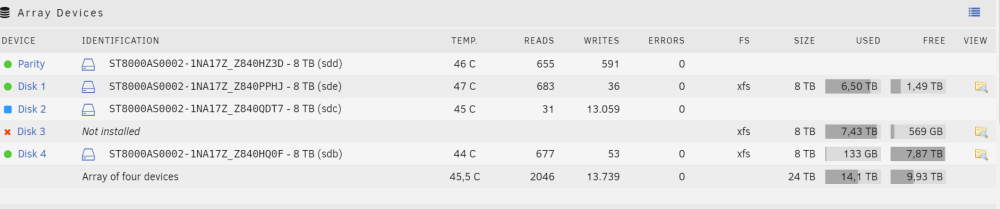
On a side note, how can I now change the config so that it reflects disk 1, 2 and 3 and not 1,3,4 so that I do not mess up like this again in the future? Obviously, after the parity rebuild completes and the array is back to perfect health again. Thanks
-
Hell yeah this seems to be working! I am so relieved. I wanted to kick myself for being lazy to not set disk 1, 2 and 3 when I originally shrunk the array. Thanks a ton guys. Unraid and unraid support rocks!
-
I created a very big error. My array has Parity, Disk 1, Disk3 and Disk 4. Disk 3 had a cross and was disabled. So i corrected the cables etc, and then connected back the disk I unassigned the disk and was planning to re assign the disk to disk 3 but mistakenly assigned it disk 2 and started the array, I got the message that the disk was being cleared. I quickly stopped the array. What can I do now? To minimise my data loss. I know I have messed up bigtime.
-
I did a complete fresh install and copied over some basics like shares etc from the config folder and re installed docker etc and all is good.
-
From the discussion, I could not gather what the solution is
-
I'm able to ping 8.8.8.8. Tried setting DNS manually from the auto generated 192.168.1.1 to 8.8.8.8 but still no luck. Some plugins update, others dont. Community apps dont load. Unraid version is 6.3.4 and cant update that either. Diagnostics attached. Please help. diagnostics-20230104-1123.zip
-
Had nothing to do with the server. The cache of the browser with which I was acccessing jdownloader needed to be cleared. Really odd.
-
I am the latest unraid stable. The network is a bit wonky. I dont remember doing it, but the network setting showed bonding and bridging enabled. i have disabled it. Also, my local static IP address was creating issues when DHCP was off, then I changed it to another IP and it now seems to be better although there was no static IP clash. Inspite of all this I was always able to connect to the server remotely using zerotier. But server would fail to connect to things like plugin update, apps tab etc which i found very strange, At the moment I am able to connect to the server remotely and install docker containers etc. But the jdownloader docker gives errors that it cant connect to the internet! Diagnostics attached. Please help. diagnostics-20221019-2112.zip
-
Will do, thank you!
-
I restarted the server and there are no errors now. A parity check is also almost at its end with no errors. All is ok then?
-
Just converted all disks from reiserfs to xfs. First one disk showed errors in main, now another one has it. And the 2nd one also has billions or trillions of writes to it. Nothing disabled or red balled yet. Diagnostics attached. Can someone help pls! akserver-diagnostics-20220901-2119.zip
-
Thanks to all 4 of you, I finally think I got it! Will do as recommended. Help much appreciated.

