





extremeaudio
Members
-
Joined
-
Last visited
Everything posted by extremeaudio
-
The only reason I installed crashplan is in order to be able to make automatic backups of my windows laptop. Right now thats the only machine backing up, soon I plan to add my other laptop too. I don't know that I could back up my server too? By that, do you mean to crashplan cloud or to the server itself (does that make any sense?) What part of all this does the crashplan desktop docker help configure?
-
Thanks ljm42, gfjardim and Leifgg also of course, my files are backing up once again. However, I don't understand the exact mechanism - what exactly is the crashplan desktop docker for? Isn't the desktop one the one I am running on my Windows PC which is backing up to the server? What exactly is that helping configure? Also, the last time I lost connection and even this time when I re connected I saw two instances of "Tower" as my backup destination, one without a green ball, and one with. So I just deactivated the old one and started backing to the one visible now from scratch. Which I'm sure is the wrong thing to do but I dont know any better.
-
Ah, ok. Gotcha! I thought all you guys went beyond the splash page. Leifgg is the reason I got back onto crashplan. I had almost given up when I got reconnection errors after my first outing with it, until I read his splendid tutorial. Guess I will give it a few days before I revisit it!
-
It does show 4.4.1 But no green ball next to the server destination. 172.17.42.1 is what I can see in the server\apps\crashplan\id\.ui.info file as well. Thanks for the help. I really wish crashplan worked more reliably. Its a must-have tool.
-
I followed your steps but no luck.
-
Err, crashplan is not working right now. It shows my server as offline from my windows pc which I need to back up. What do I check?
-
Does anyone think its a good idea to back up the flash drive and the apps folder on the cache drive (and maybe even the docker.img) using crashplan? If yes, what would need to be done? And how would one go about restoring this? I ask this since recently I had a cache drive go bad and it turned out quite painful restoring all the dockers and setting them up again.
-
Really appreciate the help, will try it out as soon as I get time and get back to you. Thanks!
-
@ Leifg - I tried what you mentioned, but no luck. Is there any way to produce logs that might help others troubleshoot why a connection is not being made?
-
I'm in the same boat as you. I reinstalled Crashplan afresh on the server. Network type set to bridge. The config folder is set to my apps folder on the cache drive. I have added 4243 as well as 4242 as the ports. The ui properties file has the following lines serviceHost=172.17.42.1 servicePort=4243 Everything else is remarked. I left this as it is. From my Windows PC, the instance of Crashplan configured as crashplan server has the following lines in ui properties - serviceHost=192.168.1.49 servicePort=4243 where 192.168.1.49 is the ip address of my unraid tower. my.service xml on the server also has the following lines <serviceHost>0.0.0.0</serviceHost> <servicePort>4243</servicePort> When I start the crashplan-server instance from the windows pc, it just gets stuck on the splash screen.
-
My cache disk died and I had to reinstall the docker (everything on the unraid side), the Windows desktop being backed up still has the original settings. Crashplan version is 4.3 and docker starts just fine. Now I have this in my ui.properties file #Fri Dec 09 09:50:22 CST 2005 #serviceHost=192.169.1.49 #servicePort=4243 #pollerPeriod=1000 # 1 second #connectRetryDelay=10000 # 10 seconds #connectRetryAttempts=1 #showWelcome=true #font.small= #font.default= #font.title= #font.message.header= #font.message.body= #font.tab= serviceHost=192.168.1.49 servicePort=4243 The ip address is correct. I am sure of that. When I open crashplan-desktop it says my server is offline. It also mentions 4242 port at the end although in ui properties file I have 4243 everywhere. Just for confirmation, I have pasted the contents of the crashplan ui properties file of both, the crashplan desktop instance and the crashplan server instance from my pc respectively Crashplan Desktop #Fri Dec 09 09:50:22 CST 2005 #serviceHost=127.0.0.1 #servicePort=4243 #pollerPeriod=1000 # 1 second #connectRetryDelay=10000 # 10 seconds #connectRetryAttempts=3 #showWelcome=true #font.small= #font.default= #font.title= #font.message.header= #font.message.body= #font.tab= serviceHost=127.0.0.1 servicePort=4243 Crashplan Server #Fri Dec 09 09:50:22 CST 2005 #serviceHost=192.168.1.49 #servicePort=4243 #pollerPeriod=1000 # 1 second #connectRetryDelay=10000 # 10 seconds #connectRetryAttempts=3 #showWelcome=true #font.small= #font.default= #font.title= #font.message.header= #font.message.body= #font.tab= serviceHost=192.168.1.49 servicePort=4243 Can someone help with how to troubleshoot? P.S. Is port forwarding required? Don't remember doing that the last time.
-
Someone kindly help out with this
-
I have 8GB of RAM. I would never do more than 4 simultaneous streams. Am I safe enough to just map the transcode directory to RAM and get going? I had instances with very old unRAID where my server has crashed many times and this was attributed by some members to suspected unusually high RAM usage by Plex, hence the skepticism.
-
Ok thanks a lot!
-
Hello! Anyone have any idea what's going on here
-
I had crashplan working for a while. A few days ago when I tried to resume backup, the crashplan server would just not connect. I tried restarting and also reinstalling Crashplan and I got it going for some time and now its back down again. Crashplan log as below. Please help! Command: root@localhost:# /usr/bin/docker logs --tail=350 CrashPlan Did not find /usr/local/crashplan/bin/run.conf file. Did not find /usr/local/crashplan/bin/run.conf file. Did not find /usr/local/crashplan/bin/run.conf file. Did not find /usr/local/crashplan/bin/run.conf file. Did not find /usr/local/crashplan/bin/run.conf file. Did not find /usr/local/crashplan/bin/run.conf file. Did not find /usr/local/crashplan/bin/run.conf file. Did not find /usr/local/crashplan/bin/run.conf file. Did not find /usr/local/crashplan/bin/run.conf file. Did not find /usr/local/crashplan/bin/run.conf file. Did not find /usr/local/crashplan/bin/run.conf file. Did not find /usr/local/crashplan/bin/run.conf file. Did not find /usr/local/crashplan/bin/run.conf file. Did not find /usr/local/crashplan/bin/run.conf file. Did not find /usr/local/crashplan/bin/run.conf file. Did not find /usr/local/crashplan/bin/run.conf file. Did not find /usr/local/crashplan/bin/run.conf file. Did not find /usr/local/crashplan/bin/run.conf file. Did not find /usr/local/crashplan/bin/run.conf file. Did not find /usr/local/crashplan/bin/run.conf file. Did not find /usr/local/crashplan/bin/run.conf file. Did not find /usr/local/crashplan/bin/run.conf file. Did not find /usr/local/crashplan/bin/run.conf file. Did not find /usr/local/crashplan/bin/run.conf file. Did not find /usr/local/crashplan/bin/run.conf file. Did not find /usr/local/crashplan/bin/run.conf file. Did not find /usr/local/crashplan/bin/run.conf file. *** Shutting down runit daemon (PID 37)... *** Killing all processes... *** Running /etc/my_init.d/config.sh... Current default time zone: 'Asia/Kolkata' Local time is now: Thu Jan 1 16:20:47 IST 2015. Universal Time is now: Thu Jan 1 10:50:47 UTC 2015. cp: cannot stat ‘/usr/local/crashplan/bin/run.conf’: No such file or directory *** Running /etc/rc.local... *** Booting runit daemon... *** Runit started as PID 40 Did not find /usr/local/crashplan/bin/run.conf file. Did not find /usr/local/crashplan/bin/run.conf file.
-
Thanks so much! It's up and running. The 3rd mapping /boot-unraid and /boot ... What's that for? Is it required?
-
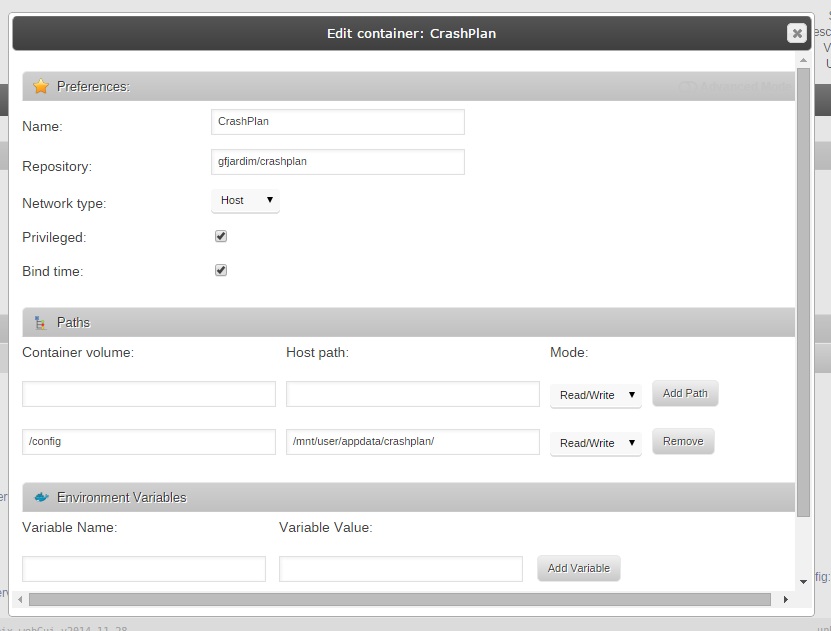
I understand that these core crashplan features are not linked to unraid or your docker in any way and in view of that I am very thankful for all your help. I am now all hooked and ready to go. My last obstacle is the destination options that crashplan-server is posing to me look as shown in the attachment. It defaults to a folder called "data" whose location I am unsure of. And if I try and expand the "mnt" folder tree I do not see any levels below it. It just says "loading" for a second and then goes blank. I believe there is something I need to put into the Paths section of the plugin's preferences but not sure what. Would be obliged if you help me with this. And I will most definitely buy you a beer when I come to France
-
Sorry I went through your link and all the explanation pertains to setting up user id and inbound backup on the client machine and not on the server. I have already signed in on the server and I have not set any inbound destination because I do not want any backup on the client! How is this set up on the server? This really has me confused!
-
No. I already asked a couple posts ago how I would know the backup destination on server. Where do i set that?
-
What's to configure on the server? Have to leave everything on default, right? Its the client where the IP is changed to point to the server Please refer attachment
-
Any other suggestions? I removed and reinstalled crashplan to the default config directory etc but still no joy!
-
I did exactly what you said on a new PC on the network. But when crashplan starts, under destinations I only see my PC name. I don't see any other computer, namely the unraid server.
-
The settings on the server are as above. On the client windows pc, I have the IP and service port set to the IP of my tower and port 4243. With this config, the crashplan program always stops at "Unable to connect to the backup engine. Retry?" In the ui.properties file on the windows pc there is another service port field at the bottom of the file. This is set to 4200 by default. I tried setting this to 4243 too and this took me into the app. But I can't see my server as one of the computers to back up to. I can only see my windows PC I am not familiar with using crashplan so I don't know what is exactly going on. Please help. By the way, when I go to the Settings>Network tab in crashplan windows desktop program I can see the Internal address as 0.0.0.0:4242 Is this correct? Lastly, even if I made the connection from my PC to the server where would the backup be stored on the server? EDIT: Just checked again and the internal IP address had changed to 192.168.1.125:4243 which is the internal ip of my pc.
-
<serviceHost>0.0.0.0</serviceHost> <servicePort>4243</servicePort> This is from the server.
