





kolepard
Members
-
Joined
-
Last visited
Everything posted by kolepard
-
Sorry to hear support for this as unRAID moves to Fedora will be limited, as this has been the best feature added to unRAID for my purposes for a while. If you can suggest an alternative when the time comes I'd appreciate it. Thank you, though, for everything you've done on this; it's been invaluable for rsyncing data between servers for me and I very much appreciate it. Kevin
-
Just to close this loop, my issues were resolved in the referenced thread. Kevin
-
@JorgeB I will clear the pool state then. You mentioned a docker image problem, too. Are there additional steps I need to take with respect to that? Thank you. Keivn
-
@wgstarks Thank you! Editing the docker settings by setting "Network Type" to "Container" and then setting "Container Network" the "binhex-deluge-vpn" solved this problem! All Dockers are now working normally again. @JorgeB I ran scub twice once under 7.2.4 and a second time under 7.3.1. The results appear the same. Scrub result under 7.2.4 UUID: 6b450441-1d2d-4b45-ab90-434d50d5cc7c Scrub started: Sun Jun 14 08:07:15 2026 Status: finished Duration: 0:00:37 Total to scrub: 186.42GiB Rate: 5.04GiB/s Error summary: no errors found Scrub result under 7.3.1 UUID: 6b450441-1d2d-4b45-ab90-434d50d5cc7c Scrub started: Sun Jun 14 08:53:02 2026 Status: finished Duration: 0:00:46 Total to scrub: 281.30GiB Rate: 6.12GiB/s Error summary: no errors found I also ran an extended SMART self-test on the NVMe drive that was reporting errors; that report is attached. Thank you @JorgeB for your help with this. Kevin tower-smart-20260614-0911.zip
-
Thank you @JorgeB and @itimpi . I have updated to 7.3.1 again and posted diagnostics in a new thread, as you have recommended. https://forums.unraid.net/topic/199433-dockers-fail-to-start-with-731/#comment-1627674 Reverting to 7.2.4 again resolved the issues with the Dockers not starting. Thank you. Kevin
-
I updated from 7.2.4 to 7.3.1 yesterday. The update process seemed to go fine, but upon restart it reported errors on my second cache pool drive (which is made of 2 NVMe drives on a Supermicro riser card installed on a Supermicro X12SPi-TF motherboard) that had not been reported previously on 7.2.4. None of the Docker modules in the Arr stack (Prowlarr, Sonarr, Radarr) would start and gave an Execution Error - Bad Parameter. They were also listed as having invalid IP addresses. Diagnostics are attached. Any help appreciated. I have successfully reverted to 7.2.4 (I had the same problem with 7.2.7) but obviously cannot stay on that version forever. Many Thanks. Kevintower-diagnostics-20260613-1236.zip
-
I updated from 7.2.4 to 7.3.1 today. The update process seemed to go fine, but upon restart it reported errors on my second cache pool drive (which is made of 2 NVMe drives on a Supermicro riser card installed on a Supermicro X12SPi-TF motherboard) that had not been reported previously on 7.2.4. None of the Docker modules in the Arr stack (Prowlarr, Sonarr, Radarr) would start and gave an Execution Error - Bad Parameter. They were also listed as having invalid IP addresses. Subsequently I reverted to 7.2.4 and the reported errors disappeared and the Arr stack modules started normally. Just thought I'd report the experience. Kevin
-
Thank you to tjb_altf4 and Kilrah for providing the answer. I appreciate your help. Kevin
-
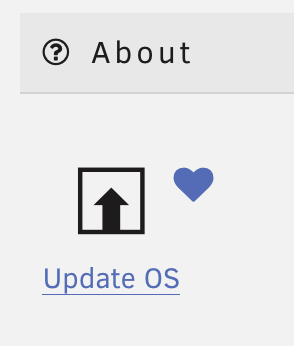
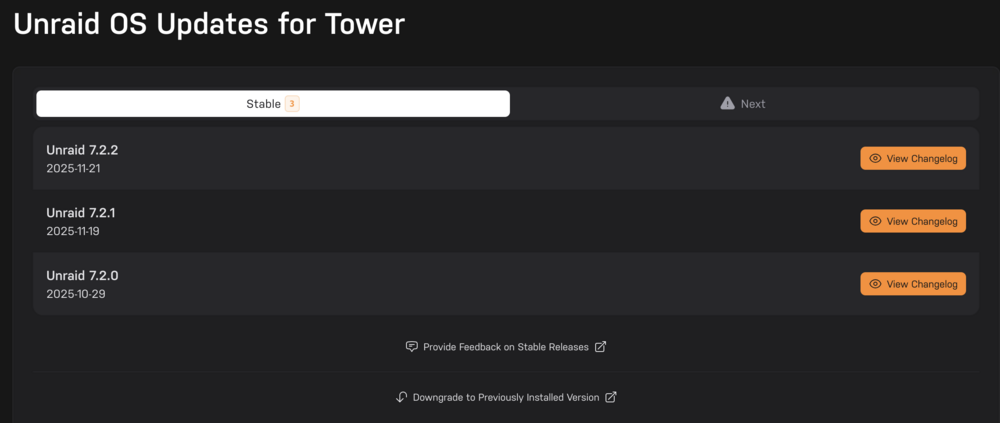
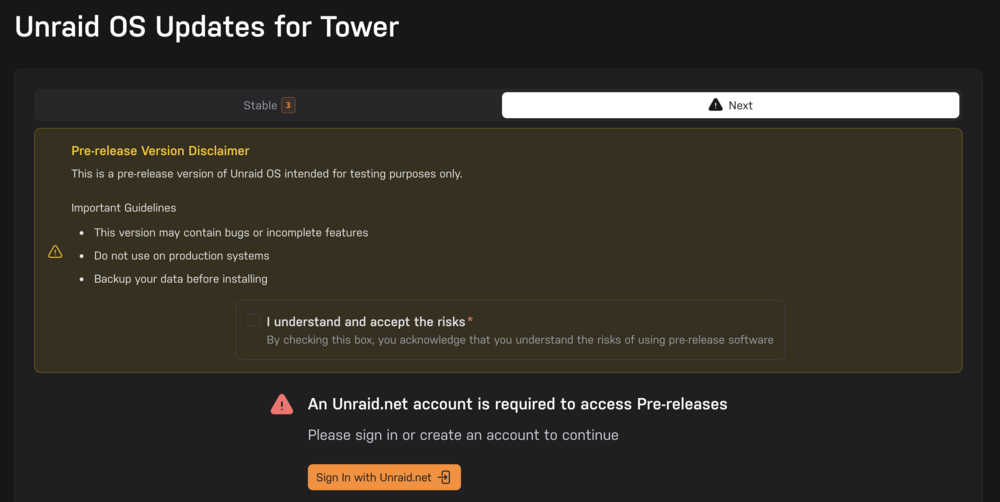
I still see this. Under the Tools tab I select this: I then get this screen: To me this looks like the "Stable" branch is selected. I then click "Next" and get this: Where you can see the Pre-rlease Version Disclaimer. Sorry for my slow response; I've been out of town and unable to take screenshots. Kevin
-
When I go through the update tool in 7.1.4 although I see 7.2.0 listed under stable releases (dated 29-October-2025), when I try to progress, it presents a warning and disclaimer that this is pre-release. If this is not actually pre-release, will that warning/disclaimer be corrected? Thanks. Kevin
-
Thanks. I keep backups of everything on the cache drive. Thank you again. Kevin
-
Thanks for verifying. I presume these remaining 2 drives are mirrored, correct? Is there a better way for me to set this up so I avoid this problem in the future? Or was this just bad luck? Kevin
-
Those were before the steps I outlined in the next post, so you're right. These are after. Thank you for checking them for me. Kevin tower-diagnostics-20250706-0914.zip
-
Most of my last message disappeared, an only the diagnostics appeared; I'm not sure why. That Seagate drive is will appear "spun up" for a while after a power cycle, no matter how I attach it, which I think is the major problem. The last set of diagnostics was obtained while it was "spun up" (i.e., green dot). What I did was run btrfs dev remove missing /mnt/cache It reported no device was missing, which was true, so I did this: Ran a balance operation and let it finish. Stopped array Set the problematic drive, sdj, to unassigned Checked "I Want to Do This" Restarted the array Let the BTRFS Operation complete, which showed a cache pool of 3 devices (Huzzah! Progress!) Stopped the array again Removed the second SSD Again checked "I Want to Do this" Restarted array Let the BTRFS operation complete again This has left me with a pool 2 devices of the 2 NVMe drives on the PCIe riser card. Fortunately I was able to complete the first 5 steps before the troublesome SSD dropped off and reported "spun down". I'm not sure what I would have needed to do if the troublesome drive "spun down" before I could complete those steps. I presume these remaining 2 drives are mirrored, correct? Is there a better way for me to set this up so I avoid this problem in the future? Or was this just bad luck? Thank you again for your help. Kevin
-
tower-diagnostics-20250705-1318.zip
-
New diagnostics.tower-diagnostics-20250702-0919.zip
-
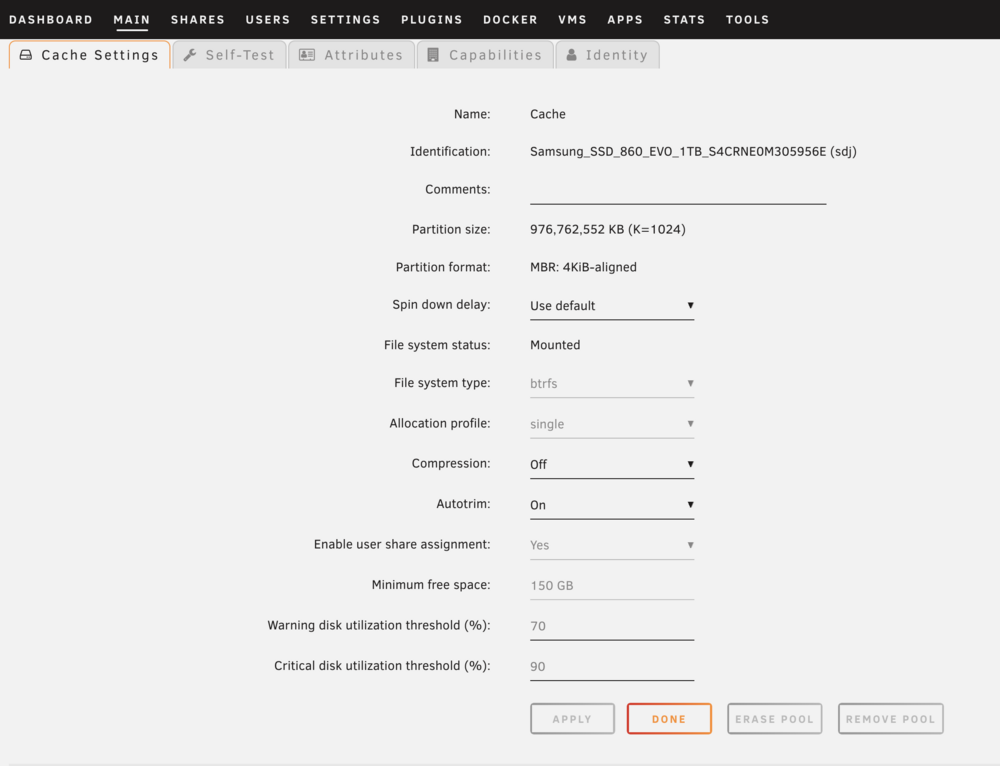
I ran btrfs dev remove missing /mnt/cache Then clicked on the first device in the pool which took a rather long time to load but ultimately showed this, with the "Remove Pool" option greyed out. The device is currently listed as in Standby mode, and is not spinning up when I click on the grey dot to make it spin up. I appreciate your ongoing efforts. Kevin

-
What I ultimately want is 2 drives in the cache pool that are mirrored, so that if there is a problem with one, I can just pull it out until I can replace it. I thought that was how the cache pool worked with multiple devices, but this experience makes me think that is not how it works. Is there a better way to set up the cache so it is mirrored (either actually or effectively) so that if there is a problem with one I can easily switch to another until I can replace the faulty drive? In any case I want to remove the Samsung and Ironwolf SSDs and use the two NVMe drives in a redundant pool. Is this an unstable enough situation that I should move everything off the cache pool while I can? As an aside, I think the problem with the Samsung drive itself, as it dropped off again this morning even with new cables. Thank you again. Kevin
-
New diagnostics. Thank you again! tower-diagnostics-20250701-1426.zip
-
btrfs_vi_show_cache.txt tower-diagnostics-20250629-1101.zip And I thank you very much for your help. Kevin
-
I am running unRAID 7.1.2 and have a BTRFS cache pool. I started with 2 SSDs, but wanted to free up slots for additional HDD data drives, so I put a PCIe card with two NVMe drives on it and added those to the pool. What I am trying to do now is remove the 2 SSDs from the cache pool, but have been unable to do so. I've tried following instructions here: <https://forums.unraid.net/topic/133522-cache-pool-remove-a-disk/> But have been unsuccessful, and I'm hoping someone can help me through this. I use the cache for my appdata share and docker.img and have incoming files go there to other shares (set for Cache->Array). I've tried stopping the array, and unassigning the 2 SSDs from the slots, the checking the "I Want To Do This Box" but the array will not restart giving an error about too many missing devices. I'm not sure what I'm missing and how to fix this, so any help is appreciated. Thank you.
-
I have a build using a Supermicro X12SPi-TF motherboard. The problem I'm running in to is that as soon as I connect one of my optical drives (LG Electronics WH16NS40) is connected the system will not start up. It doesn't seem to matter how I do the connection. I've tried: 1. Using a SFF 8643 Forward breakout to SATA cable. 2. Connecting from one of the two SATA DOM SATA ports on the motherboard 3. Installing an IBM M1015 (flashed to IT mode) card and connecting using a SFF 8087 forward breakout cable to SATA connection. In any of those settings when I turn on the power supply the motherboard will get power as evidenced by the onboard LED flashing, but when I press the power button, the fans start to spin for 1 or 2 seconds then stop spinning and nothing else happens. The motherboard LED continues to flash. Disconnecting from the optical drive (but leaving cables otherwise attached to the card or motherboard will let the system start normally. The optical drives have power (the LEDs on them light up) but making a connection to a SATA connector makes the startup fail. I've checked the sSATA and SATA BIOS settings which are configured for AHCI. Where you specify SATA connection type it is set to Hard Drive (you can also choose Solid State Drive) but not optical drive. I am not trying to actually boot from an optical drive, only have one connected to the system to use once booted. Boot mode is set to UEFI and not legacy. Any ideas on why connecting an internal optical drives cause startup to fail? I'm at a loss at this point. Thank you for any help. Kevin
-
I'm running 3. 1 - Main storage for media, dockers. 2 - Backup of #1 3 - offsite backup of #1
-
Has anyone tried the "mover empty disk" feature to verify it's working correctly in 7.1.2? Kevin
-
Thank you for the reply and suggestions. After following the steps earlier in the guide, (I suspect most significantly making sure unRAID had a user/password combination that matched the one on the W11 box and changing it to a Private network) I was successfully able to use the drive mapping feature to assign drives to the shares I wanted. Your guide was invaluable, so thank you. Kevin





