





malebron
Members
-
Joined
-
Last visited
Everything posted by malebron
-
Of the 10 or so sticks I tested so far (all "blacklisted") all have legit looking GUIDs. Some old, some new, some branded , some not. My assumption was that the tool checks whether the GUID has already been registered with Unraid (presumably because some lazy manufacturer used the same GUID for a batch). Is this not true? Unfortunately I don't have a spare machine to test boot with right now (or the time), so I guess I'll keep backing up and wait till it fails. There has got to be a better way. Thanks for the info.
-
Thanks guys. I'm only using the tool to identify a valid drive I can move my existing Unraid installation to safely. Trial installation and test booting each one would be even more effort. I realize these things are only a few dollars each, but I'd rather just buy one that's known to work, rather than spend hours buying and testing a whole bunch. I'm actually surprised that there's not a list of "known good drives with unique GUIDs" to help newcomers. (If there is, please point me in the right direction!)
-
After recovering from a corrupt file on my USB stick (a cheap no-brand that's been going strong for many years) I decided it's probably time to swap it for something better. So I downloaded the Unraid USB Creator. Every single USB stick I own was flagged as "blacklisted" including branded and unbranded ones. So I ordered one of the few USB 2.0 drives available (from PNY a reputable brand, I thought, who's products I have used many times). NOPE. "blacklisted"! Can someone recommend - or is there a list of - currently available USB 2.0 drives that are NOT blacklisted? Thanks all!
-
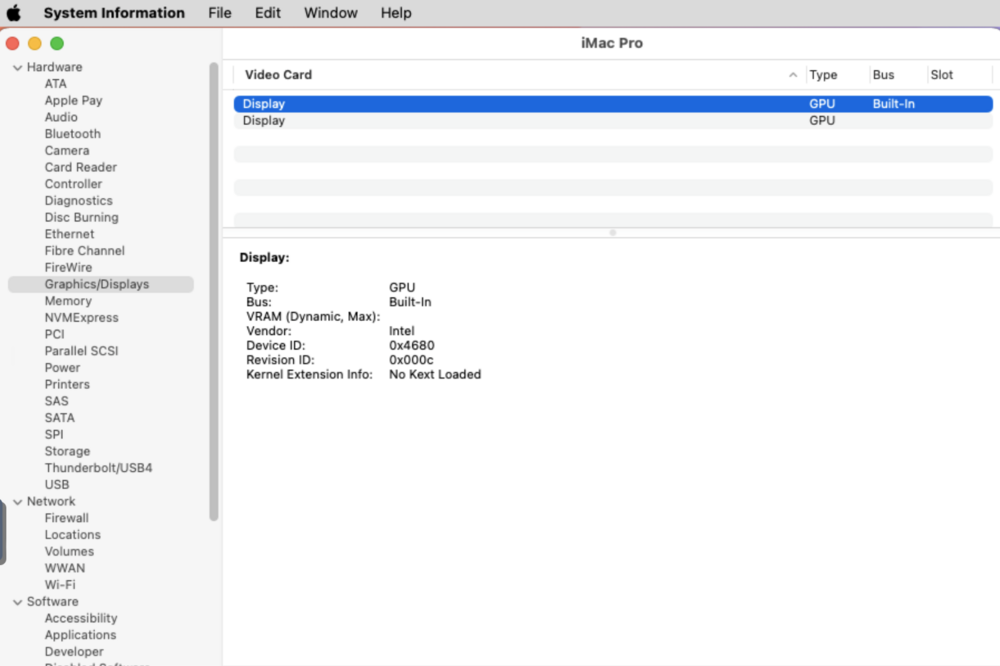
Hi, I'm setting up passthru for my iGPU (Intel i5 Alderlake) - Unraid V7.0.0 - MacOS Sonoma To do this I checked the GPU under Tools/Systen Devices, rebooted Unraid, and added the iGPU as 2nd GPU in the template I can see the device under System Information/Graphics Displays, but it does not appear to be used. Under the device details it says "No Kext Loaded". (See attached) Compared to my how my physical Intel Mac Mini reports its iGPU, it looks quite different Has anyone done this successfully? Do I need a kext? Or do I need to fix something in the XML? Here's the part that looks relevant: </input> <graphics type='vnc' port='5900' autoport='yes' websocket='5700' listen='0.0.0.0' keymap='en-us' sharePolicy='ignore'> <listen type='address' address='0.0.0.0'/> </graphics> <audio id='1' type='none'/> <video> <model type='qxl' ram='65536' vram='65536' vgamem='16384' heads='1' primary='yes'/> <alias name='video0'/> <address type='pci' domain='0x0000' bus='0x00' slot='0x1e' function='0x0'/> </video> <hostdev mode='subsystem' type='pci' managed='yes'> <driver name='vfio'/> <source> <address domain='0x0000' bus='0x00' slot='0x02' function='0x0'/> </source> <alias name='hostdev0'/> <address type='pci' domain='0x0000' bus='0x00' slot='0x02' function='0x0' multifunction='on'/> </hostdev> <watchdog model='itco' action='reset'> <alias name='watchdog0'/> </watchdog> <memballoon model='none'/> </devices> Thanks!
-
Thanks so much JorgeB. I left it alone and did something else for a few hours - now I'm back at my desk, the server login screen is there! I don't know how long the boot took, but it got there in the end - any idea as to why the boot time might be extended? Also it good to know where to go if there are future issues. Thanks for that, too.
-
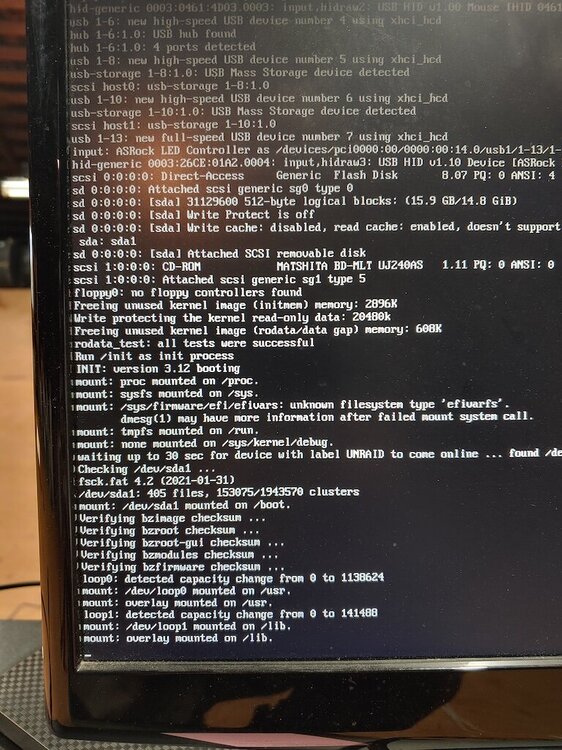
7.0.0 has been working great so far. I wanted to pass through my iGPU (Intel i5, 12th Gen) to a VM: - I checked the box for my iGPU under Tools/System Devices - I shut down all VMs and Dockers, stopped the array, and hit the reboot from the dashboard screen. After the server was inaccessible for 30mins I reckoned there was a problem so I attached a monitor to the server and rebooted using the physical button. The boot process seems to get stuck at "mount: overlay mounted on /lib" There is an error above about "efivars", but that's all. Any suggestions how to recover? Photo of the monitor screen attached.
-
When I read your post I thought I'd give this container another shot. (I quit trying after my issues posted above). Like you I installed the latest update and changed WORKGROUP to MACGROUP. What do you know, after many many weeks of trying I finally got a complete backup with no hangs or failures! Neither the native method (following SpaceinvaderOne's instructions) nor this container worked for me until now. Thanks!
-
Hi. I'm running this docker to backup a Mac Studio (just over 1TB used out of 2TB) to a share dedicated on a 3TB drive on Unraid 6.12.13. I used all the default settings for this docker except password and max storage (set to 2.6TB). There's a 2.5GB Ethernet connection from workstation to server. Time Machine starts and stops randomly and never seems to complete a backup. Sometimes it reports the free space correctly, sometimes says "0". Sometimes I can connect to the TimeMachine SMB from Finder, sometimes Finder fails to connect. After about a week Unraid says 2.16TB of the 3TB disk has been used, but Time Machine still says "Oldest Backup: None, Latest Backup: None". Time Machine will open on my Mac, but only lets me look back about a day from the present time. (I have not tried to restore anything). That -1 day was true for several days (until I stopped running the docker). TimeMachine Docker log contains this: Samba name server TIMEMACHINE is now a local master browser for workgroup WORKGROUP on subnet 192.168.0.2 ***** smb2_validate_message_id: smb2_validate_message_id: client used more credits than granted, mid 2, charge 1, credits_granted 0, seqnum low/range: 2/0 smb2_validate_message_id: smb2_validate_message_id: client used more credits than granted, mid 2, charge 1, credits_granted 0, seqnum low/range: 2/0 smb2_validate_message_id: smb2_validate_message_id: client used more credits than granted, mid 2, charge 1, credits_granted 0, seqnum low/range: 2/0 smb2_validate_message_id: smb2_validate_message_id: client used more credits than granted, mid 2, charge 1, credits_granted 0, seqnum low/range: 2/0 smb2_validate_message_id: smb2_validate_message_id: client used more credits than granted, mid 2, charge 1, credits_granted 0, seqnum low/range: 2/0 smb2_validate_message_id: smb2_validate_message_id: client used more credits than granted, mid 2, charge 1, credits_granted 0, seqnum low/range: 2/0 Maybe co-incidence, but other well established SMB devices on the same network seemed to have issues while the Docker was running. (connection failures resolved by substituting IP address). The closest to these symptoms I found was on Apple's support site (not related to Unraid) which suggested the problem was in the external drive, which should be replaced. Can you suggest any troubleshooting steps? Thanks! ***UPDATE*** Following AeroMaestro's example posted later in this thread, I installed the latest update (as of 3/3/2024) and changed the workgroup name to a different unique name. After this I was FINALLY able to complete a full backup without hangs and failures, and all seems to be working.
-
SOLVED: - In case this helps anyone else with this issue: tl;dr - DO NOT look at the log file while the installation is running. Let it complete, THEN look. After many tries and much troubleshooting I gave up on the linuxserver.io container and tried using the knex666 one, but this would not install either - it also generated a repeating error message (different to the Linuxserver.io one) every 5mins or so. I tried a few things, with no luck, but the final time I did not monitor the log, but went to get coffee. When I returned it had completed successfully. Based on this success, I tried re-installing the Linuxserver.io container, but this time I did not immediately open the logfile, but just let it run -- it completed successfully! I can't say for sure that this is the direct cause or co-incidence, but AFAIK nothing else was different.
-
Hello - I am having issues doing a clean re-install. 1) After moving to new server hardware everything works except my Linuxserver Nextcloud Docker. I was seeing the error "Configuration was not read or initialized correctly, not overwriting /app/www/public/config/config.php". After research I was unable to find a simple fix, so decided to simply do a clean re-install. 2) I completely removed the old container and renamed /mnt/user/appdata/nextcloud 3) Installation (with all defaults) gets stuck in a loop, repeating the same error over and over. I assume there is still something left over from the previous install - can you suggest what it might be? If not, what could be tripping up a clean install? Here's the log: (the last section just repeats indefinitely if left) THANKS! ***************** UPDATE I got some help from Linusserver.io via Dischord - I think we ruled out any filesystem related issues. Tried bypassing the Fuse layer and mapping the physical disks. Data drives are xfs, cache is btrfs. Tried putting appdata on a data disk in case btrfs is the issue. So far nothing fixes the problem. ***************** [migrations] started [migrations] 01-nginx-site-confs-default: executing... [migrations] 01-nginx-site-confs-default: succeeded [migrations] 02-default-location: executing... [migrations] 02-default-location: succeeded [migrations] done ─────────────────────────────────────── ██╗ ███████╗██╗ ██████╗ ██║ ██╔════╝██║██╔═══██╗ ██║ ███████╗██║██║ ██║ ██║ ╚════██║██║██║ ██║ ███████╗███████║██║╚██████╔╝ ╚══════╝╚══════╝╚═╝ ╚═════╝ Brought to you by linuxserver.io ─────────────────────────────────────── To support LSIO projects visit: https://www.linuxserver.io/donate/ ─────────────────────────────────────── GID/UID ─────────────────────────────────────── User UID: 99 User GID: 100 ─────────────────────────────────────── Setting resolver to 127.0.0.11 Setting worker_processes to 16 generating self-signed keys in /config/keys, you can replace these with your own keys if required ..+.+......+...+......+...+++++++++++++++++++++++++++++++++++++++*..+......+..+............+.+++++++++++++++++++++++++++++++++++++++*...........................+....+...+...+............++++++ ....+...+....+.....+++++++++++++++++++++++++++++++++++++++*.+......+...+++++++++++++++++++++++++++++++++++++++*......+.......+......+.....+.......+..+....+.....+.........+.......+.....+.............+........+...+.+...+..+....+......+...........+...+.+......+..+...+.......+..+....+..............................+............+...+.....+....+..+....+............+...+.....+............+..........+........+....+......+......+...+............+...+...+.....+...+....+.....+.+.....+......+...+.......++++++ ----- Initializing nextcloud 27.1.4.1 (this can take a while) ... Setting permissions New nextcloud instance Please run the web-based installer on first connect! Initializing finished After completing the web-based installer, restart the Nextcloud container to apply default memory caching and transactional file locking configurations. Alternatively, you can apply your own configurations by editing /config/www/nextcloud/config/config.php following the documentation: https://docs.nextcloud.com/server/latest/admin_manual/configuration_server/caching_configuration.html https://docs.nextcloud.com/server/latest/admin_manual/configuration_files/files_locking_transactional.html [custom-init] No custom files found, skipping... [ls.io-init] done. Exception: Not installed in /app/www/public/lib/base.php:283 Stack trace: #0 /app/www/public/lib/base.php(709): OC::checkInstalled() #1 /app/www/public/lib/base.php(1196): OC::init() #2 /app/www/public/cron.php(43): require_once('...') #3 {main} Exception: Not installed in /app/www/public/lib/base.php:283 Stack trace: #0 /app/www/public/lib/base.php(709): OC::checkInstalled() #1 /app/www/public/lib/base.php(1196): OC::init() #2 /app/www/public/cron.php(43): require_once('...') #3 {main}
-
Thx. Good to know. Really surprised that the default "direct" connect mode is so crap - especially compared to network connect. I just wonder if this is a well known deficiency (to all except me, apparently), and if so, is anyone working on a fix and/or alternative?
-
Thanks @itimi - my experience certainly seems to support that approach! Question: If I connect a VM to a network share that's hosted on the same server, is performance limited by the NIC speed?
-
Update: I tried mounting the share as an external SMB (using the server IP). This makes a HUGE difference. I can still detect a noticeable lag, but its a fraction of a second, not 5 seconds! Could the problem simply be virtio performance? Is this just a bad way to connect drives? Additional Update: I'm noticing that file transfer is also WAY faster. My subjective assessment is 2x-3x!
-
I have an Unraid share accessed by an Ubuntu VM (22.04 LTS). Access to the share is set up via the VM template. Share mode is "9p mode". The share is on a 2 drive 4TB xfs array. Unraid 6.12.3 Copying files to and from the share seems normal and performance is as expected. Within Ubuntu File Manager I can navigate UP (eg clicking on a folder) and see the contents instantly. However when I navigate DOWN (ie go back, towards root), it takes about 5 seconds after each click before contents are displayed. This is starting to get tedious! When navigating this share in Finder on my Mac everything works normally. When accessing another (external SMB) drive in Ubuntu, navigation behaves normally. I assume it's a setting somewhere, but I'm not sure where to look. Changing the caching mode for the share did not help. Any suggestions? Thanks!
-
Thanks @Gragorg. That's exactly what I was looking for. Perfect. I should have known Spaceinvaderone would have it covered!
-
I'm looking advice and guidance about moving an existing unRaid server to new hardware. My existing machine is barely adequate and cannot be expanded, so I ordered parts for a new build, but I'm not sure how I will move everything over. What steps are involved (after a full backup of course)? Is it just a question of moving the flash drive over to the new machine? What about all the configurations in my Dockers and VMs? Can I just plug my old hard drives in and go? What configs may need to be tweaked? Thanks!
-
I'm looking advice and guidance about moving an existing unRaid server to new hardware. Is it just a question of moving the flash drive over to the new machine? What about all the configurations in my Dockers and VMs? Can I just plug my old hard drives in and go? You get the idea. This question does not seem to fit any of the available categories. Where in the forums can I ask it? Thanks!
-
I've been running unRaid for a while on a refurb Dell PC which can only accommodate 2x3.5in HDDs. Now I'm looking for better CPU performance (than i5 6500 3.2GHz) and to move the drives from my old Netgear NAS over to unRaid. Refurb PCs just don't have enough drive bays. I started researching tower cases and DIY motherboards, but then discovered that you can buy used commercial rack servers very cheaply. For the same money or less I can buy a used 2U 19in rack server with 12-24 3.5in bays, dual Xenon E5-2600 series CPUs, dual 1000W PSUs etc. Would this be a really dumb idea? Would unRaid run on such a platform? Would controller support be an issue? Despite being "server grade", would the older Xeon processors have good performance compared to more recent desktop CPUs? Would I need to add any hardware? If this is a viable option, do you have any recommendations for specific manufacturers or models to look out for? (or avoid!) Thanks!
-
I initially had a permissions error also. Since it was for the version.php file I just edited, I simply used chmod 777 to enable all permissions on that file. I know that's a sledgehammer approach, but it allowed the updater to complete. I can't help on the SQLite question, but I remember that MariaDB was recommended. It was a while ago, but I think I followed a SpaceInvaderOne video in my initial installation. That may be your best bet.
-
@SliMat I have had the EXACT same issue as you. I just fixed it by setting my repository to 25.0.4 and editing "/config/www/nextcloud/version.php" to replace 26.x.x with 25.0.4. My guess is that when I followed the advice in this thread and set the repo to 26, this file was updated - even though it was actually on 25.x.x. After this you can follow the instructions here: N https://info.linuxserver.io/issues/2023-06-25-nextcloud/
-
I found this useful document "https://info.linuxserver.io/issues/2023-06-25-nextcloud/" Which says: Check your /config/www/nextcloud/config/config.php file or /config/www/nextcloud/version.php file to determine the version you have installed Switch your image to the corresponding major version from the table above (ex: your files indicate 24.x.x, use lscr.io/linuxserver/nextcloud:version-24.0.12) and start the container The file "/config/www/nextcloud/config/config.php" contains the lines 'default_phone_region' => 'US', 'dbtype' => 'mysql', 'version' => '25.0.4.1', BUT The file "/config/www/nextcloud/version.php" contains <?php $OC_Version = array(26,0,2,1); $OC_VersionString = '26.0.2'; $OC_Edition = ''; $OC_Channel = 'stable'; $OC_VersionCanBeUpgradedFrom = array ( 'nextcloud' => Do I have 25.0.4 OR 26.0.2 ? Whichever image I choose, the updater fails with "Downloaded version is lower than installed version": root@_____:~# docker exec -it nextcloud updater.phar Nextcloud Updater - version: v26.0.0beta2-9-g64e2e4c dirty Current version is 26.0.2. Update to Nextcloud 25.0.9 available. (channel: "stable") Following file will be downloaded automatically: https://download.nextcloud.com/server/releases/nextcloud-25.0.9.zip Open changelog ↗ Steps that will be executed: [ ] Check for expected files [ ] Check for write permissions [ ] Create backup [ ] Downloading [ ] Verify integrity [ ] Extracting [ ] Enable maintenance mode [ ] Replace entry points [ ] Delete old files [ ] Move new files in place [ ] Done Start update? [y/N] y Info: Pressing Ctrl-C will finish the currently running step and then stops the updater. [✔] Check for expected files [✔] Check for write permissions [✔] Create backup [✔] Downloading [✔] Verify integrity [✘] Extracting failed Downloaded version is lower than installed version Update failed. To resume or retry just execute the updater again. root@_____:~#
-
I am in exactly the same position with the same problem. After changing the repository to 26.0.2 the updater wants to "upgrade" to 25.0.9. This does not work. The terminal window disappears after the extraction step. Can we go back to an older version available before 25.0.9 that the updater can then work on?
-
Thanks for the tip, itimpi. Unfortunately clearing the cache and restarting Firefox did not fix the problem. It works like a champ in Chrome and Safari. I should have mentioned I'm running the browsers on a Mac - OSX 12.5.1
-
Update: I tried starting some other, previously working VMs - same console problem: "Failed to connect to server". Then I tried a different browser (Chrome) - voila! It worked. It seems after the Unraid 6.12 upgrade the VM console (noVMC) will no longer work with Firefox. (v115.02 at time of testing)
-
I just upgraded to 6.12.3 from 6.11.5 My Ubuntu 22.04.2 VM is started but the VM console (noVNC) will not connect ("Failed to connect to server") This has "just worked" for so long, I'm not sure how to start troubleshooting this. Any tips please?


