





malebron
Members
-
Joined
-
Last visited
Everything posted by malebron
-
I've had a Nextcloud Docker instance running for over a year with no issues. I just upgraded to the latest Unraid (6.11.5), and updated my containers (I just clicked on the "update" link on the Docker page). Based on the info page I think it's now 25.0.4-ls225. Now I try to access Nextcloud I get: "This version of Nextcloud is not compatible with > PHP 8.0. You are currently running 8.1.16." Any ideas where I start to fix this? Is it in the container, is it Unraid, or where? I thought containers were self contained and took care of dependencies. THANKS!!! EDIT: I followed the instructions here. This fixed it for me: https://github.com/linuxserver/docker-nextcloud/issues/288
-
Yes!! +1 I can't believe this feature is not there. ESSENTIAL.
-
RESOLVED! "Share" under "More Options" is for sharing the music play queue only. If the queue is empty a link will be generated, but it will be invalid and will not be added to the shared media list. This is used for songs only. To share a video you must use the Share icon in the video player. HOWEVER this icon is invisible (white on white!) in the default theme!! First change the theme to a dark theme. Then you will be able to see the share icon in the lower left corner of the player. This will generate the share link, which can be managed in the Shared Media tab. (as in Subsonic). I am told this will be fixed in a future release.
-
I know this is an old thread, but in case anyone else is asking the same question: I used the linux.io community template for Airsonic-Advanced and followed Spaceinvader One's awesome videos to the letter. It worked perfectly! I use it for videos mostly rather than music, so my use case may be atypical but I discovered all kinds of problems with Airsonic-Advanced - share links don't work, video thumbnails are messed up and more. Then I found Hurricanes' Subsonic Docker on Docker Hub and followed the instructions in this thread: I found it simple to install and it was a drop-in replacement. (as long as you stop the Airsonic container before starting the Subsonic one!). No changes to the reverse proxy etc. The Subsonic version may be older but everything works exactly as it should (including my old premium license) with no issues. Based on this experience, I'd say that when they forked Airsonic from Subsonic, they forked it up! YMMV If there's a better (more recently maintained) Subsonic Docker image out there, I'd love to know.
-
UPDATE: I fired up mu old server to see how it worked on Subsonic. The Subsonic webplayer has a "share" icon (along with fullscreen, new window, play and download). This generates a link which shows up under "manage my shared media". The Airsonic player does not. I can see CC, volume, fullscreen and quality choosers. (also no download?!). The only share function I can see is for "play queue" - which appears to do nothing. Where does the share function live now? Thanks!
-
Hi - I'm trying to get sharing to work. Where is /ext/share/ ? Clicking "Share" under "More options" generates a link <web.address>/ext/share/<Java key>, but this goes to a "Sorry, the content is not available" page, and clicking "Manage Shared Media" goes to an empty list. I'm wondering if this directory or a pointer to it is missing. I remember using this feature in Subsonic - did I miss something in the setup...? Thanks
-
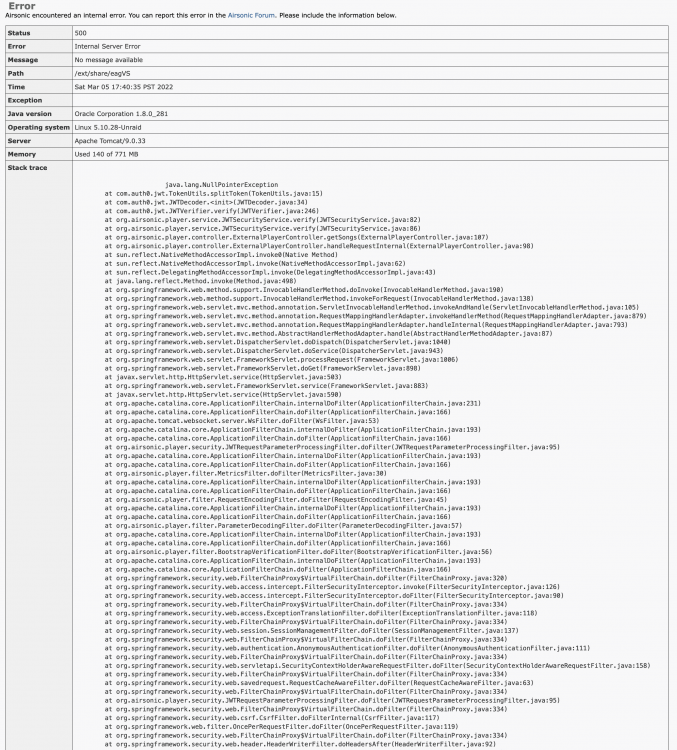
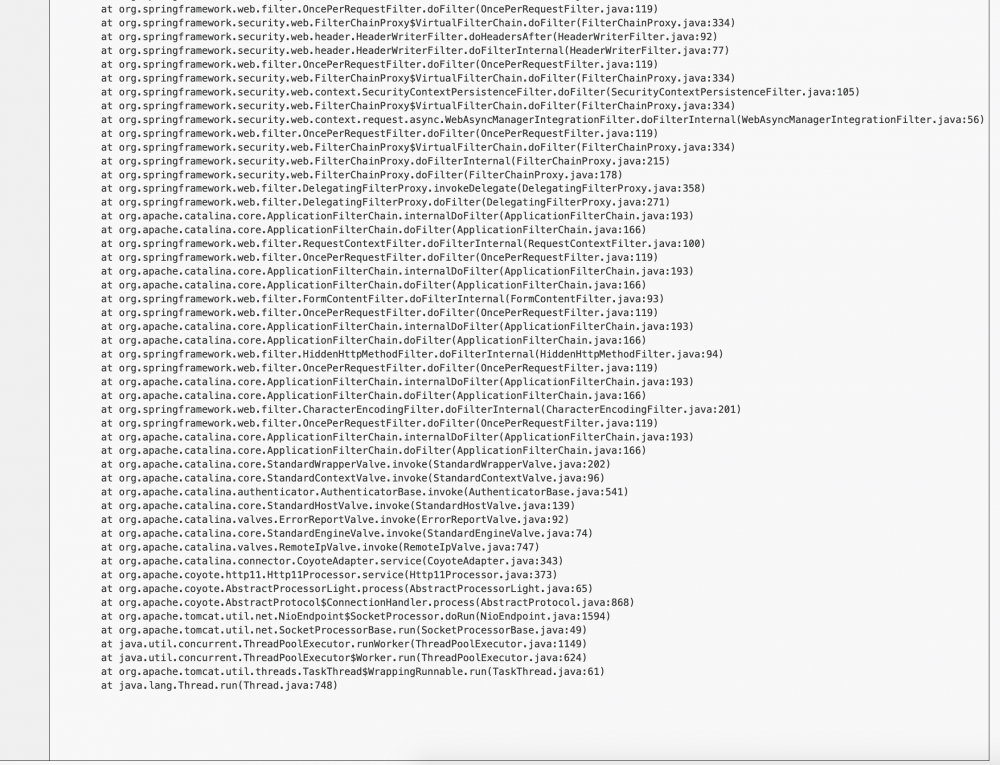
Just installed the docker and everything looks good. However when I use the share "Share" function the link generated causes an internal server error. Any ideas? I noticed that even after generating the link, there's nothing showing under the "Shared Media" tab. Status 500 Error Internal Server Error Message No message available Path /ext/share/eagVS Time Sat Mar 05 17:40:35 PST 2022 Exception Java version Oracle Corporation 1.8.0_281 Operating system Linux 5.10.28-Unraid Server Apache Tomcat/9.0.33 Memory Used 140 of 771 MB
-
Who knows what the problem was, but after I shut everything down (both server and desktop) and rebooted. It seems OK. Yup. "Turn it off and turn it on again" FTW!
-
New Ubuntu VM: After working OK for an hour or so VNC is suddenly unable to connect and I get a "noVNC" screen. Clicking "Connect" on this screen brings the desktop back for a second, then back to the "noVNC" screen. Sometimes I get just enough time to do something like shut down. Sometimes its just a flash and gone. Clearing the browser cache sometimes gives me a bit more access time, but not always. I have tried all the VNC options in the template I have tried Firefox, Chrome and Opera (same result) and Safari (doesn't work at all) I have deleted the VM and started again from scratch The first install I got Deluge installed and working, but because I lost access I had to delete the VM and start again. The second time I put a VNC password in the template, but was blocked by Firefox's "insecure" warnings. Third time I got part way through trying to set up TightVNC server as alternative connection, but couldn't finish before VNC lost the connection. (The TightVNC client connects, but with just a blank grey screen). All ideas welcome. I'm about to trash it and try a another fresh VM install... TIA
-
UPDATE: If you are having the same issue (upload from Nextcloud's Mac desktop client fails for large files with 413 error) - I can confirm that the Owncloud Mac client uploaded files up to 4.3GB no errors. Looks like the Nextcloud desktop client is the problem. (Also the Owncloud client can generate public links from the desktop - the Nextcloud client cannot). Note: There is a "server version unsupported" message - so no guarantee of future compatibility.
-
I'm now getting this when logged into NextCloud on a laptop browser. Mine is happening for anything above 1GB I believe. Actually - I discovered that (despite this 504 error code) the file actually uploaded OK and synced to my Mac too. My research seems to point to nginx timeout values - but others have tried to fix this error with no success. I'm still unable to upload files >1GB from the Nextcloud desktop client (Mac) even though these upload OK from the web GUI.
-
Max upload file size issue: The plot thickens... I originally saw the errors (413) when uploading >1GB files from my desktop using Nextcloud's Mac desktop app. Today I tried dragging and dropping to the web GUI instead. Whaddayaknow, a 1.1GB and 3.1GB uploaded with no errors AND synced correctly back to my desktop. (These failed using the other method) However a 4.3GB file failed to upload with "Error When assembling chunks, status code 504" (Note: Adding new files >1GB to the Nextcloud folder on my Mac still fail with a 413 error.) 1) Any idea what the 504 "chunks" error could be about? 2) Does anyone know if the desktop app communicates to Nextcloud differently to the web GUI? Is there another conf file? Maybe there's a different desktop app I can test with (eg can I use the Owncloud app with Nextcloud?) Thanks!
-
Ah thanks JonathanM! I'd never have guessed. It's like getting to a strange town and being told to "turn left where the MacDonalds used to be"...
-
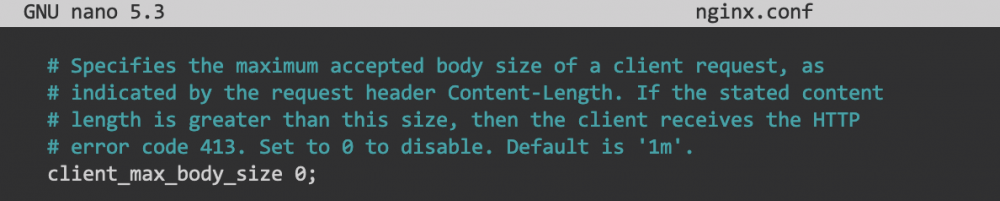
Hmm. This talks about a parameter for letsencrypt -- which I don't have installed. Just swag (per the video). I found a "client_max_body_size" parameter in ~appdata/swag/nginx/nginx.conf, but that was correctly set to 0. However, IF that had been set too low, it would have generated the 413 error I'm seeing. Just for grins I tried changing it to 10G and restarting the container, but no change. Are there any other conf files I should be looking for?
-
Thanks snowboarder714, Yeah I looked at these but the situation doesn't look like my issue ...and I don't see a resolution. I have a brand spanking new clean install on a brand new server. I have only installed the required Dockers for Nextcloud -- everything exactly done per Space Invader One's video. Other than upload file size, its working well. So... 1) Is there SUPPOSED to be a file size limit? In which case, I'm looking for the settings or parameters to increase this value? OR 2) Is file size SUPPOSED to be unlimited, and this condition is an error which needs troubleshooting? Also: total noob here, so you know... Thanks.
-
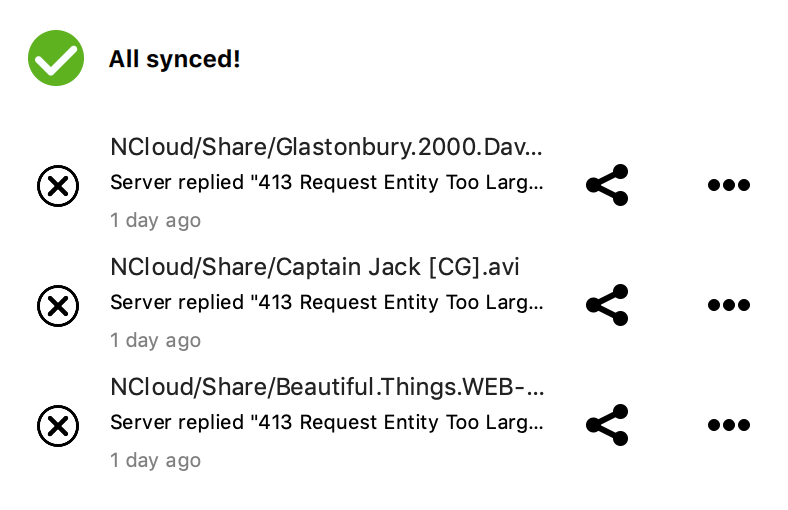
Hi I just installed this Docker along with Mariadb and Swag, exactly as per Space Invader One's video, and everything is working fine. I'm brand new to Unraid and Dockers, so I followed every step very carefully. My problem is that there seems to be an upload size limit. Files over 1GB are not uploaded and my Mac desktop app shows the error "Server replied "413 Request Entity Too Larg..." I have searched this thread and the web without finding a clear resolution that I can understand. Are there some clear instructions to increase the max file size somewhere? Thanks!
-
Thanks! Those Space Invader One videos are definitely the way to go. I think the answers to all my questions are there!
-
Thanks for the reply. 1) My goal is to run headless anyway, so that's fine. I was concerned that it might be a sign I'd done something wrong, but all looks good through the web GUI. I may test legacy boot later if I have time. 2) Does that mean that, for long term use, I should get a really high quality stick. (The one I'm using now was a free gift at a trade show!) I assume config changes, user info, etc are written to the stick, so it has to be reliable? 3) I see. So containers and VMs would see the array as one device and the SSD as another? Would I need to create partitions on the SSD for cache and app use? Does it need to be formatted a specific way? Are there any docs or vids available explaining how to do this? 4) Thanks. I found an explanation of the way parity is used in Unraid and I think I understand it now.
-
Hello I'm giving Unraid a try for the first time and have some basic questions. I'm installing on a refurb HP mid tower with i5, 16GB, integrated graphics (runs Win 10 fine). It has a 512GB SSD, and 2xHDD slots for the starter array. 1) When I boot UnRaid with the GUI option, my attached screen is black with a blinking cursor top left. I tried DP and VGA connection without success. The web GUI works fine however, so I'm OK - just wondered if it's meant to be web only. (non-GUI boot provides the expected on-screen CLI) 2) I'm booted off a USB stick. I assume this is only for testing and when running for real I will load the OS onto my system drive (SSD), but can find no mention of how to do so. 3) I read that an SSD should not be part of the array. Since the UnRaid OS requirements are small, how is this capacity best utilized? 4) Is it best for the array drives to be the same capacity? How would a 2TB and a 4TB work? Thanks!




